
Streaming bitrate is one of the most important technical factors in online video delivery. It determines how clearly a video appears, how often buffering occurs, and how much bandwidth is consumed during playback — and getting it wrong in either direction causes real problems for viewers.
Set streaming bitrate too low and viewers see pixelated images and compression artifacts. Set it too high for the available network conditions and playback stalls as the player waits to buffer more data. The goal is a precisely calibrated middle ground. This guide explains what streaming bitrate is, how it affects video quality, the recommended settings for 720p, 1080p, and 4K, and how infrastructure — including your live streaming platform and CDN — interacts with bitrate to determine the final viewer experience.
What Is Streaming Bitrate?
Streaming bitrate refers to the amount of data transmitted each second during a video or audio stream. It is commonly measured in kilobits per second (Kbps) or megabits per second (Mbps). Higher bitrate means more data is delivered per second — and generally, more data means better image quality. See the full technical definition on Wikipedia: Bit rate.
Think of bitrate as the width of a data pipe feeding your viewer’s device. A wider pipe carries more visual detail every second. A narrow pipe forces the encoder to discard information — and those discarded details show up as blurriness, blockiness, or stuttering playback.
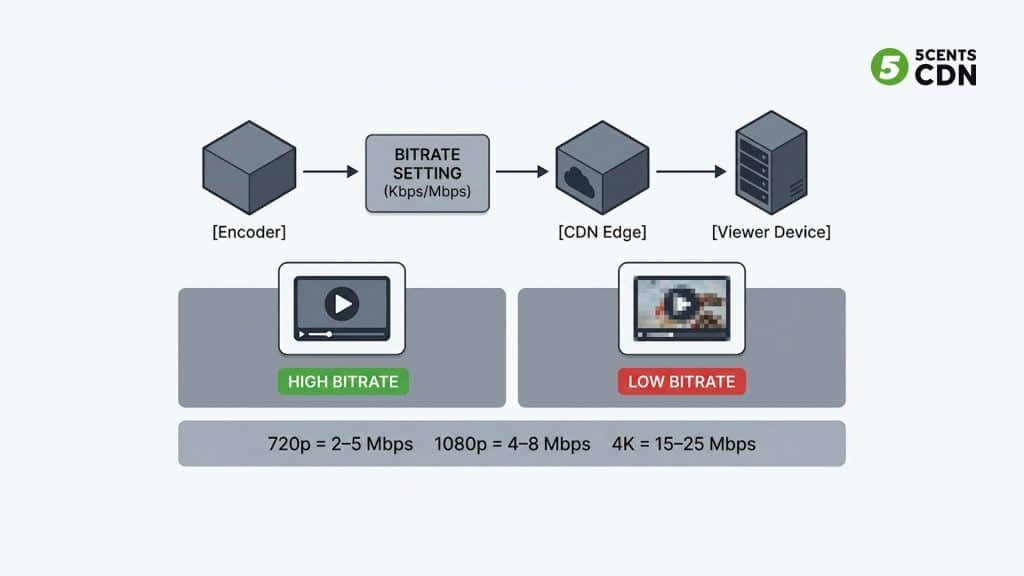
Video Bitrate vs Audio Bitrate
A total streaming bitrate is made up of two components:
Video Bitrate
Video bitrate governs image sharpness, motion clarity, color accuracy, and detail retention. Higher video bitrate allows the encoder to preserve more visual information — particularly important for fast-motion content like sports, gaming, and live events where many pixels change between frames.
Audio Bitrate
Audio bitrate controls sound quality, dynamic range, and overall listening clarity. For most streaming scenarios, audio bitrate ranges from 96 Kbps (acceptable quality) to 320 Kbps (near-lossless). For general video streaming, 128–192 Kbps is a practical standard that delivers clear audio without consuming significant bandwidth.
The sum of video and audio bitrate equals the total stream bitrate delivered to viewers.
How Streaming Bitrate Affects Video Quality
Higher Bitrates
Higher bitrate settings typically result in:
- Sharper image quality and finer detail
- Better color representation and gradients
- Fewer compression artifacts and blocking
- Clearer motion in fast-moving scenes
This matters most for content with rapid motion — live sports, gaming streams, concerts, and action video — where many pixels change between frames and compression has less redundancy to exploit.
Lower Bitrates
Lower bitrate configurations can produce:
- Blurry or soft images, especially in motion
- Pixelation and visible block-shaped compression artifacts
- Reduced detail in complex or textured scenes
- Color banding in gradients and sky shots
However, higher bitrate does not automatically mean a better viewing experience. If the viewer’s internet connection cannot support the chosen bitrate, the video player pauses to buffer — which is worse than a slightly lower-quality but uninterrupted stream. Balancing bitrate against your audience’s available bandwidth is the core challenge of streaming bitrate optimization.
Bitrate vs Resolution: Key Differences
Resolution and bitrate are frequently confused, but they serve different roles. See also: Video compression — Wikipedia.
Resolution
Resolution refers to the number of pixels in each video frame — 720p, 1080p, 4K. Higher resolution means more pixels and potentially more visual detail, but resolution alone does not determine quality.
Bitrate
Bitrate determines how much data is used to encode and deliver that resolution. A 1080p video at an insufficient bitrate will look worse than a properly encoded 720p video. Resolution sets the ceiling; bitrate determines how close you get to it.
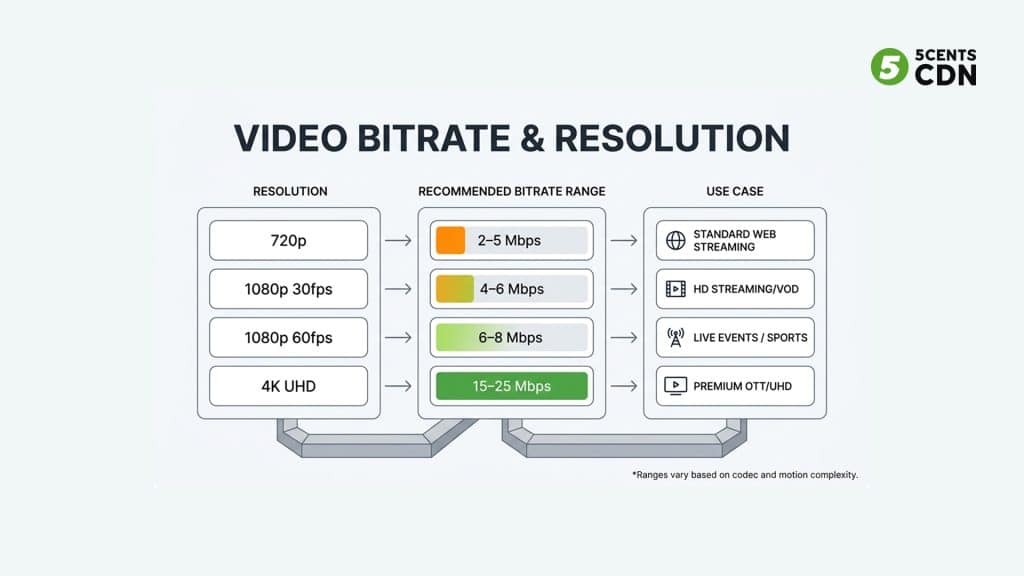
Recommended Streaming Bitrate Settings
These are industry-standard bitrate ranges based on resolution, frame rate, and typical use cases. Actual values vary with codec efficiency and scene complexity.
| Resolution | Frame Rate | Bitrate Range | Best Use Case |
| 480p | 30fps | 500 Kbps – 1.5 Mbps | Low-bandwidth / fallback ABR tier |
| 720p | 30fps | 2 – 4 Mbps | Standard web streaming, social |
| 720p | 60fps | 3.5 – 5 Mbps | Gaming, fast motion at HD |
| 1080p | 30fps | 4 – 6 Mbps | HD VOD, webinars, business video |
| 1080p | 60fps | 6 – 8 Mbps | Live sports, concerts, esports |
| 4K | 30fps | 15 – 20 Mbps | Premium OTT, UHD on-demand |
| 4K | 60fps | 20 – 25 Mbps | Professional broadcast / live UHD |
Note: Switching to H.265/HEVC from H.264 can maintain equivalent quality at roughly half the bitrate — worth considering for bandwidth-constrained deployments. Use our bandwidth calculator to estimate bandwidth requirements for your specific setup.
What Is Adaptive Bitrate Streaming?
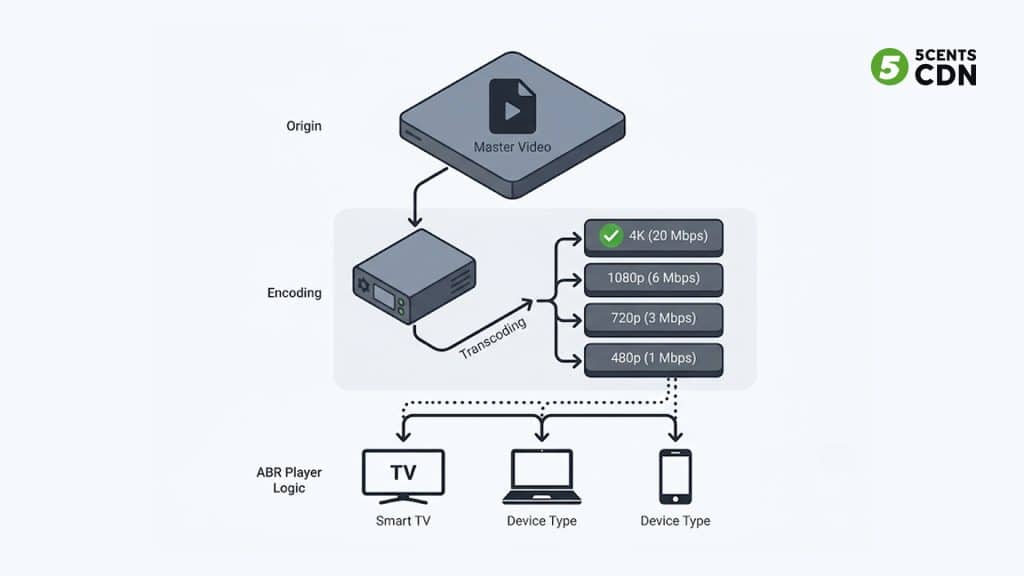
Adaptive Bitrate Streaming (ABR) is a technique that encodes the same video at multiple quality levels, then lets the player automatically switch between them based on the viewer’s available bandwidth. See: Adaptive bitrate streaming — Wikipedia.
Instead of delivering one fixed stream that either buffers on slow connections or wastes quality on fast ones, ABR continuously monitors the viewer’s download speed and switches to the most appropriate quality rendition in real time.
Benefits of adaptive bitrate streaming:
- Reduced buffering — poor connections drop to a lower quality tier instead of stalling
- Smooth quality transitions without visible interruption
- Better playback reliability across mobile, desktop, and smart TV devices
- Efficient bandwidth usage — fast connections automatically receive higher quality
ABR is delivered via live transcoding that produces multiple renditions from a single input stream. The player — such as an HLS/DASH video player — then selects the appropriate rendition for each viewer automatically.
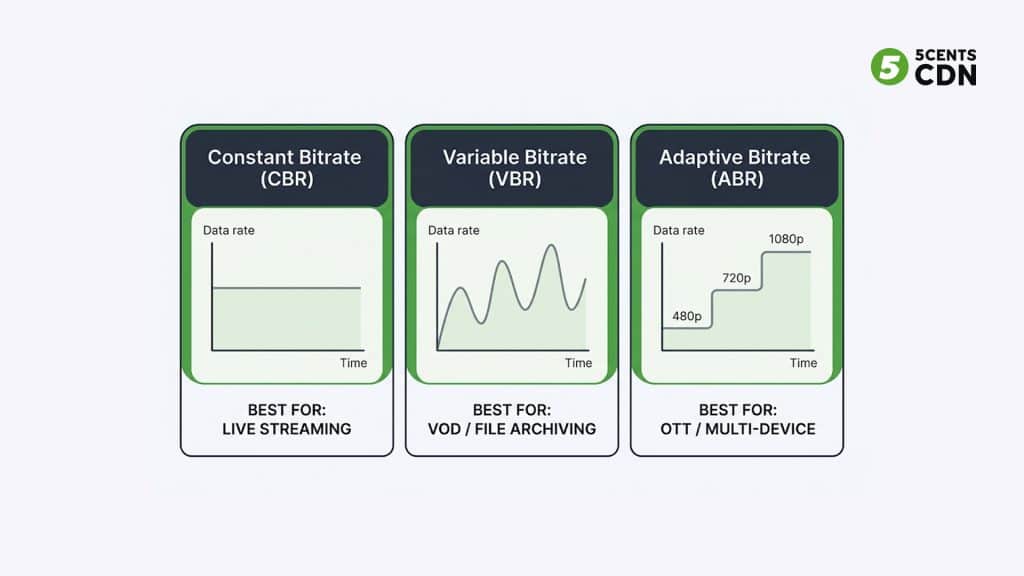
CBR vs VBR vs ABR: Which Should You Use?
Three encoding modes govern how bitrate is distributed across a stream:
CBR — Constant Bitrate
CBR maintains a fixed data rate throughout the entire stream. Every second receives the same number of bits regardless of scene complexity. This predictability makes CBR the standard for live streaming — stable bitrate is easier for encoders, CDN infrastructure, and network buffers to handle in real time.
VBR — Variable Bitrate
VBR dynamically adjusts the data rate based on scene complexity. Fast-action sequences receive more bits; static scenes use fewer. This delivers better quality per bit for pre-recorded video but is not suitable for live streaming where real-time encoding cannot look ahead.
ABR — Average Bitrate
ABR targets a specific average bitrate over time while allowing fluctuation around that target. It is a middle-ground approach — more predictable than VBR but more efficient than CBR. ABR is commonly used in VOD delivery where a rough file-size target matters.
Why Bitrate Configuration Matters
Preventing Playback Buffering
When the selected bitrate consistently exceeds available viewer bandwidth, playback stalls. This is the single largest driver of viewer abandonment — research consistently shows viewers leave within 90 seconds of experiencing poor quality. Proper bitrate configuration, combined with adaptive streaming, prevents most buffering scenarios before they reach the viewer.
Managing Bandwidth Costs
Bitrate directly determines the amount of data transferred during delivery. Higher bitrate settings increase total bandwidth consumption across your streaming infrastructure. Platforms distributing to large audiences at high bitrates can see significant cost differences between a well-optimized setup and an unoptimized one. Use the CDN bandwidth calculator to model costs at different bitrate configurations, or review available CDN pricing plans to find the right tier for your delivery volume.
Improving Viewer Engagement
Streaming quality has a direct impact on viewer retention. Poor video performance leads to higher abandonment rates, reduced watch time, and negative platform perception. Conversely, consistently reliable playback — even at a moderate quality level — outperforms an unstable high-quality stream in audience retention metrics.
Best Practices for Streaming Bitrate Optimization
Achieving reliable streaming performance requires both encoding best practices and infrastructure alignment:
- Implement adaptive bitrate streaming: Encode at least 3–4 renditions (e.g., 480p, 720p, 1080p) to serve all connection types.
- Use efficient codecs: H.264 is universally compatible; H.265/HEVC delivers comparable quality at roughly half the bitrate for supported devices.
- Use CBR for live output: Constant bitrate keeps live encoder output predictable and reduces buffering during real-time delivery.
- Test across network conditions: Simulate slow mobile, broadband, and congested network environments before going live.
- Monitor analytics continuously: Use a video analytics SDK to track buffer ratio, average bitrate served, and quality switch events in real time.
- Align bitrate to audience bandwidth: If a large segment of your audience is on mobile or in regions with lower average speeds, weight your ABR ladder toward lower-bitrate tiers.
The Role of CDN Infrastructure in Streaming Bitrate Delivery
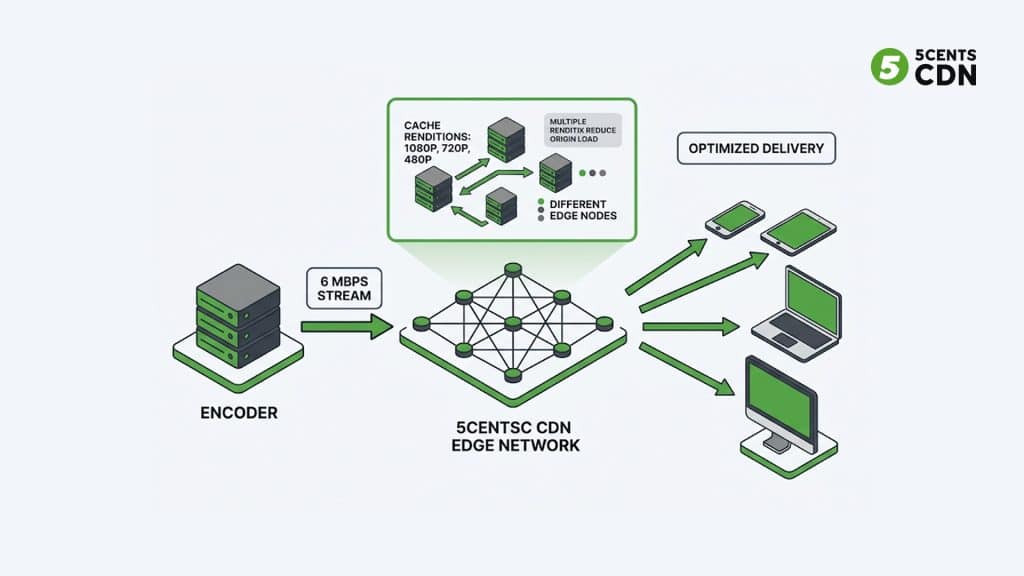
Even with perfectly configured bitrate settings, streaming quality depends heavily on the infrastructure distributing that content. A content delivery network distributes video files across geographically distributed edge servers — bringing content physically closer to viewers and reducing the latency and packet loss that degrade streaming performance.
Without a CDN, even a perfectly encoded 1080p stream at the ideal bitrate can buffer for viewers who are geographically distant from the origin server. CDN infrastructure solves this by:
- Caching multiple ABR renditions at edge nodes near viewers
- Reducing the round-trip distance between server and viewer device
- Absorbing traffic spikes during live events without origin overload
- Providing faster playback start times through edge-cached segment delivery
5centsCDN’s video delivery infrastructure is built specifically for video streaming workloads, and our OTT and media CDN solutions are designed to complement adaptive bitrate delivery at scale — from individual content creators to enterprise broadcast platforms.
Summary: Streaming Bitrate at a Glance
| Topic | Key Point | Recommendation |
| What is bitrate | Amount of data transmitted per second | Measure in Kbps (audio) or Mbps (video) |
| 1080p bitrate | Quality depends on both resolution AND bitrate | Use 4–8 Mbps depending on FPS |
| 4K bitrate | High resolution requires high bitrate | 15–25 Mbps for smooth 4K delivery |
| Live streaming mode | Fixed bitrate handles real-time delivery | Use CBR for all live output |
| VOD / file delivery | Efficiency matters more than stability | Use VBR or multi-rendition ABR |
| Buffering prevention | Too-high bitrate = viewer buffering | Match bitrate to audience bandwidth |
| CDN role | Infrastructure amplifies bitrate settings | Use edge delivery for global audiences |
Frequently Asked Questions
What is a good streaming bitrate for 1080p?
For 1080p at 30fps, a bitrate of 4–6 Mbps delivers good quality for most streaming scenarios. For 1080p at 60fps — common in live sports and gaming — use 6–8 Mbps to handle the increased motion data.
What is the best bitrate for live streaming?
For live streaming, the best bitrate depends on resolution and frame rate. Use 2–4 Mbps for 720p, 4–8 Mbps for 1080p, and 15–25 Mbps for 4K. Always use CBR (Constant Bitrate) for live output to ensure stable delivery. Also ensure your upload speed is at least 1.5× your chosen bitrate.
What is adaptive bitrate streaming?
Adaptive Bitrate Streaming (ABR) encodes video at multiple quality levels and lets the player automatically switch between them based on the viewer’s bandwidth. It reduces buffering and serves appropriate quality to every viewer regardless of their connection speed. It requires live transcoding to produce multiple renditions from a single source.
What is the difference between bitrate and resolution?
Resolution determines the number of pixels in a frame. Bitrate determines how much data is used to encode and deliver those pixels. A high-resolution stream at insufficient bitrate will look worse than a lower-resolution stream with proper bitrate settings. Both must be balanced together.
Does CDN affect streaming bitrate?
CDN infrastructure does not change the bitrate you configure, but it directly affects whether viewers receive your stream at the intended quality. Without edge delivery, high-bitrate streams buffer for distant viewers. With a CDN, multiple ABR renditions are cached at edge nodes near viewers, ensuring the right quality tier is delivered with minimal latency.
What bitrate should I use for 4K streaming?
For 4K at 30fps, use 15–20 Mbps with H.264 or 10–15 Mbps with H.265/HEVC. For 4K at 60fps, target 20–25 Mbps. Note that many viewers still cannot receive 4K streams reliably, so always include lower-quality ABR tiers in your encoding ladder.
Deliver Your Stream at the Right Bitrate — Every Time
Streaming bitrate is the foundation of video quality. Understanding the right settings for your resolution, frame rate, and audience — combined with adaptive bitrate delivery and efficient CDN infrastructure — is what separates a buffering-prone stream from a smooth, professional viewing experience.
Whether you are building a live streaming platform, a video streaming service, or scaling a multistreaming setup, 5centsCDN provides the transcoding, edge delivery, and analytics infrastructure to support every bitrate configuration at scale.
| Ready to Optimize Your Streaming Infrastructure? 5centsCDN provides live transcoding, adaptive bitrate delivery, edge CDN, and real-time analytics — all built for modern streaming workloads. → Compare CDN Plans | → Try the Live Transcoding Calculator |