
Introduction
Every time a user requests a file through a Content Delivery Network (CDN), the request passes through edge servers distributed across global locations. While CDN dashboards often provide high-level analytics, engineers and infrastructure teams frequently need detailed visibility into individual requests.
This is where CDN access logs, often referred to as raw logs, become essential.
Access logs capture the metadata of every request processed by CDN edge servers. Each log entry contains detailed information about the request, response, caching behavior, and client environment. For media platforms, OTT services, and web applications, these logs provide critical insights that help teams debug delivery problems, monitor cache performance, analyze traffic behavior, and detect security issues.
Understanding how CDN access logs work is fundamental for organizations that rely on distributed infrastructure to deliver content reliably and efficiently.
What Are CDN Access Logs?
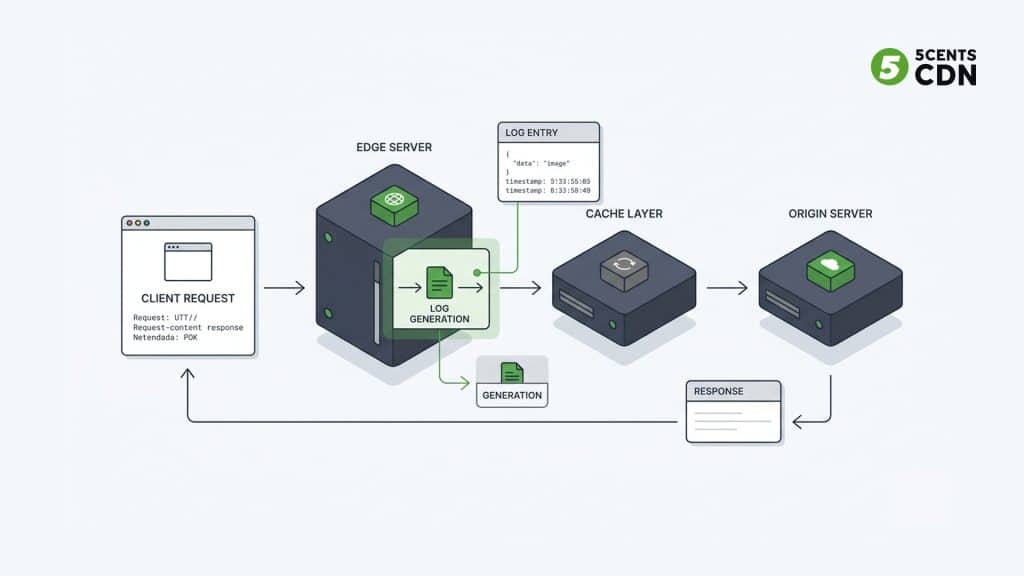
CDN access logs are structured records generated by CDN edge servers whenever a client requests content through the CDN network.
Each entry represents a single HTTP transaction handled by the edge infrastructure. Instead of summarizing traffic like analytics dashboards do, access logs capture the exact technical details of each request.
These logs allow engineers to reconstruct request flows and analyze delivery behavior at a granular level.
For example, if a streaming player fails to load a video segment, the corresponding log entry can reveal:
- whether the request reached the CDN
- whether the file existed in cache
- which edge location processed the request
- which HTTP response code was returned
- how large the response was
Because of this level of detail, access logs are one of the most valuable operational tools available in CDN environments.
What Information Do CDN Access Logs Contain?
A typical CDN access log entry includes multiple metadata fields that describe the request and response.
Client IP Address
The IP address of the user or device that initiated the request.
This helps identify:
- geographic traffic patterns
- suspicious traffic behavior
- bot or crawler activity
Cache Status
One of the most valuable log fields is cache status, which indicates whether the content was served from cache or retrieved from the origin server.
Common values include:
- HIT – Served directly from CDN cache
- MISS – Retrieved from origin
- BYPASS – Cache intentionally skipped
This field is essential for evaluating CDN caching efficiency.
Timestamp
The precise moment the request was processed by the edge server.
Timestamps allow teams to correlate CDN activity with other system events such as:
- server outages
- deployment changes
- traffic spikes
HTTP Method
The request method used by the client.
Common examples include:
- GET
- POST
- HEAD
Different request types often indicate different application behaviors.
Request Path
The exact URL path requested by the client.
Example:
/videos/live/segment-00123.ts
This helps identify:
- missing files
- incorrectly configured paths
- popular content assets
HTTP Protocol
The protocol version used during the request.
Examples include:
- HTTP/1.1
- HTTP/2
- HTTP/3
Protocol information can help identify compatibility issues with clients or network configurations.
HTTP Status Code
The response code returned by the CDN or origin server.
Common codes include:
- 200 – Successful delivery
- 404 – File not found
- 403 – Access denied
- 500 – Server error
For reference, HTTP response codes are standardized in web specifications.
📎 External documentation: https://developer.mozilla.org/en-US/docs/Web/HTTP/Status
Response Size
The total number of bytes delivered to the client.
This metric helps measure:
- bandwidth consumption
- file size distribution
- delivery efficiency
Referrer
The source page that initiated the request.
This can help identify:
- embedded content
- referral sources
- third-party integrations
User Agent
The application or device making the request.
Examples include:
- web browsers
- mobile apps
- streaming players
- automated bots
User agent data helps teams understand which devices or platforms consume their content.
How CDN Access Logs Are Generated
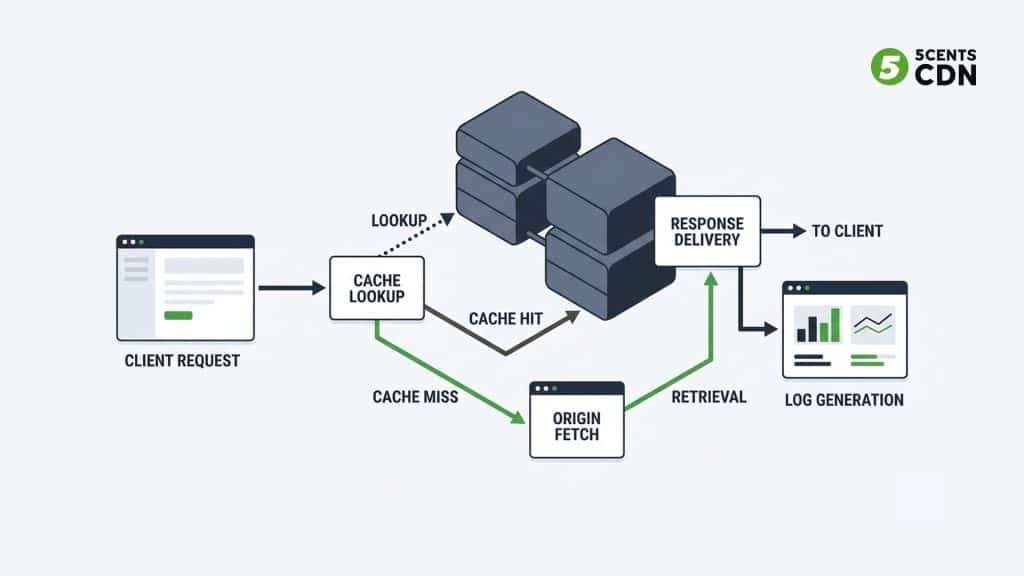
Whenever a user requests content through a CDN, the request is routed to the nearest edge server.
The edge server then performs several actions:
- The request arrives at the CDN edge node.
- The server checks if the requested content exists in its local cache.
- If cached, the edge server delivers the file immediately.
- If not cached, the CDN retrieves the file from the origin server.
- The response is delivered back to the client.
During this process, the CDN logging system records request metadata and generates a log entry describing the transaction.
These log entries are then collected and stored within the CDN logging infrastructure.
Where CDN Access Logs Are Stored
Because CDN platforms process enormous volumes of requests, access logs must be stored efficiently.
Logs are typically organized using structured storage systems and indexed by:
- service resource
- timestamp
- edge location
- service type
This organization allows users to retrieve logs for specific services or time windows.
Modern logging infrastructure often uses distributed storage solutions designed for high-volume log ingestion and retrieval.
Why Access Logs Are Critical for CDN Operations
Access logs provide insights that aggregated analytics tools cannot deliver.
Debugging Delivery Issues
Logs allow engineers to pinpoint delivery failures such as:
- missing content
- incorrect cache rules
- origin connectivity issues
By analyzing HTTP status codes and request paths, teams can identify exactly where delivery failures occur.
Understanding Traffic Behavior
Access logs reveal how content is consumed across the CDN network.
Organizations can identify:
- most requested files
- peak traffic times
- geographic request distribution
- device usage patterns
This helps optimize infrastructure and capacity planning.
Monitoring Cache Performance
Cache status data allows teams to calculate cache hit ratios, which measure how effectively the CDN is serving cached content.
Higher cache hit ratios usually lead to:
- lower origin load
- faster response times
- reduced infrastructure costs
Security Monitoring
CDN logs often reveal suspicious request patterns such as:
- automated scraping
- brute-force access attempts
- abnormal traffic bursts
Security teams frequently feed CDN logs into monitoring platforms for threat detection.
How Modern CDN Platforms Provide Access Logs
Access logs are typically made available through several mechanisms:
Log Downloads
Users can retrieve log files stored in structured storage systems for offline analysis.
Log APIs
APIs allow users to query logs programmatically using filters such as:
- time range
- status code
- request path
- client IP
Real-Time Log Streaming
Some CDN platforms support streaming logs to external systems such as:
- SIEM tools
- centralized log management platforms
- analytics pipelines
These capabilities allow organizations to integrate CDN request data into broader monitoring and observability workflows.
Platforms such as 5centsCDN provide access to raw request logs through download interfaces, APIs, and real-time log streaming, allowing teams to monitor and analyze traffic across global edge infrastructure.
Final Thoughts
CDN access logs provide one of the most detailed views into how content delivery infrastructure operates.
By capturing metadata for every request processed by edge servers, these logs allow organizations to debug issues, analyze traffic patterns, monitor cache performance, and detect suspicious activity.
For streaming platforms, media companies, and large-scale web applications, access logs are not just operational data—they are a fundamental part of maintaining reliable and efficient content delivery systems.