

When millions of viewers watched the 2022 World Cup final through streaming platforms, some experienced the winning goal 30 seconds after others saw it on broadcast TV. That gap — invisible to most viewers until they are spoiled by a notification — is the latency problem that the streaming industry has spent years trying to solve.
Low latency streaming is no longer a niche technical concern. With FIFA World Cup 2026 approaching, live sports betting, real-time auctions, interactive commerce, and social live streaming all creating audiences that demand near-real-time delivery, the question of which protocol to use — and how to architect your live streaming infrastructure around it — has direct business consequences.
This guide explains what latency is in a streaming context, how it is measured, what causes it, and how the three main low latency protocols — LL-HLS, WebRTC, and CMAF — compare across latency, scale, CDN compatibility, and use case fit.
What Is Latency in Live Streaming?
In streaming, latency refers to the delay between an event happening at the camera and that event appearing on a viewer’s screen. This is commonly called glass-to-glass latency — the time from the camera lens to the viewer’s display.
Latency is measured in seconds or milliseconds and falls into four broadly understood tiers:
| Latency Tier | Range | Typical Technology | Suitable For |
| Real-time | < 500ms | WebRTC | Video calls, interactive gaming, live auctions |
| Low Latency | 1–3 seconds | LL-HLS, LL-DASH | Live sports, live commerce, social streaming |
| Reduced Latency | 3–5 seconds | CMAF | Broadcast OTT, premium live events |
| Standard | 6–30 seconds | Traditional HLS/DASH | VOD, replay, SVOD premieres |
The right latency tier depends entirely on your use case. Not every platform needs sub-second delivery — and as we will cover, chasing sub-second latency when your use case only requires 3 seconds creates unnecessary architectural complexity and cost.
What Causes Latency in a Live Streaming Pipeline?
Latency does not come from a single source — it accumulates across every stage of the streaming pipeline. Understanding where it builds up is the only way to reduce it meaningfully.
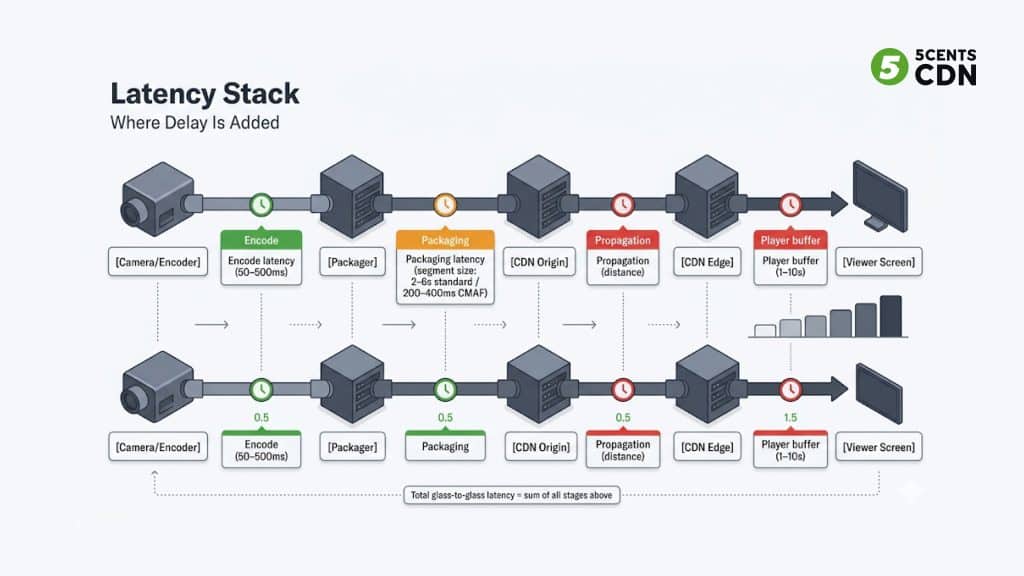
1. Encode Latency
The encoder converts raw video from a camera into a compressed digital stream. Modern encoders using H.264 or H.265 introduce 50–500ms of latency depending on configuration. Encoders optimized for low latency use faster preset settings at the expense of some compression efficiency.
2. Packaging / Segmentation Latency
The packager divides the encoded stream into segments that the CDN and player can request. Traditional HLS uses segments of 6–10 seconds — meaning the packager must wait for a full segment to complete before sending it. This is the single largest contributor to latency in standard HLS setups. LL-HLS and CMAF address this by introducing partial segments of 200–400ms that are transmitted as they are produced.
3. CDN Propagation Latency
Content must travel from your origin server to a CDN edge node close to the viewer. This is largely determined by network distance and the CDN’s PoP coverage. A well-configured CDN with an origin shield layer minimizes this to tens of milliseconds for most regions.
4. Player Buffer
The video player maintains a buffer — a small reserve of pre-downloaded segments — to protect against brief network interruptions. A larger buffer means more stable playback but higher latency. Most players default to 3–10 seconds of buffer. For low latency streaming, players like HLS.js and Shaka Player must be explicitly configured to reduce buffer targets, or the latency gains from the protocol are lost at the final step.
| Key point: Glass-to-glass latency is the sum of all four stages. Optimizing only the protocol without tuning the encoder, packager, and player buffer often produces no real-world improvement. |
What Is LL-HLS?
Low-Latency HLS (LL-HLS) is an extension of Apple’s HTTP Live Streaming protocol, standardized in 2019. It reduces the latency of standard HLS from 6–30 seconds down to 1–3 seconds by addressing the primary cause of HLS latency: large segment sizes.
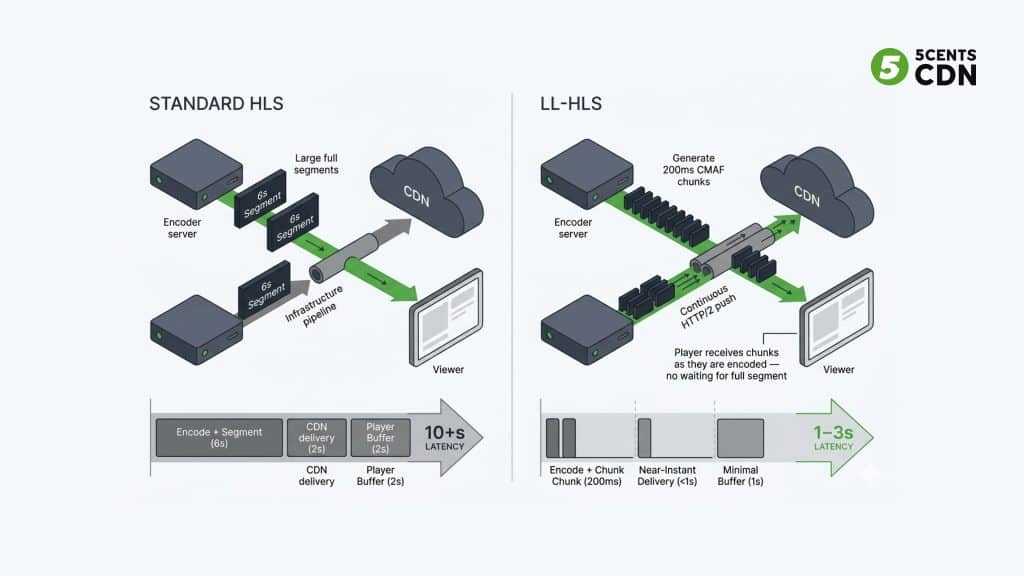
Standard HLS requires the packager to finish an entire segment (typically 6 seconds) before delivering it to the CDN and player. LL-HLS introduces two mechanisms that break this constraint:
- Partial segments (CMAF chunks): The stream is divided into chunks of 200–400ms that are published as they are produced, not when a full segment is complete.
- Preload hints: The manifest tells the player which chunk to request next before it exists, using HTTP/2 to hold the connection open. The chunk is delivered the moment it is ready.
The result is that a viewer’s player is always requesting content that is only milliseconds from being produced — rather than waiting for a full segment to be packaged and delivered.
Where LL-HLS works well
- Large-scale live events: sports, concerts, awards shows with hundreds of thousands to millions of viewers
- Live commerce and social live streaming where chat synchronization matters
- OTT platforms that already use HLS and want to reduce latency without a full infrastructure overhaul
- Any scenario where standard CDN delivery is required — LL-HLS is fully CDN-compatible
Where LL-HLS falls short
- Sub-second latency requirements — LL-HLS reliably achieves 1–3s but rarely below 1s in production
- Interactive applications where bidirectional communication is needed — LL-HLS is one-way broadcast only
What Is WebRTC?
WebRTC (Web Real-Time Communications) is an open standard developed for real-time peer-to-peer audio and video communication, built natively into all modern web browsers. It is the technology behind video conferencing tools, browser-based gaming, and interactive live events.
Unlike HLS-based protocols, WebRTC does not package content into segments. It transmits a continuous stream of encoded data directly between peers — or through a relay server — with no buffering for segment completion. This is why WebRTC consistently achieves sub-500ms glass-to-glass latency in production environments.
WebRTC topology options
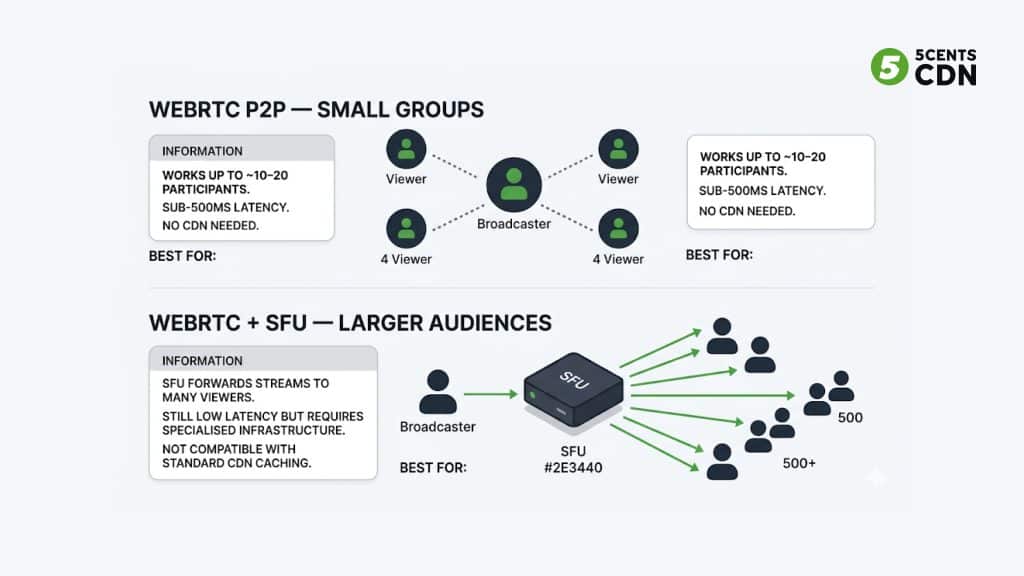
WebRTC scales through two primary architectures:
- Peer-to-peer (P2P): Direct connection between broadcaster and viewer. Works for very small groups (under 20 participants) with minimal infrastructure cost. Not viable for large audiences.
- Selective Forwarding Unit (SFU): A server receives the stream and forwards it to many recipients. Maintains low latency while scaling to thousands of viewers. Requires specialized infrastructure — standard CDN caching does not apply.
Where WebRTC works well
- Interactive live events: auctions, Q&A sessions, live shopping with real-time host interaction
- Video conferencing and collaborative platforms
- Esports and gaming with audience participation requirements
- Scenarios where sub-500ms latency is a hard requirement
Where WebRTC falls short
- Mass broadcast scale — SFU infrastructure becomes expensive and complex above ~50,000 viewers
- Standard CDN delivery — WebRTC streams cannot be cached at CDN edge nodes in the traditional sense
- ABR flexibility — WebRTC has limited adaptive bitrate configuration compared to HLS-based protocols
- Codec flexibility — browsers constrain available codec options, limiting compression efficiency
What Is CMAF?
The Common Media Application Format (CMAF) is not a protocol but an encoding and packaging standard introduced by Apple and Microsoft. It defines a single, unified container format that can be used with both HLS and MPEG-DASH, eliminating the need to package content separately for each protocol.
CMAF achieves 3–5 second latency by enabling chunked transfer encoding — the same partial segment delivery mechanism used by LL-HLS. A single CMAF-packaged stream can be delivered via both HLS and DASH players without re-encoding, making it highly efficient for platforms that need to serve a wide range of devices and players.
Where CMAF works well
- Multi-format OTT delivery where content must reach HLS (Apple/iOS) and DASH (Android, Smart TVs) devices from a single source
- Broadcast and premium OTT where 3–5 second latency is acceptable
- Reducing encoding and storage costs — one package, two delivery formats
- CDN-friendly delivery at scale
Where CMAF falls short
- Not suitable for truly low latency use cases below 3 seconds without LL-HLS or WebRTC extensions
- Player support can vary — not all CMAF configurations are consistently supported across older devices
Protocol Comparison: Latency Benchmarks and Key Characteristics
The following table reflects production benchmarks from 2025–2026 deployments, not theoretical minimums. Actual numbers vary based on encoder configuration, CDN setup, and player buffer settings.
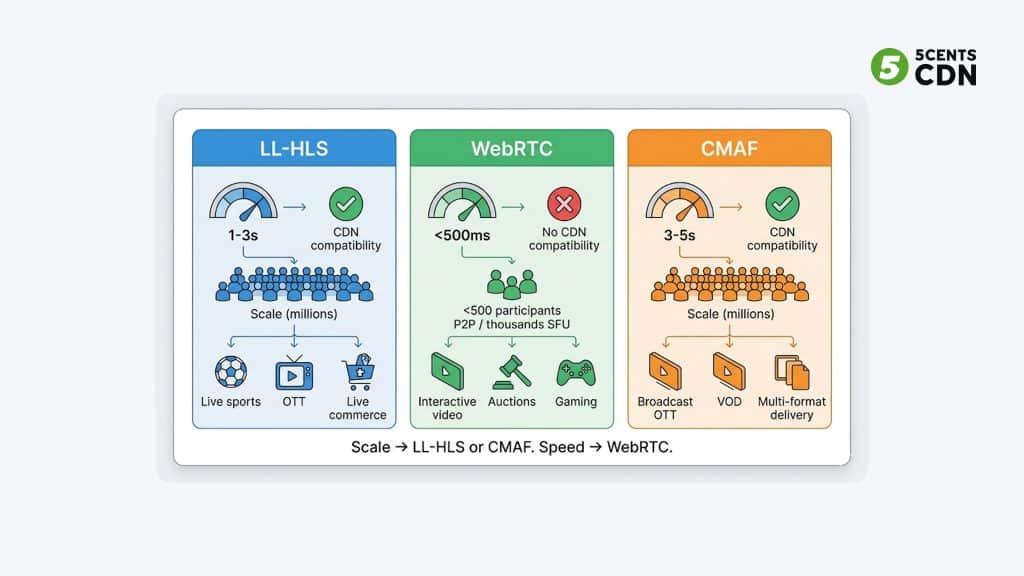
| LL-HLS | WebRTC | CMAF | |
| Typical latency | 1–3 seconds | < 500ms | 3–5 seconds |
| Best-case latency | ~1 second (tuned) | 80–200ms | ~2.5 seconds |
| CDN compatible | ✓ Yes — fully | ✗ No (SFU required) | ✓ Yes — fully |
| Max scale | Millions of viewers | ~10K–50K (SFU) | Millions of viewers |
| ABR support | ✓ Full ABR ladder | Limited | ✓ Full ABR ladder |
| Browser native | ✓ All modern browsers | ✓ Built-in | ✓ All modern browsers |
| Bidirectional | ✗ One-way only | ✓ Yes | ✗ One-way only |
| Codec flexibility | H.264, H.265, AV1 | H.264, VP8/VP9 (limited) | H.264, H.265, AV1 |
| Infrastructure cost | Low–Medium (standard CDN) | High (SFU servers) | Low–Medium (standard CDN) |
| Best use case | Live sports, OTT, live commerce | Video calls, interactive events | Broadcast OTT, multi-format |
How CDN Architecture Interacts With Each Protocol
One of the most overlooked aspects of the low latency protocol decision is CDN compatibility. The protocols behave very differently when placed behind a CDN — and this affects both latency and cost at scale.
LL-HLS and CDN
LL-HLS is designed for CDN delivery. Partial segments are small HTTP objects that CDN edge nodes cache and serve just as they do with standard HLS segments. A well-configured CDN with origin shield can serve millions of LL-HLS viewers simultaneously while the origin only handles a fraction of the total requests. The key configuration requirement is that the CDN must support HTTP/2 (for preload hints) and must not buffer partial segments before forwarding them.
Pairing LL-HLS with delivery acceleration and an efficient transcoder that produces a proper ABR ladder gives you the full low latency stack — fast encode → small segments → cached edge delivery → optimized player.
WebRTC and CDN
WebRTC does not integrate with traditional CDN infrastructure. Standard CDN edge nodes cache HTTP objects — but WebRTC streams are transmitted over UDP using SRTP (not HTTP), making them uncacheable by conventional CDN architecture.
At scale, WebRTC requires a network of SFU servers rather than CDN edge nodes. These SFU servers receive the stream and forward it to many recipients, but they are not the same as a CDN — they do not cache content, they relay it in real time. This makes WebRTC infrastructure significantly more expensive to scale than LL-HLS.
CMAF and CDN
Like LL-HLS, CMAF is fully CDN-compatible. CMAF chunks are HTTP objects that edge nodes cache normally. The key advantage is that a single CMAF stream can be served to both HLS players (Apple devices) and DASH players (Android, smart TVs) from the same cached content, reducing CDN storage and egress overhead compared to maintaining two separate HLS and DASH streams.
Which Protocol Should You Use?
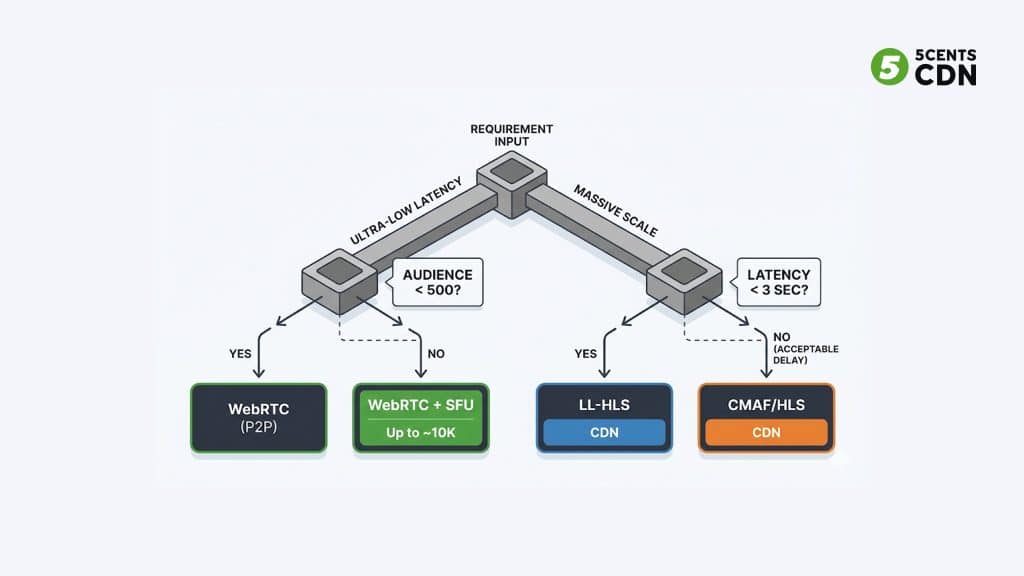
The answer depends on three factors: how low your latency requirement actually is, how large your audience will be, and whether your viewers need to interact or just watch.
| Use Case | Protocol | Reason |
| Live sports — millions of viewers | LL-HLS | CDN-friendly, 1–3s acceptable, handles massive scale |
| Live sports betting / real-time scores | LL-HLS | 1–3s usually sufficient; WebRTC too complex at this scale |
| Interactive live auction / Q&A (< 10K) | WebRTC | Sub-second required; audience small enough for SFU |
| Large interactive event (10K–50K) | WebRTC + SFU | Latency-critical; requires SFU infra investment |
| OTT broadcast — global multi-device | CMAF | Single package, HLS + DASH, CDN-friendly, cost efficient |
| Live commerce / social streaming | LL-HLS | Chat sync at 1–3s acceptable; CDN scale needed |
| Video conferencing / collaboration | WebRTC | Bidirectional required; sub-500ms essential |
| VOD with replay of live events | CMAF or standard HLS | Latency irrelevant for VOD; efficiency matters more |
One practical note: many large-scale live platforms now use a hybrid approach — LL-HLS for the passive broadcast audience (millions of viewers), combined with WebRTC for a small interactive layer (guest speakers, Q&A panellists, interactive elements). Use the live transcoding calculator to estimate the encoding cost for your ABR ladder.
Summary: LL-HLS vs WebRTC vs CMAF
| LL-HLS | WebRTC | CMAF | |
| Latency | 1–3 seconds | < 500ms | 3–5 seconds |
| CDN delivery | ✓ Yes | ✗ No | ✓ Yes |
| Viewer scale | Millions | Thousands | Millions |
| Interactive | ✗ No | ✓ Yes | ✗ No |
| Infrastructure cost | Low | High | Low |
| Best for | Sports, OTT, commerce | Calls, auctions | Broadcast, multi-format |
Frequently Asked Questions
What is the difference between low latency HLS and standard HLS?
Standard HLS packages video into segments of 6–10 seconds, creating a minimum latency of around 10–30 seconds end-to-end. LL-HLS uses partial segments of 200–400ms and preload hints to reduce this to 1–3 seconds, while maintaining CDN compatibility and full adaptive bitrate support.
Is WebRTC better than LL-HLS?
It depends on the use case. WebRTC achieves sub-500ms latency — significantly faster than LL-HLS. But WebRTC does not work with standard CDN infrastructure, requires SFU servers to scale beyond a few hundred viewers, and lacks flexible ABR support. LL-HLS is almost always the better choice for large-scale broadcasts. WebRTC is better for small, interactive sessions where sub-second latency is a hard requirement.
What is glass-to-glass latency?
Glass-to-glass latency refers to the total delay from a camera capturing an event to a viewer seeing it on their screen. It includes encode latency, packaging latency, CDN propagation, and player buffer time combined.
Can LL-HLS work with a standard CDN?
Yes. LL-HLS is fully compatible with standard CDN delivery — this is one of its primary advantages over WebRTC. The CDN must support HTTP/2 (for preload hints) and must not introduce additional buffering at the edge. Most major CDNs support LL-HLS delivery natively.
What is CMAF and how is it different from HLS?
CMAF (Common Media Application Format) is a packaging standard, not a delivery protocol. It defines a single container format that both HLS and DASH players can consume, eliminating the need to encode content twice. CMAF enables 3–5 second latency through chunked transfer encoding. LL-HLS builds on CMAF to achieve 1–3 second latency.
What latency is acceptable for live sports streaming?
For live sports where viewers may also be watching on broadcast TV or following live commentary, latency above 10 seconds creates a spoiler risk from social media or second-screen apps. LL-HLS at 1–3 seconds is generally considered the minimum acceptable standard for premium sports streaming in 2026. For betting and real-time fantasy sports integrations, the bar is lower — even 3–5 seconds is often sufficient.
| Need a Low Latency Streaming Solution? 5centsCDN offers custom low latency streaming infrastructure for platforms that need reliable, scalable delivery — whether you are building for live sports, OTT, live events, or interactive broadcasting. Our team works with you to configure the right protocol, transcoding setup, and CDN architecture for your specific use case and audience scale. For custom solutions and pricing — contact us. |