


Viewers no longer accept that live means now-or-never. They expect to join a match ten minutes late and start from kickoff, pause a broadcast to answer the door, or scroll back three days in a programme guide to watch something they missed. Delivering that is cloud DVR — and more broadly time-shifted viewing, the family of features that decouple when content airs from when it’s watched.
The terminology around it is genuinely muddled. Cloud DVR, nPVR, catch-up TV, start-over, timeshift, and TV archive get used interchangeably in sales material, while meaning quite different things in an engineering discussion. This guide separates them, explains how time-shifted viewing is actually implemented on top of a live streaming pipeline, and works through the two things that decide whether a deployment is viable: storage economics and content rights.
What Time-Shifted Viewing Means
Time-shifting is simply recording live programming so it can be watched later. The concept predates streaming by decades — it’s what a VCR did, and later what a set-top-box DVR did with a hard disk. Cloud DVR moves that storage off the viewer’s device and onto the operator’s infrastructure. Nothing is recorded locally; the platform retains the content and streams it back on request.
That shift changes the engineering problem completely. A set-top DVR records one stream for one household onto one disk. A cloud DVR records channels centrally and serves them to an entire subscriber base — which turns a consumer-electronics feature into a storage, rights, and delivery problem. It also unlocks capabilities a local box can’t offer, such as making the last week of a channel browsable to every subscriber without any of them having pressed record.
The Four Modes of Time-Shifted Viewing
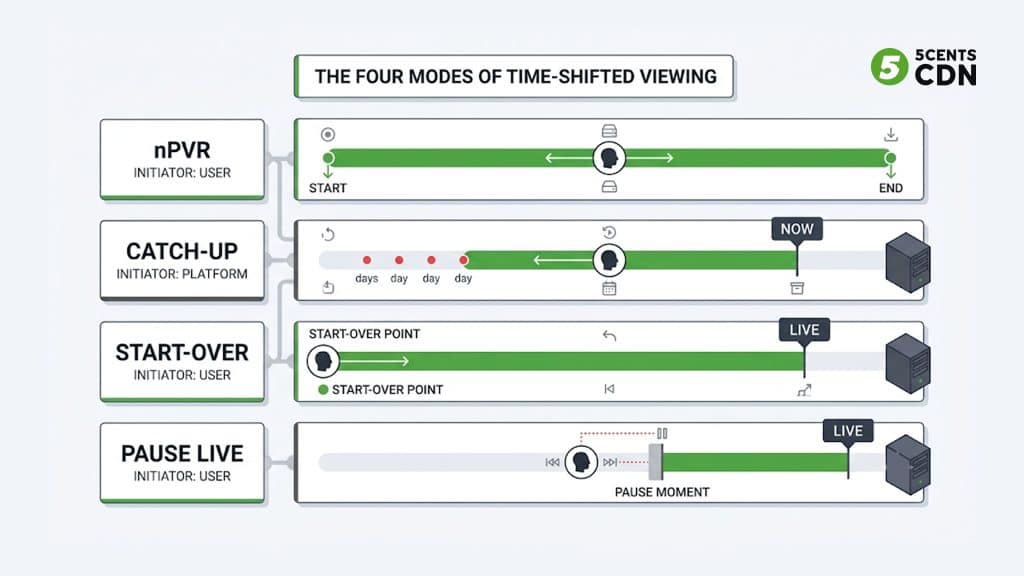
Four distinct features hide behind the general label. They differ in who initiates the recording, how much is retained, and how long it lives.
1. Cloud DVR / nPVR
Network PVR (nPVR) is subscriber-initiated recording stored centrally. The viewer picks a programme from the guide and schedules it, exactly as they would on a set-top box, but the recording lives on the operator’s platform and appears in a personal library accessible from any device. Retention is typically long or indefinite, and storage is usually quota-based per subscriber. Series-linked recording — capture every episode — belongs here too.
2. Catch-Up TV
Catch-up is operator-initiated and requires nothing from the viewer. The platform records everything on eligible channels continuously, and viewers browse the programme guide backwards to play anything that aired inside the retention window — commonly somewhere between 7 and 30 days. This is the mode that most changes viewer behaviour, because it removes the need to plan ahead entirely. It’s also the most storage-hungry, since you record everything whether anyone watches it or not.
3. Start-Over
Start-over lets a viewer restart a programme that is currently airing from its beginning. It’s the feature that rescues someone tuning into a match at the fifteen-minute mark. Technically it’s a narrow slice of catch-up — you only need retention back to the start of the current programme — but it depends on knowing where the programme boundary is, which is a metadata problem we’ll come back to.
4. Pause Live TV
Pausing live TV creates a time-shifted buffer: the stream keeps being retained while the viewer is away, and playback resumes from the pause point, now running behind the live edge. Continue watching from that offset and you’re in what’s traditionally called chase play — playing back a delayed version of a stream that is still being recorded. The viewer can then skip forward until they catch up to live.
Comparison at a glance
| Mode | Initiated by | Scope recorded | Typical retention |
| Cloud DVR / nPVR | Subscriber | Only selected programmes | Long or indefinite, quota-based |
| Catch-Up TV | Operator | Everything on eligible channels | Fixed window, often 7-30 days |
| Start-Over | Viewer, on demand | Current programme only | Until the programme ends |
| Pause Live TV | Viewer, on demand | Rolling buffer from pause point | Minutes to hours, session-scoped |
How Cloud DVR Actually Works
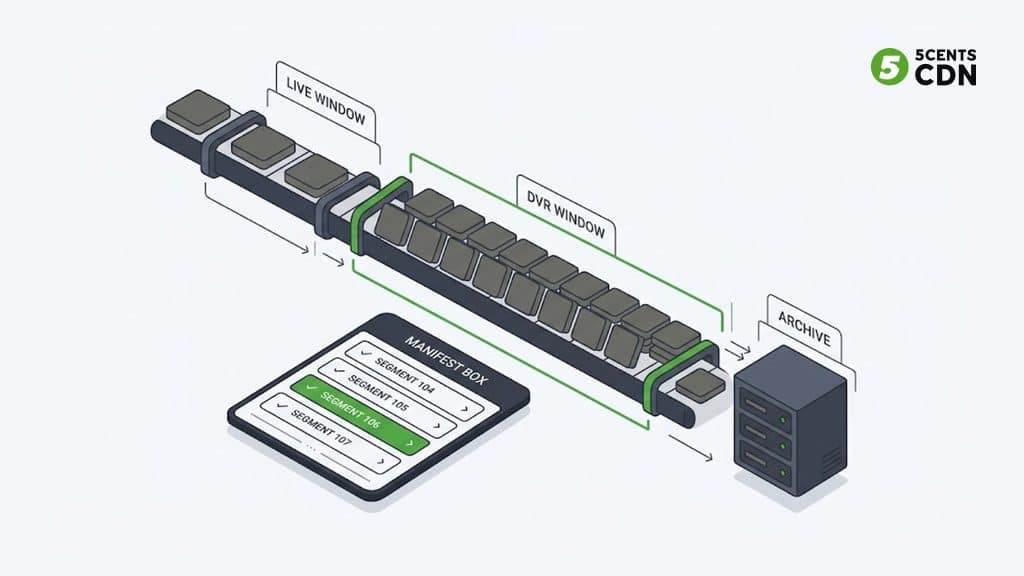
Here’s the insight that makes the whole thing simpler than it sounds: if you’re already streaming live over HLS or DASH, you are already recording. Live delivery works by continuously cutting the stream into short media segments and advertising the available ones in a manifest. Normally the manifest exposes only a short trailing window — a handful of segments near the live edge — and older segments are discarded as new ones arrive.
Time-shifted viewing is largely a matter of not throwing those segments away and telling the player they exist. Extend the window advertised in the manifest and a player can seek backwards through it — that’s the classic DVR window. Keep the segments in durable storage beyond that and index them against a programme schedule, and you have catch-up TV. The media itself doesn’t need to be produced twice; you’re changing retention and addressing, not adding a parallel recording system.
In practice, deployments distinguish two tiers. A sliding window keeps a fixed duration behind the live edge — say two to six hours — with the oldest content continuously ageing out. This serves pause, start-over, and short-range rewind cheaply, often straight from the delivery layer’s cache. An archive persists content for days or longer in object storage, indexed for retrieval by programme rather than by position in a live stream. Catch-up and nPVR are served from there, and because the content is no longer near-live it can be treated much like any other on-demand asset.
Cloud DVR Performance and Scalability Considerations
One consequence worth planning for: time-shifted viewers fragment your audience across the timeline. In pure live delivery, everyone requests the same segment at the same moment, which caches beautifully. With time-shifting, viewers are scattered across hours or days of content, so requests spread across a far larger object set and cache efficiency drops. That’s a delivery consideration, not just a storage one.
There’s also a practical ceiling on how far you can stretch the manifest approach. Because a live playlist enumerates its available segments, a long DVR window makes the playlist itself large: at six-second segments, a four-hour window means around 2,400 entries, and a full day means roughly 14,400. Every player fetching and re-parsing a manifest that size, repeatedly, is wasteful — and on constrained devices it becomes a genuine performance problem. This is why deployments tend to cap the sliding window at a few hours and hand anything older to the programme-indexed archive, where content is requested as a discrete asset rather than as a position in an ever-growing list.
The EPG Alignment Problem
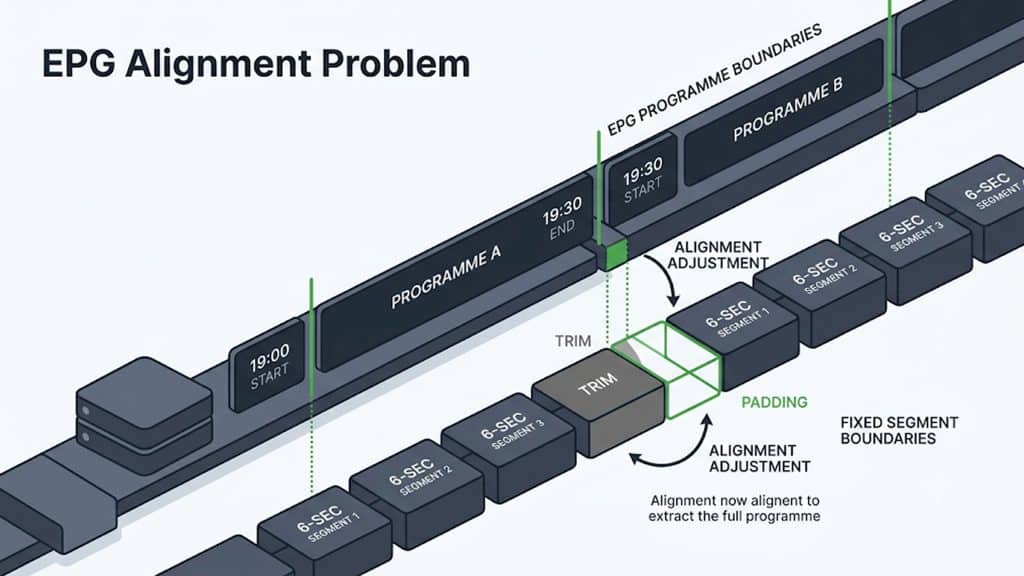
Retaining segments is the easy half. The harder half is that viewers don’t think in segments — they think in programmes. Catch-up, start-over, and nPVR all require mapping “the 19:00 news” onto a specific range of recorded media, and those two things rarely line up.
Segments are cut on a fixed cadence — commonly two to ten seconds, aligned to keyframes across every rendition in your encoding ladder. Programmes start and end whenever the schedule says, which is almost never on a segment boundary. So extracting a programme means resolving its start and end times to the nearest segment boundaries, then deciding whether to trim or pad. Pad and viewers get the tail of the previous show; trim and they miss the opening seconds.
It gets worse in the real world, because broadcast schedules drift. Live sport overruns, news breaks in, and the guide data is a prediction rather than a record. Robust implementations therefore lean on in-stream signalling rather than the schedule alone — the same SCTE-35 markers used to signal ad breaks can also carry programme-boundary information, letting the platform record what actually happened instead of what was supposed to happen. If your catch-up library is full of programmes that start two minutes early and cut off before the ending, this mismatch is almost always the cause.
Storage: Do the Math Before You Commit
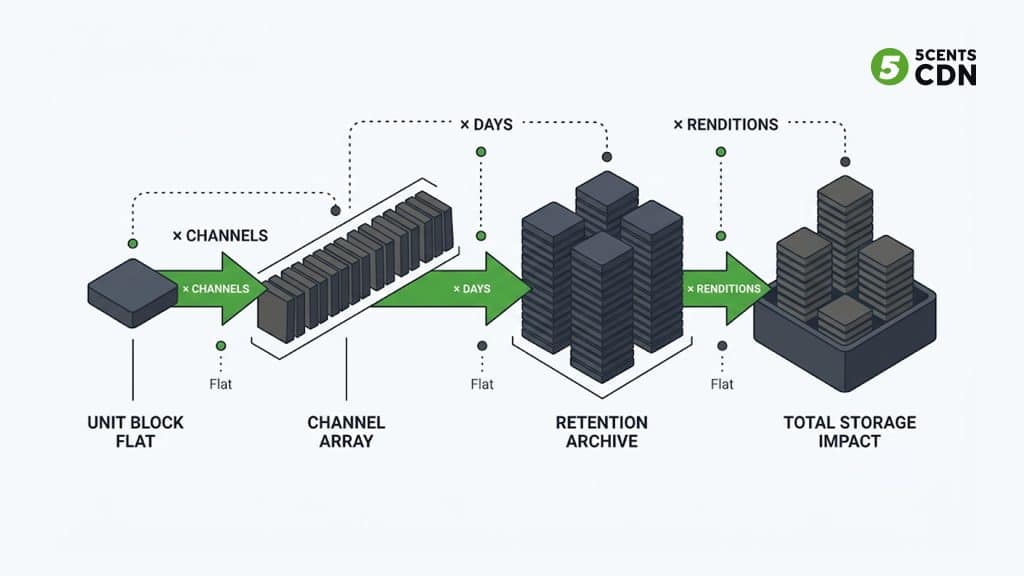
Storage is where time-shifted viewing projects succeed or fail commercially, and the arithmetic is simple enough that there’s no excuse for guessing. Start from bitrate:
Storage = bitrate ÷ 8 × duration × channels × renditions
Work it through with a single 5 Mbps rendition. That’s 0.625 MB per second, or roughly 2.25 GB per hour and 54 GB per channel per day. Now scale it: a 7-day catch-up window on one channel is about 378 GB. Across 100 channels, that’s roughly 38 TB. Extend the window to 30 days and the same 100 channels need about 162 TB. These are arithmetic from that one bitrate assumption, not industry benchmarks — plug in your own numbers and the shape of the problem becomes obvious immediately.
Then apply the multiplier most plans forget. If you record the full ABR ladder rather than a single rendition, you store every rung. A ladder totalling around 12 Mbps across its renditions pushes the same channel from 54 GB to roughly 130 GB per day — so that 100-channel, 7-day window becomes about 91 TB instead of 38 TB. Deciding what to record is therefore a bigger cost lever than choosing a storage vendor.
Practical ways to control it
- Record fewer renditions. Retain a high-quality mezzanine or a reduced subset of rungs and re-derive lower renditions on demand if needed, rather than archiving the entire ladder.
- Record once, serve many. For catch-up, a single shared copy serves every subscriber. Only per-user nPVR semantics require anything resembling per-subscriber copies — and even then, shared storage with per-user entitlements is the sane implementation.
- Tier by age. Recent content earns fast storage because it’s actively watched; a three-week-old programme can sit on cheaper, slower storage. Move it automatically.
- Use efficient codecs for the archive. A more efficient codec reduces every stored byte for the whole retention period, so the saving compounds across the archive in a way it never does for live delivery alone.
- Prune by demand. Retention doesn’t have to be uniform. Keep popular channels and genres longer; expire content nobody opens. Instrument this before you decide — viewing data usually shows a steep drop-off.
Rights, Blackouts and Retention Windows
The constraint that most often derails a deployment isn’t technical. You generally do not have the right to record and replay everything you carry. Licensing agreements specify, per channel and often per programme, whether content may be recorded at all, how long it may remain available, and where it may be played back.
That means your platform needs rights enforcement as a first-class feature, not a bolt-on. Channels flagged non-recordable must be excluded from nPVR entirely. Catch-up windows must expire content automatically when the licensed period ends. Territorial restrictions require geo-based access control on playback, and blackout rules may prohibit replay during specific periods even for content you’re otherwise allowed to hold. Sport is the hardest case, where rights can vary by fixture and by region simultaneously.
The same protection you apply to live and on-demand delivery applies here too — recorded content is still premium content, so encryption and access control should extend across the archive rather than stopping at the live stream. Practically, it’s worth modelling recording rights alongside your channel metadata from day one; retrofitting per-programme rights onto an archive that was built assuming everything is recordable is painful.
From DVR to VOD
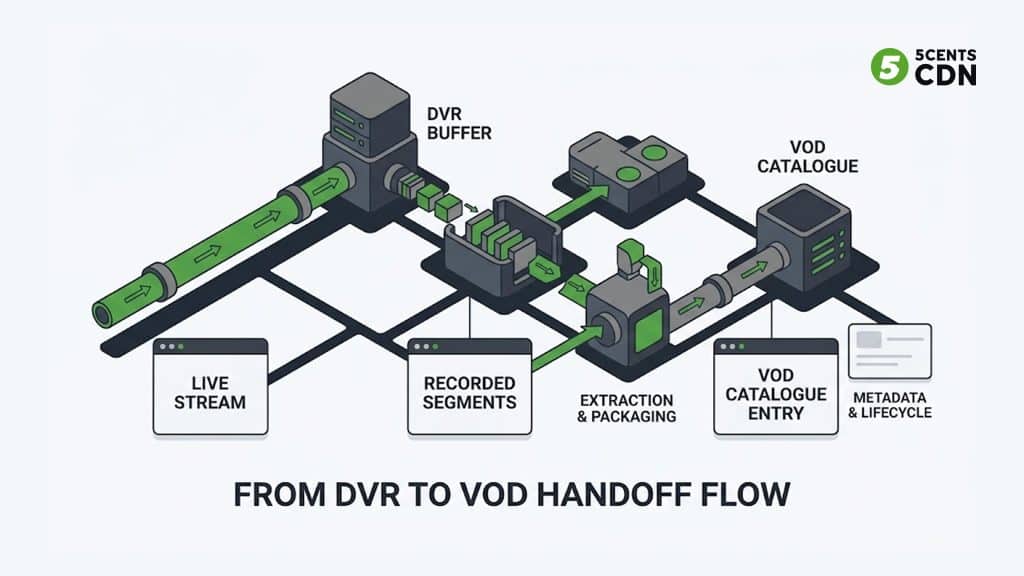
The last piece is what happens when a recording stops being a time-shifted stream and becomes a catalogue asset. Converting a recording into a proper on-demand title means extracting the programme’s segment range, repackaging it as a standalone asset with its own manifest, attaching metadata, artwork, and captions, and giving it an independent lifecycle in your library.
This is how live output becomes durable catalogue value — a match, a concert, or a conference session recorded once and then monetised for months. It’s also the cleanest path to building a library without commissioning anything new, which matters for FAST and linear channel operators who need volume, and for CTV apps where a deep back catalogue drives session length. Once converted, the asset behaves like any other on-demand content in your pipeline.
5centsCDN supports this end to end. Our recording and DVR capability captures live streams for time-shifted playback and DVR-to-VOD conversion, backed by cloud storage for the archive, a scheduler for linear playout, and global edge delivery for both live and recorded content. If you’re planning time-shifted features for an OTT or media platform and want to size the storage and delivery side properly before committing, talk to our team.
Frequently Asked Questions
What is the difference between cloud DVR and catch-up TV?
Cloud DVR (or nPVR) is subscriber-initiated: the viewer schedules a specific programme and it lands in their personal library, usually with long retention. Catch-up TV is operator-initiated: the platform records everything on eligible channels automatically, and any viewer can play anything inside a fixed window, commonly 7 to 30 days, without having scheduled anything.
How much storage does cloud DVR need?
It scales with bitrate, retention, channel count, and how many renditions you keep. As a worked example, a single 5 Mbps rendition is about 54 GB per channel per day, so a 7-day window across 100 channels is roughly 38 TB, and a 30-day window is roughly 162 TB. Recording a full adaptive bitrate ladder instead of one rendition can more than double those figures.
What is start-over TV?
Start-over lets a viewer restart a programme that is currently airing from its beginning, which is useful when they tune in partway through. Technically it is a narrow form of catch-up, requiring retention only back to the start of the current programme, but it depends on accurate programme-boundary data.
Does cloud DVR work with HLS and DASH?
Yes, and it builds on how they already work. Both protocols deliver live video as a series of short segments advertised in a manifest. Time-shifted viewing extends how long those segments are retained and how much of the timeline the manifest exposes, so no separate recording format is required.
Can you record every channel for catch-up TV?
Not usually. Recording and replay rights are set by content licensing agreements and vary by channel, programme, and territory. Some channels cannot be recorded at all, others have limited catch-up windows, and blackout rules may block replay during certain periods, so rights enforcement has to be built into the platform.
