


An encoding ladder is the set of video renditions a streaming service prepares from a single source file, each encoded at a different resolution and bitrate so that a player can switch between them as network conditions change. It is the foundation of adaptive bitrate streaming, and the quality of your ladder design decides whether viewers get sharp, stall-free playback or a blurry, buffering mess. Get the rungs right and a phone on a weak cellular signal and a 4K TV on fibre both get the best experience their connection allows. Get them wrong and you waste storage, waste bandwidth, and still deliver a worse picture.
This guide is about ladder design — how many rungs to build, what resolution and bitrate to assign each one, when a fixed ladder is enough, and when per-title or context-aware methods earn their keep. If you need the fundamentals of bitrate itself or the mechanics of the conversion step, start with our companion posts on streaming bitrate and video transcoding. Here we assume you know what a bitrate is and focus on the ladder as an engineering decision.
What an Encoding Ladder Actually Is
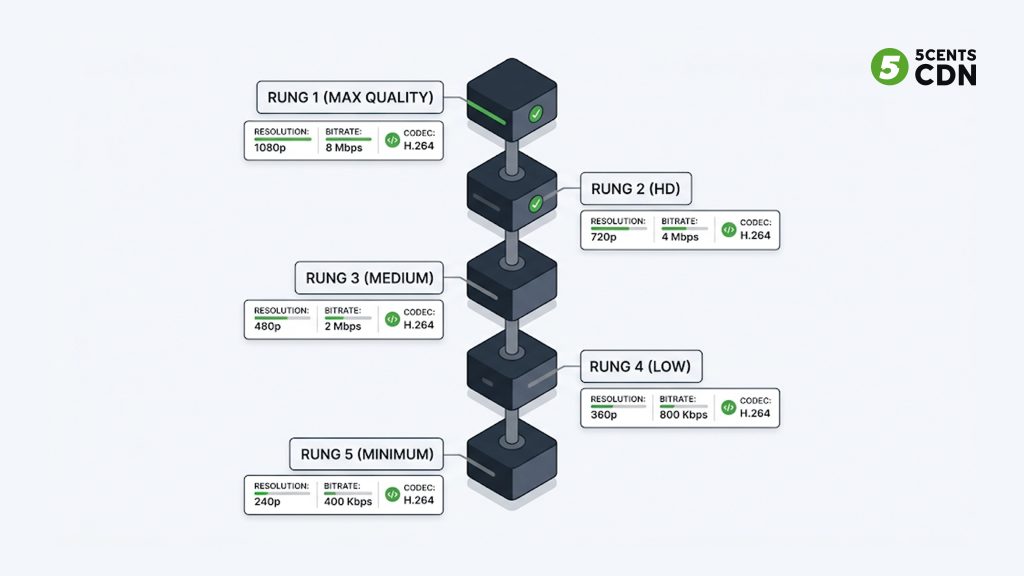
Picture a ladder standing upright. Each rung is one complete version of your video — a rendition (also called a variant) with its own resolution, bitrate, and codec settings. The top rung is the highest quality: full resolution, high bitrate, meant for viewers with fast, stable connections and large screens. The bottom rung is the smallest and lightest: low resolution and low bitrate, built to keep playing when the network is struggling. The rungs in between fill the gap so the player can climb up or down in sensible steps.
During playback, the player continuously measures available bandwidth and buffer health, then requests segments from whichever rung best matches current conditions. When bandwidth rises, it climbs to a higher rung; when the connection weakens, it drops to a lower one. Because every rung is time-aligned and segmented identically, this switching is seamless — the viewer sees quality shift, not a stall. The list of rungs and their properties is written into a manifest file (an HLS playlist or DASH MPD) that the player reads before and during playback.
A useful way to think about it: the encoding ladder is the menu, and the adaptive bitrate algorithm in the player is the diner choosing from it moment to moment. You, the operator, write the menu in advance. If the menu has no affordable dish, a hungry viewer on a slow connection simply can’t be served — which is why the bottom rung matters as much as the top.
Rungs, renditions, and the manifest
Three terms get used interchangeably and it helps to keep them straight. A rendition or variant is one encoded version of the content. A rung is that rendition’s position on the ladder relative to the others. The manifest is the text file that advertises all of them to the player, including a declared bandwidth value for each. That declared value is not always identical to the true encoding bitrate — a subtlety we return to below, because it directly affects how aggressively players climb your ladder.
Three Ways to Build a Ladder
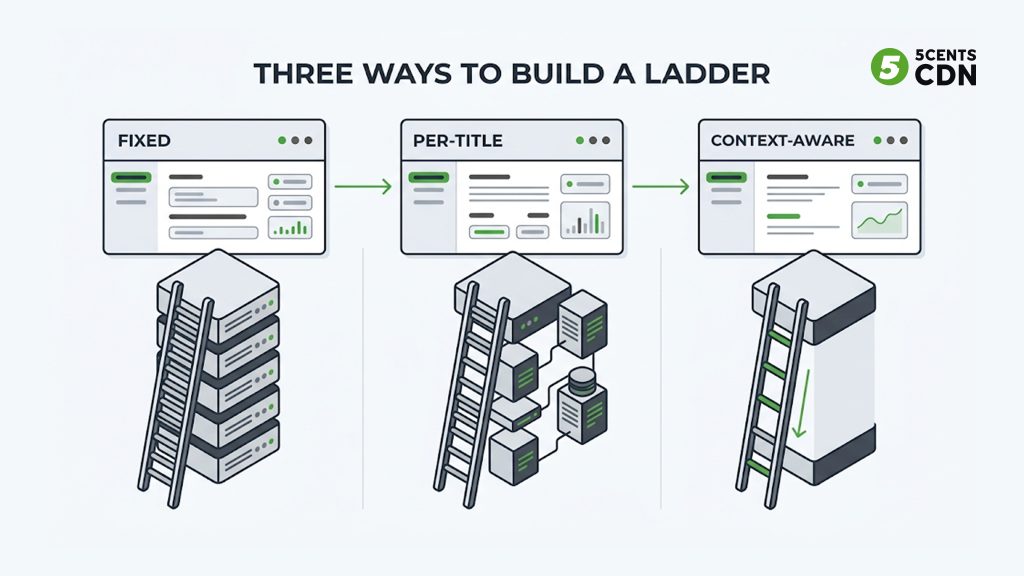
There is no single perfect ladder. The right design depends on your content, your audience’s devices and networks, your codec, and your budget. Historically, ladder design has evolved through three approaches, each solving a limitation of the one before it.
1. Fixed (one-size-fits-all) ladders
The original approach, popularised by Apple’s HLS guidance around 2010, is a fixed ladder: one predetermined set of resolution/bitrate rungs applied to every piece of content regardless of what’s in it. A ten-rung fixed ladder might run from an audio-only or very low rung up to a 1080p or 2160p top rung, and you’d push every title through the same recipe.
Fixed ladders are simple, predictable, and fast — no per-file analysis, so they suit live streaming and large libraries where you can’t afford to analyse every asset. Their weakness is that content complexity varies enormously. A high-motion sports clip and a static news desk shot don’t need the same bitrate to look good, but a fixed ladder gives them identical treatment. The result is that simple content is over-encoded (wasting bits and money) while complex content can be under-encoded (looking soft) at the same rung.
2. Per-title encoding
In 2015 Netflix popularised per-title encoding, which tailors the ladder to each individual title. The encoder analyses the source, encodes it at many resolution/bitrate combinations, and scores each with a perceptual quality metric such as VMAF. From those scores it keeps only the rungs that deliver a meaningful quality gain, discarding redundant ones. A simple cartoon might end up with five rungs; a grainy action film might need nine.
The payoff is real: the same perceived quality at a lower average bitrate, which cuts both delivery cost and storage. The trade-off is analysis time and compute. Because it needs to inspect the whole file first, classic per-title encoding suits video-on-demand rather than live, though modern encoders increasingly approximate it in near real time.
3. Context-aware encoding
From around 2018, context-aware encoding (CAE) extended per-title thinking to include the delivery context — the devices and networks the content will actually reach. Rather than optimising the ladder for the content alone, CAE also factors in screen sizes, device decoder capabilities, and typical network conditions for your audience. The practical result is often a ladder with fewer rungs that delivers the same quality of experience, because rungs no device or network will ever use are simply not built.
A context-aware ladder can match the perceived quality of a fixed ladder while using roughly half the variants, either by lowering bitrates or by pushing higher resolutions deeper down the ladder. Fewer variants means lower encoding cost, less storage, and simpler manifests. The trade-off is that CAE depends on good data about your audience — get the assumptions wrong and you can starve a device class you underestimated.
Most production pipelines today blend these. A common pattern is a per-title or context-aware ladder for a VOD catalogue, plus a lean fixed ladder for live channels where analysis time isn’t available. The point is not to pick a camp but to match the method to the workload.
How Many Rungs, and Where to Place Them
The most common design question is how many rungs to build. More rungs mean smoother, less noticeable quality switches and finer matching to bandwidth — but each rung adds encoding cost, storage, and manifest complexity. Too few rungs and the jumps between them become visible and switching gets clumsy; too many and you pay for renditions that barely differ from their neighbours.
A practical starting point for a broad-audience VOD ladder is somewhere between five and eight video rungs spanning from a low mobile-friendly rung up to your top target resolution. The exact count should be driven by data, not habit: place a new rung only where it delivers a visible quality improvement over the rung below it. If two adjacent rungs score almost identically on a perceptual metric across your content, one of them is redundant.
The spacing principle
Rungs should be spaced so that each step up delivers a roughly consistent perceptual improvement, not a consistent bitrate increase. Because quality rises quickly at low bitrates and then flattens, evenly spaced bitrates produce uneven quality jumps. A rough rule of thumb many engineers use is that consecutive rungs should differ in bitrate by something in the range of 1.5× to 2× — close enough that switching isn’t jarring, far enough apart that the rungs aren’t redundant. Treat that as a heuristic to refine with measurement, not a law.
Designing the Top and Bottom Rungs
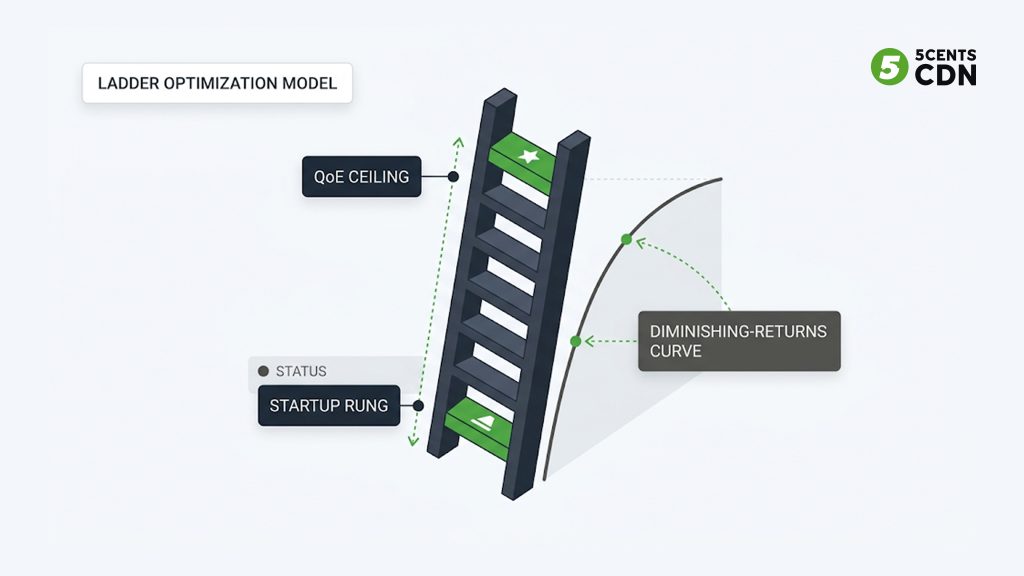
The two ends of the ladder deserve special attention because they define the limits of the experience: the bottom rung sets your worst case, and the top rung sets your best case and your peak cost.
The bottom rung: keep playback alive
The bottom rung exists to keep video playing when the network is at its worst. Its job is continuity, not beauty — a viewer should rarely stay here long, so it can trade quality for reliability. Set its resolution and bitrate low enough that it plays with high probability under poor conditions, but not so low that the picture becomes unwatchable. Frame rate can also be reduced on the lowest rungs to preserve bits for essential detail. Many designs pair the bottom video rung with a low-bitrate audio option so that, in the worst case, sound continues even when the picture is minimal.
The top rung: quality without waste
The top rung sets your ceiling for perceptual quality — high resolution, high bitrate, full frame rate for high-motion content. The discipline here is resisting the temptation to go higher than viewers can perceive. Quality of experience does not rise linearly with bitrate: beyond a certain point the curve flattens and the human eye stops noticing improvement, while your delivery bill keeps climbing. Worse, an excessively high top rung is harder to sustain and raises the chance of stalls for the very viewers it’s meant to impress. Set the top rung where meaningful quality gains stop, not where the encoder’s maximum is.
Declared vs encoding bitrate
One subtlety separates good ladders from naive ones. The bitrate a player uses to decide which rung to fetch is the declared bandwidth value in the manifest, not the raw encoding bitrate — and the two can differ once you account for container overhead, audio, and peak-versus-average behaviour. If you under-declare, players will be too cautious and pick lower rungs than the network could handle. If you over-declare, players may reach for rungs the connection can’t sustain, causing stalls. Declaring bandwidth accurately, with a sensible margin for overhead, is part of ladder design, not an afterthought.
Codec-Specific Ladders
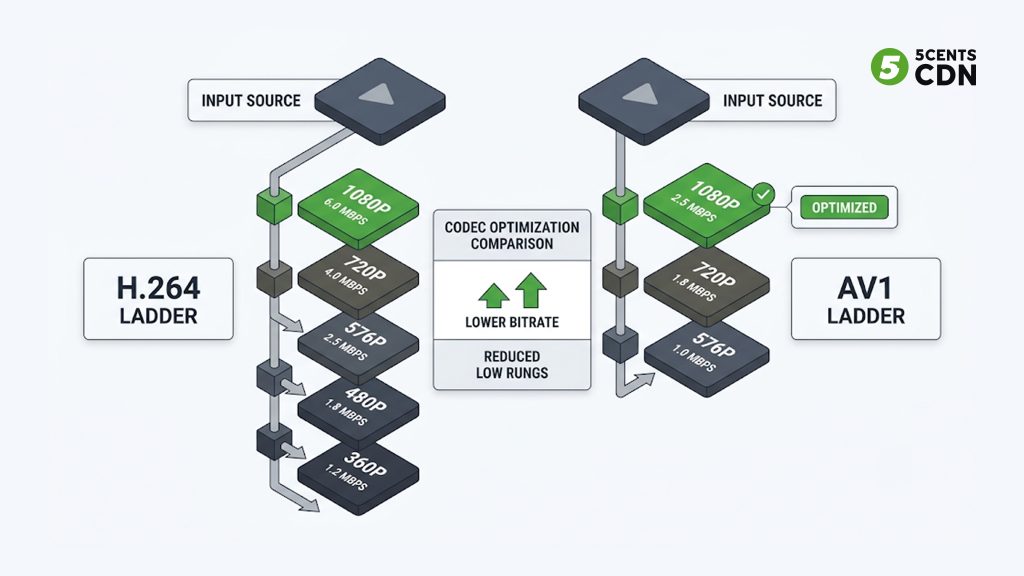
A ladder is not codec-agnostic. Different codecs achieve the same visual quality at different bitrates, so a ladder tuned for one codec is wrong for another. Modern codecs like HEVC, VP9, and AV1 are far more efficient than H.264, which changes both the bitrate of each rung and the resolution you should assign to it.
Because an efficient codec produces good quality at lower bitrates, its rungs shift downward in bitrate. More importantly, it lets you push higher resolutions further down the ladder: a resolution that needed a mid-tier bitrate in H.264 can sit on a lower rung in AV1. A well-known consequence is that copying an H.264 ladder’s resolutions straight into an HEVC or AV1 pipeline is suboptimal — you should generally use larger resolutions deeper in the ladder and can often drop the lowest one or two rungs entirely, because the efficient codec keeps quality acceptable at bitrates where H.264 would have fallen apart.
If you deliver multiple codecs — for example H.264 for maximum device compatibility and AV1 for efficient delivery to capable players — you effectively maintain multiple ladders. That multiplies encoding and storage cost, so codec choice is itself a ladder-design decision: the efficiency saving on delivery has to justify the extra renditions. Our guide to hardware vs software encoding covers how that compute cost plays out in practice.
Keyframe Alignment and Segment Structure
For a player to switch cleanly between rungs, the rungs must be structurally compatible. Every rendition needs aligned keyframes (a consistent GOP structure) and identical segment boundaries, so that the player can leave one rung at the end of a segment and pick up the next rung’s matching segment without a gap or glitch. If keyframe intervals differ across rungs, switching produces visible stutters or forces the player to buffer.
This is why segment duration and GOP size are ladder-wide decisions, not per-rung ones. A shorter segment gives the player more frequent opportunities to switch, which helps responsiveness on volatile networks and matters for low-latency streaming, but adds slight overhead. Packaging the whole ladder in a common format such as CMAF lets a single set of segments serve both HLS and DASH players, which reduces storage and simplifies the manifest side of ladder management.
Live vs VOD Ladders
The workload changes the ladder. For video-on-demand, you have time to analyse each asset, so per-title or context-aware ladders are worth the compute — you encode once and serve many times, so optimisation pays back repeatedly. For live, there is no time to analyse the whole file because it doesn’t exist yet, so live pipelines lean on fixed or fast-approximated ladders tuned by genre (a sports channel ladder differs from a talk-show ladder). Live ladders also tend to favour fewer rungs and shorter segments to keep latency down, accepting slightly less optimisation in exchange for speed and stability.
Common Ladder-Design Mistakes
A few recurring errors account for most poor ladders:
- Reusing an H.264 ladder for an efficient codec, wasting the codec’s advantage by keeping bitrates and resolutions unchanged.
- Building too many near-identical rungs, paying to encode and store renditions the player treats as interchangeable.
- Setting the top rung by the encoder’s maximum rather than by the point of perceptual diminishing returns, inflating cost with no visible benefit.
- Neglecting the bottom rung, so viewers on weak networks stall instead of dropping gracefully to a low but playable rung.
- Misaligned keyframes or segment boundaries across rungs, turning quality switches into visible glitches.
- Over-declaring bandwidth in the manifest, tempting players onto rungs the network can’t sustain.
A Practical Ladder-Design Workflow
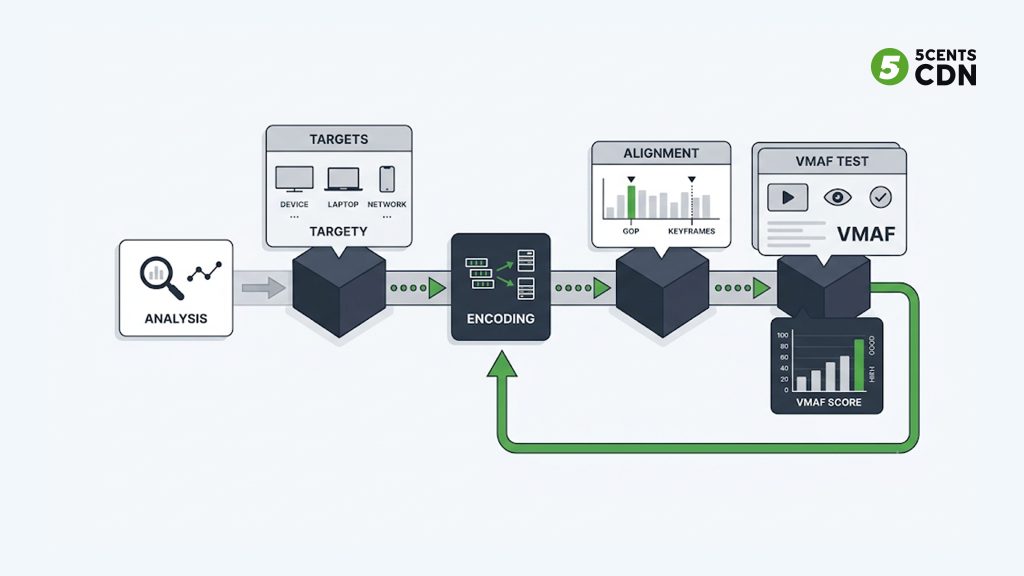
Pulling it together, a repeatable design process looks like this:
- Analyse the source and, if possible, the content type — motion, complexity, and detail drive how many rungs you need and how they should be spaced.
- Define your audience’s device and network profile — screen sizes, decoder support, and typical bandwidth set your top and bottom rungs and inform whether context-aware trimming is worthwhile.
- Choose the codec (or codecs) — this determines the bitrate and resolution of every rung before you place them.
- Place the rungs — start from a sensible baseline count, then add or remove rungs based on perceptual quality rather than fixed bitrate steps.
- Align GOP and segment boundaries across all rungs, and package in a common format so one set of segments serves multiple players.
- Test with a perceptual metric such as VMAF and with real playback across representative devices and network conditions.
- Refine and repeat — measure which rungs actually get played, drop the ones that don’t, and re-tune. Ladder design is iterative, not one-and-done.
Where Delivery Fits In
A well-designed ladder only pays off if the renditions reach viewers quickly and consistently. Every rung has to be cached and delivered from an edge close to the viewer, or the player will spend its time waiting rather than climbing to higher quality. This is where your ladder meets your content delivery network. A CDN built for video keeps all your renditions warm at the edge so switching between rungs is instant, and absorbs the traffic spikes that live events and popular VOD titles create.
5centsCDN’s video streaming and encoding tools can generate multi-rendition ABR output and deliver it across a global edge network, while our live transcoding service builds live ladders in real time. If you’re planning an OTT or media platform and want your encoding ladder and delivery tuned together rather than in isolation, get in touch with our team — we can help you match ladder design to how your audience actually watches.
Frequently Asked Questions
What is the difference between an encoding ladder and a bitrate ladder?
They are the same thing. “Bitrate ladder” emphasises the different bitrates of each rung; “encoding ladder” emphasises that each rung is a separately encoded rendition. Both describe the set of resolution/bitrate versions prepared for adaptive bitrate streaming.
How many rungs should an encoding ladder have?
There is no fixed number. A broad-audience VOD ladder often uses five to eight video rungs, but the right count is driven by content complexity, target devices, and codec efficiency. Add a rung only where it delivers a visible quality improvement over the rung below it.
What is per-title encoding?
Per-title encoding tailors the ladder to each individual video by analysing its complexity and keeping only the rungs that add perceptible quality. It delivers the same perceived quality at a lower average bitrate than a fixed ladder, at the cost of extra analysis time, which suits VOD better than live.
Do different codecs need different ladders?
Yes. Efficient codecs like HEVC and AV1 reach the same quality at lower bitrates than H.264, so their rungs use lower bitrates and can push higher resolutions further down the ladder. Reusing an H.264 ladder for AV1 wastes the codec’s efficiency advantage.
Why do all rungs need aligned keyframes?
Players switch rungs at segment boundaries. If keyframes and segment boundaries aren’t aligned across every rendition, the player can’t switch cleanly, producing stutters or forcing it to rebuffer. Consistent GOP size and segment duration across the whole ladder make switching seamless.
