


The television in your living room has quietly become a computer. Instead of pulling channels from a cable or satellite signal, it pulls apps and streams from the internet — and that shift has a name: Connected TV, or CTV. It is now the dominant way people watch television, and for anyone building or distributing video, understanding CTV is no longer optional.
This guide covers CTV from every angle: what it is and how it differs from related terms, the devices involved, how it actually works from source to screen, the kinds of content it carries, the business models behind it, and its real advantages and drawbacks. Because getting content onto a TV screen is as much an infrastructure question as a business one, it also covers the delivery side that most CTV explainers leave out.
What Is CTV (Connected TV)?
Connected TV (CTV) refers to any television set that connects to the internet to stream digital video content — either through built-in smart-TV software or through an external device plugged into it. Instead of receiving a broadcast signal on a fixed schedule, a CTV pulls on-demand and live content from streaming apps over a broadband connection, letting viewers watch what they want, when they want, on the biggest screen in the house.
Adoption is not a trend on the horizon — it is already here. Industry figures widely cite that roughly 88% of U.S. households now own at least one CTV device, and streaming has overtaken cable as the largest share of total TV viewing. CTV sits at the center of the cord-cutting shift that has reshaped how television works.
CTV, OTT, and Streaming: Clearing Up the Terms
Three words get used interchangeably, and untangling them makes everything else clearer. The cleanest way to see it is as three nested circles.
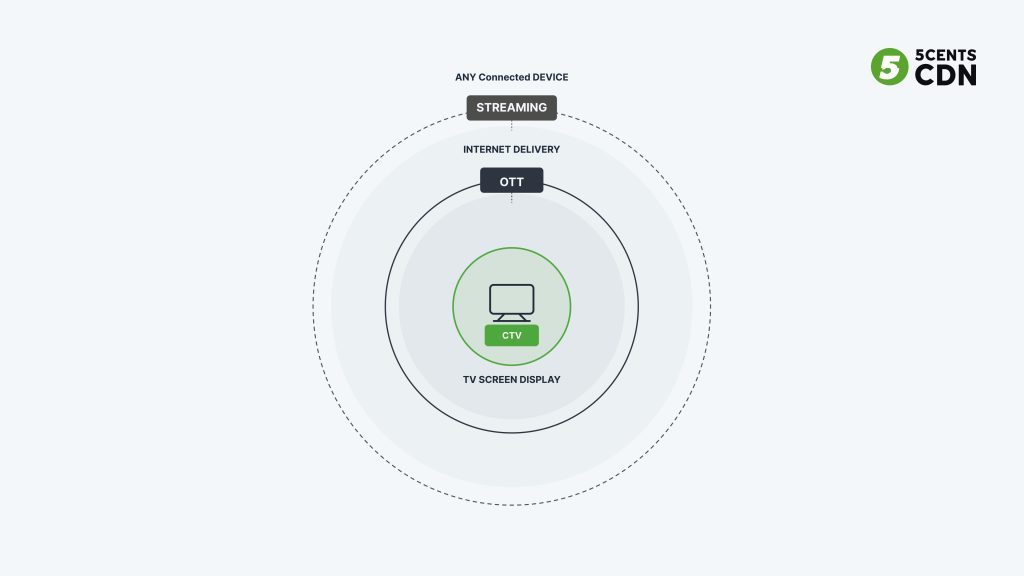
- Streaming is the broadest term: delivering audio or video over the internet to any device — phone, laptop, tablet, or TV.
- OTT (over-the-top) is streaming video delivered “over the top” of the internet, bypassing cable and satellite — the method of delivery, on any device.
- CTV (connected TV) is specifically OTT content watched on a television screen. It is a device category, not a delivery method.
So the relationship is a hierarchy: all CTV is OTT, and all OTT is streaming, but not the other way around. Watching Netflix on your phone is OTT but not CTV; watching the same Netflix on your smart TV is both. The simplest test: if it is on the TV screen and coming from the internet, it is CTV.
The Rise of CTV: How We Got Here
CTV did not appear overnight; it is the endpoint of two decades of gradual change. Broadband reached most homes, video compression and streaming matured, and then a handful of shifts tipped the balance. Netflix’s move from mailing DVDs to streaming in the late 2000s proved on-demand internet video could be a mainstream habit. Cheap streaming sticks and boxes in the 2010s let anyone turn an ordinary TV into a connected one for the price of a dinner. Smart TVs with streaming built in became the default at the electronics store. And a wave of “cord-cutting” — households dropping cable for streaming — turned a niche behavior into the norm.
By the mid-2020s the crossover was complete: streaming overtook cable and broadcast as the largest share of television viewing, and the living-room TV became the primary streaming screen rather than a secondary one. The arrival of ad-supported tiers on major services and the explosion of free ad-supported channels accelerated it further, because free and low-cost options pulled in the viewers who had resisted paying for multiple subscriptions. CTV today is not the future of television — for a large share of the audience, it simply is television.
Types of CTV Devices
A television becomes “connected” in one of three ways, and knowing the categories matters because each behaves a little differently for viewers and for the platforms delivering to them.
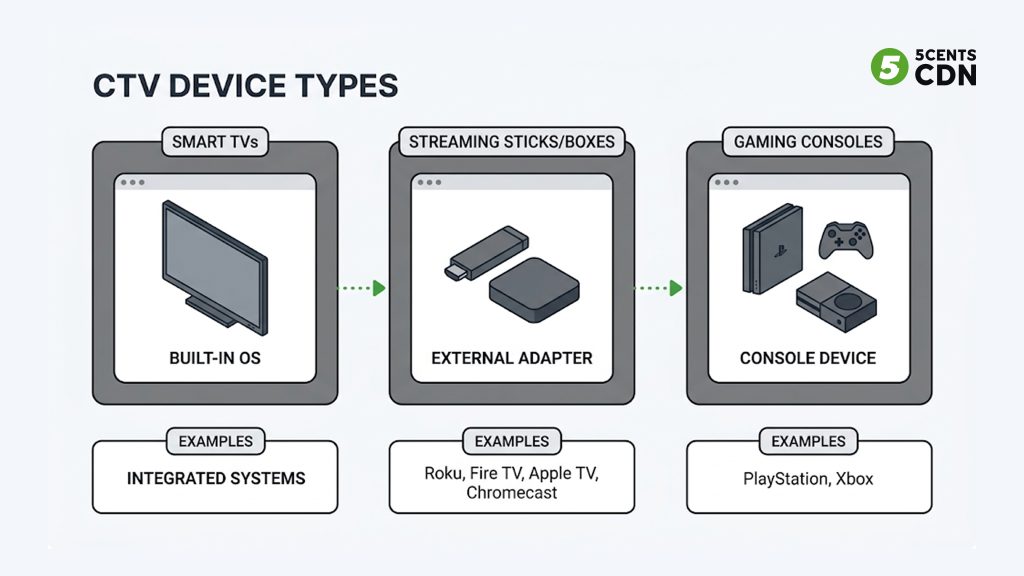
Smart TVs
A smart TV has internet connectivity and a streaming operating system built in — no extra hardware needed. Major platforms include Samsung Tizen, LG webOS, Google TV/Android TV, Roku TV, and Amazon Fire TV. The TV itself runs the apps, which makes it the simplest option for viewers and an important target platform for anyone publishing a streaming app.
Streaming Sticks and Boxes
These external devices plug into a TV’s HDMI port and turn any television — smart or not — into a CTV. Roku, Amazon Fire TV Stick, Apple TV, and Google Chromecast are the household names. They are cheap, easy, and hugely popular, which is why a single streaming service must typically ship apps for several of these ecosystems to reach its audience.
Gaming Consoles
PlayStation, Xbox, and Nintendo Switch all run streaming apps, so a console doubles as a CTV device. They are a meaningful slice of big-screen streaming, especially among younger households, and are one more platform a publisher may need to support.
One clarification that trips people up: casting from a phone (via Chromecast, for example) makes the casting device the CTV — the phone is just a remote, not the streaming platform. The device actually pulling and rendering the stream on the TV is the CTV.
How CTV Works
From the viewer’s side, CTV feels effortless: open an app, pick something, and it plays. Underneath, a fairly involved chain makes that happen. The device connects to the internet over Wi-Fi or Ethernet, runs a streaming application, and requests video from that service’s servers. The video is delivered as an adaptive stream — broken into short segments at multiple quality levels — so playback can adjust to the household’s available bandwidth in real time, staying smooth on the big screen where quality lapses are most visible.
Some CTV ecosystems also support hybrid standards like HbbTV (Hybrid Broadcast Broadband TV), which blends traditional broadcast with internet delivery to offer interactive features and ads on compatible sets — common in European markets. But the core model is the same everywhere: an app on an internet-connected screen pulling streamed video on demand.
A useful way to picture the whole loop: the CTV app is like a customer at a restaurant with a very responsive kitchen. The app asks for the next few seconds of video; the delivery network serves them; the app keeps a small buffer ready and continuously asks for more, ordering a higher- or lower-quality “portion” depending on how fast the kitchen (the network) is keeping up. That constant, adaptive back-and-forth is what keeps a stream smooth as household bandwidth fluctuates — someone else in the house starting a video call should nudge the stream to a slightly lower rung, not freeze it. The whole system is designed so the viewer never thinks about any of it.
How Content Reaches a CTV: The Delivery Side
Here is the part most CTV guides skip entirely, and it is the part that decides whether your stream looks great or buffers on a 65-inch screen. Getting content onto a CTV is an infrastructure pipeline, not just an app.
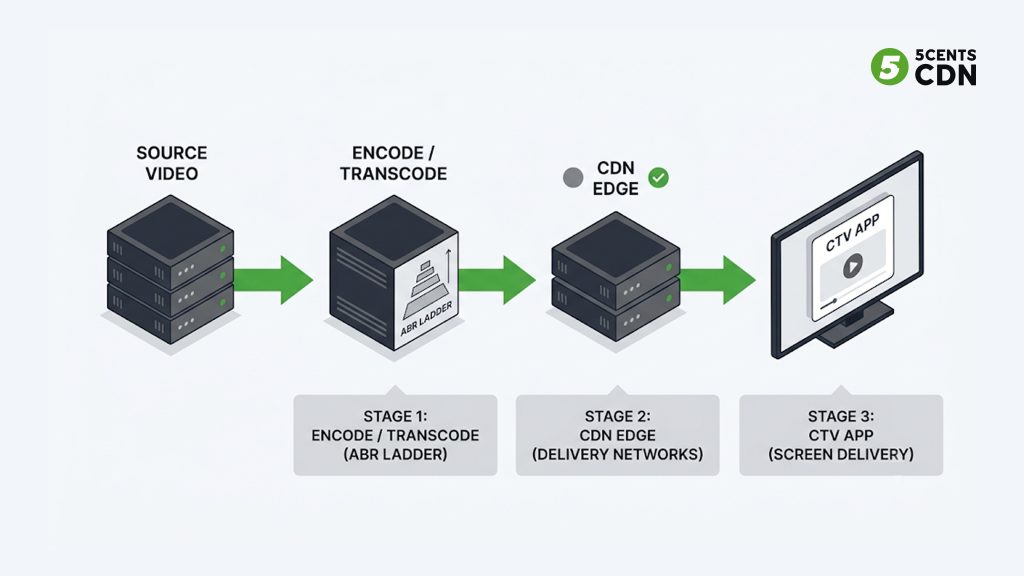
It starts with encoding. Source video is transcoded into an adaptive bitrate ladder — several renditions at different resolutions and bitrates — and packaged into streaming formats like HLS and DASH. The big screen raises the stakes here: CTV viewers expect crisp 1080p or 4K, so the top of the ladder has to be high quality, while lower rungs keep playback smooth when the home connection dips.
Those renditions are then delivered through a content delivery network (CDN). Because CTV sessions are long and high-bitrate — people watch full movies and live events on the big screen — delivery has to be both high-capacity and close to the viewer to avoid buffering. A CDN caches the video at edge servers near audiences so each stream comes from nearby rather than a distant origin. For live content, the chain also includes ingest and real-time low-latency delivery so a CTV audience is not minutes behind the action.
Finally there is the app itself: a streaming service must build and maintain apps for each CTV platform it wants to reach (Roku, Fire TV, Apple TV, Samsung, LG, Android TV, consoles), each with its own development requirements. The takeaway for anyone launching on CTV is that the screen is the easy part — the encode-package-deliver pipeline behind it is what determines the experience.
It is worth dwelling on why the big screen is uniquely demanding, because it changes the engineering. On a phone, a brief quality dip or a few seconds of buffering is forgivable and often unnoticed. On a 65-inch 4K panel in a quiet living room, the same dip is glaring — compression artifacts are visible from across the room and a rebuffer stops a shared, lean-back experience cold. CTV sessions are also long (full films, multi-hour live events) and run at the highest bitrates in your ladder, so a single viewer consumes far more delivered data than a mobile viewer. Multiply that by a live audience all tuning in at once, and the concurrency and bandwidth demands are the toughest in streaming.
This is exactly why the delivery layer matters so much for CTV specifically. High-quality renditions at the top of the ladder, an efficient modern codec to keep those renditions affordable to deliver, a high-capacity CDN with edges close to viewers, and — for live — a resilient ingest and low-latency path all have to work together. A beautiful app on a weak delivery backbone produces exactly the buffering and quality complaints that drive CTV viewers away. Getting CTV right is, in large part, getting the infrastructure right.
What Content Is Watched on CTV
CTV carries essentially every kind of video, but a few categories dominate:
- On-demand (VOD): movies and series streamed on demand — the Netflix/Disney+/Prime Video experience that defines modern TV.
- Live streaming: sports, news, and events delivered live, increasingly the battleground as major services invest in live rights.
- FAST channels: free ad-supported streaming TV — scheduled, linear-style channels (The Roku Channel, Tubi, Pluto TV) that recreate the lean-back “flip through channels” feel for free.
- User-generated and social video: YouTube and similar, now a huge share of big-screen time.
CTV Monetization Models
How CTV content makes money is central to why the space matters commercially. The main models mirror streaming broadly, with CTV advertising as the fast-growing standout.
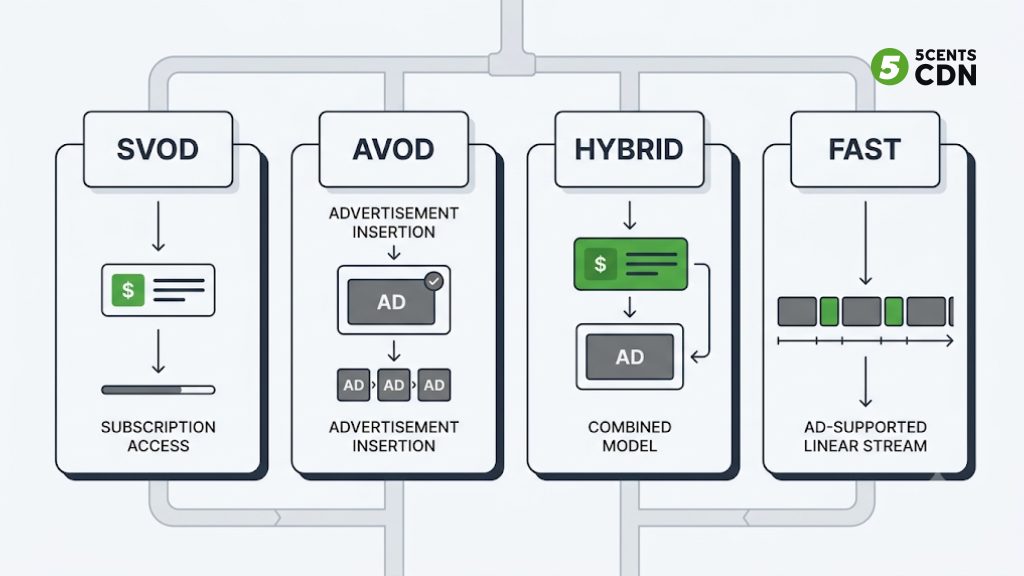
Subscription (SVOD)
Viewers pay a recurring fee for ad-free (or ad-light) access — the Netflix model. Predictable revenue, but subscriber growth eventually plateaus, which is why many SVOD services have added ad tiers.
Advertising (AVOD) and CTV Advertising
Free-to-watch, funded by ads. CTV advertising is booming because it fuses TV’s big-screen impact with digital targeting: ads can be aimed at household-level audiences and measured far more precisely than linear TV. Industry forecasts widely put U.S. CTV ad spend in the tens of billions of dollars for 2026 (MNTN cites a projection of around $38 billion). Ads run as in-stream spots (pre-, mid-, and post-roll), interactive and shoppable formats, and overlay or companion units — and on CTV they are typically non-skippable, driving high completion rates.
Free Ad-Supported TV (FAST)
A fast-growing subset of AVOD: scheduled, linear-style channels delivered free and monetized with ads. FAST recreates the traditional channel-surfing experience and has become a major CTV category in its own right — we cover it in depth in our guide to FAST channels.
Hybrid and Transactional
Many services now blend models — a subscription with an optional cheaper ad-supported tier — while transactional (TVOD) rent-or-buy and pay-per-view remain important for new releases and live events. Most large platforms run several models at once to capture different audiences.
Advantages of CTV
- Big-screen engagement: long, focused, lean-back sessions on the largest screen in the home, often watched by several people at once.
- Reach beyond cable: access to cord-cutters and “cord-nevers” who traditional TV cannot reach.
- Data and targeting: for advertisers, household-level targeting and real-time measurement impossible with broadcast.
- Flexibility for viewers: on-demand and live content, multiple services, no fixed schedule.
- Multiple revenue paths: subscription, ads, FAST, and transactional models can all run on the same platform.
Disadvantages and Challenges
- Platform fragmentation: reaching viewers means building and maintaining apps across many device ecosystems, each with its own requirements.
- Delivery demands: long, high-bitrate big-screen sessions put real pressure on encoding and CDN delivery — buffering is far more noticeable on a large screen.
- Measurement complexity: for advertisers, co-viewing and cross-device attribution make CTV measurement harder than mobile, with inconsistent metrics across platforms.
- Ad fraud and inventory quality: a fast-growing ad market with uneven standards attracts fraud and “repackaged” inventory concerns.
- Internet dependency: the experience is only as good as the household connection, which the platform does not control.
Why Businesses Are Investing in CTV
Put the pieces together and the pull is obvious. CTV is where the audience has already moved, it offers monetization flexibility that linear TV never could, and it combines the emotional impact of the big screen with digital-grade targeting and measurement. For content owners, it is the primary way to reach modern viewers; for advertisers, it is increasingly where the most valuable TV audiences actually are. The barrier to entry is no longer demand — it is execution: building the apps and, above all, standing up the delivery infrastructure to serve high-quality video reliably at scale.
Frequently Asked Questions
What is CTV in simple terms?
CTV (Connected TV) is any television that connects to the internet to stream video — either a smart TV with built-in apps or a regular TV using a device like Roku, Fire TV, Apple TV, or a gaming console. It lets viewers watch streaming content on the big screen without cable or satellite.
What is the difference between CTV and OTT?
OTT is the delivery method — streaming video over the internet to any device. CTV is the device category — specifically OTT content watched on a television screen. All CTV is OTT, but OTT also includes streaming on phones, tablets, and desktops, which is not CTV.
Is a smart TV a CTV device?
Yes. A smart TV is one type of CTV device — it has internet connectivity and streaming apps built in. Other CTV devices include streaming sticks and boxes (Roku, Fire TV, Apple TV, Chromecast) and gaming consoles.
How is content delivered to a CTV?
Source video is encoded into an adaptive bitrate ladder, packaged into formats like HLS or DASH, and delivered through a CDN that caches it on edge servers near viewers. A streaming app on the CTV device requests and plays the stream, adjusting quality to the home’s bandwidth.
How does CTV make money?
Through several models: subscriptions (SVOD), advertising (AVOD, including fast-growing CTV advertising), free ad-supported linear channels (FAST), and transactional rent-or-buy (TVOD). Many platforms combine models — for example a subscription with a cheaper ad-supported tier.
Is CTV the same as streaming?
Not exactly. Streaming is the broad act of delivering video over the internet to any device. CTV is specifically streaming watched on a television screen. All CTV involves streaming, but not all streaming is CTV.
CTV vs OTT at a Glance
| CTV | OTT | |
|---|---|---|
| What it is | A device category | A delivery method |
| Where | On the TV screen | Any internet device |
| Examples | Smart TV, Roku, Fire TV, console | Netflix, Hulu, YouTube on any device |
| Relationship | A subset of OTT | Includes CTV + mobile/desktop |
Delivering to CTV with 5centsCDN
Reaching CTV audiences reliably comes down to the delivery pipeline behind the app — encoding high-quality renditions and serving long, high-bitrate sessions to the big screen without buffering. 5centsCDN provides the live and VOD delivery infrastructure to do exactly that, from transcoding through global edge delivery. If you are launching or scaling a CTV offering, get in touch with our team to talk through the setup that fits your content and audience.
