


Transcoding vs transmuxing is one of the most commonly confused comparisons in video streaming. These two terms sound almost identical, get used interchangeably in casual conversation, and mean very different things in a streaming pipeline. The distinction matters because one of them is one of the most expensive operations you’ll run, while the other is nearly free. Confuse transcoding vs transmuxing and you either burn money re-processing video that didn’t need it, or assume a cheap rewrap will fix a problem that actually requires full re-encoding.
The one-line version: transcoding re-encodes the video itself; transmuxing only changes the container it’s wrapped in. This guide explains what that actually means, why the cost gap between them is so large, and how to tell which one any given job needs.
The Core Distinction: Codec vs Container
To keep transcoding and transmuxing straight, you need two ideas that people often blur together: the codec and the container.
The codec is how the video and audio are compressed — H.264, HEVC, AV1, AAC, Opus. It determines the actual encoded bits that represent the picture and sound. The container — MP4, MPEG-TS, fMP4, MKV — is the wrapper around those encoded streams. A container format holds the compressed video track, the audio track, and metadata like timing, subtitles, and chapters, and interleaves them so a player can read them together. The container is the box; the codec is what’s inside it.
With that split in mind the two operations become simple. Transmuxing changes the box and leaves the contents untouched. Transcoding changes the contents. Everything else about their behaviour — the cost, the quality impact, the use cases — follows directly from that one difference.
What Transmuxing Is
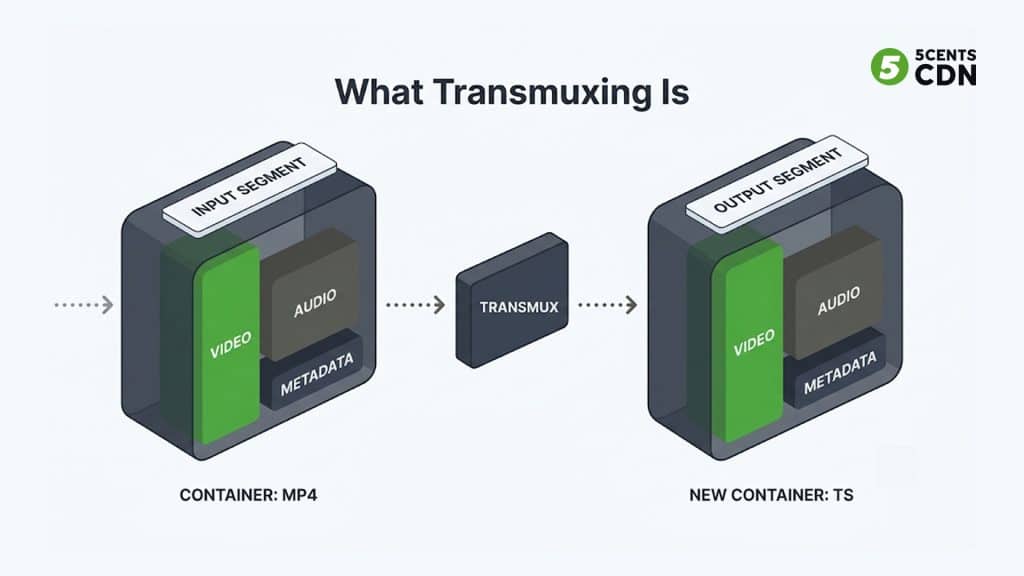
Transmuxing — short for transmultiplexing, and also called repackaging, rewrapping, or remuxing — moves the encoded audio and video from one container into another without decoding or re-encoding them. The compressed bitstream comes out bit-for-bit identical; only the packaging changes.
Mechanically, the transmuxer demultiplexes the source — separating the interleaved video, audio, and metadata back into individual elementary streams — and then remultiplexes those same streams into the target container. At no point are the video frames turned back into pixels. Because there’s no decode-and-re-encode cycle, transmuxing is fast, light on CPU, and lossless: the picture that comes out is exactly the picture that went in.
An elementary stream is just the raw coded output of a single encoder — the H.264 video on its own, or the AAC audio on its own, before anything wraps them together. Different containers interleave and timestamp those elementary streams differently — MPEG-TS was designed for broadcast and error resilience, fMP4 for efficient HTTP delivery and seeking — but the coded frames inside are format-agnostic. That’s the property transmuxing exploits: the same elementary streams are valid whether they’re packaged in TS or fMP4, so moving between the two is a repackaging job, not a re-encoding one.
The analogy that makes it stick: transmuxing is taking the pages out of a manila folder and putting them into a ring binder. Same pages, in the same order — you’ve only changed the binding. Nothing on the pages is rewritten.
What transmuxing cannot do
The flip side of leaving the encoded data untouched is that transmuxing cannot change anything about the encoding. It cannot change the codec, so it can’t turn H.264 into AV1. The resolution or bitrate cannot be change , so it can’t produce a lower-quality version for viewers on slow connections. It only solves container and protocol compatibility — getting content that’s already in the right codec into the right wrapper for the target device or delivery method. The moment you need to alter the encoded streams themselves, transmuxing is the wrong tool.
What Transcoding Is
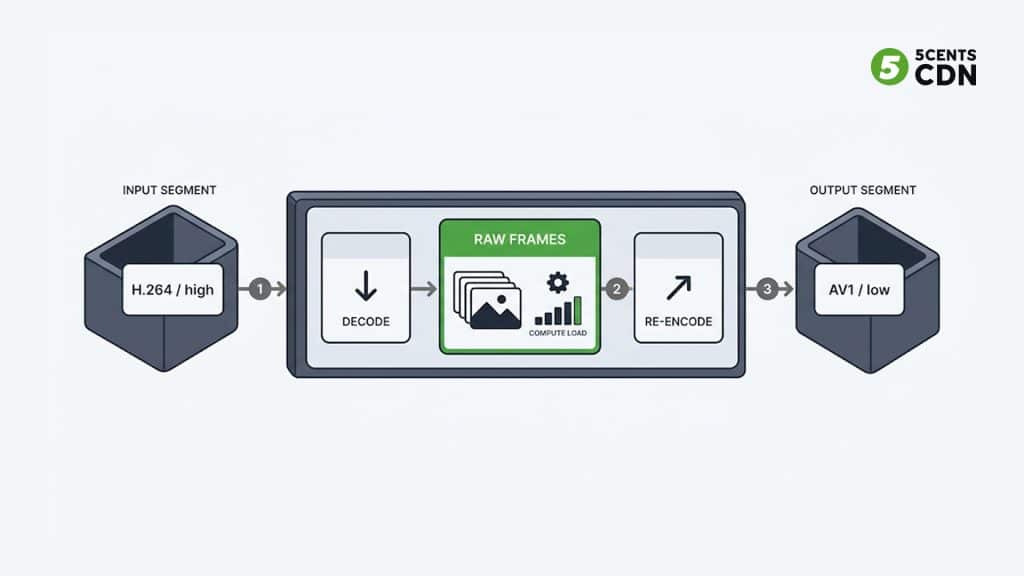
Transcoding is the full conversion: it decodes the encoded video back into raw, uncompressed frames and then re-encodes them — potentially with a different codec, a different bitrate, a different resolution, or a different frame rate. Unlike transmuxing, it changes the encoded data itself.
Back to the analogy: if transmuxing is re-binding the pages, transcoding is retyping the entire document — possibly translating it into another language (a new codec) and reformatting every page (new resolution) as you go. The story is the same; every word has been rewritten. Our video transcoding guide covers the mechanics in depth, but the key point here is what makes it costly.
That decode-to-raw step is the expensive part. Uncompressed video is enormous, and re-encoding it means running the full compression process again — analysing frames, estimating motion, making rate-control decisions. It’s compute-intensive whether it runs on CPUs or dedicated hardware, and it takes real time, which is why it’s the operation that dominates the cost of a streaming pipeline. There’s also a quality consideration: because lossy codecs discard information every time they encode, re-encoding already-compressed video introduces generational loss — each transcode of a transcode is slightly worse than the last, like photocopying a photocopy.
A nuance: the container has to allow the codec
One subtlety catches people out. Transmuxing only works if the target container actually supports the codec your streams use — the box has to be able to hold what you’re putting in it. Most modern containers are flexible, but not infinitely so: some codec-and-container combinations simply aren’t valid, and a player may also refuse a technically-valid combination it doesn’t implement. When that happens, you can’t rewrap your way out of it — changing the codec to something the target supports is, by definition, a transcode. So the practical test isn’t just “is the codec already what I want,” it’s “does the target container and player accept this codec.” If either answer is no, you’re transcoding.
It’s also worth knowing that audio and video are handled independently, which enables a middle ground people forget exists. If your video codec is already correct but the audio codec isn’t supported, a pipeline can re-encode only the audio while transmuxing the video through untouched — a partial transcode. Since audio is far cheaper to encode than video, this is dramatically less expensive than a full transcode, and it’s a common optimisation when the only incompatibility is on the audio side.
The Cost Difference — and Why It Matters
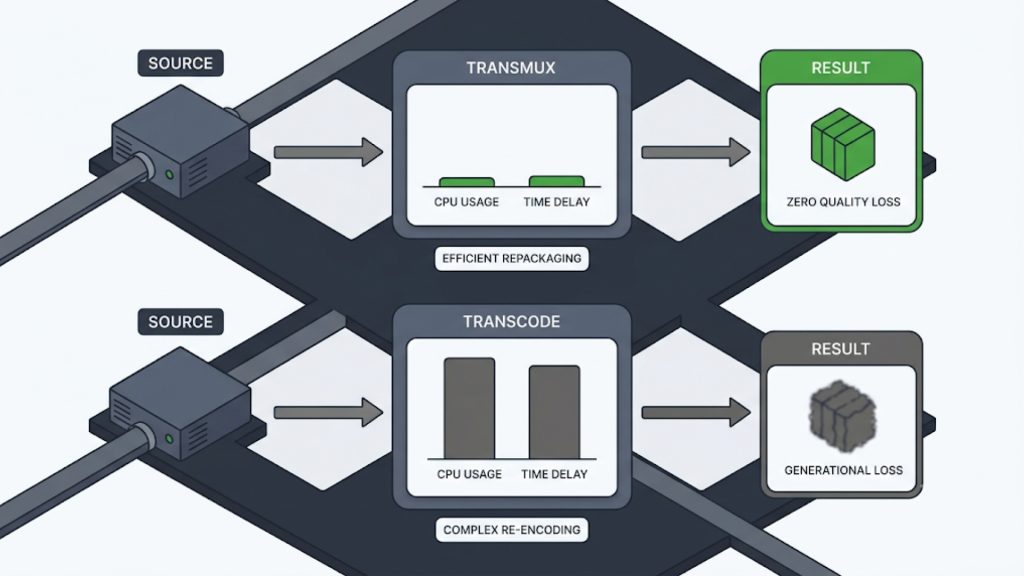
This is the practical heart of the comparison. Transmuxing and transcoding sit at opposite ends of the cost spectrum, and the gap is large — often an order of magnitude or more in processing terms.
| Transmuxing | Transcoding | |
| What changes | Container / wrapper only | The encoded video & audio |
| Re-encode? | No | Yes (decode then encode) |
| CPU / compute | Very low | High |
| Speed | Near-instant | Slower; the pipeline bottleneck |
| Quality impact | None (lossless) | Some generational loss |
| Can change codec | No | Yes |
| Can change resolution/bitrate | No | Yes |
| Enables an ABR ladder | No | Yes |
The takeaway isn’t that one is better than the other — they do different jobs. It’s that you should transmux whenever transmuxing is sufficient, and only transcode when you genuinely need to change the encoding. Every unnecessary transcode is wasted compute, wasted money, and a small, permanent quality tax on your content. A well-designed pipeline treats transcoding as the operation to avoid unless it’s truly required.
The Classic Use Cases
When transmuxing is the right tool
The textbook case is live ingest. A broadcast encoder or software like OBS sends a stream in — historically over RTMP, increasingly over SRT — typically already in H.264 and AAC. Browsers and mobile devices can’t play RTMP, but they can play HLS. Since the codec is already correct and only the delivery packaging is wrong, the server simply rewraps the incoming stream into HLS segments. No re-encoding needed — that’s a transmux, and it’s why it can happen almost instantly at ingest.
The other common case is serving multiple protocols. MPEG-TS and fMP4 are different containers, and historically HLS used TS while DASH used fMP4. Transmuxing the same encoded streams between the two lets you serve both protocols from one set of encodes. (This is also exactly the redundancy that CMAF was designed to remove — by defining a single fMP4-based segment format both HLS and DASH can use, CMAF lets one set of segments serve both, reducing the need to transmux or store the same content twice.)
When transcoding is unavoidable
Transcoding is required whenever the encoded streams themselves must change. The most common triggers:
- You need multiple quality renditions. Adaptive streaming needs several bitrate/resolution versions of the same content — an encoding ladder. Producing those renditions is transcoding by definition, since each rung is a different encode.
- The source codec isn’t supported. If the incoming codec won’t play on your target devices, or you want the efficiency of a newer codec, you must re-encode to change it.
- The source bitrate is too high. A high-bitrate contribution feed intended for quality, not delivery, has to be brought down to deliverable bitrates — which means re-encoding.
- You need a specific frame rate or format. Standardising mixed sources to a common frame rate or format for a uniform output requires transcoding.
How to Decide: Transmux or Transcode?
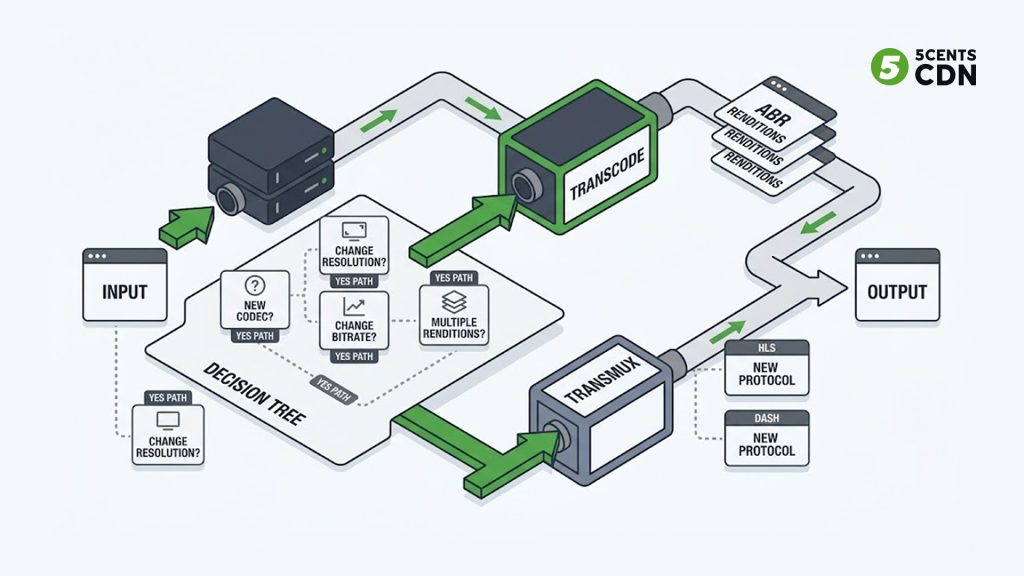
The decision reduces to a single question asked three ways. If the answer to any of these is yes, you need to transcode:
- Does the codec need to be converted?
- Will the video need different resolutions or bitrates, including multiple renditions for an ABR ladder?
- Must the frame rate or other encoded video properties be modified?
If all three are no — the encoded streams are already fine and only the container or delivery protocol needs to change — then transmux, and save the compute. If any is yes, transcode, because no amount of rewrapping can change what transmuxing leaves deliberately untouched.
In real pipelines the two frequently work together. A live workflow might transmux a compatible incoming stream straight to HLS for the highest rendition while transcoding it into several lower renditions to build the full ladder — rewrapping what it can and re-encoding only what it must. Understanding the boundary between the two is what lets you design a pipeline that spends compute only where it genuinely adds value.
Where 5centsCDN Fits
Getting this balance right is central to running an efficient streaming operation, and it’s built into our platform. 5centsCDN’s live transcoding and video encoding services handle re-encoding and ABR ladder generation when your content genuinely needs it, while efficient repackaging gets compatible streams to viewers without needless re-encoding — all delivered over a global CDN edge. If you’re designing a live or OTT pipeline and want to make sure you’re not paying to transcode what you could simply transmux, talk to our team.
Frequently Asked Questions
What is the difference between transcoding and transmuxing?
Transcoding decodes the video and re-encodes it, which can change the codec, resolution, bitrate, or frame rate. Transmuxing only changes the container the video is wrapped in — it moves the same encoded streams from one format to another without re-encoding. Transcoding alters the actual video data; transmuxing does not.
Is transmuxing lossless?
Yes. Because transmuxing doesn’t decode or re-encode the video, the compressed streams are copied unchanged into the new container. There’s no generational quality loss. Transcoding, by contrast, re-encodes with a lossy codec and introduces some quality loss each time.
Why is transmuxing so much cheaper than transcoding?
Transcoding has to decode compressed video into raw frames and then run the full compression process again, which is computationally heavy and time-consuming. Transmuxing skips that entirely and only re-packages the existing encoded data, so it uses a fraction of the CPU and happens almost instantly.
Can you transmux RTMP to HLS?
Yes, and it’s one of the most common uses of transmuxing. An RTMP ingest stream is usually already H.264/AAC, which HLS supports, so the server only needs to repackage it into HLS segments rather than re-encode it. If you also need lower-quality renditions for adaptive streaming, those additional versions require transcoding.
Do I need transcoding for adaptive bitrate streaming?
Yes. Adaptive bitrate streaming relies on multiple resolution and bitrate versions of the same content — an encoding ladder. Creating those renditions means re-encoding the source into each one, which is transcoding. Transmuxing cannot change bitrate or resolution, so it cannot build an ABR ladder on its own.
