

Video transcoding sits at the centre of every modern streaming platform. Every time a viewer presses play — on any device, on any connection speed — the content they receive has been transcoded. Without it, streaming as we know it would not exist.
The source video coming from a camera, editing suite, or broadcast encoder is typically a single high-bitrate file or stream in a format optimized for capture quality, not for delivery across the internet. Transcoding converts that source into multiple formats, resolutions, and bitrates that can be delivered to any device over any network condition — automatically, at scale, in real time for live content and asynchronously for VOD.
This guide explains what video transcoding is, how it differs from encoding and transmuxing, how it works differently for live streaming versus video on demand, and the key decisions OTT operators face when building a transcoding pipeline.
What Is Video Transcoding?
Video transcoding is the process of converting a video from one encoded format to another. More precisely, it is the process of decoding an already-compressed video file or stream and re-encoding it — changing the codec, resolution, bitrate, frame rate, or container format in the process.
The result is one or more output versions of the same content, each optimized for a different delivery context — a high-bitrate 4K version for fiber-connected smart TVs, a mid-range 1080p version for broadband viewers, and a lightweight 480p version for mobile users on cellular networks.
For OTT platforms, video transcoding is not optional. A single 100 Mbps ProRes master file from a camera is technically correct but practically undeliverable over the internet to most viewers. Transcoding is what makes that file accessible to everyone.
The Decode-Modify-Encode Pipeline
Video transcoding follows a three-step pipeline regardless of whether it is processing a live feed or a stored file:
- Decode: The input video is decompressed from its source codec (e.g., H.264, ProRes, HEVC) back to raw uncompressed frames. This requires significant computing — decoding a compressed video requires understanding and reversing the codec’s compression algorithm.
- Modify: The raw frames are altered according to the target output specifications — scaled to a new resolution, filtered, watermarked, or prepared for re-encoding at a new bitrate. Multiple output versions are prepared simultaneously.
- Encode: Each output version is re-compressed using the target codec (H.264, H.265, AV1) at the target bitrate and packaged into the delivery format (HLS, DASH, CMAF). A single input stream produces multiple output renditions in this step.
This decode-modify-encode cycle is compute-intensive — especially when producing 5–8 simultaneous output renditions at different resolutions and bitrates. The hardware or cloud infrastructure running the transcoder determines how many simultaneous streams can be processed and at what speed.
Transcoding vs Encoding vs Transmuxing
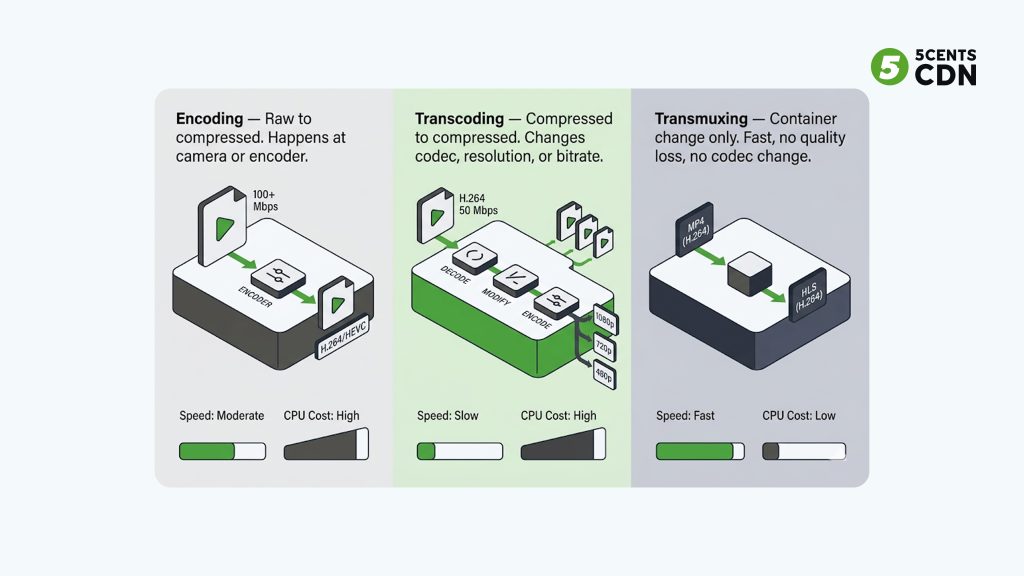
These three terms are frequently confused, but they describe distinct operations with different compute costs and use cases:
| Operation | What It Does | Compute Cost | When to Use |
| Encoding | Compresses raw/uncompressed video into a codec (H.264, HEVC). Happens at the camera or encoder. | High | At camera / encoder — first compression from raw |
| Transcoding | Converts already-compressed video from one format/bitrate/resolution to another. Decode → modify → encode. | Very High | Creating ABR renditions from a master file or live feed |
| Transmuxing | Changes the container format only (e.g., MPEG-TS to HLS) without re-encoding the video data. | Very Low | Repackaging for delivery without quality change (fast, cheap) |
Transmuxing is frequently used when a live RTMP stream arrives at the packaging server and needs to be repackaged into HLS or DASH for viewer delivery, without changing the codec or bitrate. It is significantly faster and cheaper than full transcoding. However, transmuxing cannot change resolution or bitrate — if you need multiple quality renditions, you need transcoding.
What Is an ABR Encoding Ladder?
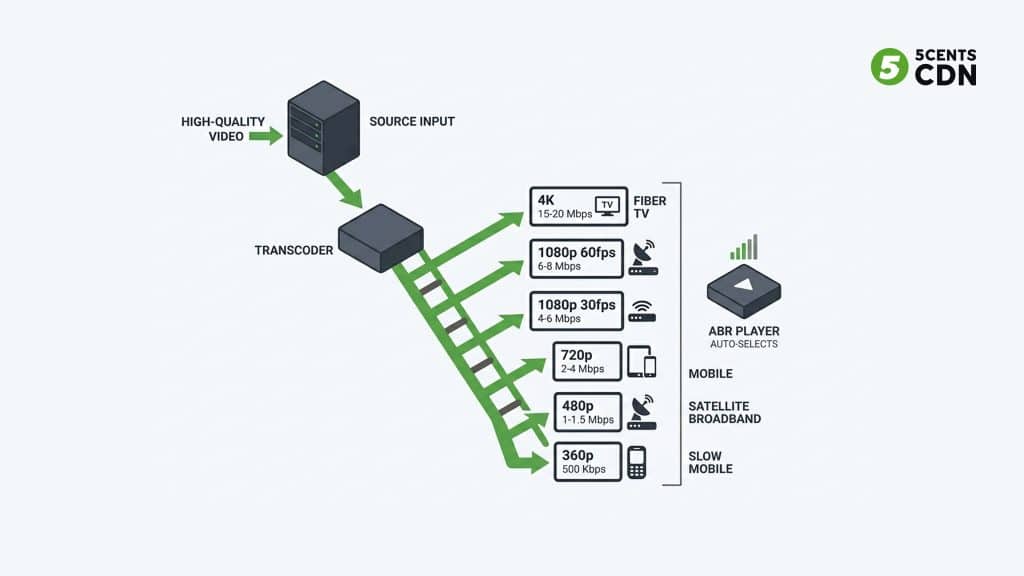
An ABR (Adaptive Bitrate) encoding ladder is the set of output renditions produced by the transcoder — typically 4–7 versions of the same content at different resolutions and bitrates. See: Adaptive bitrate streaming — Wikipedia.
The player — running on the viewer’s device — monitors the viewer’s available bandwidth in real time and automatically selects the highest quality rendition the connection can support without buffering. If bandwidth drops, the player switches down to a lower rung of the ladder. If it improves, it switches back up.
A typical ABR ladder for an OTT platform might look like this:
| Resolution | Frame Rate | Target Bitrate | Audience Served |
| 4K (2160p) | 30fps | 15–20 Mbps | Fiber-connected smart TVs, premium OTT |
| 1080p | 60fps | 6–8 Mbps | Live sports, high-motion events |
| 1080p | 30fps | 4–6 Mbps | Standard broadband, HD VOD |
| 720p | 30fps | 2–4 Mbps | Broadband, tablet, laptop |
| 480p | 30fps | 1–1.5 Mbps | Mobile, weak broadband |
| 360p | 30fps | 500–800 Kbps | Slow cellular, fallback tier |
| Critical configuration: keyframe intervals must be aligned across all renditions. If the keyframe (I-frame) interval differs between the 1080p and 720p renditions, the player cannot switch cleanly between them — producing visible glitches or stalls. All renditions should share the same keyframe interval, typically 1–2 seconds for live and 2–4 seconds for VOD. |
Use the video encoding calculator to estimate the compute and bandwidth requirements for your specific ladder configuration.
Live Transcoding vs VOD Transcoding
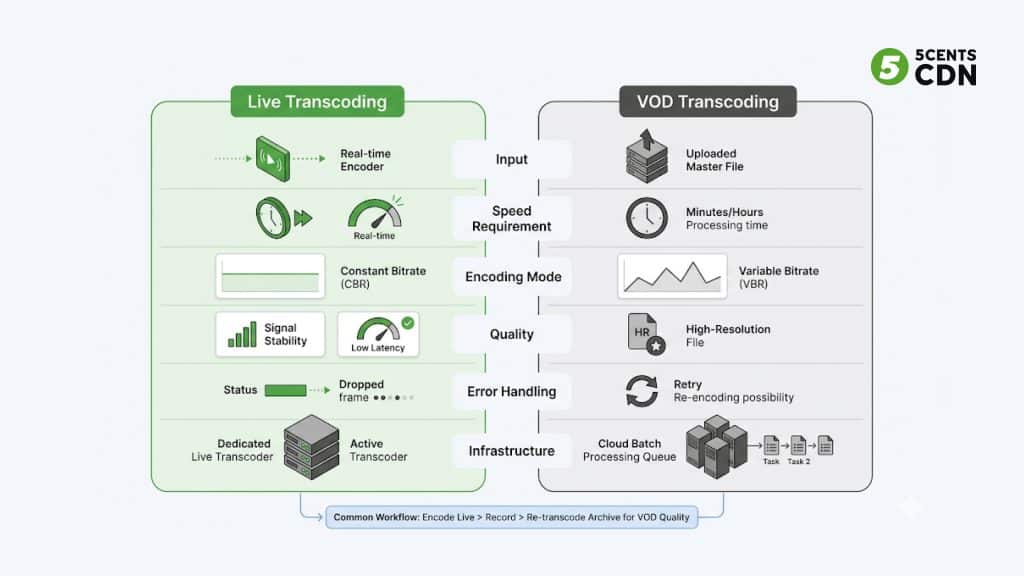
Live and VOD transcoding use the same fundamental decode-modify-encode pipeline, but they operate under completely different constraints. Understanding the difference is critical for OTT infrastructure decisions.
Live Transcoding
Live transcoding processes a real-time input stream — from a camera feed, broadcast encoder, or SRT/RTMP ingest — and must produce output renditions faster than they are being generated. A 30fps stream generates 30 frames per second; the transcoder must process each frame within its display window or viewers see latency growth and potential stream failure.
This real-time constraint means:
- CBR (Constant Bitrate) is required: the encoder cannot look ahead to optimize bitrate allocation — it must maintain a fixed output rate for stable CDN delivery and player buffering
- Keyframe interval must be short: 1–2 seconds for LL-HLS / live event delivery
- Error handling is skip-forward: if a frame cannot be processed in time, the encoder skips it rather than stalling the stream
- GPU or hardware acceleration is typically required: CPU-only transcoding cannot handle multiple simultaneous live streams at an acceptable cost
VOD Transcoding
VOD transcoding processes a stored file — an uploaded master — without real-time constraints. The transcoder can take minutes or hours to produce the output renditions, allowing for quality optimizations that are impossible in live transcoding:
- VBR (Variable Bitrate) or CRF (Constant Rate Factor): the encoder allocates more bits to complex scenes and fewer to static ones, maximizing quality per bit
- Multi-pass encoding: the first pass analyzes the entire file; the second pass encodes with optimal bitrate distribution — better quality at the same file size
- Scene detection and optimization: the transcoder can identify scene boundaries and place keyframes at optimal positions
A common production pattern for OTT operators: encode live for real-time delivery using hardware transcoding with CBR → record the event → re-transcode the archive using software encoding with VBR for the VOD version in the content library. The VOD version benefits from quality optimization that was impossible during the live broadcast.
5centsCDN’s live transcoding service handles the real-time pipeline — taking your ingest stream and producing multi-bitrate HLS/DASH output for CDN delivery. Use the live transcoding calculator to estimate costs for your specific stream configuration.
Hardware vs Software Transcoding
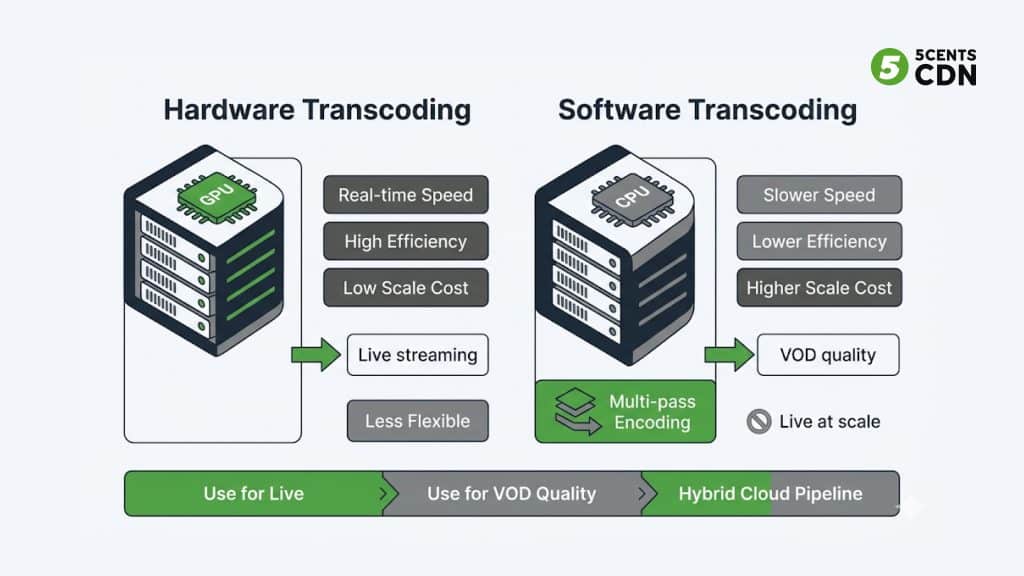
Transcoding can be performed by hardware accelerators (GPUs, ASICs, FPGAs) or by general-purpose CPU software. Each has distinct performance and cost characteristics.
Hardware Transcoding (GPU / ASIC)
GPU-based transcoders use dedicated video encoding engines — NVIDIA’s NVENC, AMD’s AMF, Intel’s Quick Sync, or purpose-built ASICs — to process video in parallel with minimal CPU load. Hardware encoding is typically 10–50× faster than software encoding for equivalent resolution.
Hardware transcoding is the standard for live streaming at scale. A single GPU server can handle dozens of simultaneous live streams that would require a large CPU cluster to match. The tradeoff is reduced fine-grained quality control — hardware encoders have limited configuration options compared to software encoders like x264/x265.
Software Transcoding (CPU)
Software transcoders (FFmpeg with x264/x265, HandBrake, cloud encoding services) use general-purpose CPU compute. They offer significantly more tuning flexibility — multi-pass encoding, scene detection, fine bitrate control — at the cost of processing speed.
Software transcoding is preferred for VOD quality optimization where processing time is not a constraint. For live streaming, pure software transcoding is typically too slow and too expensive at scale unless running on very large CPU clusters.
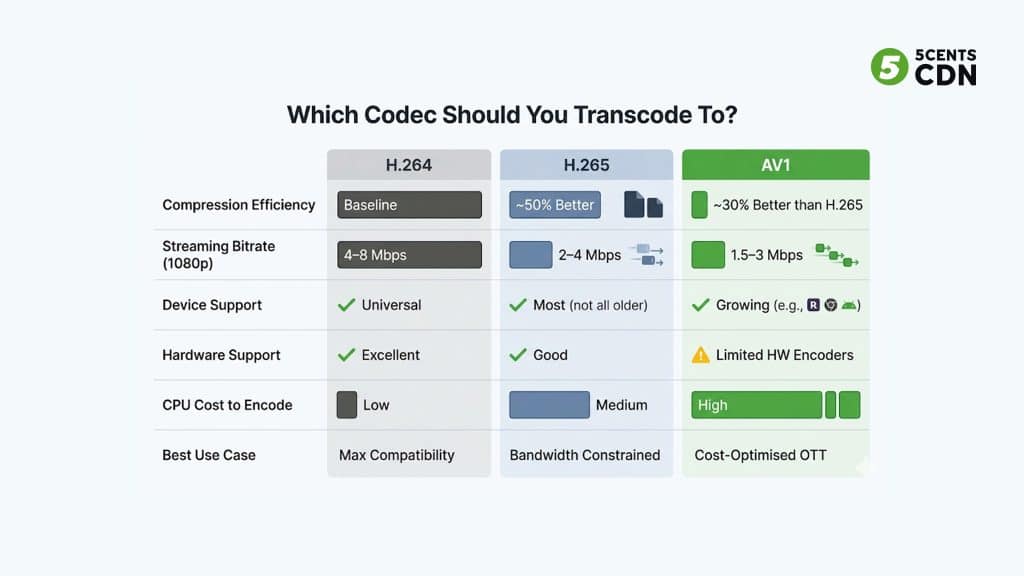
H.264 vs H.265 vs AV1: Which Codec to Transcode To?
The output codec determines the tradeoff between compression efficiency, device compatibility, and transcoding cost. Three codecs dominate OTT streaming in 2026. See: Video codec — Wikipedia.
| Dimension | H.264 (AVC) | H.265 (HEVC) | AV1 |
| Compression vs H.264 | Baseline | ~50% more efficient | ~30% more efficient than H.265 |
| 1080p streaming bitrate | 4–8 Mbps | 2–4 Mbps | 1.5–3 Mbps |
| Device compatibility | Universal — all devices | Most modern devices | Growing — Roku, Chrome, Android, newer TVs |
| Hardware encoder support | Excellent — all GPUs | Good — most modern GPUs | Limited — few hardware encoders |
| Encoding speed | Fast | Medium | Slow (software) / emerging (hardware) |
| Best use case | Maximum compatibility, live streaming | Bandwidth reduction, 4K VOD | Cost-optimised delivery at scale |
| DRM compatibility | Full | Full | Full |
For most OTT platforms in 2026: transcode primarily to H.264 for maximum compatibility with an H.265/HEVC track for supported devices at higher resolutions (4K). Consider AV1 for bandwidth-optimized delivery where device support in your target audience has reached sufficient coverage.
Cloud Transcoding Architecture for OTT
OTT platforms at scale use cloud transcoding infrastructure rather than on-premise servers for three reasons: elastic scalability, geographic flexibility, and operational simplicity.
How Cloud Transcoding Works
A cloud transcoding service accepts your source file or live stream input, processes it through a managed transcoding pipeline, and outputs HLS/DASH renditions to a storage bucket or CDN origin. The platform handles hardware provisioning, fault tolerance, and capacity scaling transparently.
Cloud vs On-Premise: When to Use Each
- Cloud transcoding: best for variable workloads, bursty live events, and platforms without dedicated infrastructure teams. Pay per minute of content processed.
- On-premise or dedicated hardware: best for consistent high-volume pipelines where the economics of dedicated hardware beat per-minute cloud pricing, or where data sovereignty requirements prevent cloud processing.
Cloud transcoding pricing is typically based on minutes of content processed and the number of output profiles. As a rough guide, transcoding 1 hour of live content into 5 quality profiles costs between $0.05 and $0.50, depending on codec and resolution. Once transcoded, delivery acceleration through CDN edge distribution handles global viewer delivery independently of the transcoding layer.
Common Video Transcoding Mistakes to Avoid
- Misaligned keyframe intervals across ABR renditions: all renditions must share the same keyframe interval for clean ABR switching. Different intervals cause visible glitches when the player changes quality level.
- Using VBR for live output: variable bitrate produces unpredictable output that can overwhelm CDN buffers. Use CBR for all live transcoder output.
- Transcoding to a higher resolution than the source: upscaling never improves quality — it increases file size and compute cost with no viewer benefit. Always set output resolution at or below source resolution.
- Not including a low-bitrate fallback rendition: if the lowest rung of your ABR ladder is 720p at 3 Mbps, mobile viewers on weak connections will buffer rather than drop to a lower quality. Always include a 480p or 360p fallback.
- No QoE monitoring after deployment: transcoding configuration errors often appear as viewer-side quality issues — buffering, quality switches, and startup delay. Use a real-time video analytics SDK to track rebuffer ratio and quality switch events in production.
Summary: Video Transcoding at a Glance
| Topic | Key Point | OTT Operator Action |
| What is transcoding | Decode → modify → encode — produces multiple output renditions from one source | Ensure your pipeline produces 4–6 ABR renditions per stream |
| Transcoding vs transmuxing | Transmuxing only changes the container — fast and cheap, but cannot change bitrate or codec | Use transmuxing for repackaging; transcoding for new quality renditions |
| ABR ladder | Set of renditions from 4K down to 360p — player auto-selects based on viewer bandwidth | Align keyframe intervals across all renditions |
| Live transcoding | Real-time, CBR, hardware-accelerated, latency-sensitive | Use dedicated GPU infrastructure; never use VBR for live output |
| VOD transcoding | Asynchronous, VBR/CRF, software-friendly, quality-optimized | Use multi-pass encoding for VOD archive quality |
| Codec choice | H.264 for compatibility; H.265 for bandwidth efficiency; AV1 for cost-optimised scale | Start with H.264; add H.265 for 4K; evaluate AV1 for your device audience |
| Cloud transcoding | Elastic scaling, per-minute pricing, no hardware management | Preferred for variable live workloads and bursty events |
Frequently Asked Questions
What is the difference between video transcoding and video encoding?
Encoding compresses raw, uncompressed video (from a camera sensor) into a codec format for the first time. Transcoding converts already-compressed video from one encoded format to another — changing codec, resolution, bitrate, or container. Every transcoding operation involves encoding (the re-compression step), but encoding does not involve transcoding. For streaming platforms, transcoding is the more relevant operation — source files arrive already compressed and must be converted into multiple ABR renditions for delivery.
Why do streaming platforms need video transcoding?
Without transcoding, a platform would need to serve the same source file to all viewers — a single bitrate and resolution that either exceeds the bandwidth capacity of most viewers or underserves the quality expectations of viewers with fast connections. Transcoding enables adaptive bitrate streaming: multiple quality versions of the same content that the player switches between automatically based on the viewer’s available bandwidth.
What is the difference between live transcoding and VOD transcoding?
Live transcoding processes a real-time stream faster than it is generated, requiring hardware acceleration and CBR output. VOD transcoding processes stored files without real-time constraints, allowing VBR encoding and multi-pass quality optimization. A common production pattern is to live-transcode for the broadcast and then re-transcode the recorded archive as a VOD asset for better quality per bit.
What is an ABR bitrate ladder in transcoding?
An ABR (Adaptive Bitrate) encoding ladder is the set of output renditions produced by the transcoder — typically 4–7 versions of the same content at different resolutions and bitrates (e.g., 4K at 15 Mbps down to 360p at 500 Kbps). The video player on the viewer’s device automatically selects the highest quality rendition the connection supports and switches between renditions as network conditions change. Keyframe intervals must be aligned across all renditions for clean ABR switching.
What is the best codec for video transcoding for OTT?
For most OTT platforms in 2026: H.264 for maximum device compatibility, H.265/HEVC for bandwidth-optimized 4K delivery, and AV1 for cost-optimized large-scale delivery where device support in your audience has reached sufficient coverage. Transcode primarily to H.264 and add H.265 tracks for 4K renditions and supported devices.
What is transmuxing, and when should I use it instead of transcoding?
Transmuxing changes only the container format of a video (e.g., MPEG-TS to HLS) without re-encoding the video or audio data. It is much faster and cheaper than transcoding, but cannot change the codec, resolution, or bitrate. Use transmuxing when you receive an RTMP or SRT live stream that already has the correct codec and bitrate and simply needs to be repackaged into HLS or DASH for viewer delivery. Use transcoding when you need multiple quality renditions or a different output codec.
Video Transcoding and Live Streaming Infrastructure at 5centsCDN
Building a transcoding pipeline for OTT delivery involves decisions across hardware, codec configuration, cloud vs on-premise infrastructure, ABR ladder design, and CDN integration. The right configuration depends on your content type, audience scale, and latency requirements.
5centsCDN provides custom live streaming and transcoding infrastructure for OTT platforms — covering live transcoding, video encoding, CDN edge delivery, and origin shield. Solutions are scoped per project based on your specific pipeline requirements.
| Building or Scaling a Video Transcoding Pipeline? 5centsCDN offers custom transcoding and live streaming infrastructure for OTT platforms. Get in touch to discuss your requirements. → Contact us |