

Every streaming engineer eventually runs into the same hidden tax: to reach viewers on Apple devices and everywhere else, the same video often had to be packaged twice — once for HLS, once for DASH. Two sets of files, double the storage, and two copies competing for room in every CDN cache. CMAF was designed to end that tax.
This guide explains what CMAF is, how it works, and why it has quietly become the default packaging layer for modern HTTP streaming pipelines — with particular attention to what it means for delivery cost and CDN efficiency, the part most explanations skip. We will cover the double-packaging problem it solves, the segment-fragment-chunk structure that makes low latency possible, how it relates to HLS, DASH, MP4, and MPEG-TS, and where it fits in a modern streaming stack in 2026.
What Is CMAF?
CMAF (Common Media Application Format) is a standardized, fragmented-MP4 media format that packages streaming video and audio into a single set of segments that both HLS and DASH can deliver. Standardized as ISO/IEC 23000-19, it lets you encode and store content once instead of maintaining separate MPEG-TS and fMP4 copies for each protocol.
A key clarification up front: CMAF is not a streaming protocol and not a codec. It is a container format — a set of rules for how media segments are structured and packaged. Protocols like HLS and DASH still handle how a player requests and plays those segments; CMAF just standardizes the segments themselves so both protocols can share them.
What Does CMAF Stand For?
CMAF stands for Common Media Application Format. The name captures its purpose precisely: a common format, shared across applications and playback platforms, so the industry can stop maintaining parallel packaging workflows. It was jointly proposed to MPEG by Apple and Microsoft in 2016 and published as an international standard in 2018.
Why CMAF Exists: The Double-Packaging Problem
To understand why CMAF matters, it helps to know the problem it solves. When the industry moved away from Flash and RTMP toward HTTP-based adaptive bitrate streaming, two protocols came to dominate: Apple’s HLS and the open MPEG-DASH standard.
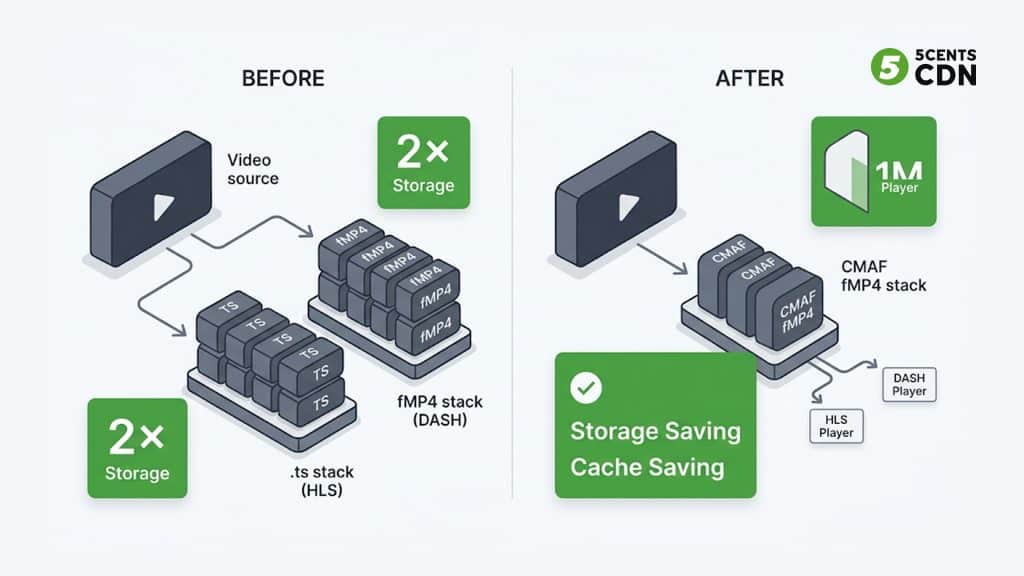
The catch was that they used different container formats. HLS historically required MPEG-2 Transport Stream (.ts) segments, while DASH used fragmented MP4 (fMP4). Reaching both audiences meant encoding and storing the same audio and video twice — in two different wrappers holding essentially identical media.
That duplication is expensive in three compounding ways: double the packaging work, double the origin storage, and — critically — two separate objects competing for space in every CDN edge cache. CMAF collapses those two sets into one, which is where its cost story really lives (more on that below).
It helps to make the duplication concrete. Suppose you offer a single video in four bitrate renditions (say 240p, 480p, 720p, and 1080p) with one audio track. Under the old model you would package each rendition twice — once as MPEG-TS for HLS and once as fMP4 for DASH — producing two parallel sets of segment files that hold the same underlying media. Add DRM to the mix and it gets worse: because HLS FairPlay historically used one encryption mode and DASH Widevine/PlayReady used another, you could end up encrypting and storing several distinct encrypted copies of identical content. Every one of those copies has to be transcoded, stored on origin, and cached at the edge independently.
This was not a minor annoyance. As streaming scaled to millions of concurrent viewers across iPhones, Android phones, smart TVs, game consoles, and browsers, the cost of maintaining parallel workflows became a real line item — in storage bills, in origin egress, and in the engineering overhead of keeping two packaging pipelines in sync. The industry needed one container that every HTTP protocol could agree on. That is the problem CMAF was created to solve.
A Short History of CMAF
CMAF is often described as a technical achievement, but its bigger accomplishment was diplomatic — getting competing platform owners to standardize on one container. The timeline is worth knowing because it explains why CMAF looks the way it does.
The story starts with the decline of Flash and RTMP around 2016–2020. As browsers dropped Flash, the industry moved to HTTP-based adaptive bitrate streaming, and two approaches took hold: Apple’s HLS (built on MPEG-TS) and MPEG-DASH (built on fragmented MP4). In February 2016, Apple and Microsoft jointly proposed a common format to the Moving Picture Experts Group (MPEG). In June 2016, Apple announced HLS support for fragmented MP4 — the same container Microsoft already favored — which was the pivotal concession that made a shared format possible. Specifications were finalized in July 2017, and CMAF was published as ISO/IEC 23000-19 in 2018. Subsequent editions refined the specification, and the third edition (2024) is the reference production deployments target today.
The takeaway: CMAF did not invent a new file format from scratch. It standardized fragmented MP4 into a single, portable profile that both HLS and DASH could consume — turning a two-container world into a one-container one.
How CMAF Works
CMAF achieves this unification through a small number of well-defined building blocks.
Fragmented MP4 and ISOBMFF
CMAF is built on the ISO Base Media File Format (ISOBMFF), the same foundation as MP4. A regular MP4 stores its indexing information (the ‘moov’ box) describing the whole file, which means a player generally needs the complete file before it can play smoothly — fine for downloads, awkward for live streaming.
Instead of one continuous file, CMAF writes content as fragmented MP4 (fMP4) — small, independently decodable pieces with a .m4s extension, each carrying its own moof/mdat box pair (movie fragment metadata plus the media data). Because each fragment is self-describing, a player can fetch and decode it without the whole file. And because both modern HLS and DASH can consume fMP4, a single CMAF-packaged segment can be referenced by an HLS playlist (.m3u8) and a DASH manifest (.mpd) at the same time. The manifests differ; the media segments they point at are identical.
Segments, Fragments, and Chunks
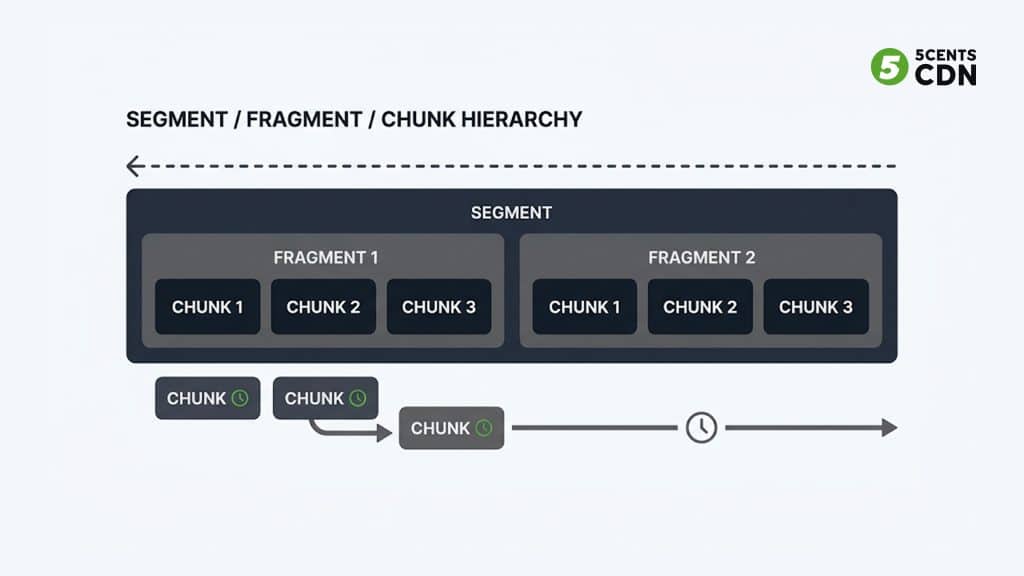
CMAF defines a clear hierarchy, and understanding it is the key to understanding CMAF’s latency story. A CMAF track (video, audio, or subtitles) is divided into segments — the addressable unit a player requests over HTTP. Segments are made up of one or more fragments, and fragments can be further subdivided into chunks. A chunk is the smallest unit and can contain as little as a single frame’s worth of data.
This nesting is what makes low latency possible. With traditional segment-based streaming, a player has to wait for an entire segment — often two to ten seconds long — to be fully encoded and downloaded before playback of that segment can begin. That waiting is a major source of the multi-second delay in older HTTP streaming. CMAF’s chunk structure removes that constraint.
Chunked Encoding and Chunked Transfer
With chunked encoding and chunked transfer encoding, each small chunk can be published and delivered the moment it is encoded, while later chunks in the same segment are still being produced. The encoder emits chunks continuously, and HTTP chunked transfer encoding streams them to the player as they arrive rather than waiting for the whole segment file to close.
The classic analogy is a meal served in courses rather than all at once — you start the appetizer while the kitchen finishes the main. In streaming terms, the player starts decoding the opening chunks of a segment while its final chunks are still being encoded upstream. This is how CMAF brings glass-to-glass latency down from the 30–45 seconds typical of early HTTP streaming to the low-single-digit-second range, without abandoning the HTTP delivery model that makes CDN scaling possible in the first place.
Common Encryption (CENC)
CMAF pairs naturally with Common Encryption (CENC), which lets a single set of segments be protected once and decrypted by multiple DRM systems — Widevine, PlayReady, and FairPlay. Historically this was another source of duplication: FairPlay used the ‘cbcs’ scheme (AES-CBC with pattern encryption) while Widevine and PlayReady commonly used ‘cenc’ (AES-CTR), so protecting content for all three meant encrypting separate copies.
The alignment of the industry around the ‘cbcs’ scheme changed that. With cbcs Common Encryption, the same encrypted CMAF segments can be decrypted by every major DRM, so you encrypt once and serve everyone. Combined with the single-container packaging, this removes one of the last places where the old workflow forced you to store multiple copies of identical content — which is exactly why CMAF plus CENC is treated as the modern default for protected streaming.
CMAF and CDN Delivery: Cache Efficiency and Cost
This is where CMAF pays off in infrastructure terms, and it is the part most explanations underplay. A CDN accelerates delivery by caching content at edge locations close to viewers. The more often a requested object is already sitting in the edge cache, the higher your cache hit ratio — and the less traffic has to travel back to origin.
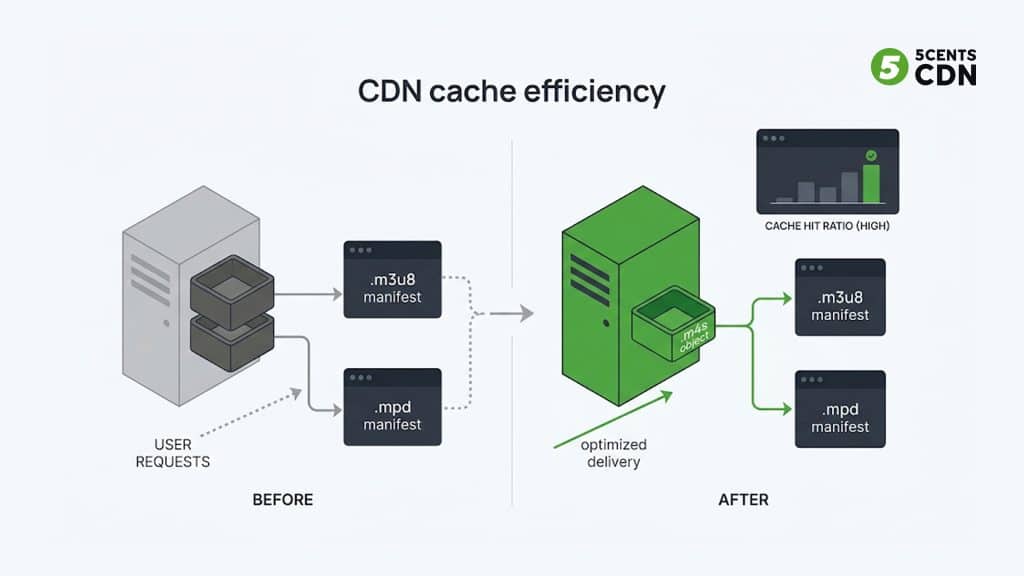
Before CMAF, HLS (.ts) and DASH (fMP4) versions of the same video were two distinct objects. Each edge cache had to store both, and each competed for the same finite cache space — effectively halving efficiency for that content. With CMAF, both the HLS and DASH manifests point at the same .m4s segments. The edge caches one object, not two, so the same footprint covers both protocols and the effective cache hit ratio roughly doubles for that content.
Stacked together, the operational wins are substantial: encoding and storage overhead drops by up to around 75% when you stop maintaining parallel .ts and fMP4 renditions, origin storage is halved, and edge cache efficiency improves because there is a single shared object to serve. For anyone paying for storage and delivery at scale, that is a direct line to lower cost.
A simplified worked example makes the cache effect concrete. Imagine a popular live event with a full bitrate ladder cached at an edge node. Under the old model, that edge stored the HLS (.ts) copy and the DASH (fMP4) copy of every rendition — two objects per rendition, splitting requests and cache space between them. A viewer on an Apple device pulled the .ts version; a viewer on Android pulled the fMP4 version; the edge had to keep both warm. Under CMAF, both devices request the same .m4s objects. The edge keeps one warm copy that satisfies everyone, so a larger share of requests are served from cache instead of falling through to origin.
Two things follow directly. First, origin offload improves — fewer cache misses mean fewer trips back to origin, which lowers origin egress and load during traffic spikes. Second, more of your cache budget goes to breadth of content rather than duplicate copies of the same content, so a given edge footprint effectively covers more of your catalog. For a live-sports or FAST operator serving unpredictable, spiky demand, that headroom is exactly what protects the viewer experience at peak.
CMAF vs fMP4 vs MP4
These three terms are often confused. MP4 is a traditional container designed to hold a complete video file for download or progressive playback — great for local files, poor for adaptive streaming. Fragmented MP4 (fMP4) breaks that container into smaller independently decodable pieces suited to streaming. CMAF is a standardized profile of fMP4: it specifies exactly how those fragments are structured so they are interoperable across HLS and DASH rather than packaged in slightly different, incompatible ways.
Put simply: all CMAF segments are fMP4, but not all fMP4 is CMAF-compliant. CMAF is the agreed-upon, portable way to do fMP4.
CMAF vs MPEG-TS
MPEG-TS (MPEG-2 Transport Stream, the .ts container) is the format HLS used from its 2009 launch. It was designed decades ago for broadcast transport — satellite and cable — where resilience to transmission errors mattered more than storage efficiency. Apple chose it originally because early iOS devices decoded MPEG-TS natively in hardware.
The trade-off is overhead and duplication. MPEG-TS carries extra packet structure that adds bytes relative to fMP4, and because the rest of the streaming world (browsers, Android, smart TVs, DASH) standardized on fragmented MP4, sticking with MPEG-TS meant maintaining a container almost nobody else used. CMAF’s move to fMP4 for HLS is what finally let HLS and DASH share one set of files.
MPEG-TS has not disappeared — it still appears in legacy device support, some contribution/ingest workflows, and older set-top environments — so a small MPEG-TS fallback is sometimes retained for backward compatibility. But for new HTTP delivery, CMAF (fMP4) is the default, and MPEG-TS is the legacy path you keep only where you must.
CMAF, HLS, and DASH: How They Fit Together
It is a common misconception that CMAF competes with HLS or DASH. It does not. HLS and DASH are delivery protocols — they define the manifest and how a player fetches and sequences segments. CMAF is the container the segments are packaged in. They operate at different layers and are designed to work together.
| Attribute | HLS / DASH | CMAF |
|---|---|---|
| Type | Streaming protocol | Container format |
| Role | Defines how segments are requested and played | Defines how segments are packaged and stored |
| Manifest | .m3u8 (HLS) / .mpd (DASH) | None — CMAF is the segment, not the manifest |
| Segment file | References the segment | .m4s (fragmented MP4) |
| Relationship | Deliver CMAF segments | Packaged once, served by both |
The modern best practice is CMAF packaging delivered over both HLS and DASH: one shared set of .m4s segments, two lightweight manifests. Choosing a protocol without CMAF means accepting legacy double-packaging overhead.
CMAF for Low-Latency Streaming
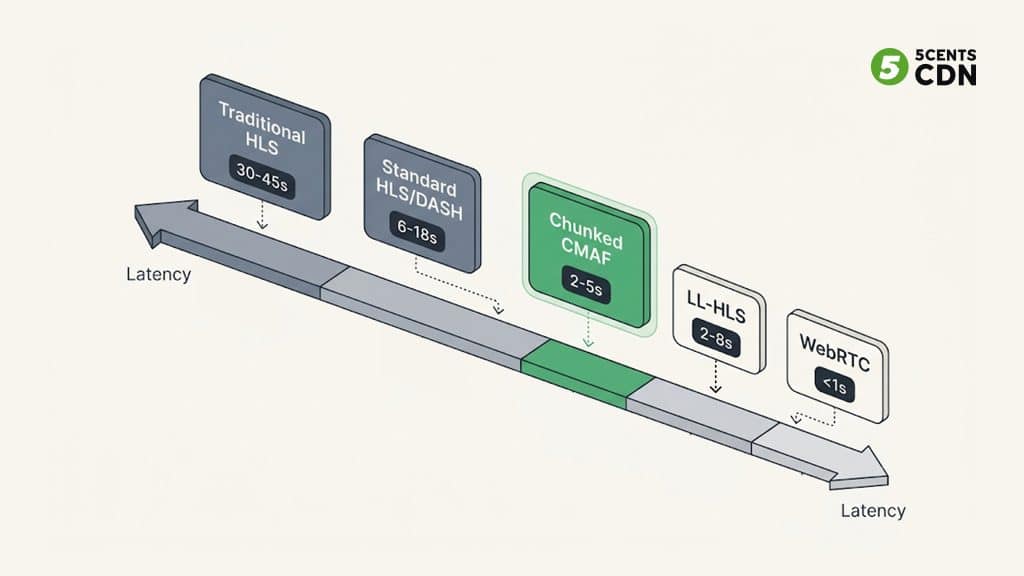
Chunked CMAF is one of the main tools behind modern low-latency streaming. By delivering chunks as they are produced, CMAF typically achieves 2–5 seconds of glass-to-glass latency — close to broadcast television and a dramatic improvement over the 30–45 seconds of early HTTP streaming.
Where does that sit relative to other options? Low-Latency HLS (LL-HLS) lands in a similar 2–8 second band and is often implemented using CMAF-style partial segments anyway. WebRTC goes further, to sub-second latency, but is harder to scale to large audiences and less CDN-friendly. CMAF hits the sweet spot for most one-to-many use cases: low latency, broad device support, and cost-efficient CDN delivery. That makes it a strong fit for live sports, live commerce, betting, news, and FAST channels.
Where CMAF Is Used
- Live sports and events: near-broadcast latency at scale without sacrificing CDN cacheability.
- FAST channels and OTT: a single packaged set feeds connected TVs, mobile, and browsers alike.
- VOD libraries: one stored rendition set instead of duplicate .ts and fMP4 catalogs, cutting storage cost.
- DRM-protected content: encrypt once with CENC/cbcs and serve every major DRM.
CMAF Adoption in 2026
For years CMAF was described as ’emerging’ or ‘promising.’ That framing is now out of date. In 2026, CMAF is the assumed default packaging layer for modern HLS and DASH pipelines rather than an optional upgrade you might adopt later. When teams design a new streaming workflow today, fMP4/CMAF-style segments are the starting point, and MPEG-TS is the exception kept only for legacy reach.
Several forces drove this shift. Viewer expectations for near-broadcast latency on live content pushed operators toward chunked delivery, and CMAF is the practical way to get there over standard CDNs. The maturation of cbcs Common Encryption removed the DRM duplication that once complicated CMAF rollouts. And the sheer economics — halved storage, better cache efficiency, one pipeline instead of two — made the migration pay for itself at scale. The result is broad support across encoders, packagers, players, and CDNs, which in turn makes CMAF the safe, interoperable choice rather than a bet on an unproven format.
CMAF Benefits and Limitations
Benefits
- Encode, package, and store one set of segments instead of two — up to ~75% less encoding/storage overhead.
- Higher CDN cache efficiency because a single object serves both HLS and DASH.
- Low latency in the 2–5 second range via chunked encoding and transfer.
- Simplified DRM through Common Encryption.
Limitations
- Very old devices and legacy players may still need MPEG-TS fallbacks.
- Ultra-low-latency, interactive use cases (sub-second) may still call for WebRTC.
- Realizing the benefits depends on an encoding, packaging, and delivery chain that fully supports CMAF-style fMP4 output end to end.
Frequently Asked Questions
Is CMAF a protocol or a format?
CMAF is a container format, not a protocol. It standardizes how media segments are packaged. Protocols such as HLS and DASH handle how those segments are requested and played.
What is the difference between CMAF and fMP4?
CMAF is a standardized profile of fragmented MP4. All CMAF segments are fMP4, but CMAF adds rules that make the fragments interoperable across HLS and DASH. Plain fMP4 is not guaranteed to be CMAF-compliant.
Does CMAF reduce streaming costs?
Yes. By replacing separate MPEG-TS and fMP4 copies with one shared set of segments, CMAF can reduce encoding and storage overhead by up to around 75% and improve CDN cache efficiency because a single object serves both HLS and DASH.
What latency can CMAF achieve?
With chunked encoding and chunked transfer encoding, CMAF typically delivers 2–5 seconds of glass-to-glass latency, compared with 30–45 seconds for early HTTP streaming.
Does CMAF work with DRM?
Yes. CMAF pairs with Common Encryption (CENC). Using the cbcs scheme, one encrypted set of segments can be decrypted by Widevine, PlayReady, and FairPlay.
Is CMAF the same as low-latency HLS?
No, but they are closely related. Low-Latency HLS (LL-HLS) is an extension of the HLS protocol, while CMAF is a container format. In practice many LL-HLS deployments use CMAF-style partial segments, so the two are often used together rather than as alternatives.
Do I need to replace HLS and DASH to use CMAF?
No. CMAF is not a replacement for HLS or DASH — it is the container they package their segments in. You keep delivering over HLS and DASH; CMAF just lets both reference one shared set of fMP4 segments instead of separate MPEG-TS and fMP4 copies.
Delivering CMAF-Based Streaming with 5centsCDN
CMAF’s advantages — lower storage, higher cache efficiency, and low-latency delivery — only materialize when your encoding and delivery chain supports modern fMP4 packaging. 5centsCDN supports modern fMP4 (CMAF-based) HLS packaging as part of its video delivery workflow. If you are planning a low-latency or cost-optimized streaming setup, get in touch with our team to talk through the delivery workflow that fits your requirements.