


The VP9 Codec powers much of the world’s online video, even if most viewers never realize it. If you have watched a 4K video on YouTube, there is a strong chance you have watched VP9 without knowing it. Google’s open, royalty-free codec quietly carries a huge share of the world’s streaming video—chosen not because it is the flashiest option, but because it delivers significant bandwidth savings without a licensing bill. For anyone building a streaming service, that combination of efficiency and zero royalties is exactly why the VP9 Codec still matters.
This guide explains what VP9 is, how it compresses video, how it stacks up against H.264, HEVC, and its own successor AV1, the container and protocol realities you need to know before using it, where device support stands today, and — honestly — where VP9 fits in a 2026 streaming stack.
What Is VP9?
VP9 is an open, royalty-free video coding format developed by Google, released in June 2013 as the successor to VP8. Its whole purpose is compression efficiency: encoding high-quality video at a significantly lower bitrate than older codecs, so the same picture takes less bandwidth to deliver. Across independent testing and vendor reports, VP9 is widely cited as reducing bitrate by roughly 30–50% compared with H.264 at equivalent visual quality.
Two words carry most of VP9’s importance: open and royalty-free. Unlike HEVC/H.265 — its main rival, which carries complex patent-licensing fees — VP9 can be used to encode and distribute video with no per-stream or per-device royalties. For a platform delivering video at scale, avoiding licensing costs while cutting bandwidth is a rare double win, and it is the single biggest reason VP9 became a backbone format of the open web.
A Short History of VP9
VP9’s roots trace to Google’s February 2010 acquisition of On2 Technologies for around $124.6 million. On2 had built a long lineage of video codecs (the VPx series, VP3 through VP8), and Google’s plan was to turn that technology into free, open codecs for the web. VP8 came first; VP9 followed, reaching public release on June 17, 2013, as part of the WebM Project.
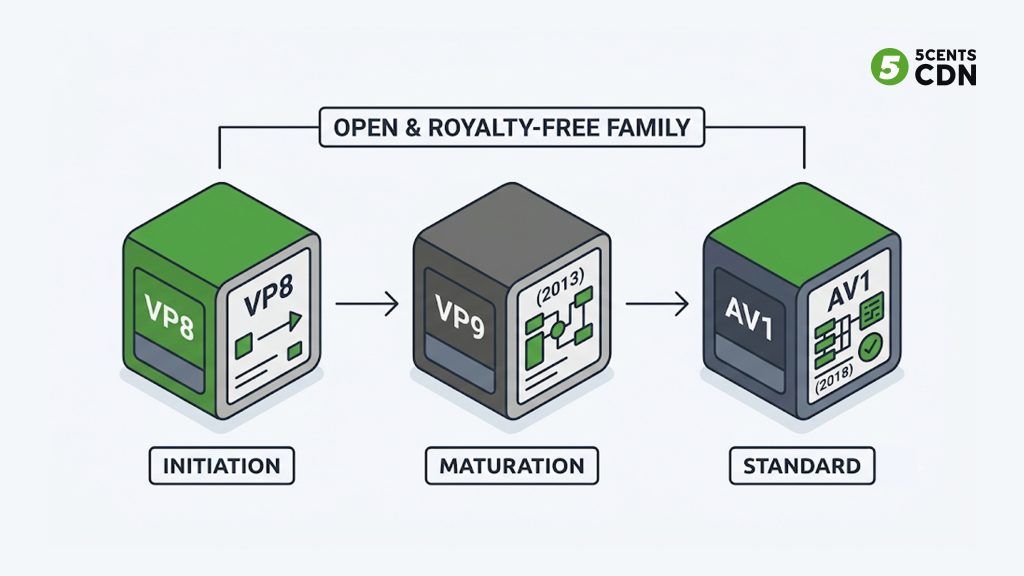
Google then spent years pushing VP9 into the ecosystem: YouTube adopted it heavily (encoding its 4K content in VP9), browsers added native decoding, and hardware vendors built VP9 support into chips. Its lineage did not stop there. VP9’s techniques fed directly into AV1, the next-generation royalty-free codec from the Alliance for Open Media — so VP9 is best understood as the crucial middle step between VP8 and today’s AV1, and the codec that proved a royalty-free format could compete with the licensed MPEG codecs.
How VP9 Works
Like any video codec, VP9 compresses video by removing redundancy — storing only what changes and what the eye will notice, rather than every pixel of every frame. It improves on older codecs mainly by working in larger, smarter blocks.
Traditional codecs divide every video frame into many small blocks and encode each one individually. VP9 improves this process by introducing larger superblocks (up to 64 × 64 pixels) that can be split into smaller blocks only where additional detail is needed. This allows simple areas of a frame to be encoded efficiently while preserving precision in more complex regions.
Think of describing a photograph: a large blue sky can be summarized in a few words, while detailed areas like faces or text require a much more detailed explanation. VP9 follows the same principle by allocating more bits to complex regions and fewer bits to simple ones. Combined with improved motion prediction, which reuses information from previous frames, and more efficient entropy coding, VP9 delivers higher visual quality while using significantly less bandwidth.
A little more concretely, VP9 leans on three families of technique. Intra-frame prediction guesses a block’s content from neighboring pixels in the same frame, so flat or gradient areas cost almost nothing. Inter-frame prediction with sub-pixel motion compensation tracks how regions move between frames, so a panning shot is largely “the same pixels, shifted” rather than encoded afresh each frame. And an improved entropy-coding stage packs the resulting data more tightly than older codecs. None of this is unique to VP9 in concept — every modern codec does versions of it — but VP9’s larger blocks and refined implementations are what give it its efficiency edge over H.264 while staying royalty-free.
VP9 vs Other Codecs
The VP9 Codec does not exist in a vacuum — the right way to understand it is against the codecs it competes with and descends from.
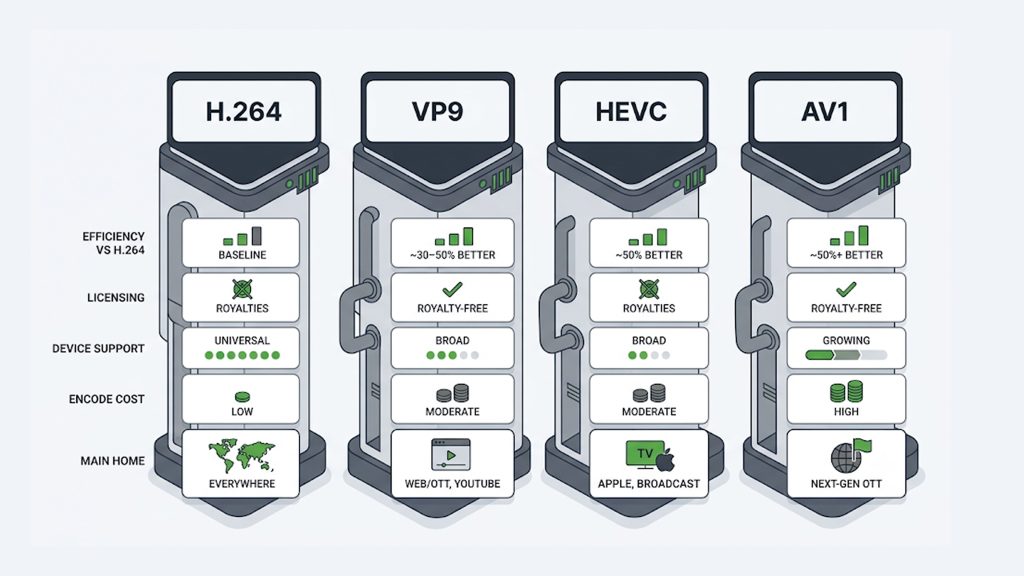
VP9 vs H.264 (AVC)
H.264 is the universal baseline — it plays literally everywhere. VP9’s advantage is efficiency: roughly 30–50% lower bitrate for the same quality, which is a large bandwidth and storage saving. The trade-off is reach: H.264 still has broader device support and is simpler to deploy. VP9 is the upgrade you choose when bandwidth savings justify a slightly narrower device footprint.
VP9 vs HEVC (H.265)
This is VP9’s main rivalry, and they are close on compression — both roughly halve H.264’s bitrate, with HEVC often slightly ahead at the highest resolutions. The decisive difference is licensing: HEVC carries complicated, layered patent royalties, while VP9 is completely royalty-free. Many web and OTT platforms chose VP9 specifically to sidestep HEVC’s licensing complexity, even where HEVC had a small technical edge.
VP9 vs AV1
AV1 is VP9’s own successor and is more efficient still — another sizeable step down in bitrate — and also royalty-free. The catch is maturity: AV1 is more computationally expensive to encode and its hardware decoding support, while growing fast, is younger than VP9’s. In practice VP9 sits in a sweet spot right now: more efficient than H.264, royalty-free unlike HEVC, and more broadly hardware-supported than AV1. Many platforms run VP9 today and adopt AV1 progressively as decoder support widens.
Codec Comparison at a Glance
| H.264 | VP9 | HEVC | AV1 | |
|---|---|---|---|---|
| Efficiency vs H.264 | Baseline | ~30–50% better | ~50% better | ~50%+ better |
| Licensing | Royalties | Royalty-free | Royalties | Royalty-free |
| Device support | Universal | Broad | Broad | Growing |
| Encode cost | Low | Moderate | Moderate | High |
| Main home | Everywhere | Web/OTT, YouTube | Apple, broadcast | Next-gen OTT |
Containers and Protocol Support: The Practical Catch
Here is the part that trips up teams adopting VP9, and that most codec explainers gloss over: VP9 is a codec, not a container, and where you can actually deliver it is more limited than its efficiency alone suggests.
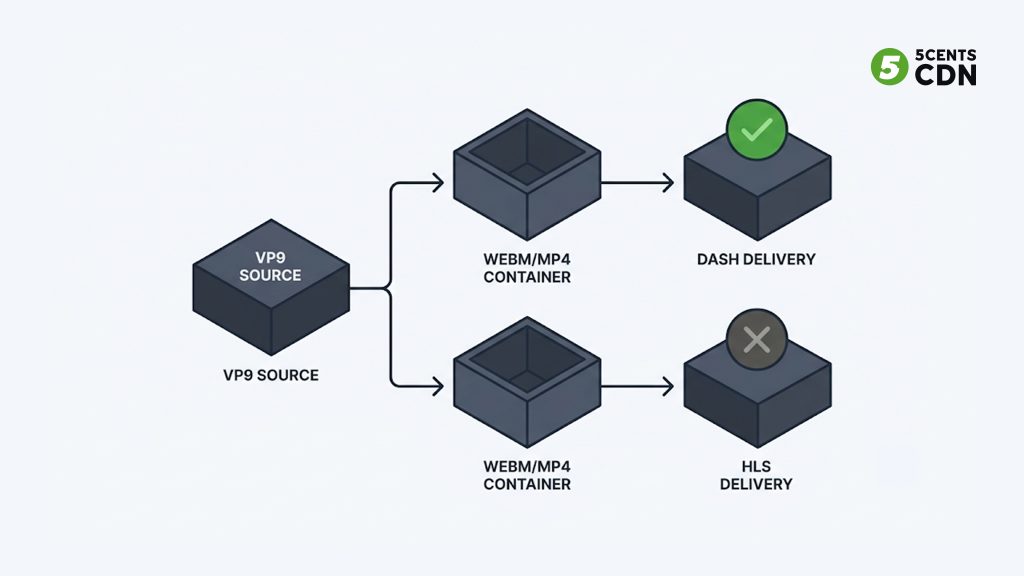
VP9’s natural home is WebM, the open container Google built for it, typically pairing VP9 video with Opus or Vorbis audio. VP9 also works in the Matroska (MKV) container and, since later tooling, inside fragmented MP4 — which is what allows VP9 to be delivered over MPEG-DASH. That DASH path is important: it is how platforms serve adaptive VP9 streams to browsers and devices at scale.
The catch: HLS does not natively support VP9. Apple’s HLS authoring guidelines call for H.264 or HEVC, so if your delivery is HLS-first — which much of the streaming world is, especially for Apple devices — VP9 is not a drop-in choice. In practice this means VP9 shines in DASH-based and browser-centric delivery (where it pairs beautifully with the open web), while HLS-centric workflows lean on H.264/HEVC or look to AV1. Knowing this before you build saves a painful surprise late in the pipeline.
VP9 Profiles, 10-bit, and HDR
VP9 is not a single fixed setting — it defines several profiles that determine which color depths and chroma-sampling options a stream can use. Profile 0 covers standard 8-bit 4:2:0 video (the common case), while higher profiles add support for 10-bit and 12-bit color depth and richer chroma sampling (4:2:2 and 4:4:4), added to the libvpx encoder over time. This matters for two modern needs: HDR and high-fidelity content. Because VP9 supports 10-bit color, it can carry HDR video — the wider range of brightness and color that premium 4K content relies on — which is a large part of why it became viable for high-end streaming and not just everyday web video.
The practical takeaway is that VP9 is capable enough for premium delivery (4K, HDR, high frame rates), not just a lightweight web codec. When you choose a VP9 profile you are trading a little efficiency and compatibility for higher fidelity, the same balance every codec asks you to strike — so match the profile to the content rather than defaulting to the highest one everywhere.
Device and Browser Support
VP9’s reach is broad on the web. Chrome, Firefox, Edge, and Opera decode it natively, and Apple added VP9 support in Safari with iOS 14, iPadOS 14, and macOS Big Sur (2020) — which closed its biggest historical gap. On the hardware side, many modern GPUs, smart TVs, Android devices, and streaming boxes include VP9 hardware decoding, which matters because hardware decode means smooth playback without draining the CPU or battery.
The nuance worth keeping in mind: support is strong but not truly universal the way H.264 is. Older devices without VP9 hardware decode fall back to CPU decoding (heavier on battery) or to an H.264 version of the stream instead. This is why platforms that use VP9 almost always keep an H.264 rendition available as a fallback — serving VP9 to devices that can take it, and H.264 to those that cannot.
VP9 and Delivery Cost
VP9’s efficiency is not just a quality story — it is a cost story, which is where it connects to your delivery infrastructure. Every percent of bitrate VP9 saves is a percent less data your CDN has to push for every second every viewer watches. At scale, a 30–50% bitrate reduction versus H.264 translates directly into lower egress and delivery bills, plus less origin storage for the VP9 renditions.
There is a real trade-off to weigh, though: VP9 is more expensive to encode than H.264, so you spend more compute up front to save on delivery. That maths favors VP9 most for popular content — a video streamed millions of times earns back its encoding cost many times over in delivery savings, while a rarely watched clip may not. This is exactly why YouTube encodes its most-watched and highest-resolution content in VP9: the delivery savings across billions of views dwarf the extra encoding cost.
Consider a video that streams at 8 Mbps using H.264. The same perceived quality can often be delivered at around 5 Mbps with VP9, reducing bandwidth by approximately 3 Mbps per viewer. While this difference may seem minor for a single stream, it becomes substantial when content is delivered to millions of viewers or watched repeatedly from a large on-demand library. Since CDN and data transfer costs are typically based on the amount of data delivered, lower bitrates translate directly into lower delivery costs.
Encoding a video in VP9 requires additional processing power, but this is a one-time investment for each encoded version of the content. Once the video is available, every playback benefits from the reduced bitrate without requiring additional encoding effort. This creates a favorable economic trade-off: pay once during encoding and continue saving bandwidth and delivery costs on every future view. For platforms with high traffic volumes, these recurring savings are a key reason for adopting more efficient codecs like VP9.
When Should You Use VP9?
- Web and browser-first delivery: VP9 pairs naturally with WebM/DASH and is natively decoded by all major browsers.
- High-resolution and high-volume content: 4K and popular titles where bandwidth savings across many views justify the encoding cost.
- Royalty-sensitive projects: when you want HEVC-class efficiency without HEVC’s licensing complexity.
- Alongside H.264 as a fallback: serve VP9 to capable devices and H.264 to the rest for full reach.
When is VP9 not the answer? If your delivery is strictly HLS-first for Apple devices, if you need universal reach with the least complexity (H.264), or if you are building for the future and your device targets support it (AV1, VP9’s more efficient successor). VP9 is a pragmatic present-day choice, not the only one.
Frequently Asked Questions
What is the VP9 codec?
VP9 is an open, royalty-free video codec developed by Google and released in 2013 as the successor to VP8. It compresses video roughly 30–50% more efficiently than H.264 at the same quality, and is used heavily on YouTube and across the open web.
Is VP9 better than H.264?
For efficiency, yes — VP9 delivers the same visual quality at roughly 30–50% lower bitrate, saving bandwidth and storage. H.264 still wins on universal device support and lower encoding cost, so many platforms serve VP9 with an H.264 fallback.
What is the difference between VP9 and HEVC?
VP9 and HEVC (H.265) have similar compression efficiency, with HEVC sometimes slightly ahead at the highest resolutions. The key difference is licensing: HEVC carries patent royalties, while VP9 is completely royalty-free — the main reason many web platforms chose VP9.
Is VP9 better than AV1?
AV1 is VP9’s successor and is more efficient, and also royalty-free — but it is more expensive to encode and its hardware decode support is younger. VP9 currently offers a balance of efficiency, royalty-free licensing, and broad hardware support, with many platforms adopting AV1 progressively.
Does HLS support VP9?
No, not natively. Apple’s HLS guidelines call for H.264 or HEVC. VP9 is delivered mainly via the WebM container and over MPEG-DASH (using VP9 in fragmented MP4). HLS-first workflows typically use H.264/HEVC or move to AV1.
What container does VP9 use?
VP9’s primary container is WebM, usually paired with Opus or Vorbis audio. It also works in Matroska (MKV) and in fragmented MP4, which enables VP9 delivery over MPEG-DASH.
Is VP9 royalty-free?
Yes. VP9 is open and royalty-free — it can be used to encode and distribute video with no per-stream or per-device licensing fees, unlike HEVC. This is one of its biggest advantages for streaming at scale.
Encoding VP9 with 5centsCDN
VP9’s bandwidth savings only pay off when your pipeline can encode it and deliver it efficiently to the right devices. 5centsCDN supports VP9 as a codec option in its video encoding and transcoding workflow, feeding straight into global delivery. If you want to cut delivery costs with more efficient codecs, get in touch with our team to talk through the encoding setup that fits your content and audience.
