


Hardware vs software encoding is one of the first decisions every streaming workflow must make. Every video that streams has been encoded—compressed from a huge raw signal into something small enough to send over a network. The question is what does the compressing: a dedicated piece of hardware built only for that job, or software running on a general-purpose computer. That single choice between hardware vs software encoding ripples through your video quality, latency, costs, and how many streams you can run at once.
The catch is that “hardware vs software encoding” means two different debates depending on where you sit. For a live broadcaster it is “buy an encoder appliance or run OBS on a PC?” For a platform transcoding thousands of streams it is “GPU/ASIC acceleration or CPU software encoding?” This guide covers both, because the trade-offs — and the right answer — flip depending on which one you are solving.
First, What Is Encoding?
A quick grounding, since the whole comparison rests on it. Encoding is compressing raw video into a smaller, streamable format using a codec such as H.264 or HEVC. Raw video is enormous — far too large to stream — so an encoder applies a codec to shrink it dramatically while preserving as much quality as possible. (Re-encoding already-compressed video into different sizes or formats is transcoding, and it is where the at-scale version of this question lives.) Both hardware and software encoders run the same codecs — the difference is what physically does the computing.
How They Work
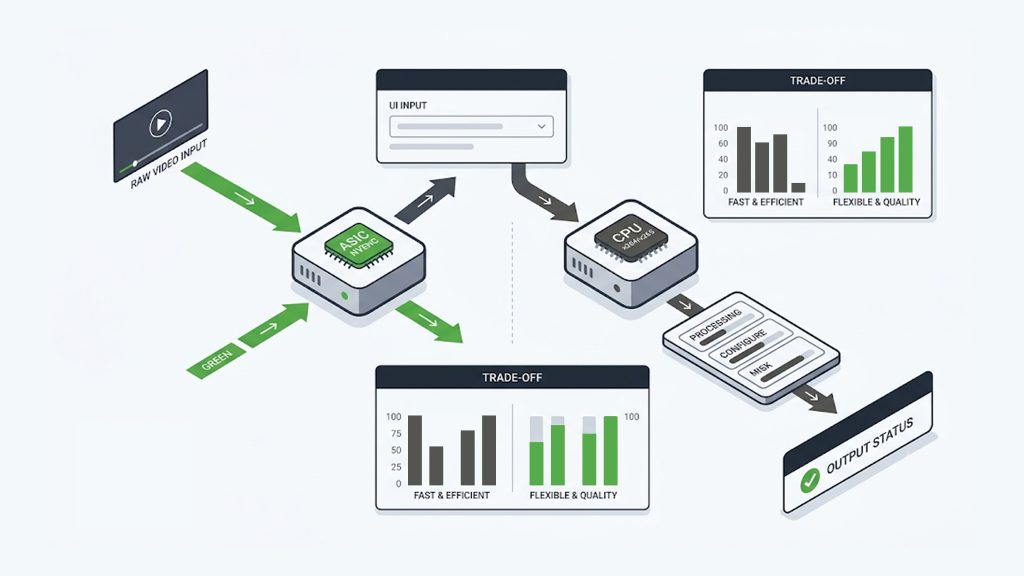
Software Encoding
Software encoding runs the codec as a program on a general-purpose processor — usually the CPU. The best-known examples are the open-source libraries x264 (for H.264) and x265 (for HEVC), which power tools like OBS Studio, FFmpeg, and HandBrake. Because it is just software running general-purpose instructions, it is enormously flexible: every parameter is exposed, it runs on hardware you already own, and it can squeeze out excellent quality if you give it enough processing time.
The analogy that fits: software encoding is packing your own suitcase by hand. With patience and skill you can fit an astonishing amount in beautifully — but it takes time and effort, and doing many suitcases at once wears you out. The “effort” here is CPU time: slower presets produce better compression but demand more processing, and the CPU is simultaneously trying to run everything else.
This is why software encoders expose “presets” that trade speed for quality — from ultrafast (quick but larger files) to veryslow (small, high-quality files that take much longer to produce). That single dial captures software encoding’s whole character: it hands you the full spectrum of the speed-versus-quality trade-off and lets you choose, whereas a hardware encoder largely makes that choice for you in silicon.
Hardware Encoding
Hardware encoding runs the codec on dedicated, purpose-built silicon instead of the general CPU. This can be a standalone encoder appliance, or a fixed-function block inside a GPU — such as NVIDIA’s NVENC, Intel Quick Sync, or AMD’s VCE — or a specialized ASIC or FPGA in a data center. Because the chip does only one thing, it does it extremely fast and with very little power, while leaving the CPU free for other work.
Back to the analogy: hardware encoding is a professional packing service with purpose-built machines. It is dramatically faster and can handle huge volume effortlessly, but it packs the way its machines were designed to — you get less fine-grained control than doing it by hand. That fixed-function nature is the source of both its speed and its rigidity.
It is worth distinguishing the kinds of hardware because hardware encoding spans a range of technologies. A fixed-function GPU block like NVENC is built into consumer and data-center graphics cards and is what most people mean when they refer to hardware encoding.
An ASIC (application-specific integrated circuit) is a chip designed solely to encode a specific codec. It offers the highest efficiency and stream density, making it common in large-scale broadcast and cloud transcoding hardware, but it cannot be reconfigured once manufactured.
An FPGA (field-programmable gate array) sits between GPUs and ASICs. It provides reconfigurable hardware that can be programmed for new codecs or encoding optimizations, delivering much of the speed of dedicated silicon while offering greater flexibility—at the cost of increased complexity and expense.
The general rule applies across all three technologies: the more specialized the silicon, the faster and more efficient the encoding. The trade-off is flexibility, as highly specialized hardware is less adaptable to changing codecs and streaming requirements.
The Core Trade-offs
Speed and Latency
Hardware wins decisively. Dedicated silicon encodes far faster and with lower, more consistent latency than software on the same task — which is exactly what real-time live streaming needs. Software can keep up if you throw a powerful CPU at it, but it competes with everything else the machine is doing, so under load it is more prone to dropped frames and stutter.
Quality and Efficiency
This is where the old wisdom is out of date. For years the rule was “software (x264) looks better; hardware trades quality for speed.” That was true of early hardware encoders, but modern ones have closed the gap: NVIDIA notes that its Turing-generation and newer NVENC produces quality on par with x264’s faster presets. The nuance that still holds: given unlimited time, a slow software preset can still achieve the best compression efficiency (smallest file at a given quality), because it can search harder. But for real-time work, modern hardware is no longer the quality compromise it once was.
Flexibility and Control
Software wins. Every codec parameter is adjustable, it supports the newest codecs as soon as an encoder library ships (no new hardware to buy), and it can be reconfigured or updated instantly. Hardware is comparatively fixed: an appliance supports the input ports and codecs it shipped with, and adding a next-generation codec often means buying new silicon rather than a software update.
CPU Load and Power Efficiency
Hardware wins. By offloading encoding to dedicated silicon, it frees the CPU for other tasks and uses far less power per stream — which matters enormously both for a gamer streaming while playing and for a data center running thousands of streams on a power budget.
Cost
It depends on scale. For one stream, software is cheaper — free tools like OBS run on hardware you already own. A dedicated encoder appliance is a real upfront cost. But that flips at scale and over time: for professional and high-volume use, the reliability, lower power draw, and reduced operational effort of hardware often make its total cost of ownership lower over several years, even with the higher purchase price.
Common Misconceptions
A few beliefs about this topic are widely repeated and mostly out of date — clearing them up sharpens the decision.
“Hardware encoding always looks worse.” This was true a decade ago and is now largely a myth for real-time use. Modern GPU encoders reach quality comparable to fast software presets, so for live streaming the visible gap has mostly closed. The honest, still-true version is narrower: given lots of time, a slow software preset can still compress more efficiently.
“Software encoding is always cheaper.” Only at small scale. Once you factor in reliability, power draw, and the staff time to babysit software rigs, hardware frequently wins on total cost of ownership for professional and high-volume operations.
“It’s an either/or choice.” Rarely. Most serious workflows mix both — hardware for live and scale, software for premium on-demand — and the two live comfortably side by side in the same pipeline.
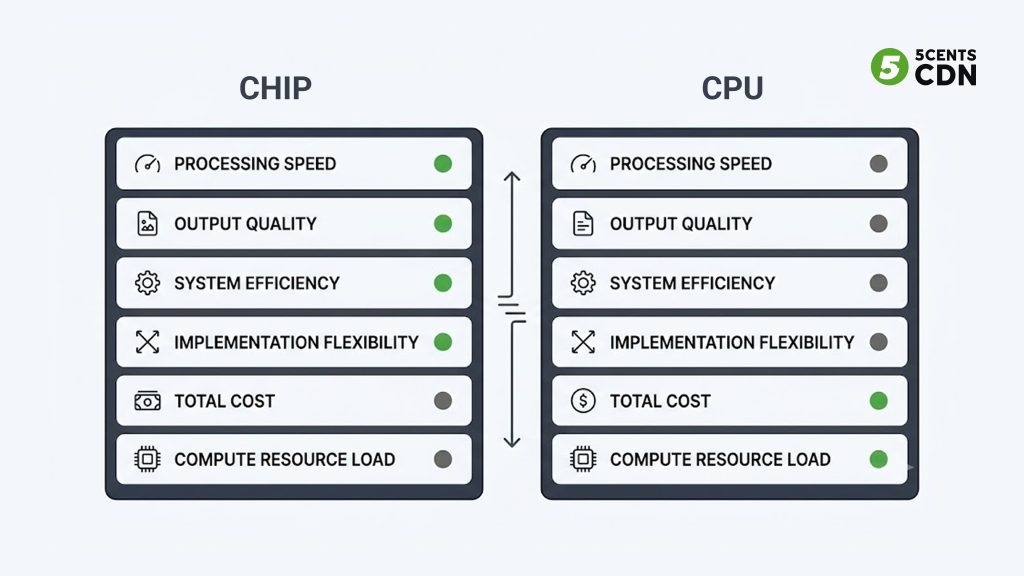
Hardware vs Software Encoding: Side by Side
| Hardware Encoding | Software Encoding | |
|---|---|---|
| Runs on | Dedicated chip / GPU / ASIC | General-purpose CPU |
| Examples | NVENC, Quick Sync, encoder appliances | x264, x265, OBS, FFmpeg |
| Speed / latency | Very fast, low latency | Slower; depends on CPU |
| Quality (real-time) | On par with x264 fast presets (modern) | Excellent with slow presets + time |
| Best compression | Very good | Best, given enough time |
| Flexibility | Fixed to shipped features | Fully configurable, newest codecs |
| CPU load / power | Low (offloaded) | High CPU use |
| Upfront cost | Higher | Low / free |
| Best for | Live, scale, reliability | Max quality, flexibility, low budget |
Encoding at Scale: The Server-Side Story
Most guides stop at the contribution encoder — the box or app that gets one live feed onto a platform. But the same hardware-versus-software question returns, transformed, on the server side, and this is where it matters most for streaming platforms.
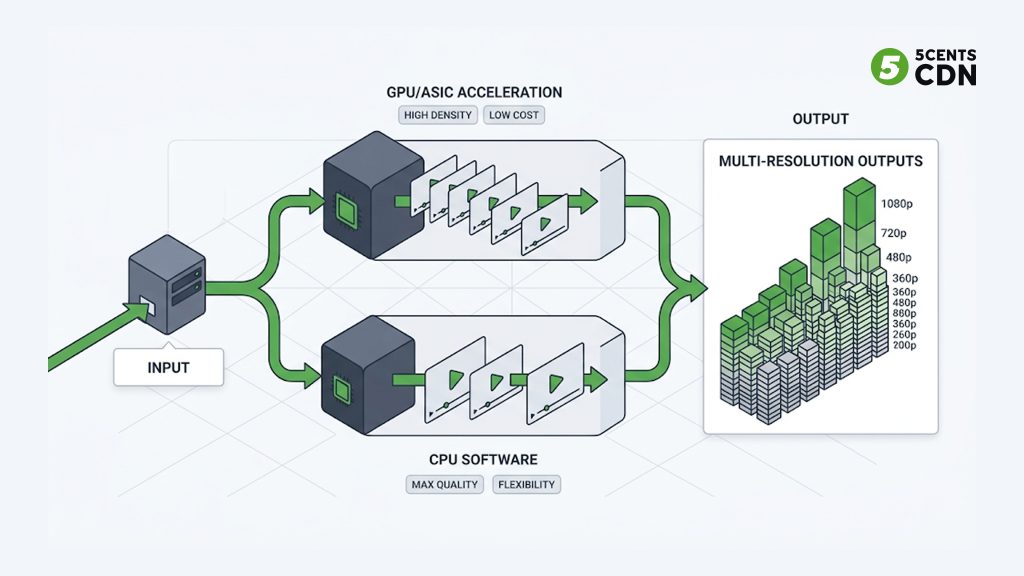
When a platform ingests a stream, it transcodes it into a full adaptive bitrate ladder — many renditions at different resolutions and bitrates — and often does this for hundreds or thousands of concurrent streams. At that volume, the encoding method is a major cost and capacity decision, not a preference.
Here the trade-off sharpens. GPU and ASIC hardware acceleration can transcode far more streams per server at a fraction of the power, dramatically lowering the cost per stream and the physical footprint — decisive for live at scale, where thousands of renditions must be produced in real time. CPU software encoding, by contrast, can extract the best compression efficiency (smaller files, lower delivery bandwidth) and offers total flexibility, which suits on-demand libraries where each title is encoded once, carefully, ahead of time and then served millions of times.
So the practical pattern many platforms adopt: hardware-accelerated transcoding for live and high-concurrency workloads where speed and density win, and software encoding for premium VOD where you can spend extra time to shave every last bit off the delivery bandwidth. This is exactly the kind of balance a live and VOD transcoding pipeline is built to strike, feeding the resulting renditions into CDN delivery.
The economics here are worth spelling out, because they are the opposite of the single-stream case. When you encode one stream, software on existing hardware is essentially free and hardware is an added purchase. When you transcode thousands of concurrent live streams into full bitrate ladders, the maths inverts: each stream consumes CPU cores if done in software, so a pure-software farm needs far more servers, more rack space, more power, and more cooling to hit the same capacity. Hardware acceleration packs many more simultaneous encodes onto each server, so the cost per delivered stream drops sharply and the physical footprint shrinks. At broadcast scale, that difference is the line between a viable service and an unaffordable one.
VOD flips the priorities. Because an on-demand title is encoded once and then streamed potentially millions of times, it is worth spending generous encoding time up front: a slow software preset that shaves even a few percent off the file size pays for itself many times over in reduced delivery bandwidth across all those views. There is no real-time constraint, so the speed advantage of hardware matters far less, and the compression advantage of software matters far more. This is why the same platform rationally uses different encoding methods for its live and on-demand catalogs — the workload, not dogma, decides.
Which Should You Choose?
Choose Hardware Encoding When…
- Running mission-critical live streams where reliability and consistent low latency are paramount.
- You need to encode or transcode at scale — many concurrent streams — where density, speed, and cost per stream matter most.
- Wanting to offload encoding so the CPU (or a gamer’s GPU headroom) is free for other work.
- You value set-and-forget stability over fine-grained control.
Choose Software Encoding When…
- Starting out, on a budget, or running a single stream — free tools on existing hardware are enough.
- You need maximum compression efficiency for on-demand content encoded ahead of time.
- You want full control over every setting, or need the newest codec before hardware support exists.
- Your workflow changes often and you value flexibility over raw throughput.
In reality, many operations use both: software where quality and flexibility rule, hardware where speed, scale, and reliability rule. The two are complementary tools, not rivals — the skill is matching each to the job.
Frequently Asked Questions
What is the difference between hardware and software encoding?
Hardware encoding runs the codec on dedicated silicon — a purpose-built chip, GPU block (like NVENC), or ASIC — making it fast, low-latency, and power-efficient. Software encoding runs the codec (like x264 or x265) on a general-purpose CPU, offering more control and, with enough time, the best compression, at the cost of speed and CPU load.
Is hardware encoding better quality than software?
For real-time streaming, modern hardware encoders (Turing-generation NVENC and newer) are roughly on par with x264’s faster presets, so the old “hardware is worse quality” rule is outdated. However, a slow software preset given unlimited time can still achieve the best compression efficiency — the smallest file at a given quality.
Is NVENC hardware or software encoding?
NVENC is hardware encoding. It is a dedicated fixed-function encoder block built into NVIDIA GPUs that offloads encoding from the CPU. x264 and x265 are the equivalent software encoders that run on the CPU.
Which is cheaper, hardware or software encoding?
For a single stream, software is cheaper — free tools like OBS run on hardware you already own. At scale or over several years, hardware often has a lower total cost of ownership thanks to reliability, lower power use, and reduced operational effort, despite the higher upfront cost.
Which is better for live streaming at scale?
Hardware acceleration (GPU/ASIC) is usually better for live at scale because it transcodes many more concurrent streams per server, in real time, at lower power and cost per stream. Software encoding is often preferred for on-demand content, where each title is encoded once, carefully, for maximum efficiency.
Do hardware and software encoders use the same codecs?
Yes. Both encode using standard codecs like H.264 and HEVC — the codec is the same, only the thing doing the computing differs. That is why a hardware-encoded and a software-encoded H.264 stream both play on any H.264-compatible device.
Encoding and Transcoding with 5centsCDN
Whether your workflow calls for hardware-accelerated speed at scale or software encoding for maximum quality, the encoded renditions still have to be produced reliably and delivered to viewers. 5centsCDN provides live and VOD transcoding that feeds straight into global delivery. If you are planning your encoding pipeline, get in touch with our team to talk through the approach that fits your content and scale.
