


MPEG-TS vs fMP4 is one of the most important decisions when packaging HLS. At some point, you hit a fork in the road: should your segments be MPEG-TS (.ts) files or fragmented MP4 (.m4s) files? For years there was no choice—HLS meant MPEG-TS, full stop. Today, fMP4 is not only supported but increasingly the default, and the format you pick affects storage, CDN efficiency, device compatibility, and whether you can even use certain codecs and DRM.
This guide is written for the engineer making that decision. It explains what each format is, how they differ in concrete terms, why the industry has been migrating from MPEG-TS to fMP4, and when the older format still earns its place. It is not about converting a .ts recording from your dashcam into a playable .mp4 — it is about which segment format belongs in your streaming pipeline.
What Is MPEG-TS?
MPEG-TS (MPEG Transport Stream) is a container format defined back in MPEG-2 Part 1 (ISO/IEC 13818-1) for broadcasting — satellite, cable, and terrestrial TV. Its defining design choice is that it chops everything into small, fixed-size packets of just 188 bytes, each carrying its own timing and synchronization information. That structure was built for one purpose: surviving a lossy transmission channel. If some packets are corrupted or dropped over the air, the rest of the stream keeps playing.
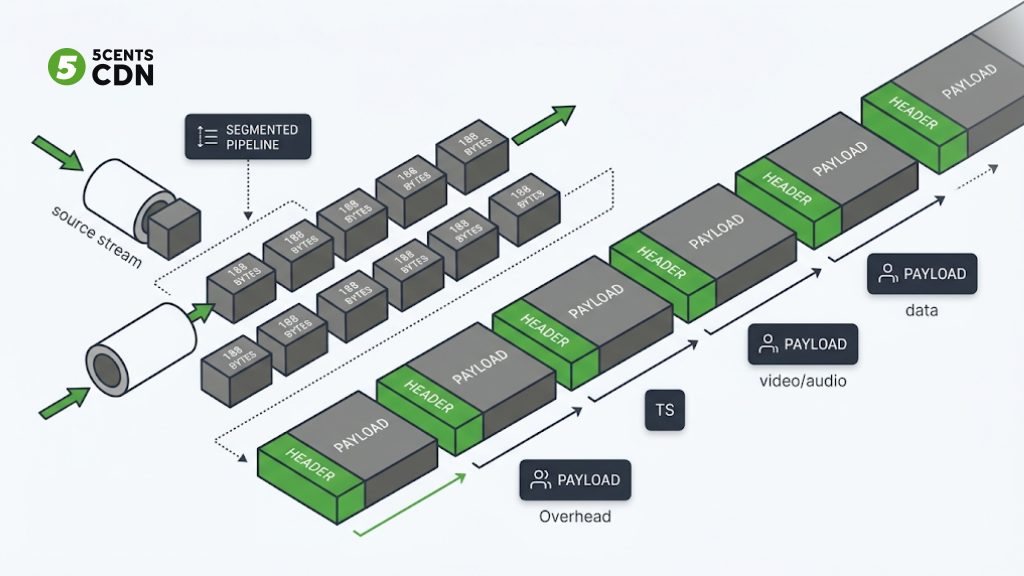
When Apple launched HLS in 2009, it chose MPEG-TS as the segment format, largely because early iOS hardware already decoded transport streams natively and the format’s resilience suited unreliable networks. So a classic HLS stream is a playlist (.m3u8) pointing at a series of .ts segment files, each a self-contained few seconds of transport stream.
Under the hood, MPEG-TS is more elaborate than it looks. Media is first wrapped into packetized elementary streams (one for video, one for audio, and so on), then chopped into those 188-byte transport packets and interleaved together. Small tables called PSI (Program Specific Information) — including the Program Association Table and Program Map Table — tell a decoder which packets belong to which program and stream. This machinery is what lets a single transport stream carry multiple TV channels at once, which was exactly the point in broadcast. For a single HLS segment it is mostly unused capability, carried along as extra structure.
The strength — tiny self-describing packets — is also the weakness. All those 188-byte packet headers add up to real overhead, and because the rest of the streaming world (browsers, DASH, modern devices) standardized on MP4-based formats, MPEG-TS increasingly became the odd format out that only HLS still required. It is a broadcast-era container doing a job the broadcast use case never fully needed on the open internet.
What Is fMP4?
Fragmented MP4 (fMP4) is the MP4 container — built on the ISO Base Media File Format (ISOBMFF) — written as a series of small, independently decodable fragments instead of one monolithic file. The segment files carry a .m4s extension. A plain MP4 keeps all its indexing metadata in one place and generally needs the whole file before smooth playback; fMP4 breaks the media into fragments that can be streamed and played as they arrive, which is exactly what adaptive streaming needs.
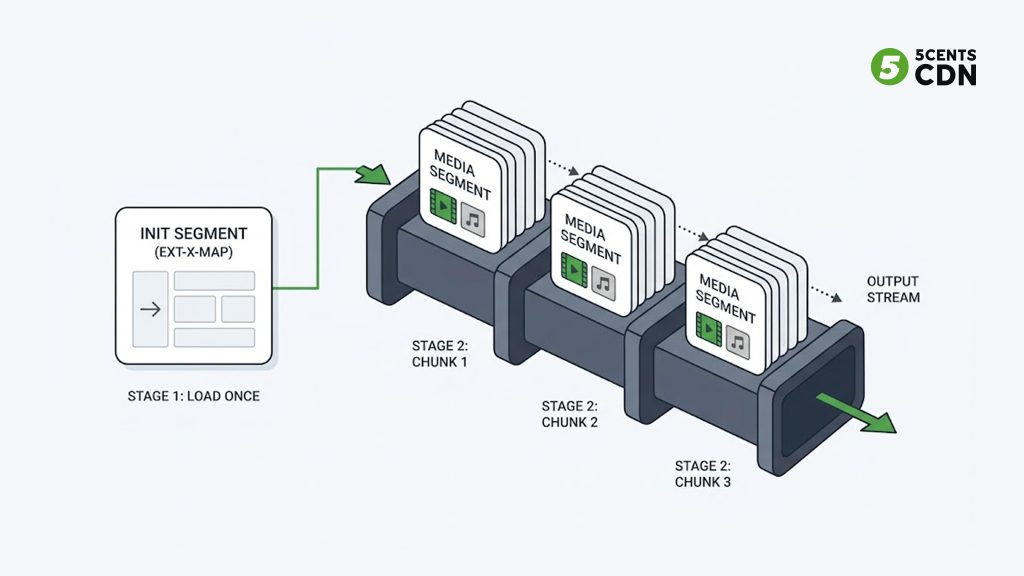
The reason fragmentation matters is worth making explicit. A regular MP4 is like a book with its full index at the very back — you need the whole thing before you can reliably jump around. Fragmented MP4 is like a book split into self-contained chapters, each with its own mini table of contents, so a reader can pick up any chapter and start immediately. For streaming, that means a player can fetch segment 47 without having downloaded 1 through 46, switch bitrates cleanly at fragment boundaries, and begin playback almost immediately — the behaviors adaptive bitrate streaming depends on.
Apple added fMP4 support to HLS at WWDC 2016, and it was a deliberate turning point: it let HLS and MPEG-DASH share the same underlying segment files, since DASH already used fMP4. One important structural difference from MPEG-TS is the initialization segment. With fMP4, a small init segment carries the setup information a player needs to decode the media segments, and the playlist references it with an #EXT-X-MAP tag:
#EXTM3U
#EXT-X-VERSION:7
#EXT-X-MAP:URI=”init.mp4″
#EXTINF:6,
segment1.m4s
#EXTINF:6,
segment2.m4s
#EXT-X-ENDLIST
The player loads that init segment once, then all the .m4s media segments that follow. (With MPEG-TS, each .ts segment typically carries its own setup information inline, so no separate init segment is needed — part of why .ts is self-contained but heavier.)
One point of frequent confusion worth clearing up: fMP4 is not a different format from MP4 — it is MP4, just structured as fragments. And the standardized, portable profile of fMP4 that both HLS and DASH agree on is called CMAF, which is why you will often see “fMP4” and “CMAF” used almost interchangeably in a streaming context. If you want the deeper story of how one fMP4 set serves both protocols, see our guide to CMAF.
MPEG-TS vs fMP4: The Key Differences
The two formats can carry the same video and audio, but they package it very differently. Here is what actually matters when you choose.
| MPEG-TS (.ts) | fMP4 (.m4s) | |
|---|---|---|
| Origin | MPEG-2 broadcast (1990s) | ISOBMFF / MP4 family |
| Packet structure | Fixed 188-byte packets | Fragments (moof/mdat) |
| Overhead | Higher (packet headers) | Lower |
| Init segment | None (self-contained) | Yes (#EXT-X-MAP) |
| Shared with DASH | No | Yes (same segments) |
| HEVC / H.265 in HLS | Not supported | Required |
| Legacy device support | Broadest (older iOS/players) | Modern devices (HLS v7+) |
| CDN cache efficiency | Separate from DASH copy | One object serves both |
Overhead and Efficiency
MPEG-TS wraps media in a stream of 188-byte packets, each with its own header. That fixed packetization is what makes it resilient, but the headers are pure overhead — at the same quality, .ts segments run slightly larger than the equivalent .m4s. Think of MPEG-TS like shipping a product in dozens of small identical boxes each with its own label and padding: robust, but a lot of packaging. fMP4 is more like shipping the same goods in fewer, right-sized cartons — less material spent on the wrapping.
On any single segment the difference is modest — a few percent. But streaming multiplies everything by scale: every rendition, every segment, every viewer, every second watched. A few percent of overhead removed from a large VOD library or a high-concurrency live event turns into a meaningful reduction in storage and egress. It is the same logic that makes codec efficiency matter — small per-unit savings compound into real money once they are paid across millions of delivered segments. fMP4’s lower overhead is not dramatic per file, but it is free efficiency you keep collecting forever once you switch.
Codec and DRM Requirements
This one is often decisive: HLS only supports HEVC/H.265 when you use fMP4 — the older MPEG-TS path cannot carry it. The same applies to modern codecs and to the Common Encryption used by DRM, which is built around the fMP4/CMAF structure. If your roadmap includes HEVC, AV1, or multi-DRM protection, fMP4 is not optional — it is a prerequisite.
This single fact resolves the debate for a lot of teams before any efficiency argument is even made. Delivering 4K or HDR economically usually means HEVC or AV1; protecting premium content usually means Widevine, PlayReady, and FairPlay via Common Encryption. Both roads lead exclusively through fMP4 in HLS. So if your content strategy points at higher-efficiency codecs or studio-grade protection — and most serious streaming roadmaps do — the segment-format question is effectively already answered, and MPEG-TS simply cannot come along.
CDN Efficiency
Because fMP4 segments can be shared between HLS and DASH, you store and cache one set of files instead of a separate .ts set for HLS and an fMP4 set for DASH. That directly improves your CDN cache hit ratio — one cached object serves both protocols instead of two objects competing for edge space. For anyone delivering to both ecosystems, this is a concrete storage and delivery saving, not just a tidiness win.
Why Streaming Is Moving to fMP4
Put the differences together and the industry direction is clear. Adopting fMP4 lets a platform serve HLS and DASH from a single set of segments, cut storage and packaging work, improve cache efficiency, and unlock HEVC, next-generation codecs, and modern DRM — all at once. For a workflow being built or modernized today, fMP4 is the sensible default, and MPEG-TS is the compatibility fallback rather than the starting point.
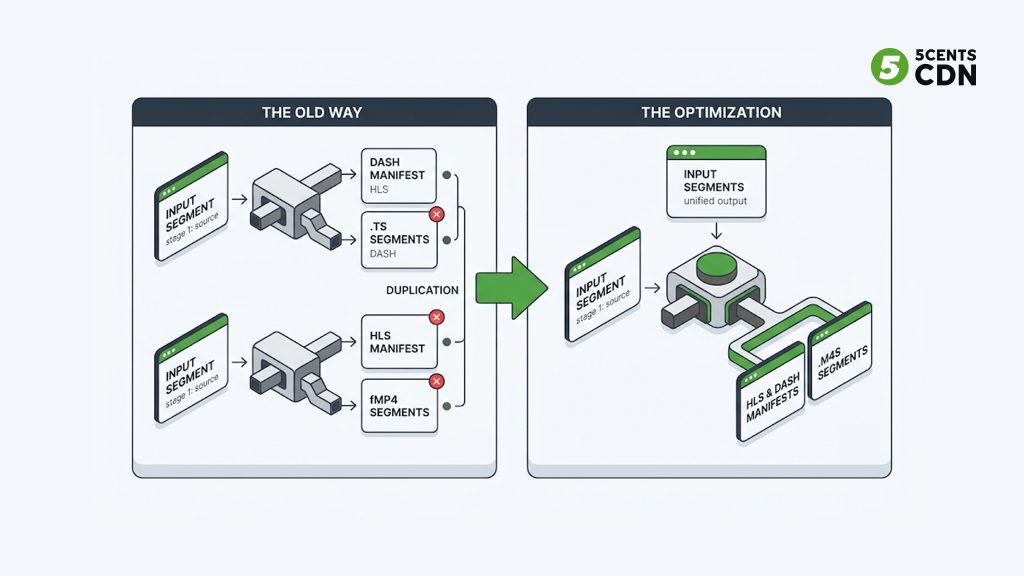
This is a genuine reversal from a decade ago, when “HLS” simply meant “.ts.” The shift was gradual because it depended on device support catching up, but by now modern players and platforms handle fMP4 HLS routinely, and the remaining reason to reach for MPEG-TS is specifically to support old hardware.
It is worth appreciating why the change took a full decade rather than happening overnight. A segment format is only useful if the viewer’s device can decode it, so even after Apple enabled fMP4 in 2016, operators had to keep serving .ts for years to avoid breaking playback on the installed base of older iPhones, smart TVs, and set-top boxes. As those devices aged out and fMP4-capable players became the overwhelming majority, the cost-benefit tipped: the efficiency, codec, and DRM advantages of fMP4 now clearly outweigh the shrinking population of TS-only devices. That is the quiet story behind most format migrations in streaming — the technology is ready long before the device fleet is, and the default flips only once the audience has caught up.
When MPEG-TS Still Makes Sense
MPEG-TS is not dead, and treating it as legacy-only would be a mistake in a few real situations:
- Old device fleets: very old iOS versions and legacy set-top boxes may only reliably play .ts HLS. If your audience includes them, a TS rendition (or a TS fallback) still matters.
- Broadcast and contribution: MPEG-TS remains standard in broadcast facilities, IPTV, and many contribution/ingest workflows, thanks to its error resilience and decades of entrenched equipment.
- Existing pipelines: a mature, working .ts pipeline serving an audience on capable devices has no urgent reason to migrate until a codec, DRM, or DASH requirement forces the move.
In practice, many operators run fMP4 as the primary format and keep a limited MPEG-TS fallback for the long tail of old devices — capturing the efficiency of fMP4 while not stranding legacy viewers.
How to Choose
- Building or modernizing a pipeline today? Default to fMP4 — it is more efficient, shares segments with DASH, and unlocks HEVC/AV1 and DRM.
- Need HEVC/H.265, AV1, or Common Encryption DRM in HLS? fMP4 is required; MPEG-TS cannot carry them.
- Delivering to both HLS and DASH? fMP4 (CMAF), so one segment set serves both and your cache efficiency improves.
- Must support very old devices or broadcast/IPTV equipment? Keep MPEG-TS, at least as a fallback rendition.
Frequently Asked Questions
What is the difference between MPEG-TS and fMP4?
MPEG-TS packages media into fixed 188-byte packets designed for broadcast resilience, with each .ts segment self-contained. fMP4 packages media as fragmented MP4 (.m4s) segments built on ISOBMFF, with a separate init segment referenced by #EXT-X-MAP. fMP4 has lower overhead, can be shared with DASH, and is required for HEVC and modern DRM in HLS.
Is fMP4 better than MPEG-TS?
For most modern streaming, yes: fMP4 has lower overhead, lets HLS and DASH share one segment set (improving CDN cache efficiency), and is required for HEVC/H.265, AV1, and Common Encryption DRM. MPEG-TS still wins for very old device compatibility and in broadcast/IPTV workflows.
Is fMP4 the same as CMAF?
Not exactly, but they are closely related. CMAF is a standardized, portable profile of fragmented MP4 that both HLS and DASH agree on. All CMAF segments are fMP4, so in a streaming context the terms are often used interchangeably.
Does HLS still use MPEG-TS?
HLS still supports MPEG-TS, but since Apple added fMP4 support in 2016, the industry has largely shifted to fMP4. MPEG-TS is now mainly used for legacy device compatibility and as a fallback rather than the default choice for new pipelines.
Why can’t I use HEVC with MPEG-TS in HLS?
Apple’s HLS specification only supports HEVC/H.265 (and other modern codecs and DRM) when segments are packaged as fMP4. The older MPEG-TS segment path in HLS does not carry them, so HEVC in HLS requires fMP4.
Do fMP4 segments work with DASH?
Yes. Because DASH already uses fragmented MP4, fMP4 segments can be shared between HLS and DASH — one set of files served by both protocols. This is a core advantage of fMP4 and the basis of CMAF.
Packaging HLS and DASH with 5centsCDN
Whether you standardize on fMP4 or keep an MPEG-TS fallback, the segments still have to be packaged and delivered efficiently at the edge. 5centsCDN supports modern fMP4 (CMAF-based) HLS packaging as part of its video delivery workflow. If you are choosing a segment format or planning a migration, get in touch with our team to talk through the setup that fits your audience and codecs.
