


For most of HLS’s history, getting an ad into a stream meant editing the stream. A stitching server rewrote the playlist, spliced ad segments in between content segments, and delivered each viewer a one-off version. HLS interstitials take the opposite approach: the playlist stays shared, a single tag says “an ad break goes here,” and the player fetches and plays the ad itself. Apple introduced the mechanism in 2021, and it has since become the signaling layer underneath server-guided ad insertion (SGAI), with working support in the major open-source web players.
This guide is the implementation-level companion to our SGAI overview. It covers what an interstitial tag actually contains, what each control attribute does, how breaks behave in live streams, where interstitials change the load on your CDN, what to expect from players, and how to debug a break that refuses to fire.
What Are HLS Interstitials?
HLS interstitials are a way to schedule ads, bumpers, recaps or any other separate video asset onto an HLS stream’s timeline by adding an EXT-X-DATERANGE tag to the playlist. The tag tells the player when the break starts and where to fetch the content for it. The player loads that content as its own stream, plays it, and then returns to the main program.
Three properties define the model:
- The interstitial is a separate asset. It is a complete HLS stream of its own, referenced by URL. Apple’s implementation guide requires interstitials to be VOD assets, but they can be scheduled against either VOD or live primary content, including CMAF-based Low-Latency HLS streams.
- The player does the work. Instead of a server splicing segments together, the player buffers the main content up to the break point and only then loads the interstitial. That timing is what lets the ad be chosen as late as possible.
- Unsupported players ignore it. Devices that do not implement interstitials skip the tag and play the main content straight through.
A cinema analogy helps. In the stitched model, someone physically splices a commercial reel into the film print, and personalizing it means cutting a separate print for every viewer. With interstitials, the print stays untouched and gains a note: “at 12:00:15, start the second projector and load reel X.” The picture is close to reality: on Apple platforms the primary player is joined by a second, interstitial player, created automatically when a break needs to play.
Where HLS Interstitials Sit in the HLS Spec
One detail trips up a lot of documentation: interstitials are not part of RFC 8216. RFC 8216, published in August 2017, is an Informational document describing version 7 of the protocol, and it predates the feature. Interstitials are defined in Appendix D of “HTTP Live Streaming 2nd Edition,” the Internet-Draft draft-pantos-hls-rfc8216bis, which describes version 13 of the protocol.
Two caveats follow. First, the draft is an Informational individual submission. Its own status text says it is not endorsed by the IETF, has no formal standing in the standards process, and should only be cited as work in progress. The current revision at the time of writing is -22, dated May 2026. Second, because the draft is where the mechanism lives, some product announcements attribute interstitials to RFC 8216. That is inaccurate. If you need to reference attribute definitions, point to Appendix D of the draft and note which revision you read.
Anatomy of an HLS Interstitial Tag
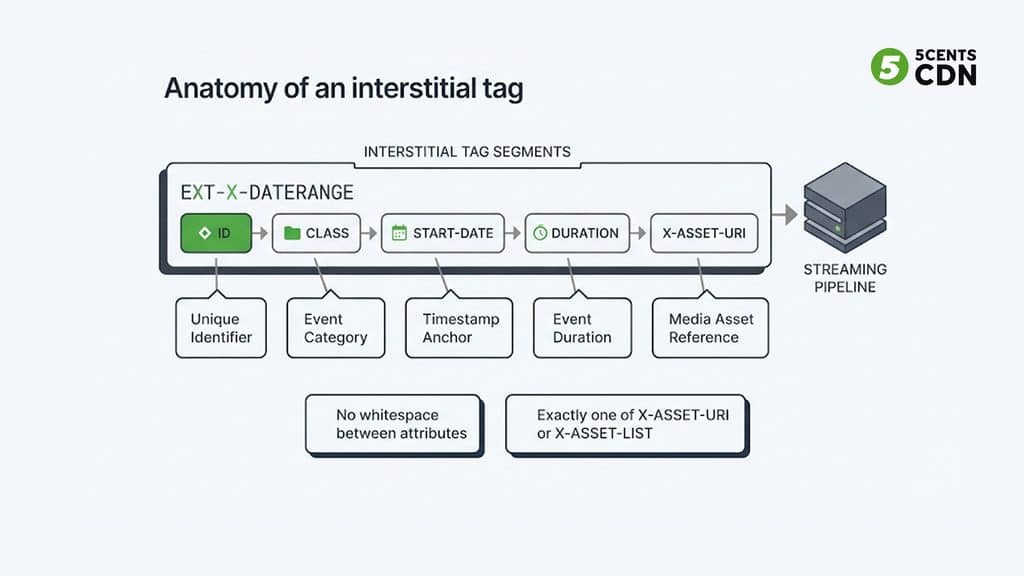
An interstitial is an EXT-X-DATERANGE tag whose CLASS is com.apple.hls.interstitial. Here is a minimal one:
#EXT-X-DATERANGE:ID=”mid-1″,CLASS=”com.apple.hls.interstitial”,START-DATE=”2026-11-02T12:00:15.000Z”,DURATION=15.0,X-ASSET-URI=”https://ads.example.com/mid-1/master.m3u8″
Reading it attribute by attribute:
- ID identifies the date range within the playlist. It matters later, because a live playlist can add attributes to an existing range by repeating the tag with the same ID.
- CLASS must be com.apple.hls.interstitial. It is what tells a player to treat the range as an interstitial rather than generic metadata.
- START-DATE is the wall-clock moment on the primary timeline where the break begins. Because it is a date and not a segment number, the break does not have to line up with a segment boundary. Apple’s two-player design lets a break start even in the middle of a video GOP.
- DURATION is the planned length of the break in seconds. It is optional in the spec but normally included.
- X-ASSET-URI points to the interstitial’s own HLS playlist.
A handful of rules cause most failed deployments:
- Exactly one asset reference. An interstitial tag carries either X-ASSET-URI or X-ASSET-LIST, never both.
- Strict attribute syntax. Attribute lists are comma-separated with no whitespace, and an attribute name cannot appear twice. The draft tells clients to ignore date ranges with illegal syntax, so a stray space does not raise an error; the break simply never plays. A duplicated attribute is worse, because clients are told they should refuse to parse the whole playlist.
- A program date is required. Any playlist that contains an EXT-X-DATERANGE tag must also contain at least one EXT-X-PROGRAM-DATE-TIME tag, because the dates need a timeline to anchor to.
- Same tags on every rendition. Apple’s guide requires all renditions of a multivariant playlist to carry the same set of date range tags.
- No nesting. An interstitial scheduled inside another interstitial is ignored by clients.
One Ad or a Whole Pod? X-ASSET-URI vs X-ASSET-LIST
X-ASSET-URI references a single asset. For an ad pod, use X-ASSET-LIST, whose value is a URL to a JSON document the player requests as the break approaches:
{
“ASSETS”: [
{
“URI”: “https://ads.example.com/creatives/a1/master.m3u8”,
“DURATION”: 15.0
},
{
“URI”: “https://ads.example.com/creatives/a2/master.m3u8”,
“DURATION”: 15.0
}
]
}
Each entry needs an absolute URI and a DURATION in seconds, and the player plays the assets back to back in array order. Interstitial assets do not need to match the primary stream’s bitrate ladder or codecs, although Apple encourages providing a suitable ladder of their own.
The asset list is where personalization happens. Apple’s guide describes the player loading the resource only after it has buffered the primary content up to the break, which is what makes the binding “late”: the server can compose the list at the moment of the request, from current inventory. For ad insertion this is the key architectural fact. The playlist carrying the tag can be identical for every viewer, while the asset-list request is the one that carries session context.
The Control Attributes That Matter
Beyond the asset reference, a handful of attributes control how a break behaves. All of them are optional.
| Attribute | What it controls | Typical use |
|---|---|---|
| CUE | PRE triggers the break before playback of the primary asset begins. POST triggers it after the asset plays to its end. ONCE prevents it triggering again on replay or seek-back. PRE and POST cannot be combined. | Pre-rolls, post-rolls, and bumpers that should only play once |
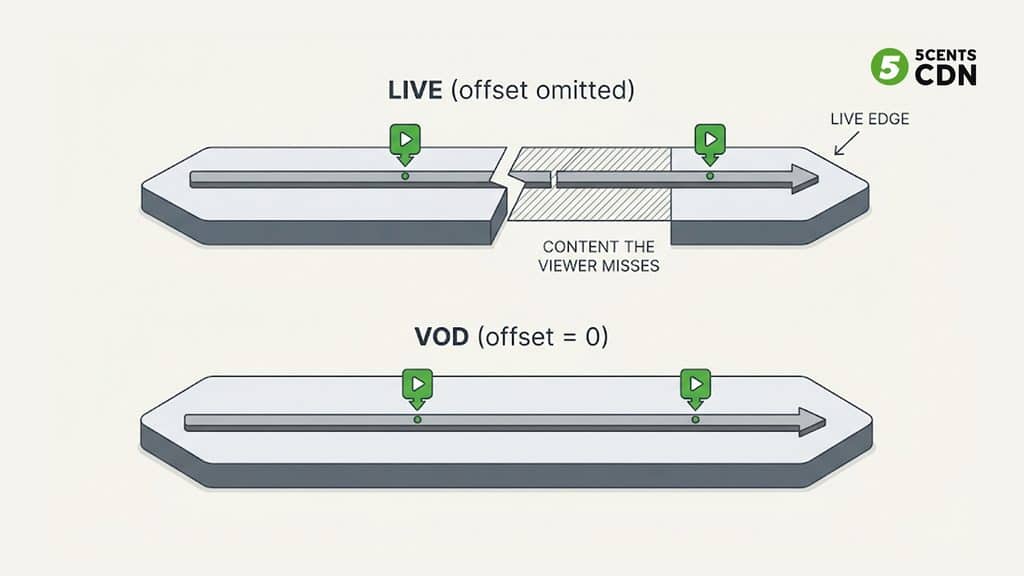
| X-RESUME-OFFSET | Where primary playback resumes, in seconds from the scheduled break point. If omitted, the player resumes after skipping forward by the break’s duration. | 0 to insert (VOD); omit to replace (live) |
| X-PLAYOUT-LIMIT | Maximum playout time for the whole break, in seconds. The player ends the break when it is reached. | Cutting a pod short; fitting a break into a fixed slot |
| X-RESTRICT | SKIP blocks seeking forward and faster-than-normal playback during the break. JUMP blocks seeking from before the break to after it without playing the break first, even if it played earlier. | Non-skippable, non-bypassable ads |
| X-SNAP | OUT transitions into the break at the nearest segment boundary. IN resumes the primary content at the nearest segment boundary. | Live streams where packager and encoder clocks drift |
| X-TIMELINE-OCCUPIES | POINT shows the break as a marker on the timeline; RANGE shows it as a span. Added with Apple’s 2024 updates. | RANGE for ads in live content |
| X-TIMELINE-STYLE | HIGHLIGHT presents the break as separate from the content; PRIMARY integrates it with the main media. | PRIMARY for rating bumpers and dub cards |
| X-CONTENT-MAY-VARY | A hint on whether every player in a coordinated viewing session receives the same break content. | Group viewing, such as SharePlay |
Several breaks can share the same START-DATE. They play in the order their tags appear, and their resume offsets add up. Appendix D.3 of the draft also defines attributes for a skip button that appears partway through a break.
X-RESUME-OFFSET: the attribute that surprises people
X-RESUME-OFFSET deserves a closer look, because live and VOD want opposite settings. When it is omitted, the player resumes the primary content after skipping forward by the length of the break. That is right for live: the match keeps playing while the ads run, so the viewer should rejoin at the same distance from the live edge, having missed those minutes, exactly as with live TV. When it is 0, the player resumes precisely where it left off. That is right for VOD: pausing a film for an ad break should not cost the viewer any of the film.
One thing the spec deliberately leaves out is ad tracking. There is no standard attribute for impression or quartile beacons. Apple’s guide shows vendor-defined X- attributes, named with reverse-DNS syntax, as the extension point, and the ad-tech industry has built signaling conventions on top of that. Check which convention your ad stack and player agree on before you rely on client-side measurement.
HLS Interstitials vs Stitched Ads vs SCTE-35 Cue Tags
Three different mechanisms mark or place ad breaks in HLS, and they are easy to confuse because they often appear in the same pipeline.
- Stitching (SSAI). A server rewrites each viewer’s playlist so ad segments sit inline between content segments, with EXT-X-DISCONTINUITY tags marking the seams. The spec requires a discontinuity tag when the file format, track layout or timestamp sequence changes, and recommends one when encoding parameters change. The player sees one continuous stream. Our guide to server-side ad insertion covers the mechanics.
- Cue tags. Markers derived from SCTE-35 splice signals, such as EXT-X-CUE-OUT and EXT-X-CUE-IN, tell downstream systems where a break belongs. On their own they play nothing; a stitcher or platform has to act on them. The HLS draft also defines a standard way to carry SCTE-35 inside EXT-X-DATERANGE, using SCTE35-OUT and SCTE35-IN attributes. To see which markers are actually present in a live stream, a SCTE-35 monitoring tool shows them.
- Interstitials. The playlist points at the ad, and the player resolves it.
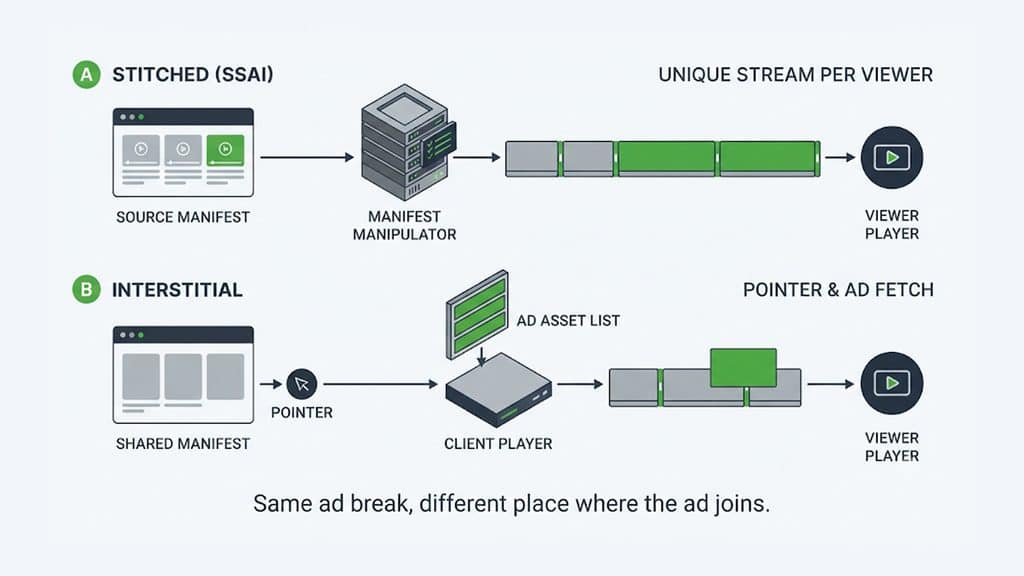
| Approach | Who places the ad | Playlist per viewer | Legacy-device behavior |
|---|---|---|---|
| Stitching (SSAI) | The server, inline in the stream | Typically unique per session | Plays normally; the ad is part of the stream |
| SCTE-35 cue tags | A downstream system that acts on the marker | Same markers for everyone | Players ignore the markers; nothing plays unless something downstream acts |
| Interstitials | The player, from a separate asset | One shared playlist; personalization happens in the asset-list request | Tag is ignored; the main content plays and the ad does not |
The last row is the business catch: on a player that does not implement interstitials, an ignored tag is an unmonetized view. Apple’s own guidance for backward compatibility is to keep static insertion for older devices, or to encode slates directly into the primary asset and override them with interstitials on newer devices. Our SGAI guide compares the wider trade-offs, including measurement and interactive formats.
How a Live Break Plays, Step by Step
Here is the sequence for a live break, from announcement to resume.
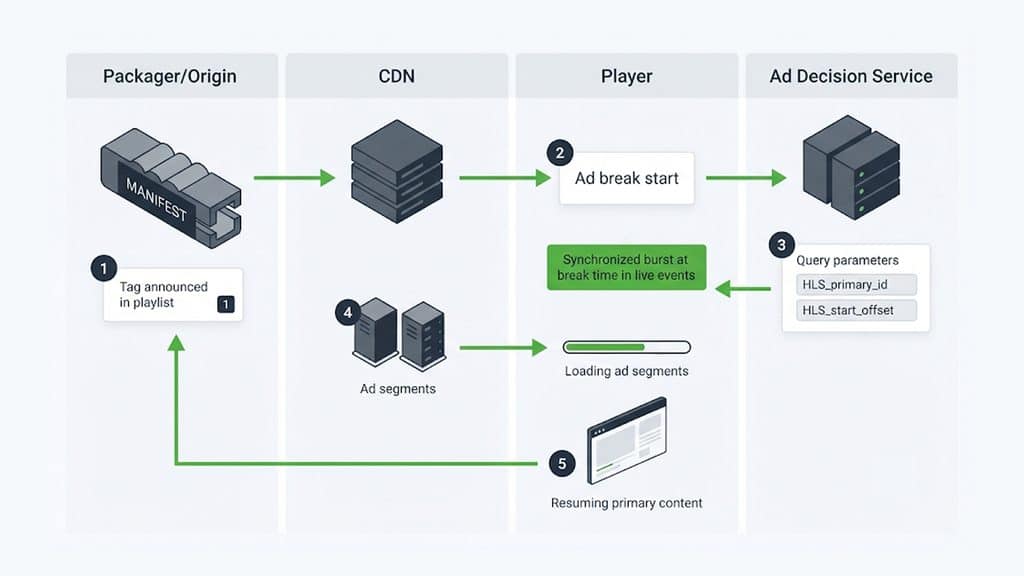
- Announce. The packager adds the interstitial tag to the live playlist ahead of the break. Apple recommends scheduling events early enough for the player to buffer. For SCTE-35-derived date ranges, the draft says the tag should be added no later than the last pre-splice segment, and earlier when possible.
- Resolve. As playback approaches the break, the player requests the asset-list URL and appends query parameters. _HLS_primary_id ties the request to the primary playback session, and _HLS_start_offset tells the server how far into the break playback will begin, which matters when a viewer joins mid-break. Apple added both in 2022.
- Decide. The decisioning service returns the JSON asset list. Knowing the start offset, it can place the most valuable ads in the time that remains instead of the part the viewer has already missed. This is where your ad decision server does its work.
- Play. The player loads each asset as its own stream through the CDN, plays them back to back, honors X-PLAYOUT-LIMIT and X-RESTRICT, and fires whatever tracking your ad stack has agreed on.
- Return. The player resumes the primary content according to X-RESUME-OFFSET, snapping to a segment boundary if X-SNAP asks for it.
Changing a break after you announce it
A live playlist can add attributes to an existing break by repeating the tag with the same ID in a later reload. Existing values cannot change; only new attributes can be added. A common use is adding X-PLAYOUT-LIMIT late to cut a break short and send viewers back to the main program.
When something fails
Apple’s guide is explicit about failure: if the request for an interstitial asset or an asset list returns an error, the client cancels the break and resumes the primary content. The viewer sees the show continue, but the ad slot is lost, so asset-list latency and error rates are revenue metrics, not just infrastructure ones.
What HLS Interstitials Mean for Your CDN
Interstitials are usually framed as an ad-tech topic, but they reshape your delivery traffic in five ways.
- The primary playlist can be shared. Because the tag is a pointer rather than stitched content, every viewer can receive the same live playlist. RFC 8216 itself highlights HLS’s compatibility with large-scale HTTP caching, and interstitials preserve it.
- The asset-list request is the new hot path. It carries per-session query parameters, so it typically bypasses a shared cache, and in a live event every player reaches the same break within seconds of the others. That is a synchronized burst on the decisioning endpoint, the same synchronized-peak pattern that stresses platforms during major live events, which we cover in why streaming platforms crash during live events. Keep asset-list responses small, fast and tolerant of failure.
- Ad creatives are ordinary VOD segments. Popular creatives cache well; long-tail personalized creatives cause more origin fetches. Ad assets deserve the same attention to cache hit ratio as your content does.
- Requests are visible to the client. The player calls the asset list and the creatives directly. If the asset-list URL redirects to a third-party ad domain, ad blockers can match it. Serving the asset list and creatives from your own hostname through the CDN keeps them first-party and harder to filter. Apple notes a server can answer with a limited number of redirects without a major performance impact, but every hop is another request.
- Match formats to avoid visible seams. Interstitial assets can use different codecs from the primary, but Apple notes this can cause transition delays on some devices, and it recommends the same aspect ratio. Encoding creatives onto the same codec family and aspect ratio as your encoding ladder is a cheap way to avoid glitches.
If you stream live event streaming, include the asset-list endpoint and your ad creative cache in the capacity plan, and configure the CDN that carries both content and ads accordingly.
Player Support for HLS Interstitials
Support is real but uneven, and it varies by attribute, not only by player.
- Apple platforms: AVFoundation has handled interstitials natively since the mechanism’s introduction in 2021, through the AVPlayerInterstitialEvent family of APIs for scheduling, observing and canceling breaks.
- hls.js: added interstitials in its 1.6 release line, with events for asset-list loading and for the start and end of breaks and assets, plus error types for asset-list load, timeout and parse failures.
- Shaka Player: includes an interstitial manager that parses interstitial date ranges, resolves asset lists, and re-requests an asset list with an updated start offset when a viewer seeks into a live break.
- Android Media3: parses interstitial date ranges into a model with fields for cue, resume offset, playout limit, snap and restrictions.
- Everything else: smart TVs, set-top boxes and older SDKs generally ignore the tags, as the spec intends.
Even where support exists, check the fine print. One commercial player SDK’s iOS documentation lists X-SNAP, X-TIMELINE-OCCUPIES, X-TIMELINE-STYLE and X-CONTENT-MAY-VARY as not supported, so a feature that works on Apple’s own player does not guarantee it works elsewhere. A practical test matrix for any player:
- Play through a break from start to finish.
- Seek over a break and check whether it plays when X-RESTRICT includes JUMP.
- Replay the section after a break to confirm CUE=”ONCE” holds.
- Join the live edge just before a break, and join again mid-break.
- Make the asset list return an error and confirm the stream resumes.
Why Your Interstitial Isn’t Playing: A Debugging Checklist
Most failures come down to a short list of causes. Start with the first row and work down.
| Symptom | Likely cause | What to check |
|---|---|---|
| The break never plays on any player | Malformed EXT-X-DATERANGE: whitespace in the attribute list, missing quotes, both or neither of X-ASSET-URI and X-ASSET-LIST. Clients ignore illegal date ranges silently. | Validate the tag character by character against the attribute-list rules |
| The whole stream fails to load | A duplicated attribute name in a tag. Clients are told to refuse such playlists. | Search the tag for repeated attribute names |
| Tag is present but players ignore it | No EXT-X-PROGRAM-DATE-TIME in the playlist, a mistyped CLASS, or tags that differ between renditions | Add the program date; match CLASS exactly; compare every rendition playlist |
| Plays on iOS or Safari but not on a TV or older player | The player does not implement interstitials, so the tag is ignored by design | Use stitched insertion for those device classes |
| The break plays again after a replay or seek-back | CUE does not include ONCE | Add CUE=”ONCE” |
| Viewers skip or seek past the ad | X-RESTRICT is missing, or the player does not enforce it. Apple notes enforcement happens at the player UI level. | Add X-RESTRICT=”SKIP,JUMP” and test enforcement on each player |
| Live viewers fall further behind live after every break | X-RESUME-OFFSET=0 set on a live stream | Omit the attribute so the player resumes after the break’s duration |
| Viewers lose part of the film after each VOD break | X-RESUME-OFFSET omitted when you meant to insert | Set X-RESUME-OFFSET=0 |
| Black frames or a stutter at the transition | Codec or aspect-ratio mismatch between ad and content, or clock drift between packager and encoder on live | Match codec family and aspect ratio; add X-SNAP for live |
| The ad slot is skipped and the show resumes | The asset-list or asset request returned an error, so the client canceled the break | Check asset-list latency and status codes from the viewer’s network path |
A stream tester such as our HLS and DASH stream tester is a quick way to confirm that the playlist parses and plays, and our guide to HLS manifest errors covers the wider troubleshooting cluster. Whether a break fires still depends on the player build you test with, so repeat the test on each player in your fleet.
When to Use HLS Interstitials
Interstitials fit best when:
- You control most of the player fleet (web apps on hls.js or Shaka, native Apple and Android apps) and can test attribute behavior on each.
- You want client-side measurement or interactive ad formats, which stitched breaks make difficult.
- You are scheduling non-ad content too. Apple’s own examples of PRIMARY-style interstitials are rating bumpers and post-roll dub cards.
Stay with stitching, or run both, when a large share of your audience is on connected-TV devices and set-top boxes whose players ignore the tags. If you are building an ad-supported streaming service for a mixed device base, the pragmatic design is stitched breaks for legacy device classes and interstitials for modern players, chosen per session. The ad insertion workflow you pick on the server side decides how much of that you can automate.
Plan Ad Breaks and Delivery Together
Whether a break is stitched into the stream or resolved by the player, it lands on your delivery network as extra requests, extra segments and sharp peaks at break time. 5centsCDN’s ad insertion handles SCTE-35 markers and server-side ad stitching inside the same CDN that delivers your stream. If you are weighing stitched against player-resolved breaks for your device mix, the 5centsCDN team can help you plan the ad stack and the delivery footprint together.
Frequently Asked Questions
What are HLS interstitials?
HLS interstitials are a way to schedule ads, bumpers or other separate video assets onto an HLS stream’s timeline using an EXT-X-DATERANGE tag with the class com.apple.hls.interstitial. The player fetches the interstitial asset itself, plays it, and then returns to the main content.
Are HLS interstitials the same as SGAI?
Not quite. SGAI is the ad-insertion architecture in which the server decides the ad and the player fetches, plays and tracks it. HLS interstitials are the HLS-side signaling mechanism that implements it; DASH uses events instead. Our SGAI guide explains the architecture, and this guide covers the HLS mechanics.
Do HLS interstitials work with live streams?
Yes. The interstitial asset must be VOD, but it can be scheduled against live primary content, including Low-Latency HLS. Live-specific features such as X-SNAP and the _HLS_start_offset query parameter exist to handle clock drift and viewers who join mid-break.
What happens on a player that doesn’t support interstitials?
It ignores the tag and plays the main content without the break, so no ad is shown. Services that need coverage on those devices typically keep stitched ad insertion for them.
Are HLS interstitials part of RFC 8216?
No. RFC 8216 predates them. Interstitials are defined in Appendix D of the HLS 2nd Edition Internet-Draft (draft-pantos-hls-rfc8216bis), which is a work in progress and not an IETF standard.
