


HLS manifest error is one of the most common causes of sudden playback failures. Your stream was working an hour ago. Now the player shows a spinner that never resolves, or a blunt manifestLoadError, and every viewer sees the same dead screen. Nothing in the video changed—the problem is that the player can no longer load the one small text file the entire stream depends on: the .m3u8 manifest.
The manifest is the control plane of an HLS stream. It is a plain-text playlist that tells the player where every video segment lives, which quality renditions exist, and how to sequence them. If the player cannot fetch or parse that file, there is no stream to play — the player has no fallback and stops immediately. That is why a manifest error feels catastrophic even though the video segments themselves may be sitting on the CDN, perfectly intact.
The good news is that manifest failures are rarely mysterious. They almost always trace back to a handful of specific, possible causes: a wrong URL, a CORS block, broken segment paths, an expired token, a stale cache, or mixed content. This guide walks through what the manifest actually is, the causes that break it, and a step-by-step method to find and fix the one that is breaking yours.
What the .m3u8 Manifest Actually Is
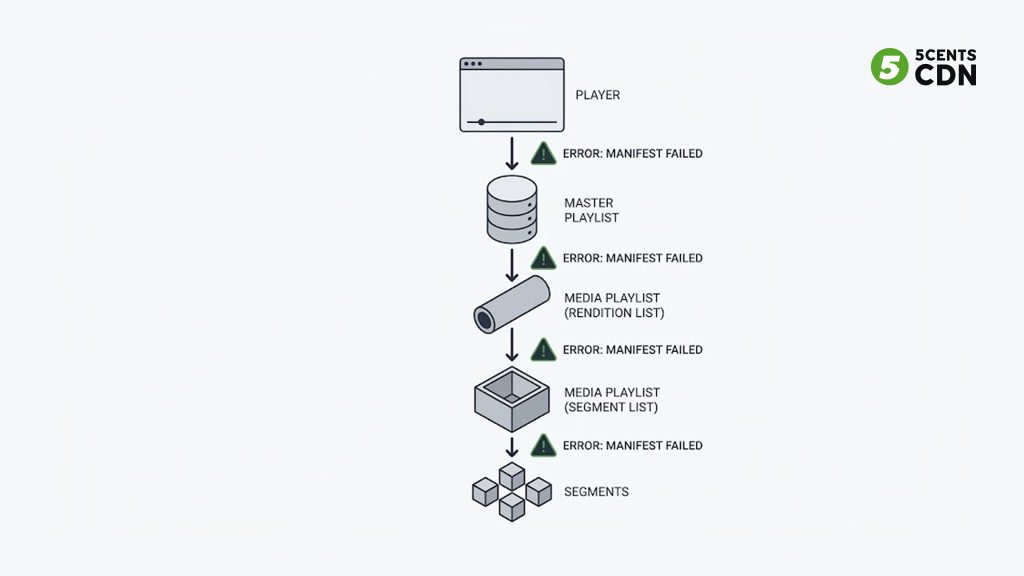
Before you can debug a manifest error, it helps to know what the player is trying to load. HLS, defined by Apple in RFC 8216, delivers video as a series of short segments listed in a playlist file with an .m3u8 extension.
Most streams use two levels of playlist. The master playlist (sometimes called the multi-variant playlist) lists the available quality renditions — 1080p, 720p, 480p — and points to a separate media playlist for each. Each media playlist lists the actual segment files in playback order, along with timing and any encryption key references. When you load a stream, the player fetches the master playlist first, picks a rendition based on available bandwidth, then fetches that rendition’s media playlist, and only then starts requesting segments.
That two-step resolution matters for debugging, because a manifest error can happen at either level. The master might load fine while a media playlist 404s. A rendition might be listed but point to a path that no longer exists. Knowing which playlist failed tells you where to look — and the browser’s developer tools will show you exactly which request broke.
Cause 1: The Manifest URL Is Wrong or the File Is Missing
The most common manifest error is also the most mundane: the player is asking for a file that is not there. The URL might have a typo, point to the wrong path, or reference a stream that was never generated — or has already ended.
For live streams, “the file is not there” often means the encoder stopped. HLS manifests for live content are generated on the fly as the encoder pushes segments; if the encoder disconnects, the origin stops updating the playlist, and depending on configuration the .m3u8 may disappear or go stale. A manifest URL that worked during rehearsal but 404s at showtime usually means the live source is not actually running.
The fastest way to confirm this cause is to open the .m3u8 URL directly in a browser. A working master playlist returns the file’s text contents — you will see lines beginning with #EXTM3U and #EXT-X-STREAM-INF. If instead you get a 404 page, the file is genuinely missing or the path is wrong. Fix the URL, confirm the encoder is running, and verify the origin is writing the playlist where the URL expects it.
Cause 2: CORS Is Blocking the Manifest
This is the error that produces the most confusion, because the manifest request succeeds — it returns a 200 — and yet the stream still will not play. The culprit is CORS: Cross-Origin Resource Sharing.
When a browser-based player fetches a manifest from a different origin than the page it is embedded on (which is almost always the case when video is served from a CDN), the browser enforces CORS. According to MDN’s reference on the Access-Control-Allow-Origin header, any cross-origin fetch from JavaScript requires the server to return an allow header that matches the requesting page’s origin, or a wildcard. If that header is missing, the browser blocks the response from being read by the player — even though the file downloaded successfully.
In developer tools, the signature of a CORS failure is distinctive: the manifest request shows a green 200 status, but the console logs a red CORS error and the response body is unreadable to the player. Players like hls.js report this as a network error, which sends people hunting for a connectivity problem that does not exist.
The fix is on the server or CDN, not the player: configure the delivery layer to return Access-Control-Allow-Origin on manifest and segment responses. On a CDN this is typically a header rule applied to the streaming zone. Because the video segments are fetched the same way, the header must be present on segment responses too, not just the manifest — otherwise the manifest loads and playback still stalls a moment later.
Cause 3: Segment Paths Are Broken
Sometimes the manifest loads and parses perfectly, but playback fails within seconds because the segment paths inside it do not resolve. The manifest is a table of contents; if the chapters it points to are not where it says, the player fetches the first segment, gets a 404, and stops.
This usually comes from relative-path resolution. Media playlists commonly reference segments by relative path (segment0.ts) rather than absolute URL. The player resolves those relative to the location of the playlist itself. If a CDN rewrite, a proxy, or a miss-configured origin changes the effective path of the playlist without changing where the segments actually live, every relative reference resolves to the wrong place and 404s. The manifest looks valid; the segments are simply not where the manifest implies.
To diagnose, open the media playlist and read the segment lines. Then take one segment reference, resolve it against the playlist URL, and request it directly. If that request 404s while the playlist loaded fine, you have a path problem. The fix is to align the segment paths with reality — either correct the origin’s path structure or use absolute segment URLs in the playlist so no relative resolution is required.
Cause 4: An Expired or Invalid Token
If you protect your streams with signed URLs or token authentication — and paid or private content usually should be — a token problem produces a manifest error that is easy to misread. A stream that worked five minutes ago and now fails, with no code changes anywhere, is very often a stale token rather than a broken stream.
Signed tokens are deliberately short-lived; expiry windows are commonly measured in minutes. When the token in the manifest URL expires, the CDN rejects the request with a 403 Forbidden, and the player reports a manifest load failure. The same happens if the token is malformed, signed with the wrong key, or scoped to a different path than the one being requested.
In developer tools, a token failure shows as a 403 on the .m3u8 request, often with a small XML or JSON error body from the CDN explaining the rejection. That 403 is the tell that distinguishes an authentication problem from a missing-file 404 or a CORS 200. The fix depends on your setup: regenerate the token, confirm the signing key and path scope are correct, and make sure the token’s lifetime is long enough to cover the session — while still short enough to prevent URL sharing. Token enforcement is typically handled at the CDN edge, so the token logic and the manifest it protects need to agree on key, path, and expiry.
Cause 5: The CDN Cached a Stale or Empty Playlist
Live manifests change constantly — for a live stream, the media playlist is rewritten every few seconds as new segments are added and old ones roll off. That makes caching a double-edged sword. Cache the manifest too aggressively and the CDN keeps serving an old version of the playlist that references segments which have already expired, or an empty playlist captured before the stream started.
The symptom is a stream that loads but behaves strangely: playback that starts and immediately stalls, segments that 404 because the cached playlist points to a window that has already rolled off, or a live stream stuck far behind the live edge. The manifest itself loads with a 200 — it is just the wrong version.
The fix is caching discipline specific to the two playlist types. The master playlist rarely changes and can cache for longer. The live media playlist must have a very short cache lifetime — on the order of the segment duration — so the edge re-validates it constantly and never serves a window that has expired. Segments, which are immutable once written, can cache for much longer. A common miss-configuration is applying one blanket cache rule to every .m3u8 and .ts file; the fix is to cache segments long, master playlists moderately, and live media playlists barely at all. A “serve stale only on error” policy helps for outages but must be tuned tight for live so it never parks viewers on an outdated window.
Cause 6: Mixed Content (HTTPS Page, HTTP Stream)
A subtle but common failure: your page is served over HTTPS, but the manifest URL is HTTP. Modern browsers block “mixed content” — an insecure resource loaded by a secure page — as a security measure. The manifest request never completes, and the player reports a load error that looks like a network failure.
This one is easy to confirm and easy to fix. Check whether the page and the manifest URL use the same scheme. If the page is HTTPS and the stream URL starts with http://, that mismatch is the cause. Serve the manifest (and every segment) over HTTPS, and make sure any absolute URLs inside the playlist also use HTTPS so a secure master playlist does not reference insecure media playlists or segments.
How to Diagnose a Manifest Error in Five Minutes
Guessing wastes time. This ordered check identifies almost any manifest error quickly, and it starts in the one place that shows you the truth: the browser’s network tab.
[IMG-2] Status-code decision map — 200+CORS, 404, 403, and stale-200 each branch to their cause and fix.
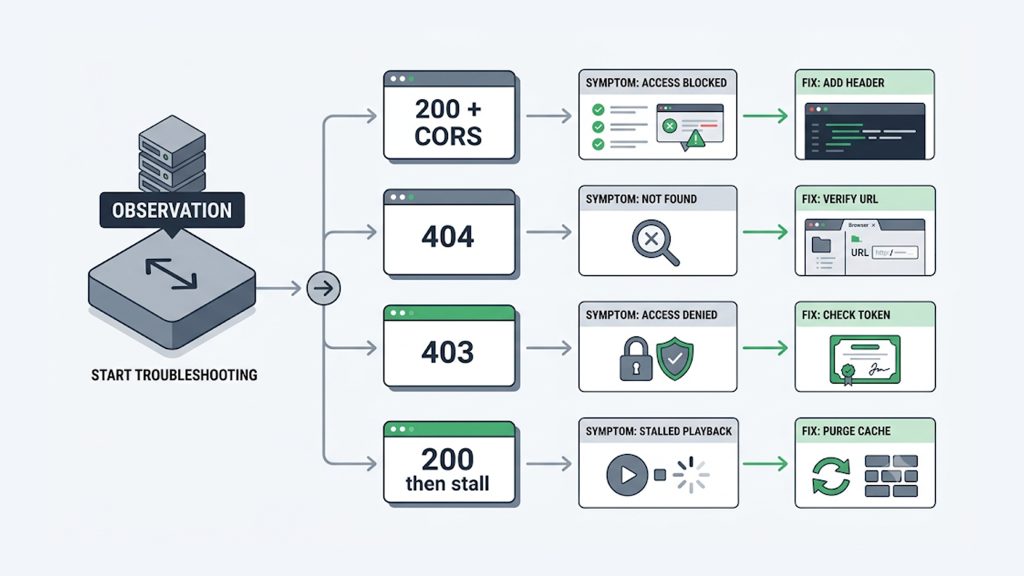
| Status | What it looks like | Most likely cause |
|---|---|---|
| 200 + CORS | Green status, red CORS console error, unreadable body | Missing Access-Control-Allow-Origin header on manifest/segments |
| 404 | Playlist text not returned; not-found page | Wrong URL, missing file, or live encoder stopped |
| 403 | Small XML/JSON rejection body | Expired, malformed, or wrong-scope token / signed URL |
| 200 then stall | Loads, plays briefly, then fails | Stale cached playlist or broken segment paths |
Step 1: Open the manifest URL directly in a browser. If you get the playlist text (#EXTM3U…), the file exists and the problem is downstream — CORS, tokens, paths, or caching. When you get a 404, the file is missing or the URL is wrong. If you get a 403, it is a token or access problem. This single test splits the problem space in half.
Step 2: Open developer tools and read the status code. Reload the stream with the Network tab open and filter for m3u8. The exact status on the manifest request is the most important clue you have. A green 200 with a red CORS console entry is a CORS problem. A 404 is a missing file or wrong path. A 403 is a token or permission problem. A 200 that plays briefly then fails points to stale cache or broken segment paths.
Step 3: Check whether it is the master or the media playlist that failed. If the master loads but a rendition’s media playlist fails, the problem is scoped to that rendition’s path or origin. This tells you whether to look at the top-level URL or at a specific rendition’s configuration.
Step 4: Test one segment directly. Take a segment reference from the media playlist, resolve it to a full URL, and request it. If the playlist loaded but the segment 404s, you have a path or caching problem, not a manifest-fetch problem.
Step 5: Compare against a known-good stream. Load a clean public HLS sample in the same player. If the sample plays and yours does not, the difference is in your delivery configuration — headers, tokens, paths, or caching — not in the player or the network.
Working the steps in order means each test rules out a category, so you converge on the real cause instead of changing settings at random.
How to Prevent Manifest Errors Before They Happen
Most manifest errors are configuration problems that only surface under real conditions — a token expiring mid-event, a cache rule that was fine for VOD but wrong for live. A few delivery-side habits prevent the majority of them.
Set CORS headers once, correctly, on the whole streaming path. Ensure Access-Control-Allow-Origin is returned on both manifests and segments across the streaming zone, so a cross-origin player never hits a silent block. Configuring this at the CDN edge applies it uniformly instead of per-file.
Cache the three file types differently. Long TTL for immutable segments, moderate for the master playlist, near-zero for live media playlists. This single distinction prevents the stale-playlist class of failure and keeps live streams pinned to the live edge.
Scope token lifetimes to the session, not the segment. A token must outlast the whole viewing session, or viewers get a mid-stream 403 when it expires. Pair sensible expiry windows with correct path scoping so protection never becomes a self-inflicted outage. Token handling is covered further in our guide to token-based authentication and, for encrypted delivery, HLS encryption.
Keep the whole path on HTTPS. Serve manifests, playlists, and segments over TLS, and make sure any absolute URLs inside playlists are HTTPS too, so mixed-content blocking never applies.
Monitor the manifest, not just the origin. Synthetic checks that actually fetch and parse the .m3u8 catch a broken or stale playlist before viewers do — far better than waiting for support tickets during a live event. This is part of the same delivery discipline that keeps OTT platforms stable at scale.
Frequently Asked Questions
What does manifestLoadError actually mean?
It means the player could not fetch or parse the .m3u8 playlist file that lists the stream’s segments. Players like hls.js classify it as a fatal network error because without the manifest there is no stream to play — the player has no fallback and stops. The underlying cause is almost always one of a small set: a wrong or missing URL (404), a CORS block (200 but unreadable), an expired token (403), a stale cached playlist, or mixed content. The error name describes the symptom; the status code on the manifest request tells you the real cause.
Why does my manifest return 200 but the stream still won’t play?
A 200 that still fails is the classic signature of a CORS problem. The file downloaded successfully, but because the required Access-Control-Allow-Origin header is missing, the browser blocks the player from reading the response. The fix is to add the CORS header on the delivery side for both manifests and segments. A 200 that plays briefly then stalls is different — that points to a stale cached playlist or broken segment paths rather than CORS.
Why did my stream work five minutes ago and suddenly stop?
The most common answer is an expired token. Signed URLs and access tokens are deliberately short-lived, often expiring in minutes, so a stream that was fine and then fails with no code changes is usually a stale token producing a 403 — not a broken stream. The second most common answer for live streams is that the encoder stopped, so the origin is no longer updating the manifest. Check the manifest’s status code first: a 403 points to tokens, a 404 points to a missing live source.
How do I fix a CORS error on my HLS stream?
Configure your delivery layer to return the Access-Control-Allow-Origin header on manifest and segment responses. On a CDN this is a header rule applied to the streaming zone, which is more reliable than trying to set it per file at the origin. Make sure the header is present on the segment (.ts or .m4s) responses as well as the .m3u8 — a common mistake is adding it only to the manifest, which loads the playlist but then stalls playback when the first segment is blocked.
Is a manifest error caused by the player or the server?
Almost always the server or delivery configuration, not the player. The player is faithfully reporting that it could not load or read the manifest; the reason lives in the URL, the headers, the token, or the cache. The quickest way to confirm is to load a known-good public HLS sample in the same player — if the sample plays and your stream does not, the player is fine and the problem is in your delivery setup.
What is the difference between the master playlist and the media playlist?
The master (or multi-variant) playlist lists the available quality renditions and points to a separate media playlist for each. The media playlist lists the actual segment files in playback order. The player loads the master first, chooses a rendition, then loads that rendition’s media playlist before requesting segments. A manifest error can occur at either level, so identifying which one failed — the master or a specific rendition’s media playlist — narrows the problem to either the top-level URL or a single rendition’s configuration.
Getting Your Stream Back Online
A manifest error looks alarming but it is almost always a small, findable configuration problem — a missing header, an expired token, a wrong path, a stale cache — not a failure of the whole stream. Open the .m3u8 directly, read the status code in developer tools, and let the code point you to the cause: 404 for a missing file, 200-with-CORS for a header block, 403 for a token, a stale 200 for caching. Work the steps in order and the real cause surfaces fast.
| Getting your stream back online 5centsCDN delivers HLS and DASH streams with the controls that prevent this whole class of error — configurable CORS headers, token authentication, per-file-type cache settings, and delivery tuned for live and VOD alike. If you are fighting manifest errors or want your delivery configured to avoid them from the start, contact our team and we will help you get playback solid. |
