


A TLS certificate is the quietest single point of failure in a streaming service. It does nothing visible for months, then expires on a specific date, and when it does, the damage is total: players refuse to load manifests, browsers show a warning nobody can click through, apps fail silently, and a live event stops for every viewer at once. 47-day TLS certificates make that expiry cycle even more important to plan for. Certificate expiry is one of the few outages that is entirely predictable and still happens constantly, because the date sits in a calendar nobody is watching.
That calendar just got much faster. An industry-wide change, already in force, is cutting the maximum lifetime of publicly trusted TLS certificates from more than a year to 47 days over the next three years. For a simple website with one certificate, that is an annoyance. For a streaming operation with dozens of hostnames across players, APIs, license servers, custom CDN domains, and several CDNs, it multiplies the number of renewals many times over, and any process that relies on a person remembering to upload a file will eventually fail on a bad day. This guide explains exactly what is changing and when, why streaming and CDN operators are hit harder than most, the failure modes to plan for, and a practical plan to make certificates something you stop thinking about.
What Is Changing, and When
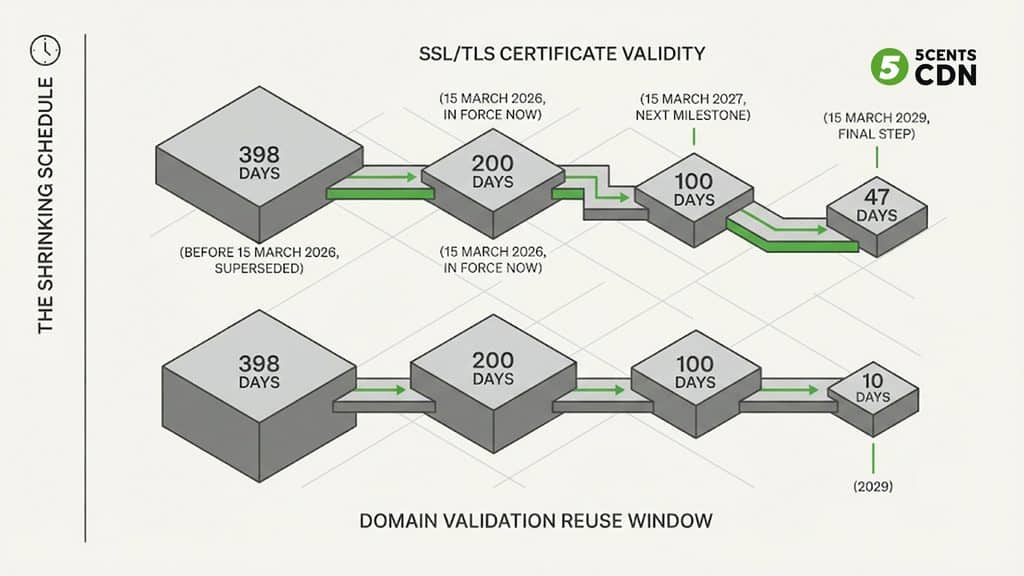
The change comes from the CA/Browser Forum, the body in which certificate authorities and the browser makers (Apple, Google, Microsoft, and Mozilla) agree the rules that publicly trusted certificates must follow. In April 2025 it adopted Ballot SC-081v3, which passed with no votes against, including all four browsers. The ballot sets a phased schedule, starting in March 2026 and concluding in March 2029, that reduces two things together: the maximum lifetime of a certificate, and the length of time a certificate authority may reuse an earlier proof that you control a domain.
The schedule at a glance
| Effective date | Maximum certificate lifetime | Domain-validation reuse | Status (October 2026) |
| Before 15 March 2026 | 398 days | 398 days | Superseded |
| 15 March 2026 | 200 days | 200 days | In force now |
| 15 March 2027 | 100 days | 100 days | Next milestone |
| 15 March 2029 | 47 days | 10 days | Final step |
Source: CA/Browser Forum Ballot SC-081v3 (schedule starts March 2026 and concludes March 2029). Intermediate dates as published in the TLS Baseline Requirements; confirm against the current version before planning.
Three points about how this works are worth being clear on. First, this is not a law. These are the Baseline Requirements that public certificate authorities must follow and that browsers enforce through their root programs, which is why the change is effectively mandatory: a certificate that breaks the rules is simply distrusted. Second, certificates already issued keep their original validity until they expire; the new limit applies to certificates issued after each date, so the effect arrives at your next renewal. Third, the rules govern publicly trusted certificates. Certificates from a private or internal certificate authority set their own lifetimes.
The first milestone has already passed. Since March 15, 2026, new public certificates cannot be valid for more than 200 days, and the next step, to 100 days, arrives on March 15, 2027, a little over four months from now. The dates above reflect the schedule as of October 2026; confirm them against the current TLS Baseline Requirements when you plan.
Why Streaming Is Hit Harder Than a Typical Website
A small website has one hostname and one certificate, and renewing it twice a year is trivial. Streaming operations are different in ways that multiply the problem.
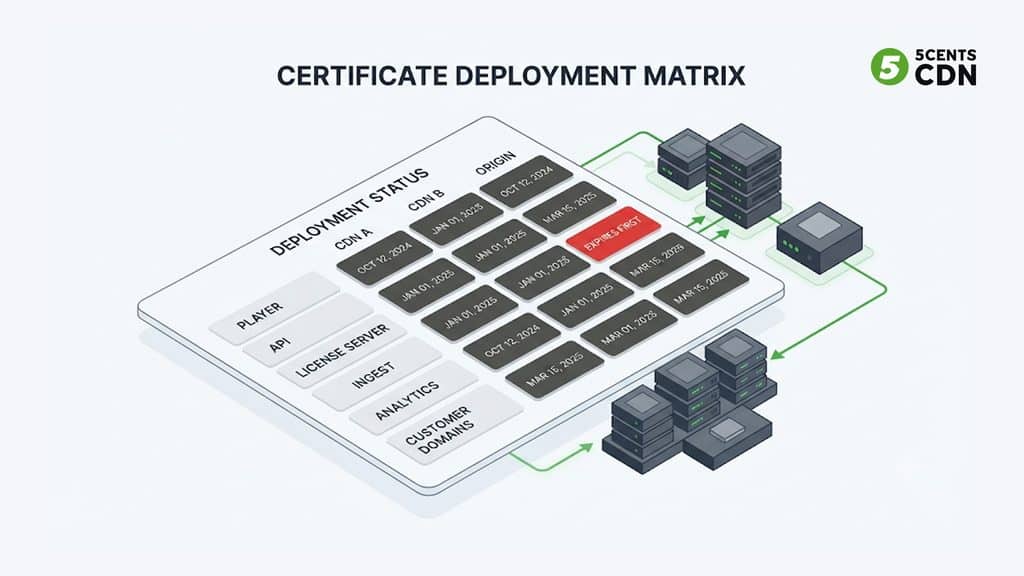
You have many hostnames. A typical operator has a player domain, an API, custom CDN hostnames for playback, ingest endpoints, a DRM license server, an analytics endpoint, and often separate domains for each white-label or enterprise customer. Every one needs a valid certificate. You often have several CDNs, and each CDN has to present a valid certificate for your hostname, so the number of certificate deployments is hostnames multiplied by CDNs, not just hostnames. Your audience is on devices you do not control, from current browsers to smart TVs and set-top boxes with old trust stores. Your service is embedded in other people’s pages and apps, so a certificate error does not just look bad on your site; it breaks playback inside a partner’s product. And your busiest moments are scheduled, which means an expiry can land in the middle of a live event, when the cost of failure is highest.
The Renewal Math
The scale of the change is easy to underestimate until you count. Consider an illustrative operator with 20 hostnames served through 2 CDNs, which is 40 certificate deployments to keep valid.
Renewals per year for 40 certificate deployments (illustrative)
| Maximum lifetime | Renewals per certificate per year | Across 40 deployments (minimum) |
| 398 days | about 0.9 | about 37 |
| 200 days | about 1.8 | about 73 |
| 100 days | about 3.7 | about 146 |
| 47 days | about 7.8 | about 311 |
Illustrative: 20 hostnames × 2 CDNs = 40 deployments. Figures assume renewal at expiry; renewing earlier, as recommended, raises the count.
Under the old 398-day limit that was roughly 37 renewals a year, a manageable amount for a careful team with a spreadsheet. At 100 days it is about 146, and at 47 days it is about 311, which is more than one for every working day of the year. These are minimums, because certificates should be renewed before they expire rather than on the last day; the guidance from large free certificate authorities is to renew about two-thirds of the way through a certificate’s lifetime, which pushes the real number higher. Few teams can do 300 manual renewals a year without missing one.
There is a second, quieter burden. A certificate authority has to confirm that you control the domain before it issues a certificate, and it may reuse an earlier confirmation for only a limited time. That reuse window is shrinking in step with certificate lifetimes, from 398 days to 10 days by 2029. In practice, proving control of your domains has to happen at roughly every renewal, so domain validation, usually done through a DNS record, must become something a system does automatically rather than a task a person does.
Free and Automated Certificates Are Not Exempt
It is tempting to assume that free, automated certificates sit outside all this. They do not; they are shrinking too. Let’s Encrypt, a widely used free certificate authority, issues 90-day certificates today and has published its plan: its default profile moves to 64-day certificates on February 10, 2027, and to 45-day certificates by February 2028, ahead of the 47-day industry limit. Its own guidance is that manual renewal is not recommended, and that systems should renew automatically and alert when renewal fails.
The practical lesson is that the question is no longer whether to automate, but how soon. Automated issuance and renewal, built on the standard protocol for it, ACME (RFC 8555), is the one approach that stays sustainable as lifetimes keep falling. Manually purchased, manually uploaded certificates are the pattern that breaks.
Where It Bites: Five Streaming-Specific Failure Modes
Live events. An expiry during a live event is a total outage for everyone watching, with no graceful degradation. The defense is operational as much as technical: renew well ahead of any major event, treat the weeks before it as a change freeze for certificates, and verify the live certificate from outside your network before you go live.
Multi-CDN pathways. When you run more than one CDN, every pathway needs a valid certificate for the same hostnames. If one CDN’s certificate expires, a steering system that is working perfectly will happily send viewers to a pathway that now fails every request. Certificate validity has to be monitored per CDN, not once per hostname, and it belongs in the same operational picture as the switching logic described in our guide to content steering and the architecture in our multi-CDN pillar. It also matters for resilience planning; our guide on keeping streaming up through a provider outage covers the wider picture.
Devices and pinning. Smart TVs, set-top boxes, and older mobile apps can carry outdated trust stores, and some apps pin a specific certificate. A pinned leaf certificate breaks at every renewal, which becomes untenable when renewals happen every few weeks. Avoid pinning leaf certificates, test renewed certificates and their chains on the oldest device you still support, and treat any app that hard-codes a certificate as a ticking clock.
Embeds, APIs, and license servers. Playback depends on more than the video host. The player’s API, the analytics endpoint, and the DRM license server all use TLS, and a failure in any of them breaks playback in ways that are hard to diagnose, especially when your player is embedded in someone else’s site or app. Inventory every endpoint a session touches, not only the one in the address bar.
Manual uploads at scale. If your own certificates are uploaded to each CDN resource by hand, every renewal is a chance to miss one zone, and the miss shows up as an outage on exactly that hostname. The fix is to reduce the number of places a renewed certificate has to be installed.
A Practical Plan
Making this manageable is a matter of a handful of disciplined steps.
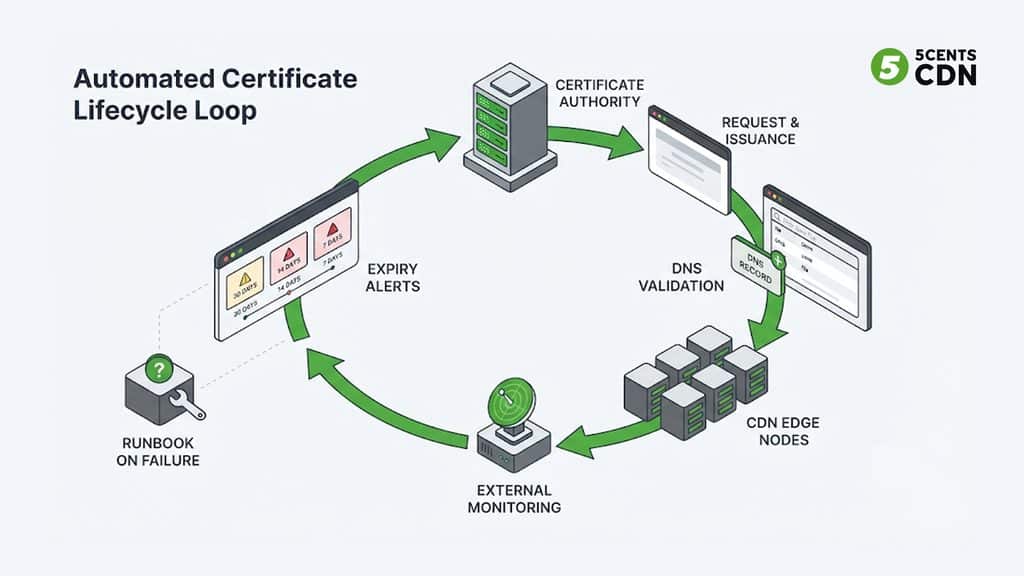
Inventory everything. List every hostname your service uses, where its certificate lives (which CDN, which zone, which server), who issued it, what type it is, and when it expires. You cannot automate what you have not found, and the forgotten hostname is the one that causes the outage.
Automate wherever you can. For the majority of streaming hostnames, a domain-validated certificate is enough, and a CDN-managed free certificate removes the manual step entirely. Automated issuance through ACME, or through your CDN’s built-in free SSL, should be the default, with manually managed certificates reserved for the cases that genuinely require them, such as organizational identity requirements.
Centralize what you must upload yourself. If you bring your own certificates, make sure each renewed certificate has to be installed in as few places as possible, and that deployment is scripted rather than clicked. Fewer installation points means fewer chances to miss one.
Automate domain validation. Make sure whatever issues your certificates can complete domain validation without a person, usually through DNS. Keep validation records in place rather than cleaning them up, give automation narrowly scoped DNS credentials, and be aware that persistent-record validation methods are being developed to make this easier.
Monitor from the outside. Check every hostname, on every CDN, with a synthetic test that reads the certificate the way a viewer would, and alert well in advance, for example at 30, 14, and 7 days. Monitoring is your safety net when automation fails quietly, and a renewal failure that is caught at 20 days left is an inconvenience, while one caught at 20 minutes is an outage.
Test on real devices after every change. Verify the renewed certificate and its chain on the oldest smart TV, set-top box, and app version you support, since trust-store problems appear on devices, not in your browser.
Set a freeze rule for events. Decide that no certificate may be within a defined window of expiry going into a major live event, and renew early enough that a failed attempt can be retried.
When You Host Other People’s Domains
Platforms that serve customers’ own hostnames, such as enterprise accounts, resellers, and white-label deployments, face a version of the problem that single-brand operators do not. Each customer’s hostname needs a certificate, and proving control of that domain usually depends on a DNS change that only the customer can make. As validation windows shrink, those proofs are needed more often, and a customer who removes a validation record during a DNS cleanup can quietly block the next renewal.
The practical response is to prefer validation methods that need a single, permanent DNS record rather than a fresh change each time, and to tell customers plainly to leave it in place. Build the expectation into onboarding, monitor each customer hostname the same way you monitor your own, and make sure someone owns the conversation when a renewal is at risk. A platform with hundreds of customer domains cannot rely on each customer remembering a task that now comes round every few weeks.
Have a Runbook for the Day It Fails Anyway
Automation reduces expiry incidents dramatically, but it does not abolish them: a DNS record gets removed, a credential expires, a certificate authority has a bad day. What separates a short incident from a long one is whether anyone has rehearsed the response.
Write down the emergency procedure before you need it. Know who is authorized to request an urgent certificate and where the account credentials live. Know exactly where each affected hostname’s certificate is installed and how a replacement gets deployed, because during an incident that discovery process is the slowest part. Keep the previous certificate and its chain available, and know how long a fresh issuance and deployment actually takes end to end, since that number tells you how early your alerts must fire. Then test it: pick a low-stakes hostname and rehearse a replacement under time pressure. The first time you practice should not be during a live event.
How This Maps to 5centsCDN
5centsCDN’s SSL options cover the cases above. Shared SSL works instantly without any certificate. Free SSL for custom CNAMEs can be set up from the control panel without contacting support, and the CNAME can be validated before you point it at the CDN, so a certificate can be deployed without any downtime, or alternatively validated after pointing. SAN certificates through Let’s Encrypt can cover multiple CNAMEs. Custom SSL lets you use your own certificate, intermediates, and key, and account-level certificate management means a certificate is uploaded once and then applied to as many zones as you choose, rather than uploaded resource by resource. That last feature matters most for teams that bring their own certificates, because it reduces the number of places a shorter-lived certificate has to be replaced. Verified domains are required before you use your own hostname in playback URLs, which is also worth putting on your inventory. HTTPS redirection and security headers are covered separately in our guide to CDN Edge Rules, and moving between CDNs without downtime is covered in our guide to migrating CDNs, where certificate readiness on the new provider is one of the first things to check.
A 47-Day Readiness Checklist
Pulling it together, an operator who is ready for shorter certificate lifetimes should be able to answer yes to each of these: every hostname across players, APIs, license servers, ingest, analytics, and customer domains is inventoried with its issuer, type, location, and expiry; each hostname is counted per CDN, not once; most certificates are issued and renewed automatically rather than uploaded by hand; any certificates you bring yourself are installed through as few places as possible and deployed by script; domain validation can complete without a person; validation records are left in place and automation uses narrowly scoped credentials; every hostname is monitored from outside on every CDN, with alerts at least 30 days ahead; renewed certificates and their chains are tested on your oldest supported devices; no app pins a leaf certificate; a certificate freeze applies before major live events; customer-owned hostnames are monitored and customers know to leave validation records in place; an emergency replacement runbook exists and has been rehearsed; and your plan has been checked against the 100-day limit arriving on March 15, 2027.
Make Certificates Boring Again
The shift to 47-day certificates is a deliberate push to make certificate management automatic, and for streaming operators the right response is to stop treating certificates as a task and start treating them as a system. The first milestone is behind us, the 100-day limit arrives in March 2027, and free authorities are shortening their own lifetimes on the same trajectory. Inventory what you have, automate issuance and validation wherever you can, reduce the places where a certificate must be installed by hand, and watch every hostname from the outside. Done well, the date that used to threaten every live event becomes something nobody on your team has to remember.
5centsCDN provides free SSL for custom CNAMEs, Custom SSL for certificates you bring yourself, and account-level certificate management, on a global CDN that supports multi-CDN setups. If you want help mapping your hostnames and certificates to a setup that will hold up as lifetimes shrink, talk to our team.
Frequently Asked Questions
What is changing with TLS certificate lifetimes?
The CA/Browser Forum’s Ballot SC-081v3 phases down the maximum lifetime of publicly trusted TLS certificates from 398 days to 47 days between March 2026 and March 2029, and shortens how long a certificate authority may reuse an earlier domain-control validation (to 10 days by 2029).
When do the new limits take effect?
200 days from 15 March 2026 (already in force), 100 days from 15 March 2027, and 47 days from 15 March 2029. Certificates already issued keep their original validity until they expire; the new limit applies at your next renewal.
Is this a law or a browser requirement?
Neither exactly. It is part of the Baseline Requirements that public certificate authorities must follow and that Apple, Google, Microsoft, and Mozilla enforce through their root programs. The ballot passed with no votes against, including all four browsers.
Why are streaming and multi-CDN setups hit harder than websites?
They have many hostnames (player, API, license server, ingest, customer domains), and every CDN must present a valid certificate for each one, so deployments equal hostnames times CDNs. Expiry can also land mid-live-event, and devices and embeds you don’t control can break on a bad certificate.
Do free certificates from Let’s Encrypt escape the change?
No. Let’s Encrypt issues 90-day certificates today, moves its default to 64 days on 10 February 2027, and plans 45 days by February 2028. Its guidance is that manual renewal isn’t recommended and that systems should renew automatically and alert on failure.
How should we prepare?
Inventory every hostname and where its certificate lives, automate issuance and renewal (ACME or CDN-managed free SSL), automate domain validation, reduce the number of places certificates are installed by hand, monitor every hostname on every CDN from outside, test renewed chains on your oldest devices, set an event freeze rule, and keep a rehearsed replacement runbook.
