


Understanding throughput vs latency is essential to understanding network performance. You pay for a fast internet connection, yet a live stream still stutters. The video that loads instantly on one network buffers on another with the “same” speed. The reason is that “fast” is not one number. Network performance is really several distinct measurements, and throughput vs latency are the two that decide whether a stream feels smooth or frustrating. They are constantly confused, and telling them apart is the key to understanding why a connection performs the way it does.
This guide explains what throughput and latency each measure, how they differ from bandwidth (the third term everyone mixes in), how they interact, and — because it is where these concepts stop being abstract — what each one means for streaming video and CDN delivery specifically.
The Simplest Way to Picture It
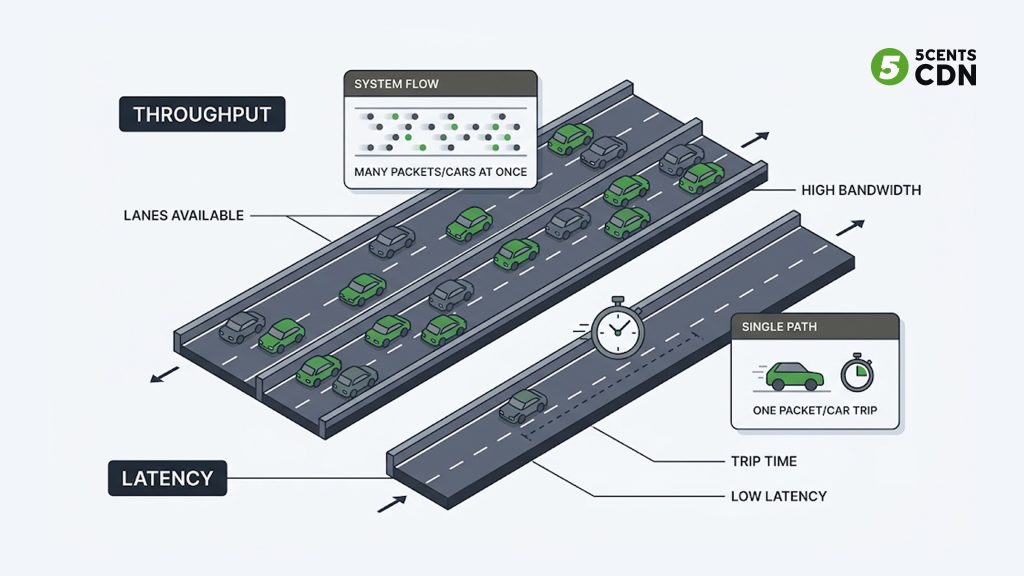
Before the precise definitions, one analogy makes the whole thing click: think of a highway carrying cars from one city to another. Latency is how long a single car takes to make the trip end to end. Throughput is how many cars actually arrive at the destination per hour. They measure completely different things — one is about time for one item, the other is about volume over time — and improving one does not automatically improve the other. A wider highway (more lanes) lets more cars through per hour, but it does not make any single car’s trip shorter. That gap between the two ideas is the whole story.
What Is Latency?
Latency is the delay — the time it takes for a piece of data to travel from its source to its destination, usually measured in milliseconds (ms). When people talk about “ping,” they are measuring latency: sending a tiny packet and timing how long it takes to get a reply (the round-trip time, or RTT). Lower latency means a more responsive connection.
Latency is not one single delay but the sum of several. Propagation delay is the raw travel time over distance — data crossing an ocean simply takes longer, bounded by the speed of light. Transmission delay is the time to push the packet onto the link. Processing delay is the time each router spends deciding where to forward the packet. And queuing delay is time spent waiting in line at a congested router. Add them up along the whole path and you get the total latency. The biggest lever is usually distance: the farther the data has to travel and the more network hops it makes, the higher the latency.
What Is Throughput?
Throughput is the amount of data that actually gets delivered successfully over a given time — the real, measured rate, usually in bits per second (Mbps or Gbps). If latency is about how fast one packet arrives, throughput is about how much data arrives per second in total. Higher throughput means more data moved in the same time, which is what matters for downloading large files or streaming high-resolution video.
The crucial word is “actually.” Throughput is what you really get, which is almost always less than the theoretical maximum, because congestion, packet loss (which forces data to be re-sent), protocol overhead, and hardware limits all eat into it. Two connections rated at the same headline speed can deliver very different real throughput depending on those conditions.
Where Bandwidth Fits In
Bandwidth is the third term in the mix, and confusing it with throughput causes half the trouble. Bandwidth is the maximum capacity of a link — the most data it could theoretically carry per second. Throughput is how much data you actually move through it. Back to the highway: bandwidth is the number of lanes (maximum possible flow), throughput is how many cars really get through given traffic, accidents, and roadwork.
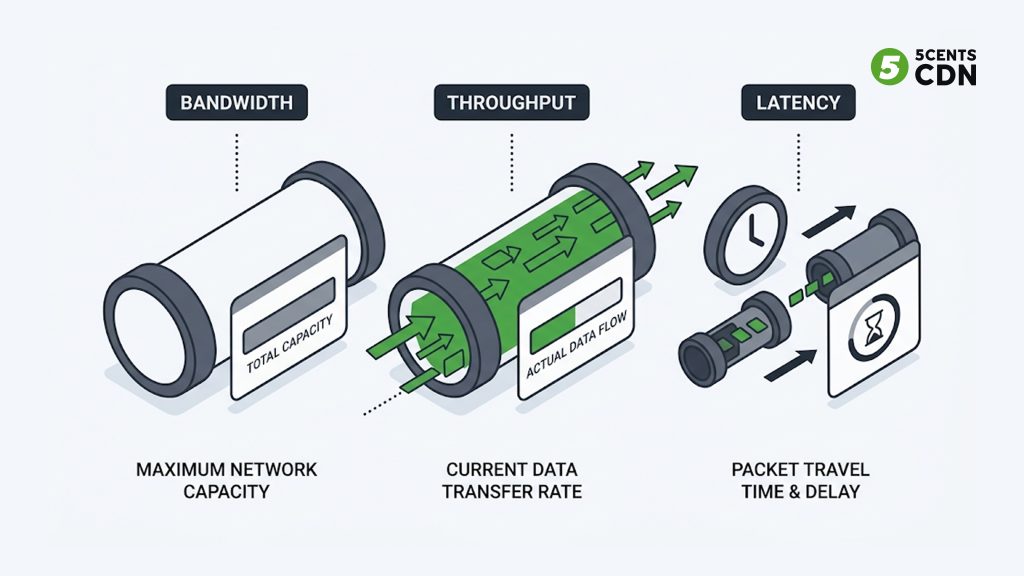
This is why “I have high bandwidth” does not guarantee good performance. A wide connection choked by congestion or packet loss delivers low throughput despite its capacity — the lanes exist, but the cars are not moving. Bandwidth is potential; throughput is reality; latency is the travel time. All three are different questions about the same connection.
How Throughput and Latency Interact
They are separate metrics, but they are not independent — and this is the part generic explanations miss. In reliable two-way protocols like TCP (which carries most web and streaming traffic), high latency can directly drag down throughput.
The mechanism has a name: the bandwidth-delay product. TCP sends a batch of data (a “window”) and then waits for the receiver to acknowledge it before sending more. On a high-latency link, each of those acknowledgement round-trips takes longer, so the sender spends more time waiting and less time sending — and throughput falls even if there is plenty of bandwidth available. It is like a warehouse that ships a truckload, then waits for a signed receipt to come back before dispatching the next one: the farther away the customer, the longer the wait, and the fewer trucks move per day no matter how many loading docks you have.
The reverse coupling exists too: pushing for maximum throughput can increase latency, because filling buffers and queues to keep the pipe full means individual packets wait longer in those queues (an effect known as bufferbloat). Engineers constantly balance the two rather than maxing out either in isolation.
What This Means for Streaming and CDN Delivery
For video, the practical question is which metric matters when — and the answer is that it depends on the type of content.
Throughput Matters Most For…
High-resolution and on-demand video. Streaming 4K needs a lot of data delivered steadily every second, so sustained throughput is what keeps the top of your adaptive bitrate ladder playable. If throughput drops, the player is forced down to a lower-quality rendition to avoid stalling. For a VOD library, healthy throughput is the difference between crisp playback and a permanent downgrade to blurry video.
Latency Matters Most For…
Live and interactive video. For a live sports stream, an auction, or a two-way call, what matters is how quickly each moment reaches the viewer — that is latency. High throughput does not help if the feed is thirty seconds behind the action. This is the entire focus of low-latency streaming, where the goal is to shrink the delay between capture and playback. A live stream can have ample throughput and still feel broken if latency is high.
Why a Fast Connection Can Still Buffer
Here is the everyday paradox resolved: buffering on a high-bandwidth connection is usually a latency or throughput-consistency problem, not a capacity one. If the video is served from a distant origin, every segment request makes a long round trip, and — via the bandwidth-delay product above — effective throughput sags, so the player cannot pull segments fast enough to stay ahead. This is exactly the problem a content delivery network (CDN) is built to solve. By caching the video on edge servers physically close to viewers, a CDN slashes the distance each request travels — cutting latency and, as a direct result, lifting effective throughput. It attacks both metrics at once, which is why moving content closer to the audience is the single most effective delivery optimization.
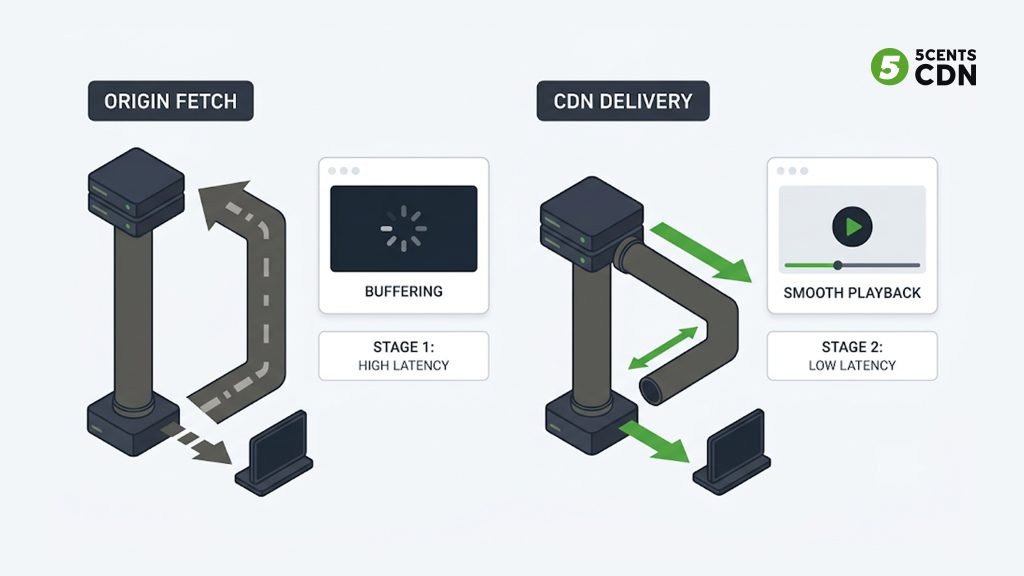
A high cache hit ratio compounds the benefit: when the edge already holds the requested segment, it is served immediately from nearby instead of fetched from a far origin, keeping both latency low and throughput high for the viewer.
Two More Metrics Worth Knowing: Jitter and Packet Loss
Throughput and latency get the headlines, but two related metrics quietly shape streaming quality and are worth understanding alongside them. Jitter is the variation in latency — not how long packets take, but how inconsistent that timing is. A stream can have acceptable average latency yet still stutter if packets arrive in an uneven, bursty rhythm, because the player cannot predict when the next chunk will land. Players absorb some jitter with a buffer, but too much overwhelms it. If latency is the average commute time, jitter is how wildly that time swings from day to day — and unpredictability is its own problem even when the average looks fine.
Packet loss is the share of packets that never arrive and must be re-sent. It hits both headline metrics at once: re-sending data consumes capacity, dragging throughput down, and waiting for the retransmission adds delay, pushing latency up. On live video especially, packet loss is a common culprit behind sudden quality drops. Together, jitter and packet loss explain many “why is it glitchy when my speed test looks fine?” situations — the averages can look healthy while the consistency underneath is poor.
Throughput vs Latency vs Bandwidth: Side by Side
| Bandwidth | Throughput | Latency | |
|---|---|---|---|
| Measures | Max capacity | Actual data delivered | Delay for data to arrive |
| Unit | Mbps / Gbps | Mbps / Gbps | Milliseconds (ms) |
| Highway analogy | Number of lanes | Cars actually arriving/hour | One car’s travel time |
| Better when | Higher | Higher | Lower |
| Measured with | Link spec | Speed test / transfer rate | Ping / RTT |
| Streaming impact | Ceiling on quality | Sustains high-res VOD | Critical for live/interactive |
How to Improve Each
Because throughput and latency are different problems, they call for different fixes — though, conveniently, the single most effective streaming optimization improves both at once. The common thread is distance: most latency comes from how far data travels, and — through the bandwidth-delay product — that same distance quietly caps throughput too. Shorten the distance and both metrics improve together, which is the core reason CDNs exist. The lists below separate the levers that mainly help each metric.
Reducing Latency
- Move content closer to viewers with a CDN and edge servers — shorter distance, fewer hops.
- Reduce the number of network hops and use efficient routing.
- Minimize processing and queuing delays along the path.
Increasing Throughput
- Reduce packet loss and congestion so less data has to be re-sent.
- Use a CDN to shorten round trips (which lifts throughput via the bandwidth-delay product).
- Apply QoS to prioritize time-sensitive traffic, and right-size protocol settings for the path.
Frequently Asked Questions
What is the difference between throughput and latency?
Latency is the time it takes one piece of data to travel from source to destination (measured in milliseconds). Throughput is how much data is actually delivered per second (measured in Mbps/Gbps). Latency is about speed of one trip; throughput is about volume over time.
Is throughput the same as bandwidth?
No. Bandwidth is the maximum capacity a link could carry; throughput is how much data actually moves through it. Real throughput is almost always lower than bandwidth because of congestion, packet loss, and overhead. Bandwidth is potential; throughput is reality.
Does high bandwidth mean low latency?
No. They are independent. A high-bandwidth connection can still have high latency — for example, a satellite link with huge capacity but a long signal distance. High bandwidth raises the ceiling on throughput but does not shorten the travel time of data.
Why does my stream buffer even on a fast connection?
Usually because of latency or inconsistent throughput, not bandwidth. If video is served from a distant origin, long round trips reduce effective throughput and the player can’t stay ahead. A CDN fixes this by serving from edge servers close to you, cutting latency and raising throughput.
Does latency affect throughput?
Yes, in reliable protocols like TCP. Because the sender waits for acknowledgements before sending more data (the bandwidth-delay product), higher latency means more waiting and lower effective throughput — even when bandwidth is plentiful. This is why reducing distance helps both metrics.
Which matters more for streaming, throughput or latency?
It depends on the content. High-resolution and on-demand video depend most on sustained throughput to keep quality high. Live and interactive video depend most on low latency so the feed stays close to real time. Most platforms need both, optimized together.
Optimizing Both with 5centsCDN
Throughput and latency both come down to how far your content has to travel and how efficiently it gets there. 5centsCDN improves both by delivering your video from edge servers close to your viewers — shortening round trips to cut latency and lift effective throughput at the same time. If you want to tighten up streaming performance for your audience, get in touch with our team to talk through the setup that fits your delivery.
