


Video gets all the attention in streaming, but audio is half the experience — and viewers are less forgiving of bad audio than bad video. A stream can drop a rung of video quality and most people shrug; let the audio crackle, desync, or muffle and they leave. Behind every clean-sounding stream is an audio codec quietly doing the compression work, and choosing the right one shapes quality, latency, bandwidth, and device compatibility.
This guide explains what an audio codec actually is, the lossy-versus-lossless divide that separates the major formats, and then compares the three codecs that matter most in modern workflows: AAC, Opus, and FLAC. It closes with the part most guides skip — which codec pairs with which streaming protocol, and how audio fits into your delivery bitrate budget.
What Is an Audio Codec?
An audio codec (short for coder-decoder) is an algorithm that compresses digital audio for storage or transmission and decompresses it for playback. Raw, uncompressed audio is enormous: CD-quality PCM runs to roughly ten megabytes per minute, which is hopeless for streaming. The codec’s encoder shrinks that data dramatically; the decoder in the viewer’s player reconstructs it in real time.
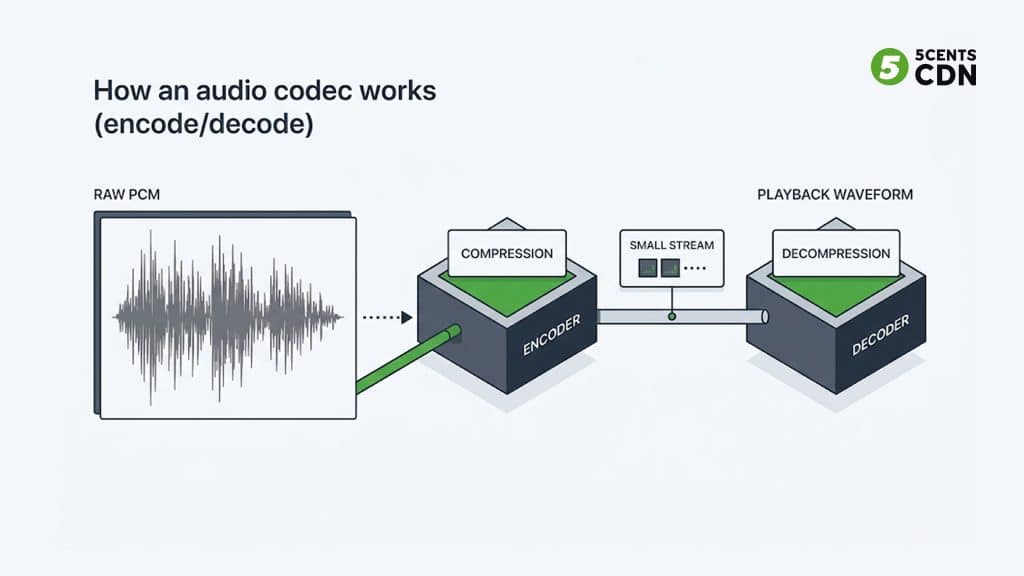
A useful mental model is packing a suitcase. The encoder is you packing before a trip: deciding what to bring, folding tightly, using every corner. The decoder unpacks at the destination. How the packing is done — what gets left behind, if anything — is what distinguishes one codec from another, and it is the basis of the single most important distinction in audio: lossy versus lossless.
One clarification worth making early because it prevents endless confusion: a codec is not the same as a container or file extension. AAC audio usually travels in an .m4a or .mp4 container; Opus commonly lives in Ogg or WebM. The codec determines how the audio is compressed; the container is just the box it ships in — the same distinction that applies to video, where the codec (like AV1 or H.264) is separate from the transcoding and packaging pipeline that wraps it for delivery.
Lossy vs Lossless Compression
Lossy codecs (AAC, Opus, MP3) achieve their dramatic size reductions by permanently discarding audio data — but not randomly. They rely on psychoacoustic models: decades of research into what human hearing actually notices. A quiet sound masked by a louder one nearby, frequencies at the edge of hearing, detail the ear cannot resolve — the encoder identifies these and throws them away. Done well, the result sounds identical to the original at a fraction of the size. The suitcase analogy: leaving behind the clothes you know you will never wear on the trip. The catch is that the discarded data is gone forever; re-encoding lossy audio again and again accumulates audible damage.
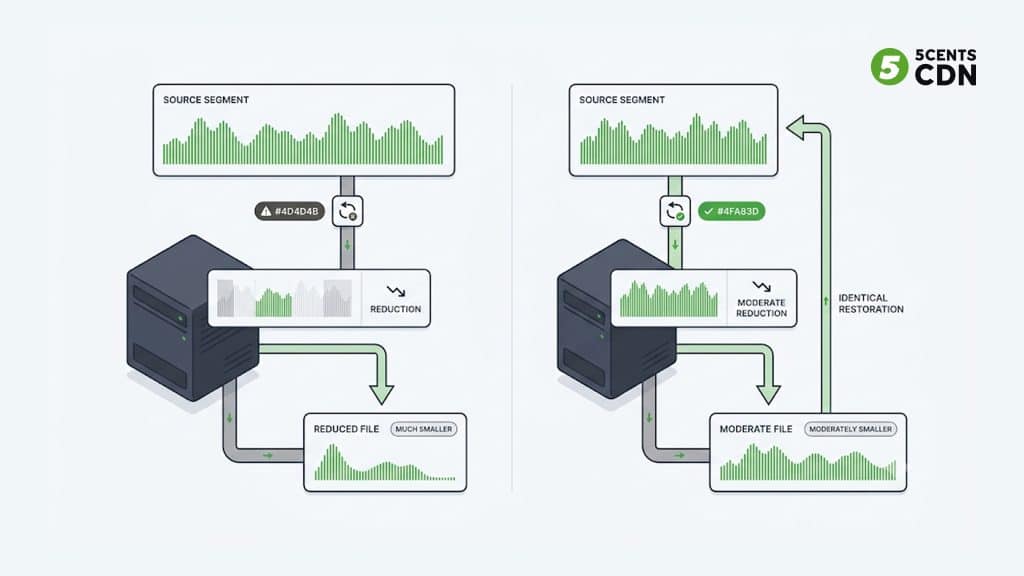
Lossless codecs (FLAC, ALAC) shrink the file without discarding anything — conceptually closer to vacuum-packing the suitcase: everything is compressed tightly, and when unpacked, every item comes back exactly as it went in. The decoded audio is bit-for-bit identical to the source. The trade-off is size: lossless compression typically only reduces audio to around half its original size, versus the 90%+ reductions lossy codecs achieve. That difference is why lossy dominates delivery and lossless dominates production and archiving.
AAC: The Streaming Default
AAC (Advanced Audio Coding) was standardized in 1997 as the successor to MP3, delivering noticeably better quality at the same bitrate through a more sophisticated psychoacoustic model. Nearly three decades later it remains the default audio codec of streaming: it is what HLS and DASH pipelines assume, what RTMP ingest expects, and what virtually every phone, browser, smart TV, and set-top box decodes natively — in many cases in hardware. Usefully for streaming operators, no license is required to distribute content encoded in AAC.
AAC is really a family of profiles. AAC-LC (Low Complexity) is the everyday workhorse for music and video sound at moderate bitrates. HE-AAC v1 adds spectral band replication to hold up quality at low bitrates, and HE-AAC v2 adds parametric stereo for very low bitrates — both matter for audiences on constrained mobile connections. Newer xHE-AAC extends efficiency further still. For most streaming video, AAC-LC in stereo at common streaming bitrates is the sensible default, dropping to HE-AAC only for genuinely low-bandwidth renditions.
AAC’s real advantage is not being the best encoder in any single dimension — it is the combination of very good quality, universal device support, and deep integration into every streaming tool and protocol. When maximum reach matters, AAC is the safe answer.
Opus: The Low-Latency Champion
Opus is the modern open standard, defined by the IETF in RFC 6716 (2012). It is royalty-free and unusually versatile: it internally combines two engines — SILK, originally built for speech, and CELT, built for low-delay music coding — and switches or blends them automatically. The result is one codec that handles a whispered podcast and a full mix equally well, across an enormous bitrate range from 6 kbps narrowband speech up to 510 kbps stereo music.
Opus has two standout properties for streaming. First, quality at low bitrates: at the constrained end, independent listening comparisons consistently place Opus at or above AAC, which is why bandwidth-sensitive audio streaming leans on it. Second, latency: Opus was designed for interactive use, with algorithmic delay low enough for natural two-way conversation — the reason it is the mandatory audio codec of WebRTC and the engine behind most real-time voice on the internet, from conferencing to in-game chat. It also includes built-in packet-loss concealment, so brief network hiccups degrade gracefully instead of gapping out.
Its historical weakness was ecosystem reach — Apple support arrived later than the rest of the industry — but modern iOS and Android both decode it, and support keeps broadening. What keeps Opus from displacing AAC in HLS/DASH delivery is simply that those ecosystems, and the hardware decoders underneath them, standardized on AAC first.
FLAC: Lossless for Source and Archive
FLAC (Free Lossless Audio Codec) is the open, royalty-free standard for lossless audio, developed under the Xiph.Org Foundation and — a fresh milestone most guides have not caught up with — formally standardized by the IETF as RFC 9639 in December 2024. FLAC typically compresses audio to roughly half to two-thirds of its original size while decoding to a bit-perfect copy of the source, and it is deliberately light to decode, which is why hardware support is broad.
In a streaming operation, FLAC’s role is almost always upstream, not at the viewer. It is the format you keep masters and contribution audio in, because a lossless source can be transcoded into AAC or Opus renditions again and again without generational damage — the golden rule is to preserve a lossless master and derive lossy delivery copies from it. Delivering FLAC to viewers is technically possible but rarely sensible for video streaming: the bandwidth cost is large and, past a well-encoded high-bitrate lossy stream, the audible benefit for typical viewing environments is negligible. Treat FLAC as your archive and pipeline format, not your delivery codec.
What About MP3 and Vorbis?
Two other names come up constantly, and both are best understood as predecessors. MP3, the format that started the compressed-audio era, still plays everywhere — its patents have fully expired, making it royalty-free — but it is technically outclassed: at any given bitrate, AAC and Opus both sound noticeably better, which is why new streaming workflows no longer choose it. It survives mainly for backward compatibility with legacy systems and old device fleets.
Vorbis was the open-source answer to MP3 and served honorably — it still powers plenty of game audio and some music streaming — but its own creators at Xiph effectively superseded it with Opus, which outperforms it across the board. For a new streaming pipeline in 2026, the practical shortlist really is the three codecs this guide covers: AAC for compatibility, Opus for latency and low-bitrate efficiency, FLAC for lossless source material.
AAC vs Opus vs FLAC: Side by Side
| AAC | Opus | FLAC | |
|---|---|---|---|
| Type | Lossy | Lossy | Lossless |
| Standardized | MPEG (1997) | IETF RFC 6716 (2012) | IETF RFC 9639 (2024); format frozen 2001 |
| Licensing | No license needed to distribute content | Fully royalty-free | Fully royalty-free, open source |
| Strength | Universal compatibility, hardware decode | Low latency, best low-bitrate quality | Bit-perfect quality |
| Latency | Moderate | Very low (interactive) | N/A (not real-time oriented) |
| Typical home | HLS/DASH delivery, RTMP ingest | WebRTC, real-time, low-bandwidth | Masters, archive, contribution |
Which Codec Pairs With Which Protocol
Here is the practical map most codec guides skip: in streaming you rarely choose an audio codec in isolation — the delivery protocol largely chooses it for you.
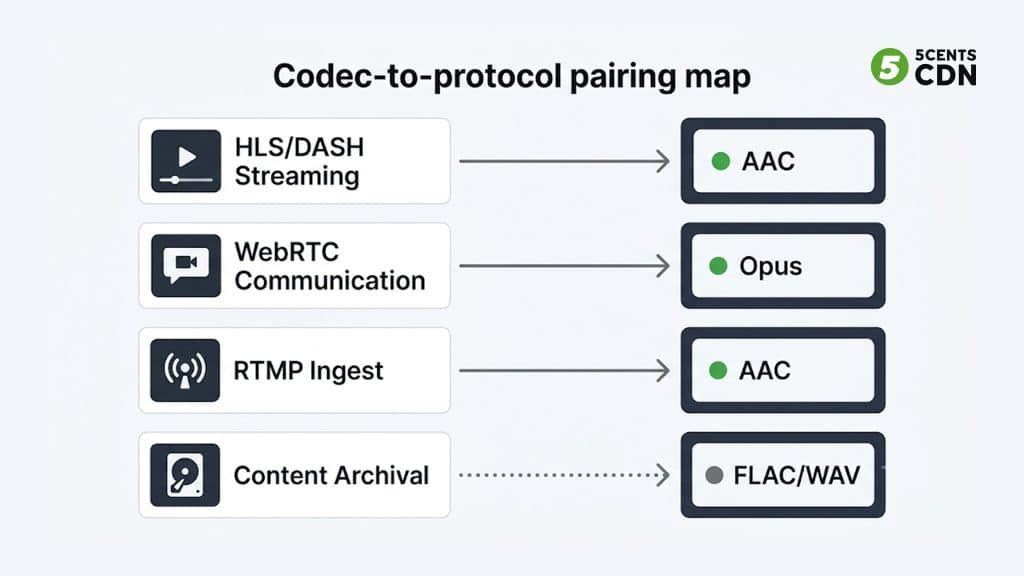
HLS and DASH — the HTTP protocols that carry virtually all OTT video — standardized on AAC, and the device ecosystem’s hardware decoders followed. If you deliver video over HLS or DASH, AAC is the pragmatic audio choice. WebRTC — the protocol for sub-second interactive streaming — mandates Opus, so anything conversational or ultra-low-latency runs Opus by design. RTMP ingest from encoders and tools like OBS pairs with AAC. And the lossless formats — FLAC or uncompressed WAV — live at the source: the studio master or contribution feed your pipeline transcodes from.
This is why the “AAC vs Opus” debate is usually settled by workflow rather than by listening tests: a live event delivered over HLS uses AAC because that is what the delivery chain and viewer devices expect, while the interactive watch-party feature beside it uses Opus because WebRTC requires it. Many platforms run both at once, encoded from the same source.
Audio in Your Delivery Bitrate Budget
Audio is a small but permanent line in every rendition of your streaming bitrate ladder — and unlike video, it usually stays constant across rungs. A common pattern is stereo AAC at a fixed rate on every rendition while the video bitrate scales up and down. That has two practical consequences. First, on high renditions audio is a rounding error, but on the lowest rungs it can become a meaningful share of the total — which is where HE-AAC or Opus earns its keep by holding quality at smaller rates. Second, because audio bytes are delivered for every second watched by every viewer, small per-stream savings multiply across an audience into real bandwidth reduction at scale.
The operational advice: do not starve audio to feed video — listeners notice audio artifacts faster than video ones — but do match the codec and rate to the rendition. Sensible stereo rates for AAC delivery sit in the widely used 128–192 kbps band for standard streams, stepping up for premium music-forward content and down (via HE-AAC or Opus) only on genuinely constrained renditions.
Sample Rate and Channels: The Other Audio Settings
Codec and bitrate get the attention, but two neighboring settings shape the result just as much. Sample rate is how many times per second the audio waveform is measured — like the frame rate of sound. Streaming almost universally uses 44.1 kHz (the CD heritage rate) or 48 kHz (the video-production standard); either is more than enough to capture everything human hearing resolves, and 48 kHz is the natural default when audio accompanies video. Higher rates like 96 kHz belong in production and archiving, not delivery — they add bandwidth without audible benefit for viewers.
Channel count is the other lever. Stereo is the default for general video content and music. Mono halves the audio data and is a legitimate choice for speech-first, low-bandwidth streams — a talk radio simulcast or a low rendition of a webinar loses little in mono. Surround formats (5.1 and beyond) matter for premium film and sports experiences but multiply audio bandwidth and complicate the encoding ladder, so they are typically reserved for the top renditions of content that genuinely benefits. The guiding principle mirrors the codec choice: match the setting to the content and the rendition, not to a one-size default.
How to Choose
- Delivering video over HLS/DASH to a broad audience? AAC — maximum device compatibility and hardware decoding.
- Real-time or interactive (WebRTC, conversational, watch-along)? Opus — mandated by WebRTC and built for low latency.
- Low-bandwidth audio streams or speech-heavy content? Opus, or HE-AAC where the delivery chain requires the AAC family.
- Masters, archives, and contribution feeds? FLAC (or WAV) — keep a lossless source and derive every lossy rendition from it.
- Unsure? AAC for delivery, FLAC for storage. That pairing covers the large majority of streaming workflows.
Frequently Asked Questions
What does an audio codec do?
An audio codec compresses digital audio for storage or transmission (encoding) and reconstructs it for playback (decoding). Lossy codecs like AAC and Opus shrink audio dramatically by discarding sounds human hearing would not notice; lossless codecs like FLAC shrink it less but preserve every bit.
Is Opus better than AAC?
At low bitrates, Opus generally delivers equal or better quality than AAC, and its latency is far lower — which is why WebRTC mandates it. AAC wins on ecosystem: HLS/DASH delivery chains and device hardware decoders standardized on it. In practice the protocol usually decides: AAC for HTTP streaming, Opus for real-time.
Is FLAC good for streaming?
FLAC is excellent as a source and archive format, but it is rarely used to deliver video streams to viewers — the bandwidth cost is high and the audible benefit over a well-encoded high-bitrate AAC or Opus stream is negligible in typical viewing environments. Keep FLAC upstream and transcode to lossy for delivery.
What audio codec does HLS use?
HLS overwhelmingly uses AAC (typically AAC-LC, with HE-AAC for low-bitrate renditions). The HLS ecosystem and device hardware decoders standardized on the AAC family, which makes it the default for HTTP-delivered video.
What is the difference between lossy and lossless audio?
Lossy compression (AAC, Opus, MP3) permanently discards audio data a psychoacoustic model judges inaudible, achieving very small files. Lossless compression (FLAC, ALAC) reduces size without discarding anything — the decoded audio is bit-for-bit identical to the original — but the files stay considerably larger.
What audio bitrate should I use for streaming?
For stereo AAC on standard video streams, the widely used range is 128–192 kbps, stepping higher for music-forward premium content. On constrained low-bandwidth renditions, HE-AAC or Opus maintains quality at lower rates. Match the rate to the rendition rather than using one number everywhere.
Is a codec the same as a file format?
No. The codec compresses the audio (AAC, Opus, FLAC); the container or file format is the wrapper it ships in (.m4a/.mp4 for AAC, Ogg or WebM for Opus). The codec determines quality and efficiency; the container determines compatibility and features.
Encoding and Delivering Audio with 5centsCDN
Whatever codec your workflow calls for, the audio has to be encoded into your rendition ladder and delivered at scale alongside the video. 5centsCDN supports audio encoding as part of its live and VOD transcoding workflows, feeding straight into global delivery. If you are planning your encoding ladder and want the audio side done right, get in touch with our team to talk through the setup that fits your streams.
