


Building an education platform means solving a video problem twice. You have live sessions — virtual classrooms, webinars, office hours — that need to feel real-time and interactive. And you have on-demand content — recorded lectures, course libraries, tutorials — that students watch on their own schedule. When streaming for E-learning there are two different streaming jobs with different requirements, and getting both right is what separates a platform students trust from one they abandon after the first buffering lecture. This guide walks through how education streaming actually works: the live-versus-VOD split, the infrastructure decisions that matter, protecting paid content, and scaling for the moments when everyone shows up at once.
It is written for the people building or running the platform — course creators, edtech teams, training providers, and institutions — not for a specific tool. If you want the higher-level case for why a delivery network matters to online education, our overview of the benefits of a CDN for e-learning covers that ground; this guide is the operational how-to that sits beneath it.
The two halves of education streaming
Almost every education platform needs both live and on-demand video, so the first step is understanding what each demands.
Live streaming is real-time teaching: a virtual classroom, a webinar, a cohort session where students and instructor are present together. The defining requirement is low latency and interaction. If a student asks a question in chat, the instructor needs to see it and respond while the moment is still relevant. A long delay between the instructor speaking and students hearing breaks the back-and-forth that makes live teaching worthwhile. Live also brings unpredictable timing — sessions start at a set hour, everyone joins at once, and the stream has to hold up under that simultaneous load.
On-demand video (VOD) is the course library: recorded lectures, modules, and tutorials students watch whenever they choose. The defining requirements here are different — reliable, fast playback across devices, a smooth experience when seeking through a two-hour lecture, and content protection so paid material is not freely copied. VOD traffic is spread across time rather than concentrated in one live moment, but it accumulates: a large catalog watched by many students is a sustained delivery load.
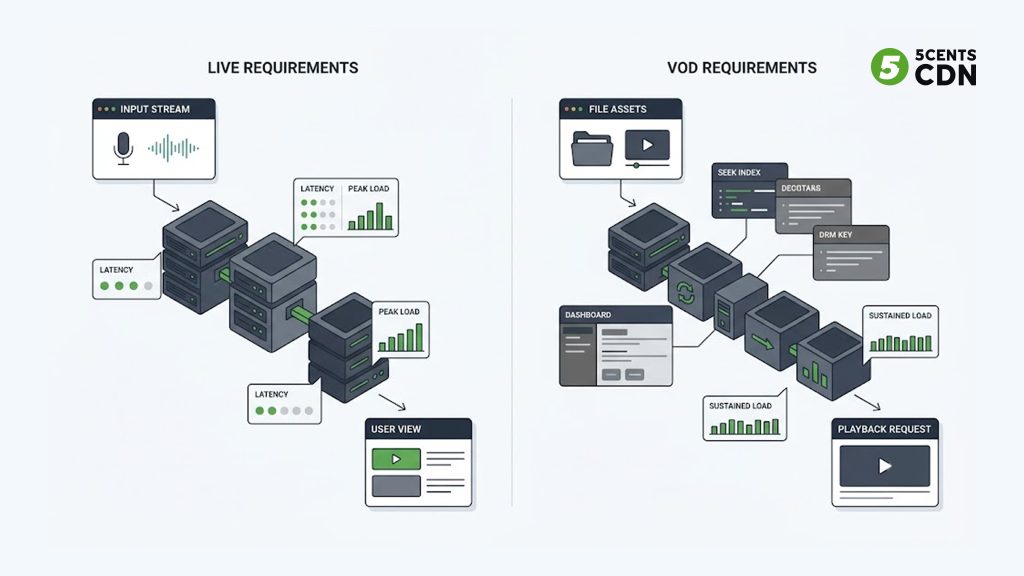
The insight that shapes everything else is that these are not competing choices — most platforms need both, and the strongest setups connect them. A live class, recorded and immediately available as VOD, becomes a course asset the moment it ends. Designing for that live-to-VOD flow from the start saves enormous rework later.
Live-to-VOD: record once, reuse forever
One of the highest-value patterns in education streaming is turning every live session into on-demand content automatically. A live lecture is valuable once when it airs; recorded and added to the library, it keeps delivering value to students who missed it, joined the course later, or want to review before an exam.
In practice this means your live workflow should capture and store the session as it streams, then make that recording available as VOD with minimal manual work. Features like cloud recording and DVR — which also let students pause and rewind a live class in progress — are what make this seamless. A platform that treats live and VOD as one connected pipeline gets double the value from every teaching hour; one that treats them as separate systems ends up manually re-uploading and re-encoding recordings, which does not scale past a handful of courses.
Latency: how real-time does a class need to be?
Not all education video needs the same speed, and matching latency to the format keeps costs and complexity sensible.
Interactive live classes — where students ask questions and the instructor responds in the moment — benefit from low latency, in the range of a few seconds, so the conversation feels natural. This is the same low-latency delivery used for other interactive live content, achievable with modern HTTP-based streaming protocols.
Webinars and large lectures that are more one-to-many, with interaction happening through moderated Q&A or polls rather than live conversation, can tolerate slightly more delay in exchange for rock-solid stability. Here, consistency matters more than shaving off the last second.
On-demand playback has no live-latency concern at all; what matters is fast startup, no buffering, and smooth seeking. The goal shifts from real-time to responsiveness.
The practical takeaway is to pick the latency profile that fits each format rather than forcing everything to be ultra-real-time. Chasing the lowest possible latency for a pre-recorded lecture adds cost for no benefit, while under-provisioning latency for an interactive class quietly kills engagement.
Adaptive bitrate: meeting students on every connection
Students watch from everywhere — a fast campus network, home broadband, a phone on mobile data, a laptop on hotel wifi. A single video quality cannot serve all of them well: too high and it buffers for those on weak connections, too low and it looks poor for everyone else.
Adaptive bitrate streaming solves this by encoding each video at several quality levels and letting the player switch between them automatically based on each viewer’s connection. A student on a strong connection sees crisp HD; the same lecture drops smoothly to a lower quality for a student on patchy mobile data rather than freezing. For education, where a lost few minutes can mean a missed concept, this smooth degradation is not a luxury — it is what keeps learners in the lesson. Delivering these multiple renditions efficiently is a core job of the streaming and delivery layer.
Reaching a global classroom
Online education is inherently borderless: your students may be spread across countries and continents. That geographic spread is exactly where delivery infrastructure earns its place. A student far from your origin server, without a distributed delivery network, experiences slow startup and buffering because every request travels a long way. A content delivery network solves this by caching your video on edge servers close to learners, so a student in another region gets the same fast, smooth playback as one next door to your servers. For any platform with international ambitions, serving content from near the learner is the difference between a global classroom and one that only works well locally.
Protecting paid course content
If your courses are paid, your video is a product — and unprotected video is a product that walks out the door. Content protection is therefore a core part of an education streaming setup, not an afterthought, and it works in layers.
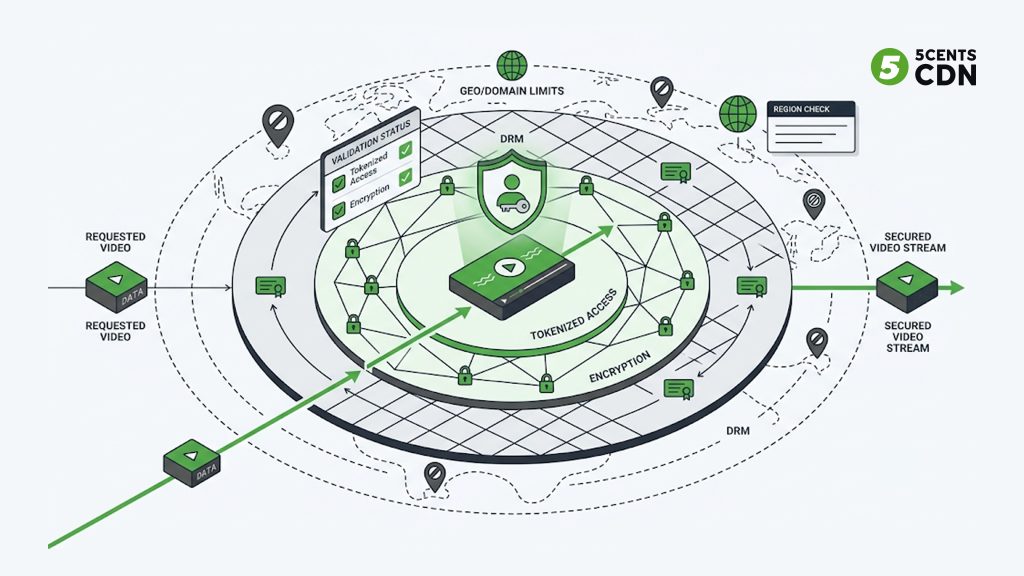
Access control ensures only enrolled or paying students can reach a stream or a course video, through mechanisms like signed or tokenized URLs that expire and cannot be freely shared. Encryption protects the video in transit so it cannot be trivially intercepted and saved. For high-value content, stronger digital rights management adds a further layer that controls playback itself. And geographic or domain restrictions can limit where and on which sites your content plays, preventing your paid lectures from being embedded on someone else’s page.
The right level depends on the value of the content: a free introductory webinar needs little protection, while a premium certification course represents real revenue worth defending. The key point for operators is that protection is a spectrum to match to the stakes, and it should be designed in from the beginning rather than bolted on after content leaks.
Scaling for the moments everyone shows up
Education traffic is spiky in ways that catch platforms out. A course launch, a live exam review the night before a test, a popular guest lecture, enrollment week — these concentrate huge numbers of students into a narrow window. A platform that runs fine with steady traffic can buckle exactly when it matters most, and a lecture that buffers during the pre-exam review is the one students remember.
Designing for peak rather than average is the discipline that prevents this. A distributed delivery network absorbs these surges by spreading load across many edge servers instead of hammering a single origin, and by serving cached content close to learners so the origin is not overwhelmed. The practical rule is to plan capacity and test against your worst-case concurrent moment — the biggest simultaneous live class or the busiest catalog day you can foresee — not the quiet average, because the average is never when things break.
Understanding engagement: analytics for learning
There is a dimension of education streaming that pure entertainment platforms care less about but that matters enormously here: understanding whether students actually watched, and where they struggled. In learning, video engagement is a proxy for learning itself.
Streaming analytics tell you which lectures get completed and which get abandoned halfway, where in a video students repeatedly rewind (often a sign the concept is hard or poorly explained), what devices and regions your learners use, and where playback problems like buffering are hurting the experience. For a course creator, that feedback loop is gold: a lecture with a sharp drop-off at the ten-minute mark is telling you something about the content, not just the stream. For an institution, aggregate playback quality data shows whether learners in certain regions are being underserved by delivery.
The operator takeaway is that analytics should be part of the streaming setup, not a separate afterthought. Delivery data and engagement data together let you improve both the infrastructure and the teaching — tightening delivery where playback suffers, and revising content where attention drops.
Delivering to every device students use
Students do not all watch the same way. Some join a live class from a laptop, others catch the recording on a phone during a commute, others cast it to a TV. An education platform has to play cleanly across all of them, which is a delivery and format question as much as a player question.
The practical requirement is broad device and browser compatibility, which is why HTTP-based streaming formats that play natively across iOS, Android, desktop browsers, and smart TVs are the pragmatic backbone of education delivery. Combined with adaptive bitrate, this means a single course video reaches a student on any device at the best quality that device and connection can handle, without you maintaining separate versions for each platform.
Putting the setup together
Pulling the pieces into a coherent setup, an education platform’s streaming stack comes down to a handful of connected decisions. You need a way to bring live sessions in reliably and encode them, ideally with low-latency contribution for interactive classes. Through adaptive bitrate delivery every student gets smooth playback regardless of device or connection. A distributed delivery network helps geography not degrade the experience. The live-to-VOD capture helps teaching hours become reusable course assets. You need content protection matched to the value of your material. And you need all of it engineered to scale for peak concurrency rather than typical load.
The connecting thread is that live and VOD should not be two disconnected systems but one pipeline, where a class streamed today becomes a library asset tomorrow, delivered fast and protected everywhere your students are.
Where 5centsCDN fits
5centsCDN provides the streaming and delivery infrastructure to run both halves of an education platform on one stack. Our live streaming supports low-latency delivery and reliable ingest for interactive virtual classrooms, live transcoding produces the multiple quality levels adaptive playback needs, and recording and DVR let a live class become on-demand content automatically — the live-to-VOD flow that makes every teaching hour reusable. Our video streaming and delivery serve your course library fast across devices, and because delivery runs on a distributed global network, learners get smooth playback wherever they are.
For protecting paid courses, access controls, encryption, and geo-restrictions help keep your content limited to the students entitled to it, and the platform is built to absorb the enrollment and exam-time spikes that define education traffic. In short, you bring the teaching and the content, and 5centsCDN handles delivering it — live and on demand — quickly, securely, and at scale. If you are building or scaling an education platform and want to work through the right live, VOD, and protection setup for your courses, get in touch with our team.
The bottom line: streaming for e-learning means handling two jobs well — real-time live classes and reliable on-demand courses — and connecting them so recorded sessions become lasting assets. Match latency to each format, deliver adaptively across every device and region, protect paid content in proportion to its value, and build for the peak moments when every student arrives at once. Get that foundation right and your video becomes an asset that scales with your platform rather than a liability that fails at the worst possible time.
Frequently asked questions
Do I need both live streaming and VOD for an online education platform?
Most platforms benefit from both. Live streaming handles real-time teaching — virtual classrooms, webinars, and cohort sessions with live interaction — while VOD serves recorded lectures and course libraries students watch on their own schedule. The strongest setups connect the two, automatically turning recorded live sessions into on-demand course content.
What latency do online classes need?
It depends on the format. Interactive live classes, where students ask questions and get answers in the moment, benefit from low latency of a few seconds so conversation feels natural. Larger webinars with moderated Q&A can tolerate slightly more delay in exchange for stability. On-demand videos have no live-latency concern; there the priority is fast startup and no buffering.
How do I stop people from sharing or pirating my paid courses?
Content protection works in layers: access control with signed or expiring URLs so only enrolled students reach the video, encryption to protect it in transit, digital rights management for high-value material, and geographic or domain restrictions to control where it can be played. The right level should match the value of the content, and it is best designed in from the start.
How do education platforms handle traffic spikes during exams or launches?
By designing for peak rather than average load. Events like course launches and pre-exam review sessions concentrate many students into a short window, so a distributed delivery network is used to spread that load across edge servers and serve cached content close to learners, keeping playback smooth when concurrency is highest. Capacity should be planned against the worst-case simultaneous moment.
Can a live class be reused as an on-demand lesson?
Yes, and it is one of the most valuable patterns in education streaming. With cloud recording, a live session can be captured as it streams and made available as VOD afterward with little manual work, so students who missed it or want to review can watch later. Designing this live-to-VOD flow from the start avoids manually re-uploading and re-encoding recordings.
