


For a church, live stream church services are not a nice-to-have—they are an essential way to reach members who cannot be in the room. The homebound, the traveling, the sick, the ones who moved away but still call your congregation home. And unlike most streams, a church service gets exactly one take. There is no second attempt at the 10 a.m. Sunday service; if the stream buffers during the sermon or drops during worship, that moment is simply gone for everyone watching. This guide walks through how to live stream your services properly — the setup, the workflow, reaching every member, and above all the reliability that a one-shot weekly broadcast demands.
It is written for the people who actually run church streaming — pastors, worship and media teams, and the volunteers who show up early on Sunday — with an emphasis on getting a dependable, professional result without needing a broadcast engineer on staff.
Start with the goal, not the gear
Before buying a single cable, get clear on what your church is actually trying to do, because that decision shapes everything else. Most churches are trying to serve some mix of three audiences: members who cannot attend in person and want to worship in real time, people discovering your church online for the first time, and members who want to catch the sermon later in the week. Each of those is a slightly different job, and the good news is that one well-designed stream can serve all three.
Knowing your primary goal tells you where to stream (your own website, social platforms, or both), whether you need the service available on demand afterward, and how much production polish is worth investing in. A small congregation reaching shut-in members needs something reliable and simple; a multi-campus ministry broadcasting to thousands needs something built to scale. Both are valid — the setup should match the goal, not chase features you will never use.
The basic church streaming setup
At its simplest, a church livestream needs four things working together: a camera to capture the service, a microphone for clear audio, an encoder to convert that into a stream, and a platform to deliver it to viewers.
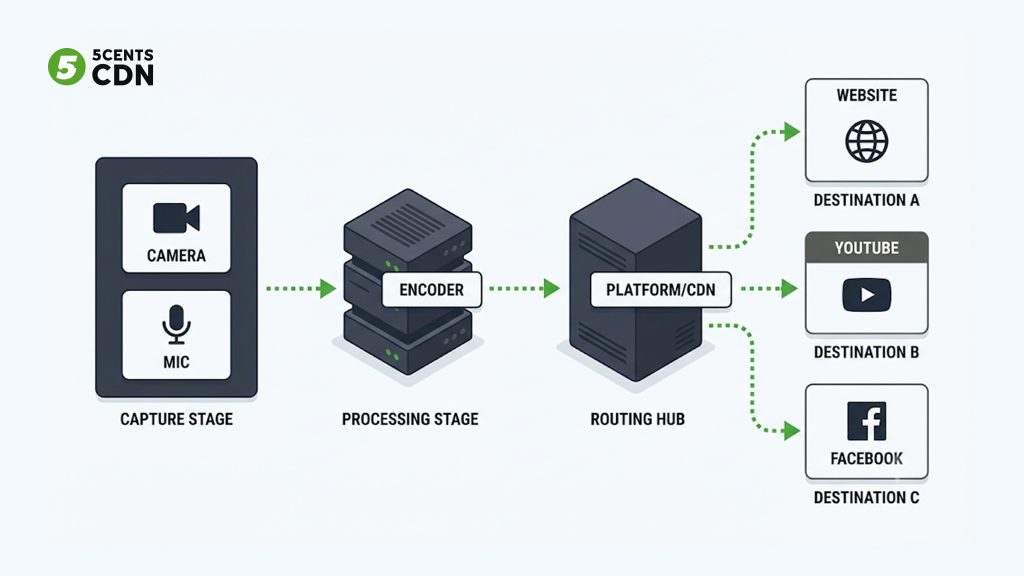
The camera can be as simple as a single fixed shot on the pulpit or as involved as multiple angles switched live. Start with one solid, stable shot; add cameras only when you have volunteers to run them.
Audio matters more than video in worship, and it is the most common thing churches get wrong. A clear feed from the sound board or a dedicated microphone beats a great picture with muffled, echoey audio every time. Members will forgive a modest image; they will not tolerate a sermon they cannot hear.
The encoder — software like OBS, or a hardware unit — takes the camera and audio and turns them into a stream to send out. This is where your service becomes deliverable video.
The platform is where that stream is delivered to viewers and, ideally, recorded for later. This is the piece that determines how reliable, how branded, and how scalable your stream is — and it is where the decisions that follow really matter.
A stable internet connection underpins all of it. Livestreaming needs consistent upload bandwidth, and it should be wired wherever possible rather than relying on building wifi that everyone else is also using on Sunday morning.
Reaching every member: your website and social platforms together
One of the first real decisions is where the stream should go, and for most churches the answer is not either-or. Your congregation is scattered across habits: some members live on Facebook, some on YouTube, and some will come straight to your church website. Reaching all of them from a single service is what simulcasting — also called multistreaming — is for: sending one live stream to multiple destinations at once.
The strongest approach for most churches is a combination. Stream to YouTube and Facebook for reach and discovery, so people who are searching or scrolling can find your service, while also embedding the stream on your own church website for a branded, controlled, ad-free experience that keeps members on your own page rather than a third-party platform. One encoded service, sent everywhere your people already are, without extra effort per platform.
This is exactly the kind of workflow a streaming platform with built-in multistreaming is designed to handle, so your media volunteer is not manually configuring three separate destinations under time pressure every Sunday morning.
The recording is as valuable as the live stream
A church service streamed live and then forgotten is only doing half its job. The sermon that aired Sunday morning is content members want all week — to re-watch, to share with a friend, to catch up on after a missed weekend. Turning every live service into an on-demand recording automatically is one of the highest-value things a church stream can do.
Practically, this means your setup should record the service as it streams and make it available afterward with minimal manual work — a video-on-demand sermon archive that grows every week. Features like automatic recording and DVR, which also let live viewers pause and rewind during the service, make this seamless. Over time that archive becomes a genuine ministry asset: a searchable library of every message, available to anyone, anytime.
The reliability problem: church streaming has no second take
Here is what separates church streaming from most other kinds, and why delivery infrastructure deserves real attention. A church service is live, scheduled, and unrepeatable. Everyone arrives within the same few minutes, the service runs for a fixed window, and if something fails during that window, there is no do-over. A buffering sermon or a frozen worship set is not a minor glitch — it is the one moment your remote members came for, lost.
Two things drive that reliability. The first is delivery close to your viewers. If your stream is served from a single distant server, members far from it experience buffering and slow starts, because every request travels a long way. A content delivery network solves this by caching and serving your stream from locations near each viewer, so a member across the country gets the same smooth playback as one across town.
The second is handling everyone arriving at once. A church stream does not build gradually — it spikes as the service begins and holds a large simultaneous audience for the duration. The delivery layer has to absorb that concurrent load without degrading, which is exactly what a distributed network is built to do by spreading viewers across many edge servers instead of overwhelming one origin.
For a weekly broadcast that cannot be re-run, reliable, well-distributed delivery is not a technical luxury — it is the difference between serving your remote congregation and letting them down at the moment that matters.
Adaptive quality: meeting members on any connection
Your members watch from everywhere and on everything — a smart TV in a living room, a phone in a hospital room, a laptop on hotel wifi. Their connections vary enormously, and a single video quality cannot serve them all. Too high and it buffers for those on weaker connections; too low and it looks poor for everyone else.
Adaptive bitrate streaming solves this by preparing the service at several quality levels and letting each viewer’s player pick the best one their connection can handle, switching automatically as conditions change. A member on strong home broadband sees crisp HD; a homebound member on a weak connection still gets a smooth, watchable stream instead of a frozen screen. For a congregation you cannot see, this quiet adaptability is what ensures no one is left staring at a spinning wheel during the sermon.
Scaling for Easter, Christmas, and the big services
Most weeks your streaming audience is fairly predictable. But a handful of services each year — Easter, Christmas Eve, a special guest, a funeral or wedding that draws distant family — can multiply your online audience several times over in a single morning. These are also often the services that matter most, and the ones where first-time online visitors form their impression of your church.
The discipline that protects these moments is designing for your peak, not your average. A delivery network that scales across many servers absorbs these surges without buffering, so your Christmas Eve service holds up under a crowd many times your normal Sunday. Planning for the biggest morning you can foresee — rather than the ordinary week — is what keeps the most important services from being the ones that fail.
Multi-campus and growing ministries
For churches with more than one location, or a central broadcast feeding several campuses, streaming becomes part of the ministry’s core infrastructure rather than a weekend add-on. A multi-campus setup might send a central sermon to satellite locations, stream each campus separately, or both. The common thread is the same reliability and delivery concerns, multiplied: more simultaneous audiences, more destinations, and a greater cost to any failure.
The practical implication is that a growing ministry benefits from treating streaming as a real system — dependable ingest, consistent delivery to every location and every remote member, and a recording workflow that captures everything — rather than a laptop and a prayer each Sunday. What works for one small congregation needs a sturdier foundation once you are serving thousands across locations.
Common church streaming mistakes to avoid
A few recurring mistakes trip up churches new to streaming, and knowing them in advance saves a lot of Sunday-morning stress.
Neglecting audio is the most common. Teams pour effort into cameras and lighting, then send muffled or echoing sound. Because worship and preaching are carried by audio, a clean feed from the sound board should be the first priority, not the last.
Relying on building wifi is the second. Wireless networks are shared, congested, and unpredictable exactly when the building is full. A wired connection for the streaming machine removes one of the biggest causes of mid-service dropouts.
Testing only moments before going live is the third. A stream that worked last week can fail this week for reasons that a five-minute check before the service would have caught. A short pre-service test — audio levels, connection, the stream actually appearing on each destination — should be part of the routine.
Overcomplicating the setup is the fourth, and it is subtle. Adding cameras, graphics, and switching faster than your volunteers can reliably run them creates fragility. A simple setup executed flawlessly serves members better than an ambitious one that breaks. Grow the production only as your team’s confidence grows.
Finally, ignoring the online audience during the service leaves remote members feeling like spectators. A simple acknowledgment, a greeting to those watching online, or a volunteer monitoring the chat turns passive viewers into a connected part of the congregation.
Keeping it manageable for volunteers
Most churches run streaming with volunteers, not professionals, and a setup that only the one tech-savvy member can operate is a setup that fails the week they are away. The goal is a workflow simple and documented enough that any trained volunteer can run it. Favoring a platform that handles the complex parts — multistreaming to every destination, recording, adaptive delivery — automatically means your volunteers focus on the camera and the sound, not on wrestling infrastructure. Reliability and simplicity are not opposites here; the more the platform handles behind the scenes, the less there is for a volunteer to get wrong on a Sunday morning.
Where 5centsCDN fits
5centsCDN gives churches the streaming and delivery infrastructure to broadcast services reliably, reach every member, and keep every sermon. Our live streaming supports the dependable ingest and delivery a one-shot Sunday service demands, with multistreaming so a single service reaches your website, YouTube, and Facebook at once. Live transcoding produces the multiple quality levels adaptive playback needs so members on any connection get a smooth stream, and recording with DVR turns each service into an on-demand sermon archive automatically.
Most importantly for a weekly broadcast that cannot be repeated, delivery runs on a distributed global network built to serve your members close to where they are and to absorb the surges of your biggest services — Easter, Christmas, and every ordinary Sunday in between — without buffering. You focus on the service; the infrastructure makes sure it reaches everyone watching. If you are setting up or upgrading your church’s streaming and want a reliable delivery foundation that scales with your ministry, get in touch with our team.
The bottom line: streaming a church service well comes down to a clear goal, a solid camera-audio-encoder-platform setup, reaching members across your website and social platforms at once, capturing every service as an on-demand recording, and — above all — delivering it reliably enough that the one-shot Sunday broadcast never fails the people counting on it. Get the foundation right, and your livestream becomes what it is meant to be: a way to keep your whole congregation together, wherever they are.
Frequently asked questions
What equipment do I need to live stream church services?
At a minimum you need a camera to capture the service, a microphone or a feed from your sound board for clear audio, an encoder such as OBS or a hardware unit to create the stream, a platform to deliver it, and a stable, ideally wired internet connection with reliable upload bandwidth. You can start simple with a single camera and clean audio, then add cameras and production polish as volunteers and needs grow.
Can I stream my church service to YouTube, Facebook, and my website at the same time?
Yes. This is called simulcasting or multistreaming — sending one live stream to multiple destinations at once. Most churches benefit from streaming to YouTube and Facebook for reach while also embedding the stream on their own website for a branded, ad-free experience. A streaming platform with built-in multistreaming handles all the destinations from a single service so volunteers do not configure each one manually.
How do I make sure my church stream does not buffer or fail during the service?
Because a church service is live and cannot be repeated, reliable delivery matters most. Serving the stream from a distributed delivery network keeps playback smooth for members wherever they are and absorbs the surge of everyone joining at once. Combined with adaptive bitrate streaming, which adjusts quality to each viewer’s connection, this keeps the service watchable even for members on weaker connections.
Should I record my church services for people to watch later?
Yes — the recording is as valuable as the live broadcast. Members use recorded sermons to catch up on missed services, re-watch a message, or share it with others during the week. Setting up automatic recording turns every service into an on-demand archive with little manual work, building a searchable library of your messages over time.
How do churches handle big services like Easter and Christmas online?
These services can draw several times your normal online audience in a single morning, so the key is designing your delivery for peak load rather than an average Sunday. A distributed delivery network scales across many servers to absorb the surge without buffering, which protects exactly the high-attendance services where reliability matters most and where first-time online visitors are forming their impression.
