


An HLS stream that fails usually fails loudly — a manifestLoadError, a 404, an obvious broken request. MPEG-DASH error fails more quietly and more cryptically. The player shows a replay button as if the video already finished, or the console prints a bare MEDIA_ERR_SRC_NOT_SUPPORTED, or the stream simply stalls after the first segment with no clear reason. The conformance tool passed the manifest, we set the CORS headers, and the stream still will not play.
DASH is more flexible than HLS, and that flexibility is exactly why it fails in more subtle ways. Where HLS gives the player a fairly rigid playlist, DASH hands it an XML document — the Media Presentation Description, or .mpd — describing periods, adaptation sets, representations, codecs, and a segment timeline the player has to interpret. More expressiveness means more ways for the manifest and the media to disagree, and more of those disagreements surface as playback failures rather than clean network errors. This guide covers the DASH-specific failure modes, how to read them, and how to configure delivery so they do not happen.
What the .mpd Manifest Describes
To debug DASH you need a mental model of what the player is reading. The .mpd is an XML manifest with a nested structure, and each level is a place a problem can hide.
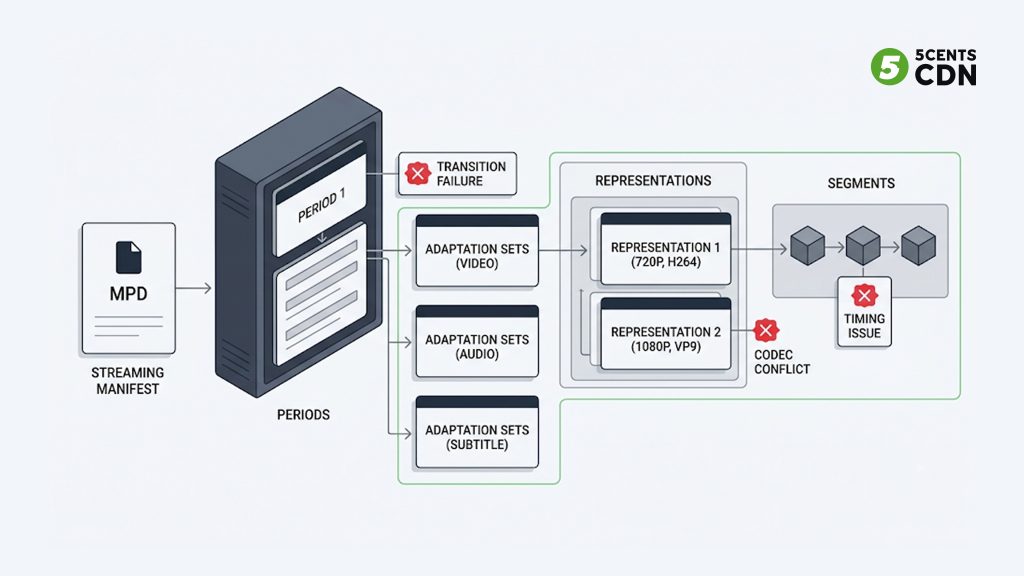
At the top are one or more Periods — time-bounded sections of the presentation. A simple VOD asset has one period; content with ad breaks has multiple periods stitched in sequence. Inside each period are Adaptation Sets, which group the alternative versions of one component — all the video renditions in one set, the audio in another, subtitles in a third. Inside each adaptation set are Representations, the individual encoded versions at specific bitrates and resolutions. And each representation points to its Segments, either through a segment template with a timeline or an explicit list.
The player walks this tree: it picks a period, chooses an adaptation set for each component, selects a representation based on bandwidth, and then resolves segment URLs from the template or timeline. A failure at any level — a period it cannot start, a representation whose codec the browser cannot decode, a segment template that resolves to the wrong time — stops playback. Knowing the tree tells you where to look when a specific error appears.
Cause 1: MEDIA_ERR_SRC_NOT_SUPPORTED (The Most Common DASH Error)
If you only recognize one DASH error, make it this one. MEDIA_ERR_SRC_NOT_SUPPORTED, often shown as CODE 4, is the error a browser throws when it cannot play the source at all — and in DASH it almost never means the file is missing. It means the browser’s Media Source Extensions cannot handle what the manifest is offering.
The most frequent trigger is a codec or container the browser cannot decode. DASH is codec-agnostic by specification — the manifest can list representations in codecs the current browser does not support through MSE. If every video representation in an adaptation set uses a codec the browser cannot play, the player has nothing to fall back to and throws CODE 4. A related version is a manifest that mixes container types — for example both mp4 and WebM representations in one set — in a way a given player will not negotiate, so it refuses the whole set rather than picking the compatible ones.
The second frequent trigger is subtler and catches people who are sure their stream is fine: the wrong Content-Type on the manifest. A DASH manifest must be served with the MIME type application/dash+xml. If your server sends it as text/xml, application/xml, or text/plain, some players refuse to treat it as a DASH source and throw an unsupported-source error before they even parse the tree. The manifest is perfect; the header describing it is wrong.
To diagnose CODE 4: first check the manifest’s Content-Type response header and correct it to application/dash+xml if it is anything else. If the MIME type is right, look at the codecs declared in the representations and confirm the browser you are testing actually supports them through MSE. The fix is either correcting the served MIME type or providing a representation in a broadly supported codec so every target browser has something it can decode.
Cause 2: Segment Availability Errors on Live (Dynamic) Manifests
This failure mode is unique to DASH live streaming and is one of the most confusing, because nothing looks broken. Live DASH uses a dynamic manifest (MPD@type=“dynamic”), and dynamic manifests carry an availability clock: the manifest describes when each segment becomes available based on wall-clock time, segment duration, and timing attributes. The player calculates which segment should exist right now and requests it.
When those calculations do not line up with reality, you get errors like “determining the initial period” failing, or requests for segments that do not exist yet, or a live edge the player cannot reach. Modern players apply the DASH timing rules strictly — they require that the segments the manifest says are available at the moment the manifest is fetched actually are available. If the packager’s timing attributes are off, or the client clock and server clock have drifted apart, the player asks for a segment a moment before it exists, gets a failure, and stalls.
The two usual culprits are clock skew and incorrect availability timing. DASH dynamic manifests often reference a wall-clock time source precisely so the player and server agree on “now”; if the client’s clock is off and the manifest provides no synchronization, the availability math breaks. And if the packager advertises segments as available too early relative to when it actually publishes them, the player consistently races ahead of the segments.
Diagnosing this means checking the manifest’s timing attributes and confirming segments are genuinely available when the manifest claims. If the stream includes a UTC timing element, verify it resolves. The fix lives in the packager and its clock configuration, not the player — the player is correctly following timing information that is wrong.
Cause 3: Multi-Period Stitching and Ad Breaks
Multi-period manifests — the mechanism DASH uses for ad insertion and content stitching — introduce their own class of failure. A manifest that plays fine as a single period can break when periods are added dynamically, particularly during live ad insertion where new periods appear on each manifest reload.
The typical symptom is that the first period plays and then playback stops when the player crosses into a new period, or new periods added on a manifest update are never played at all. Period transitions are one of the trickier parts of the DASH specification for players to implement, and inconsistencies between how a packager splits periods and how a player handles the transition surface exactly at the boundary — often the ad boundary, which is the worst possible place for a stream to stall.
If your DASH stream is used with server-side ad insertion, multi-period handling is worth testing explicitly: play all the way through a period transition, not just the opening content, and confirm that periods added on a reload actually play. The fix is usually aligning the packager’s period structure with what your target players handle reliably, and testing the specific transition rather than assuming a valid single period implies a valid multi-period sequence.
Cause 4: DRM and Encrypted Manifest Failures
Encrypted DASH adds a license layer, and failures there produce errors that look like format problems but are not. A common signature is an unsupported-format or license-parse error on encrypted content that plays perfectly when unencrypted — for example a Widevine or PlayReady license request that fails while the same clear stream works.
These failures usually trace to a mismatch in the content-protection chain rather than the manifest structure: the license server URL, the key IDs declared in the manifest, the DRM system the player supports, and the encryption scheme all have to agree. A browser that supports one DRM system will not play content encrypted for a different one, and a key ID mismatch between the manifest and the license response breaks decryption even when everything else is correct. Because the media itself is unreadable without the key, the player often surfaces this as a generic “not supported” rather than a clear “license failed,” which sends people debugging the wrong layer.
Content protection is a broad topic in its own right — the practical debugging step for a DASH context is to confirm the stream fails only when encrypted, which isolates the problem to the DRM chain rather than the manifest or codecs. From there the fix is in the protection configuration: matching the license server, key IDs, and DRM system to what the target player supports. For access control that does not require full DRM, lighter approaches like token authentication and HLS/segment encryption solve a different and simpler part of the protection problem.
Cause 5: CORS and Mixed Content (Shared With HLS)
Two causes that break DASH are not DASH-specific at all, so this section is deliberately short — they are covered in depth elsewhere and the fixes are identical across protocols.
A browser-based DASH player fetches the .mpd, its segments, and any separate audio, subtitle, and key resources as cross-origin requests, so all of them need the Access-Control-Allow-Origin header. A DASH manifest that “passes conformance and has no 404s” but still will not play in the browser is very often a CORS problem on one of those resources. The full diagnosis — including why a stream can play in VLC but fail in the browser — is in our guide to CORS errors in video streaming. The same goes for mixed content: an HTTPS page cannot load an HTTP .mpd or HTTP segments, and the browser blocks them silently.
The single takeaway: if a DASH stream fails in the browser but works in a desktop player, check CORS and scheme before you dig into the manifest tree, because those two account for a large share of “the manifest looks fine but nothing plays” reports.
How to Diagnose a DASH Error, Step by Step
DASH gives you a diagnostic asset HLS does not have: a formal conformance validator. Use it early.
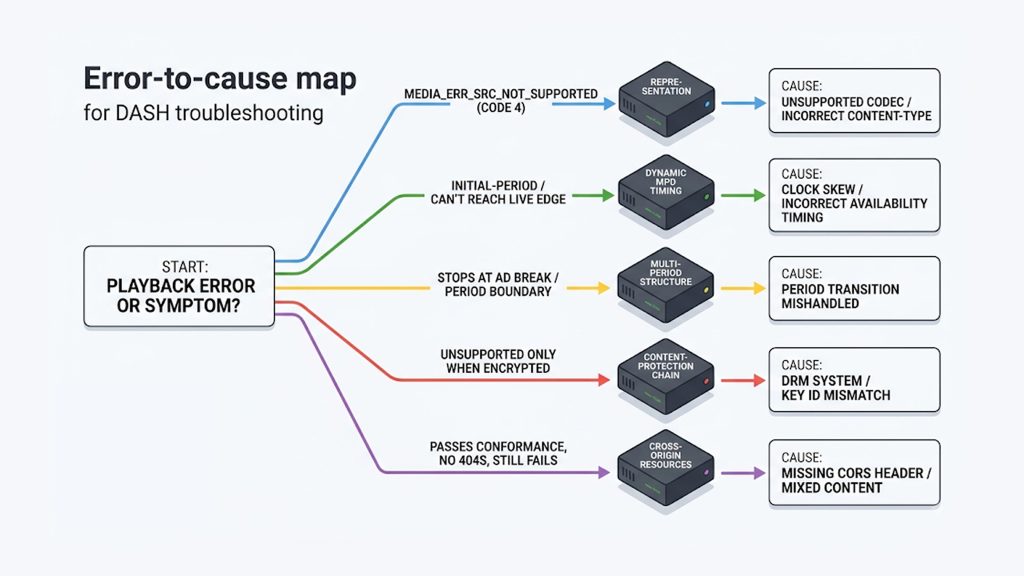
| Error / symptom | Manifest level to check | Usual cause |
|---|---|---|
| MEDIA_ERR_SRC_NOT_SUPPORTED (CODE 4) | Representation codec / manifest MIME | Unsupported codec or wrong Content-Type |
| Initial-period / can’t reach live edge | Dynamic MPD timing | Clock skew or wrong availability timing |
| Stops at ad break / period boundary | Multi-period structure | Period transition mishandled |
| Unsupported only when encrypted | Content-protection chain | DRM system / key ID mismatch |
| Passes conformance, no 404s, still fails | Cross-origin resources | Missing CORS header or mixed content |
Step 1: Run the manifest through the DASH-IF conformance tool. The DASH-IF conformance validator checks your .mpd against the specification and flags structural problems — timing errors, invalid segment templates, codec declaration issues — before you waste time in the player. A manifest that fails conformance tells you the problem is in the manifest itself.
Step 2: Check the manifest’s Content-Type. Confirm the server returns application/dash+xml. A wrong MIME type is a fast, common cause of an unsupported-source error and takes seconds to rule out.
Step 3: Read the exact console error in a DASH player. Load the stream in the dash.js reference client or your player with debug logging on. MEDIA_ERR_SRC_NOT_SUPPORTED points at codecs or MIME type; a timing or initial-period error points at dynamic-manifest availability; a license error points at DRM. The specific message narrows the tree level.
Step 4: Isolate encryption and CORS. Does it fail only when encrypted? DRM chain. Does it fail only in the browser but play in VLC? CORS or mixed content. These two quick tests eliminate large categories at once.
Step 5: Test the actual failing level. If it is live, verify segment availability timing. In case of multi-period, play through the transition. If it is a codec, confirm browser MSE support. Match the test to the error rather than changing settings at random.
How to Prevent DASH Playback Errors
Most DASH failures are packaging and delivery configuration problems that only appear under real playback. A few habits prevent the bulk of them.
Serve the manifest with the correct MIME type. Ensure the delivery layer returns application/dash+xml for .mpd files. This one header prevents a whole category of unsupported-source errors and is trivial to set once at the CDN edge.
Validate every manifest against conformance before publishing. Making the DASH-IF conformance check part of your packaging pipeline catches structural and timing errors before viewers do, rather than after.
Provide broadly supported codecs. Because DASH is codec-agnostic, it is easy to publish a manifest whose only representations use a codec some target browsers cannot decode. Include at least one widely supported representation so every browser has something to play, and consider a CMAF-based packaging approach so the same segments serve both DASH and HLS.
Get the caching right for dynamic manifests. Like live HLS media playlists, a live .mpd changes constantly and must not be cached long, or the player works from a stale availability window. Cache dynamic manifests briefly and immutable segments long.
Apply CORS headers across the whole path. Manifests, segments, keys, and subtitle tracks all need Access-Control-Allow-Origin for browser playback. Setting this uniformly at the edge — and delivering DASH through a player and delivery stack built for it — removes the most common “looks fine, won’t play” failures before they reach viewers.
Frequently Asked Questions
What does MEDIA_ERR_SRC_NOT_SUPPORTED mean for a DASH stream?
It means the browser cannot play the source, and for DASH it almost never means the file is missing. The two most common causes are a codec the browser cannot decode through Media Source Extensions, and a wrong Content-Type on the manifest. A DASH manifest must be served as application/dash+xml; if it is served as text/xml or application/xml, some players reject it as an unsupported source before parsing it. Check the MIME type first, then confirm the declared codecs are supported by the browser you are testing.
My MPD passes the conformance tool and has no 404s but still won’t play — why?
This is very often CORS. A browser-based DASH player fetches the manifest, segments, keys, and subtitle tracks as cross-origin requests, and if any of them lacks the Access-Control-Allow-Origin header the browser blocks it even though the file downloaded and the manifest is structurally valid. The tell is that the stream plays in VLC or a desktop player but fails in the browser. Check CORS on every resource and confirm the page and stream use the same HTTPS scheme before investigating the manifest structure.
Why does my live DASH stream stall or fail to reach the live edge?
Live DASH uses a dynamic manifest with an availability clock that tells the player when each segment becomes available. If the packager’s timing attributes are wrong, or the client and server clocks have drifted apart, the player calculates the wrong current segment and requests one that does not exist yet, causing stalls or an initial-period error. The fix is in the packager’s timing and clock configuration — verify segments are genuinely available when the manifest says, and that any UTC timing source resolves. The player is correctly following timing information that is incorrect.
Why does my DASH stream stop at an ad break or period transition?
Multi-period manifests, which DASH uses for ad insertion, are harder for players to handle than single-period content, and inconsistencies between how the packager splits periods and how the player handles the transition surface at the period boundary. A stream that plays a single period fine can stall when it crosses into a new period or when periods are added on a manifest reload. Test playback through the actual transition, and align the packager’s period structure with what your target players handle reliably rather than assuming a valid single period implies valid multi-period playback.
Why does my encrypted DASH content fail when the clear version works?
When a stream plays unencrypted but fails once DRM is applied, the problem is in the content-protection chain, not the manifest or codecs. The license server URL, the key IDs in the manifest, the DRM system the browser supports, and the encryption scheme all have to agree; a browser supporting one DRM system will not play content encrypted for another, and a key ID mismatch breaks decryption. Because the media is unreadable without the key, players often report this as a generic not-supported, which misdirects debugging. Confirm the failure happens only when encrypted to isolate it to the DRM layer.
Should I use DASH or HLS?
Both are HTTP-based adaptive streaming protocols and, with a shared CMAF packaging approach, can often use the same underlying segments with only different manifests. HLS has the widest device reach, especially on Apple platforms where it is natively required; DASH is codec-agnostic and common in non-Apple and DRM-heavy workflows. Many operators deliver both from one packaging pipeline. The choice depends on your device targets and protection needs rather than one being universally better; our comparison of HLS, MP4 and DASH covers the trade-offs in detail.
Getting Your DASH Stream Playing
DASH errors feel more opaque than their HLS equivalents because the manifest is more expressive and the failures are quieter — a replay button instead of an error, a generic “not supported” instead of a clear cause. But they resolve to a short list: a wrong MIME type or unsupported codec behind MEDIA_ERR_SRC_NOT_SUPPORTED, availability timing on live manifests, period transitions at ad breaks, the DRM chain on encrypted content, and the shared CORS and mixed-content issues that break any browser stream. Run the conformance tool, read the exact error, isolate encryption and CORS early, and each failure points to a specific level of the manifest tree.
| Getting your DASH stream playing 5centsCDN delivers both DASH and HLS through a player and edge stack built for adaptive streaming — correct MIME types, configurable CORS headers, and caching tuned for live and VOD manifests alike. If you are fighting .mpd playback errors or want your DASH delivery configured to avoid them, contact our team and we will help you get playback solid. |
