


Most CDN accounts run on their defaults, and defaults are written for websites. A website is mostly static files, such as stylesheets, images, and scripts, that change rarely and can be cached for days. A streaming service is a different animal. It serves a live manifest that changes every few seconds right next to video segments that never change at all, to players running inside browsers that enforce cross-origin rules, for audiences you may need to restrict by country, from an origin you would rather the public never touched directly. Run all of that on website defaults and things break in quiet ways: a live stream that freezes because its manifest was cached like a stylesheet, a player that fails with a cryptic console error because one header is missing, an origin buried under requests the edge should have absorbed. CDN edge rules give streaming operators the control needed to handle these differences.
Edge Rules are how you fix that. They are the layer where you tell the CDN, request by request, what to cache and for how long, what to redirect, who to let in, and which headers to add or strip, all before the request ever reaches your origin. This guide explains what Edge Rules are, the main categories of rule, the specific recipes a streaming operator needs, and how to build and change a rule set without breaking playback. It stays vendor-neutral where the ideas are general, and it notes where each category maps to what Edge Rules on 5centsCDN support.
What an Edge Rule Actually Is
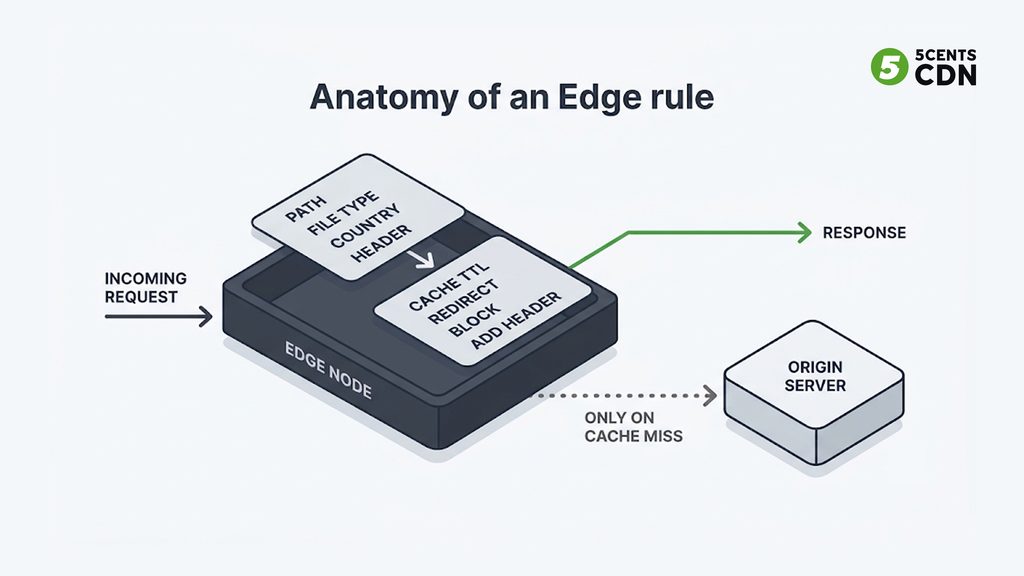
At its simplest, an edge rule is a condition paired with an action: when a request matches this condition, do that. The condition might be a path pattern, a file type, a country, a header value, or a query parameter. The action might be to set a cache lifetime, redirect the request, block it, add a header, or remove one. The rules execute on the CDN’s edge servers, so they are applied right where the viewer’s request lands, without a round trip to your origin.
That placement is what makes them valuable. A decision made at the edge costs almost nothing and takes load off your origin; the same decision made at the origin costs a round trip and a slice of origin capacity on every single request. Rules also give you control without touching origin code or player code. You can change caching, headers, or access policy through a control panel or an API and the change applies across the network, so the people who run delivery can adjust behavior without waiting for an application release. On 5centsCDN, rules are configured per zone, through the control panel or the API.
Why Defaults Aren’t Enough for Streaming
Defaults exist so that a new zone works sensibly on day one, and for the typical website that means long cache lifetimes and aggressive reuse. The default profile for web acceleration on 5centsCDN is a good example of a sensible website setup: content cached at the edge and in the mid-tier for days, browsers told to hold files for weeks, query strings ignored when deciding what counts as the same file, and responses that set cookies left uncached. For a brochure site, that is exactly right.
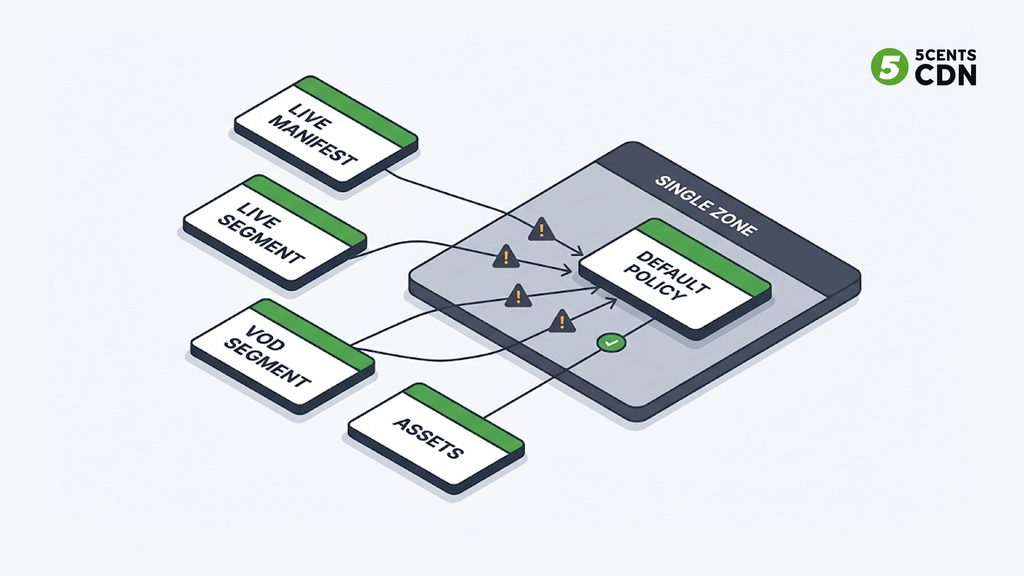
For streaming it is a poor fit, because a streaming zone holds several kinds of content with opposite needs. A live manifest must stay fresh for a few seconds at most. The media segments it points to are immutable once published and can be kept for as long as they remain in the live or DVR window, and far longer for on-demand content. Posters, thumbnails, and player assets behave like website files. A single zone-wide setting cannot serve all of those at once, which is why a streaming zone needs its own rule set rather than inheriting website defaults. The rest of this guide is that rule set, organized by the job each rule does.
Caching Rules: Manifests and Segments Are Different Animals
Caching is where Edge Rules earn their keep, and for video the central idea is that manifests and segments have different mutation patterns. Giving both the same lifetime sacrifices one of them. Make the manifest’s short lifetime apply to segments and you throw away reuse, sending a flood of avoidable requests to origin. Give a live manifest a long lifetime and viewers stop receiving new content, because their players keep being handed an old playlist.
There are usually three layers of caching you can control, and a good rule set treats each deliberately:
- Edge caching controls how long content stays on the edge servers nearest viewers. This is the layer that determines what a viewer gets served instantly.
- Mid-tier (midgress) caching controls caching between the edge servers and your origin. It is the layer that absorbs requests an individual edge misses, so the origin sees far fewer of them. It pairs naturally with an origin shield.
- Browser caching controls how long the viewer’s own device holds a file. Long browser lifetimes suit immutable segments and static assets, but they are exactly wrong for a manifest the player must re-fetch.
One decision sits above all three: whether the CDN honors the origin’s Cache-Control headers or overrides them with your own lifetimes. The HTTP caching standard, RFC 9111, defines how those headers and cache freshness work. Letting the origin decide is simple when your origin is disciplined about headers; overriding at the edge is safer when it is not, or when you want one place where cache policy lives. Either way, choose deliberately rather than inheriting whatever the origin happens to send.
Starter caching profile for a streaming zone (illustrative)
| Content | Edge cache | Browser cache | Why |
| Live manifest / playlist | A few seconds at most (at or below segment duration) | Do not hold; player must re-fetch | Changes continuously; players poll it |
| Live media segments | At least as long as the live / DVR window | Long | Immutable once published |
| VOD manifest | Long; purge when you re-publish | Short to moderate | Changes only on re-publish |
| VOD media segments | Long (days to weeks or more) | Long | Immutable; the biggest origin-offload win |
| Posters, thumbnails | Days | Days | Rarely change; version filenames when they do |
| Player JS / CSS | Days | Days | Use versioned filenames so updates take effect |
| Large downloadable files | Long | Moderate | Pair with range / slice caching |
Illustrative starting points only. Tune them against your segment duration, DVR window, and publishing workflow; they are not universal values.
For the deeper mechanics of making all this pay off, including cache-key design and the tactics that raise offload, our guide to improving your cache-hit ratio goes further. And how your rules behave when the origin errors matters for resilience too; our piece on keeping streaming up through a provider outage covers serving stale content in that situation.
Cache-Key Rules: Query Strings and Cookies
The cache key decides what counts as “the same file,” and two settings quietly dominate it: how query strings are treated and what happens to responses that set cookies.
Ignoring query strings raises your cache efficiency, because requests that differ only by a tracking parameter all map to one cached object instead of fragmenting into thousands. That is why website defaults often ignore them. But it is only safe when the query string does not change the response. In streaming, URLs sometimes carry things that do: a rendition selector, a version, a signature, a session identifier. If one of those is ignored in the cache key, the CDN can serve one viewer’s response to another. The rule of thumb is simple. Anything that changes what the response should contain must be part of the cache key, and anything that is purely tracking or analytics should be excluded from it. If your URLs carry a signature or token, make sure the access check happens before the cache is consulted, and test that behavior explicitly rather than assuming it.
Cookies work similarly. A response that sets a cookie is personalized by definition, so by default it should not be cached and shared; on 5centsCDN’s default web-acceleration profile, such responses are not cached unless you tell the CDN to ignore the cookie. That is the right default for pages, but for static video assets served from a cookie-setting origin it can silently defeat caching, so it is worth checking whether your media responses are being skipped for that reason.
Access Rules: Who Gets In
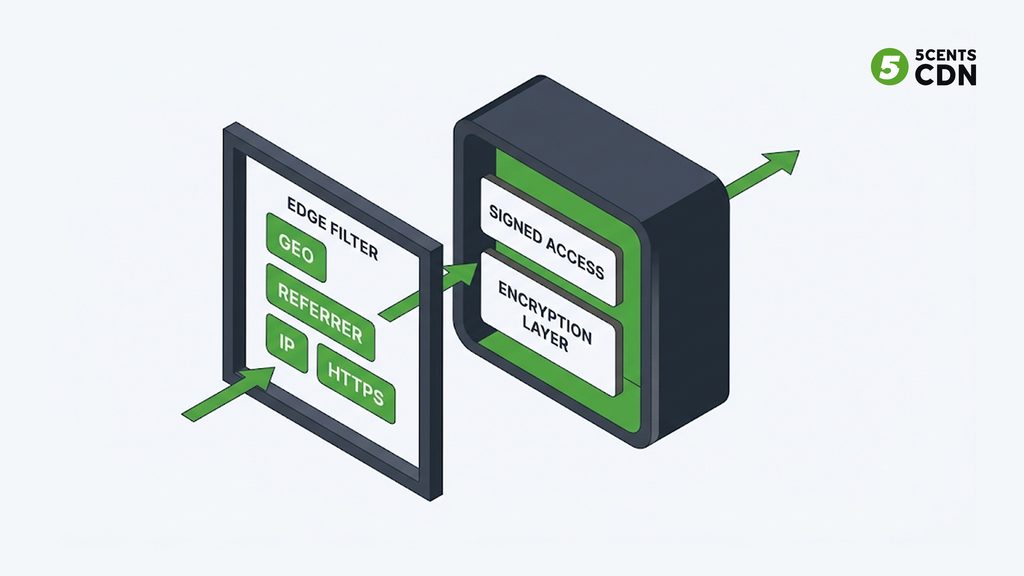
Edge Rules are also an access layer, and they are best understood as a set of coarse, cheap filters that run before anything reaches your origin. They are not a substitute for strong content protection, and being honest about what each one can and cannot do is the difference between a useful layer and a false sense of security.
Geographic rules allow or block requests by country, which supports licensing and rights territories. They are determined from the requester’s IP address, so determined viewers using anonymizing networks can route around them; treat them as enforcement of your rights map for ordinary viewers rather than an absolute wall. Our guide to geo-blocking covers the strengths and limits in detail.
Referrer-based rules check which site a request came from, which is how you stop casual hotlinking and unauthorized embedding of your player and files. They are worth setting, but they rely on a header that non-browser clients can simply fake, so they stop casual misuse rather than determined scrapers.
IP-based rules let you block abusive addresses or allow only known ones for sensitive paths such as an admin or ingest endpoint.
HTTPS enforcement redirects insecure requests to secure ones, which is both a security baseline and a requirement for many modern player and browser features.
None of these stops someone who has a valid URL and a willing browser from copying a stream. That is the job of signed access and encryption, which are separate layers; our primer on token-based authentication explains the access side. Think of access rules as the first, cheapest filter in a stack, not the whole stack.
Header Rules: Small Settings, Big Consequences
Headers are where streaming deployments most often fail in ways that are hard to diagnose, because the symptom appears in a browser console rather than in any server log you are watching.
CORS headers are the classic example. When a web page on one domain uses a player to fetch manifests and segments from another, the browser blocks the requests unless the response carries the right cross-origin permissions. The mechanism is described in MDN’s guide to Cross-Origin Resource Sharing. A missing or too-narrow header produces a player that simply will not load, with an error only a developer would recognize. Setting it once, at the edge, for both manifests and segments removes a whole category of “it works on my site but not theirs” problems.
Security headers, such as HTTP Strict Transport Security, tell browsers to insist on HTTPS. They are valuable, but browsers remember them for the duration you set, so start with a short lifetime and extend it only once you are certain every subdomain and path is ready, because a mistake lingers in visitors’ browsers long after you fix it.
Headers sent to the origin let you add a fixed value to every request the CDN forwards. A common use is a shared secret that your origin checks, so that it accepts traffic only from the CDN and not directly from the internet, which shields it from being hit around your caching layer.
Headers stripped from responses let you remove information you would rather not expose, such as server software and version details or noisy storage-provider headers, tidying what viewers and scanners see.
Redirect and Rewrite Rules
Redirect and rewrite rules handle the plumbing that keeps URLs clean and stable as your setup evolves. The everyday ones are forcing a single canonical hostname so that the bare domain and the www version do not split your cache and your search ranking, sending insecure requests to HTTPS, and redirecting old paths to new ones after you reorganize content. They matter more than they look during a migration, when old URLs live on in players, embeds, and bookmarks and must keep working; our guide to migrating CDNs without downtime leans on exactly this kind of rule parity.
A related setting is following redirects at the edge. If your origin answers some requests with a redirect, for example to a storage bucket, the CDN can follow it itself instead of passing the redirect to the viewer. That keeps your storage layout private and saves the player an extra hop, since the viewer never sees the redirect.
Large Files and Range Requests
Video is often fetched in pieces. A player seeking inside a long MP4, or a download manager resuming a large file, asks for byte ranges rather than the whole object, and how a CDN handles those requests changes both origin load and seeking speed. Left alone, a CDN may forward each range to origin or cache the entire file before serving any of it, and neither is ideal for very large objects. Slice-style range caching breaks a large file into chunks that are fetched and cached independently, so the first viewer to request the middle of a long video does not force the whole file through, and later viewers seeking anywhere get fast hits. If you serve large progressive files or downloadable assets alongside segmented streams, this is worth switching on for those paths specifically.
Building a Rule Set You Can Trust
A rule set is only as good as your ability to change it safely, and a few disciplines keep it from becoming a liability.
Know how your platform resolves overlapping rules. When several rules match one request, something decides which wins, whether it is order, specificity, or priority, and assuming it works the way you intend is a common source of surprising behavior. Test it explicitly. Keep rules narrow: scope each one to the paths and file types it is meant for, rather than writing broad rules that catch more than you meant. Change one thing at a time and watch the effect, because caching and header changes interact. After changes that affect cached content, remember that already-cached objects keep their old behavior until they expire or are purged. Test in a way that mirrors real playback, with a real player on a real page from a different origin, since several of the failures above only appear in a browser. And document what each rule is for and why it exists, because a rule set nobody understands cannot be safely modified or migrated. Real-time analytics on cache behavior, errors, and playback quality are how you confirm that a change helped rather than hurt.
The Mistakes That Cause the Most Damage
Most Edge Rules problems come down to a short list, and knowing them in advance saves a lot of debugging.
- Caching a live manifest too long. The stream appears to freeze for everyone, while every server-side metric looks healthy.
- Ignoring a query string that matters. Different renditions or versions collapse into one cached object, and viewers get the wrong content.
- Missing or too-narrow CORS headers. Players fail in browsers with errors that never appear in your logs.
- Treating referrer checks as protection. They stop casual hotlinking only; anyone determined can fake the header.
- Enabling strict security headers too eagerly. A long HSTS lifetime set before every path is ready locks mistakes into visitors’ browsers.
- Caching error responses for too long. A bad response held at the edge keeps failing viewers long after the origin is fixed.
A Starter Edge Rule Checklist for a Streaming Zone
Pulling the guide together, a streaming zone should be able to answer yes to each of these: manifests and segments have separate cache lifetimes, with live manifests kept to a few seconds at most and immutable segments cached long; you have decided whether the CDN honors or overrides origin cache headers; mid-tier caching is on so the origin sees only true misses; browser caching is long for segments and static assets but not for manifests; query strings and cookies are handled deliberately, with anything that changes the response included in the cache key; geographic rules reflect your rights map; referrer rules limit casual hotlinking; HTTPS is enforced; CORS headers are set for manifests and segments; security headers are enabled conservatively; the origin accepts traffic only from the CDN; canonical-hostname and legacy-path redirects are in place; large files use range caching; and every rule is scoped narrowly, tested in a real browser, and documented.
Put the Rules to Work
Edge Rules are the difference between a CDN that merely sits in front of your streaming service and one that is tuned to it. The defaults get you started; the rules above are what make a live manifest stay fresh, keep segments flowing from the edge instead of your origin, let your player load in any browser, enforce your territories, and keep casual misuse away from your files. None of it requires changing your origin or your player, and all of it is cheap to adjust once you understand what each rule is for.
On 5centsCDN, Edge Rules cover the building blocks described here, configured per zone through the control panel or the API: edge, mid-tier, and browser caching; query-string and cookie handling; country-based and referrer-based access control; HTTPS redirection and other redirects; CORS, security, and custom request and response headers; response-header filtering; following origin redirects; and range-request caching for large files. They run on a global CDN with free SSL and an origin shield available in front of your origin. If you want help mapping a rule set to your own streaming setup, talk to our team, or explore how Edge Rules work in practice.
Frequently Asked Questions
What are CDN edge rules?
Condition-and-action policies that run on the CDN’s edge servers. When a request matches a condition (a path, file type, country, header, or query parameter), the rule applies an action: set a cache lifetime, redirect, block, or add or remove a header — all before the request reaches your origin.
Why aren’t default CDN settings enough for video streaming?
Defaults are tuned for websites: long cache lifetimes, aggressive reuse. A streaming zone mixes live manifests that must stay fresh for seconds, immutable segments that can be cached long, and static assets. One zone-wide setting can’t serve all of them, so streaming needs its own rule set.
How should manifests and segments be cached differently?
Keep live manifests to a few seconds at most, because players poll them for new content. Cache media segments much longer — at least as long as they remain in the live or DVR window, and far longer for on-demand — because they never change once published.
Should query strings be part of the CDN cache key?
Only if they change the response. Exclude pure tracking parameters to raise cache efficiency, but include anything that selects a rendition, version, or signature — otherwise one viewer’s response can be served to another. If URLs carry a token or signature, make sure the access check happens before the cache is consulted.
Do video players need CORS headers from the CDN?
Yes, when a page on one domain uses a player to fetch manifests and segments from another. Without the right cross-origin headers the browser blocks the requests and the player won’t load. Setting them once at the edge, for both manifests and segments, removes a common class of embed failures.
Are geo and referrer rules enough to protect my video?
No. Geo rules can be bypassed with anonymizing networks and referrer checks rely on a header non-browser clients can fake. They filter ordinary and casual misuse cheaply, but real content protection needs signed access and encryption as separate layers.
