


The reason so many teams stay on a CDN they have outgrown is not loyalty — it is fear. Fear that the moment they decide to migrate CDNs, something breaks: streams go dark, certificates throw errors, a forgotten API endpoint silently fails, and the migration meant to fix their problems becomes a bigger problem than the one they started with. That fear is well-earned, because plenty of migrations do go wrong. But they go wrong for predictable, avoidable reasons, and a CDN migration done properly produces exactly zero dropped requests.
The teams that migrate cleanly share one mindset: they treat switching CDNs as a controlled, phased rollout rather than a single dramatic flip of a DNS switch. They run the old and new networks side by side, shift traffic in small increments, watch the numbers, and keep a fast path back at every step. This guide lays out that process end to end — how to audit what you have, design a zero-downtime strategy, configure the new provider for parity, test under real traffic, execute the DNS cutover safely, and validate afterward — with particular attention to the parts that bite streaming operators specifically. Follow it, and a CDN migration becomes a routine upgrade instead of a leap of faith.
Why Migrations Break (and Why They Don’t Have To)
Almost every migration disaster traces back to the same handful of causes, and naming them upfront is the best defense, because each one has a countermeasure built into the process below.
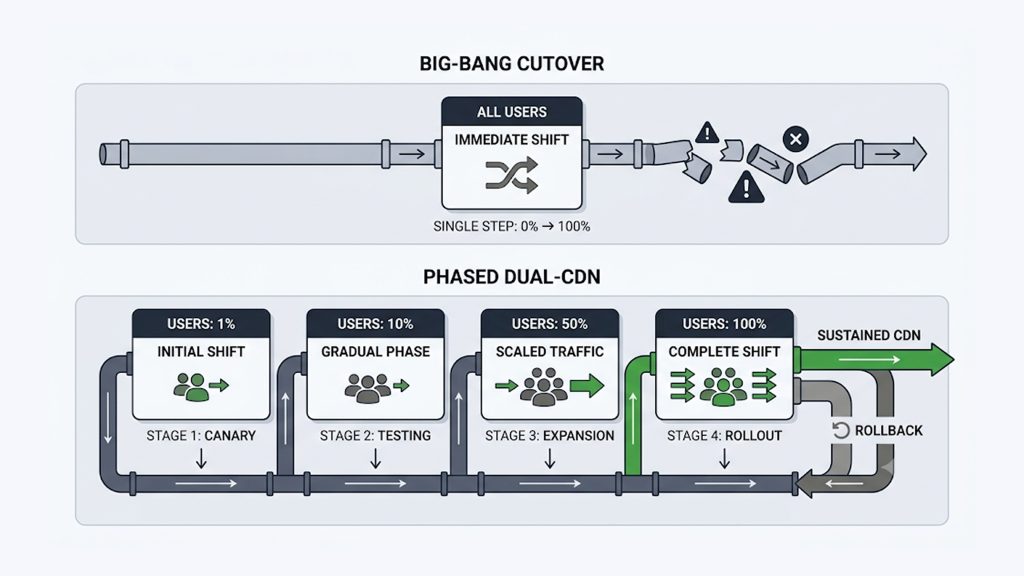
The classic failure is the “big bang” cutover: pointing all your DNS at the new CDN at once and hoping. If anything is misconfigured — and at the scale of a full edge configuration, something usually is — every user hits the broken setup simultaneously, and rollback is slow because DNS changes do not propagate instantly. Close behind are configuration gaps: cache rules that behave differently on the new provider, TLS certificates that don’t cover every domain, redirect and header logic that quietly changed, and — the perennial one — a forgotten domain or API endpoint that nobody inventoried and that fails silently after go-live. For streaming specifically, there are sharper edges still: tokenized or signed URLs that break because the new CDN signs them differently, DRM license flows that snap, and manifest or segment caching that misbehaves in ways that only show up as rebuffering under real load.
What every one of these has in common is that it is discoverable in advance. None of them is bad luck; all of them are the result of moving faster than your verification. The entire zero-downtime method is built to surface these problems while they affect nobody, and to make undoing them instant if one slips through.
First, Be Clear on Why You’re Moving
Before the mechanics, it is worth pinning down what success looks like, because the reason you are migrating determines what you must measure to know the move worked. Teams switch CDNs for a handful of recurring reasons, and each implies a different definition of “better.”
The most common trigger is cost — per-gigabyte pricing that has drifted above market, opaque billing, or punitive overage fees, the kind of problem covered in depth in our guide to reducing CDN bandwidth costs. Close behind is inconsistent performance, especially poor delivery in specific regions where the current provider’s coverage is thin. Then there is reliability — a history of outages that took your service down with the provider’s — and flexibility, where slow rule changes, rigid caching, or missing APIs hold your team back, or a multi-year contract that no longer matches how you actually use the service. Whatever the trigger, write down the specific, measurable outcome you expect — a target per-gigabyte rate, a startup-time or rebuffer threshold in your key markets, an uptime figure — before you migrate. That number becomes the thing you validate against after cutover, and without it you are moving on faith rather than evidence.
Step 1: Audit Everything You Currently Deliver
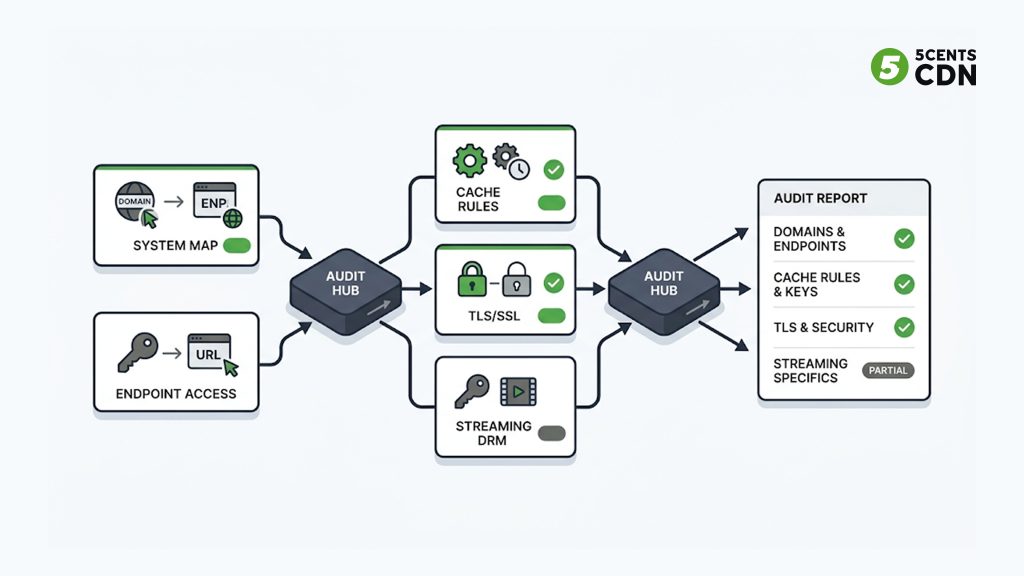
You cannot migrate what you have not mapped, and underestimating the complexity of your existing edge is the single most common root cause of migration downtime. Before touching a new provider, build a complete picture of your current setup.
Start with a full inventory of every domain and endpoint that touches your CDN: primary domains, static-asset subdomains, dedicated streaming domains for VOD and live, API endpoints, and — critically — the legacy or “forgotten” domains that still quietly receive traffic. Cross-reference this against thirty to ninety days of real traffic logs, because the things that break in migrations are almost always the ones that weren’t in anyone’s mental model. Then document the actual behavior configured at the edge: cache rules and time-to-live values, cache-key configuration (which query strings, headers, and cookies matter), origin routing and failover, redirect and rewrite rules, and every security policy — WAF rules, IP allow and deny lists, geo controls, and header manipulation.
For streaming workloads, capture the specifics that general web guides skip: how your tokenized or signed URLs are generated and validated, your segment-caching strategy and how it differs between manifests and media chunks, and any origin-shield or mid-tier caching in front of your origin. Wherever possible, export all of this as configuration rather than screenshots — the goal is a documented baseline you can reproduce exactly on the new provider, not tribal knowledge living in one engineer’s memory. This audit is tedious and it is the most important step in the entire migration; every hour spent here removes a potential outage later.
Step 2: Design a Dual-CDN, Zero-Downtime Strategy
With your current state documented, choose how you will move. The safe answer, for anything beyond a trivial site, is not a single cutover but a period of running both CDNs in parallel and shifting traffic gradually between them.
This mirrors the blue-green deployment pattern familiar from software releases: keep the known-good environment (your current CDN) fully live while you bring the new one up alongside it, verify the new one under real conditions, and shift over only when the evidence says it is safe — with an instant path back to the old one if it isn’t. Running dual-CDN buys you four things that a big-bang cutover cannot: progressive traffic shifting in small increments, a real apples-to-apples performance comparison between old and new under identical load, instant rollback if error rates climb, and the ability to validate caching, TLS, and headers on live traffic before you commit.
You can split traffic between the two providers a few ways. DNS-based weighting sends a defined percentage of users to each CDN and is the most broadly accessible method. An application layer can choose a CDN domain dynamically via a config flag or feature switch, giving you finer control. Or a reverse proxy in front of both can route by rule. Most teams use DNS weighting because it requires no application changes, with the caveat — covered in Step 5 — that DNS makes traffic shifting gradual rather than instant, which shapes how you plan both cutover and rollback. Whichever method you choose, define your phases before you start: a shadow or canary phase at one to five percent of traffic, then a deliberate ramp — ten, twenty-five, fifty, seventy-five percent — with explicit health checks and a go/no-go decision at each step, and finally full cutover once the metrics hold steady.
Step 3: Configure the New CDN for Parity First, Improvement Later
There is a powerful temptation, when standing up a new CDN, to fix everything at once — to redesign the caching, tighten the security rules, and adopt every new feature while you’re in there. Resist it. During the migration, your goal is to make the new provider behave *identically* to the old one, because parity is what lets you attribute any change in your metrics to the migration itself rather than to a configuration you altered at the same time.
Mirror the existing behavior first: the same origins and failover logic, the same cache TTLs and cache keys, equivalent redirects and rewrites, equivalent security policies, and matching TLS configuration. Pay disproportionate attention to TLS, because certificate mistakes are one of the most visible ways a migration fails at scale — ensure new certificates cover every domain, including SAN and wildcard coverage where needed, that intermediate CA chains are served correctly, and that any HTTP Strict Transport Security policy is handled carefully, since browsers cache HSTS for a long time and a mistake there can lock users out well beyond the migration window. Align caching precisely with how your origin sets Cache-Control and Expires, because a cache-key mismatch between providers can either over-cache and leak private or personalized content, or under-cache and hammer your origin — both of which are far worse than the inefficiency they replace.
For streaming, parity means confirming that tokenized and signed URLs validate correctly on the new provider, that DRM license flows work end to end, and that manifests and segments cache the way they did before. Only once you have verified true parity under real traffic should you begin, one change at a time, to introduce the improvements that motivated the move in the first place.
Step 4: Instrument Before You Shift a Single User
You cannot ensure zero downtime if you cannot see what is happening in real time, so monitoring must be in place before any traffic moves. The dual-CDN period is only as safe as your ability to compare the two providers second by second.
Define clear thresholds across the metrics that matter: availability (error rates, especially 5xx and origin timeouts), latency (time-to-first-byte and total response time broken out by region), cache efficiency (hit ratio and resulting origin load), and — for streaming — the quality-of-experience metrics viewers actually feel, startup time and rebuffer ratio. During the dual-CDN phase, the crucial capability is side-by-side comparison: the same URLs served by each provider, latency and error rates segmented by CDN, and cache-hit ratios per provider, ideally broken down by region so a problem confined to one geography doesn’t hide inside a healthy global average. Real-time analytics on your actual delivery is what turns “the new CDN feels fine” into “the new CDN is measurably equal or better in every region,” which is the only basis on which you should ever advance a phase.
The discipline here is to define your rollback triggers in advance and in numbers — a specific error-rate threshold sustained for a specific number of minutes — so that during the cutover, deciding to roll back is reading a dashboard, not making a judgment call under pressure.
Step 5: Execute the DNS Cutover Safely
DNS is where migrations visibly succeed or fail, because it is the mechanism that actually moves users, and it has a property that surprises people: changes are not instant. Understanding and planning around that property is the difference between a smooth cutover and hours stuck in a broken state.
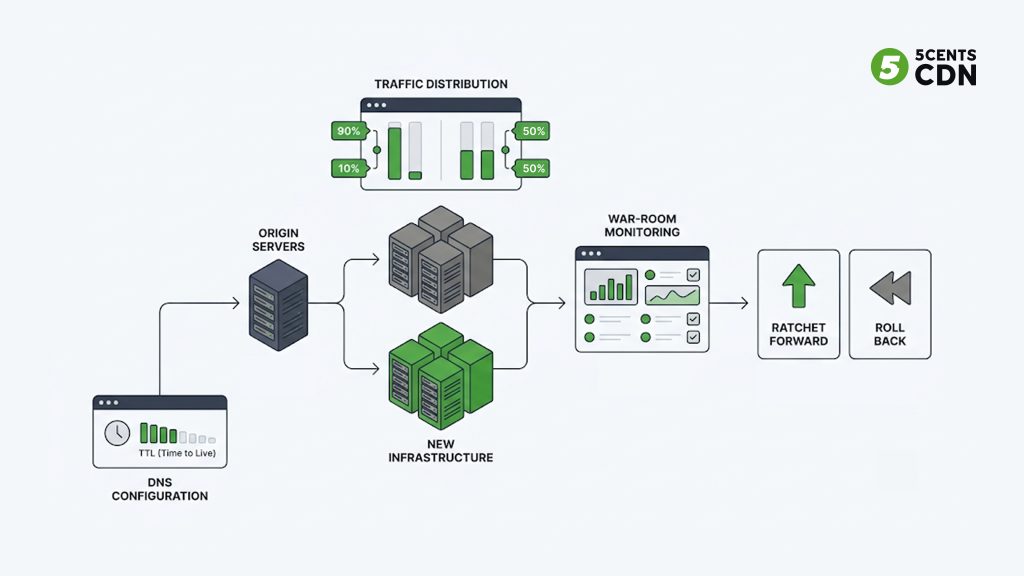
The key preparation happens days ahead of the cutover: lower the time-to-live on the relevant DNS records well in advance — from an hour down to a minute or two. TTL governs how long resolvers cache your DNS answer, so a high TTL set on cutover day means users keep hitting the old provider — or a broken new one — for as long as that cache lasts, which cripples both propagation and rollback. Lowering it beforehand is what makes both fast. Bear in mind, too, that some resolvers and clients ignore low TTLs and cache longer than they should, so a fraction of your audience will lag behind any change; plan for a gradual migration rather than a clean instant switch, and never decommission the old CDN the moment the numbers look good.
With TTLs prepared, use weighted DNS to shift traffic in the increments you defined, starting in lower-risk regions or with non-critical parts of your application, and keep a clear mapping of which DNS change corresponds to which phase so you can roll back surgically rather than all-or-nothing. During each shift, run a war room: the people who own the network, the application, and the customer experience watching the agreed dashboards together, with the pre-defined rollback triggers in front of them. Move core domains and APIs last, once the lower-risk traffic has proven the new provider under real load. A DNS setup that supports fast, reliable changes and low TTLs is part of what makes this step controllable rather than nerve-wracking.
The Rollback Path Is the Whole Point
It is worth dwelling on rollback as its own discipline, because the confidence to shift traffic at all comes entirely from knowing you can undo it instantly, and “we’ll just switch it back” is not a plan until you have made it one.
A warm rollback path means several concrete things held ready throughout the migration. The old CDN stays fully configured and live — not paused, not partially dismantled — for the entire dual-CDN period and a defined watch window after full cutover, so that reverting is a matter of shifting weight back, not rebuilding. DNS TTLs stay low through that whole window, not just during the cutover itself, because a rollback is a DNS change too and inherits the same propagation delay; raising TTLs again is one of the last things you do, not one of the first.
When you migrate CDNs, your rollback triggers should be written down as numbers agreed in advance — an error rate above a set threshold sustained beyond a set number of minutes, a latency or rebuffer regression past a defined bound — so that pulling the ripcord is an act of reading a dashboard rather than winning an argument at 3 a.m. And someone specific owns the decision and has the access to execute it immediately.
The reason this matters so much is psychological as well as technical: teams that trust their rollback path shift traffic decisively and finish migrations, while teams that don’t hesitate, hedge, and often stall out on the old provider indefinitely — still paying the bill and suffering the problems that made them want to move. A rehearsed, warm rollback is what converts a scary one-way door into a reversible, low-stakes series of small steps.
Step 6: Validate After Cutover — the Migration Isn’t Done at “DNS Switched”
Flipping the last DNS record feels like the finish line; it is actually the start of the validation phase that separates a migration that merely avoided downtime from one that actually improved things. Keep the old provider available and the rollback path warm for a defined watch period rather than tearing it down immediately.
Using a week or two of data from before and after the full cutover, compare the metrics that justified the move: latency and time-to-first-byte by region, cache-hit ratio and the resulting origin offload, and for streaming the QoE numbers — startup time, rebuffer ratio, average bitrate. Tune the new provider from here if needed, but change one thing at a time so you can attribute each effect correctly. This is also the moment to confirm the migration delivered its business case: if you moved to cut delivery spend, verify the actual per-gigabyte cost and the offload improvement against your old bill rather than assuming the savings materialized. Finally, run a short retrospective while it is fresh — where you came closest to trouble, which alerts were useful, what the runbook should say next time — because your next configuration change, multi-CDN expansion, or origin refactor will be smoother for it.
A Zero-Downtime Migration Checklist
Pulling the playbook together, a migration is ready to call complete when you can check off each of these: a full inventory of every domain, endpoint, and edge rule, including the forgotten ones; a documented configuration baseline exported from the old provider; the new CDN configured for strict parity, with TLS certificates covering every domain and CA chains verified; streaming specifics confirmed — tokenized URLs, DRM flows, and manifest/segment caching all validated; monitoring in place with per-region, per-provider comparison and numeric rollback triggers defined in advance; DNS TTLs lowered days ahead of cutover; traffic shifted in phases from low-risk to core, each with a go/no-go gate.
The old provider is kept live through a defined post-cutover watch period; before-and-after performance and cost are validated against the original goal; and a retrospective is captured. Each item maps directly to one of the failure modes from the start of this guide, and each is far cheaper to check than to recover from.
Make Your Next Migration a Non-Event
A CDN migration has a reputation for risk, but that reputation belongs to the big-bang approach, not to migration itself. Audit thoroughly, run both providers in parallel, insist on parity before improvement, instrument everything, shift traffic gradually with the rollback path always warm, and validate against real numbers afterward — do that, and the move your team has been putting off for fear of downtime turns out to be one of the highest-leverage infrastructure upgrades you can make, accomplished without a single viewer noticing anything except that the streams got better.
If you are weighing a move, 5centsCDN is built for exactly this kind of phased, low-risk transition: a purpose-built video CDN with parity-friendly configuration, fast DNS, origin shielding, and real-time analytics to compare old and new under real load. Two paths make it concrete: our guide to switching to 5centsCDN walks through the move at a practical level, and our assisted CDN migration program puts our engineers alongside your team to replicate your current setup and cut over without downtime. When you’re ready to plan it, talk to our team.
Frequently Asked Questions
Can you migrate a CDN without downtime?
Yes. Run the old and new CDN in parallel (dual-CDN), verify configuration parity, shift traffic in small increments with monitoring, and cut over DNS with a lowered TTL and a warm rollback path. Done this way, zero dropped requests is achievable.
Why do CDN migrations cause downtime?
Almost always a ‘big bang’ cutover plus configuration gaps: mismatched cache rules, TLS certs that don’t cover every domain, forgotten endpoints, or (for streaming) broken tokenized URLs and DRM. All are discoverable in advance with a proper audit and phased rollout.
What is a dual-CDN migration?
Running your current and new CDN side by side and shifting traffic gradually between them, so you can compare them under real load, roll back instantly, and validate caching/TLS/QoE before committing. It mirrors a blue-green deployment.
Why lower DNS TTL before a migration?
TTL controls how long resolvers cache your DNS answer. Lowering it days ahead means the cutover — and any rollback — propagates in minutes instead of hours. Some clients ignore low TTLs, so plan for a gradual, not instant, switch.
What should I check before declaring a migration done?
Inventory complete, config parity verified, TLS/CA chains valid, streaming specifics (tokenized URLs, DRM, manifest/segment caching) confirmed, monitoring with numeric rollback triggers in place, DNS TTLs handled, old provider kept warm through a watch period, and before/after performance and cost validated.
