


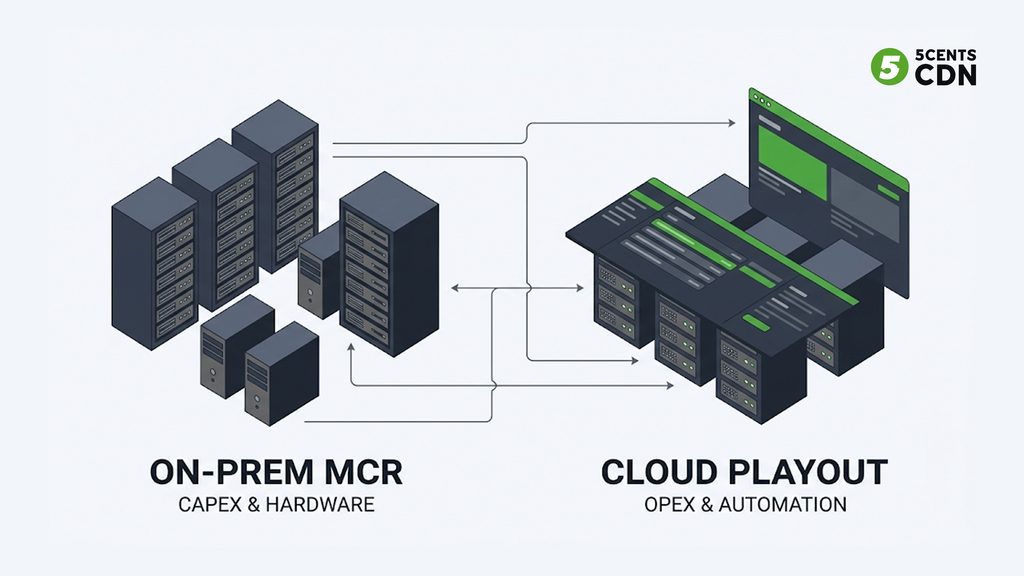
Launching a television channel used to mean building a room. A master control room, to be exact: racks of dedicated playout servers, automation hardware, graphics engines, and the staff to run them around the clock, with a capital cost that ran well into six figures before a single frame aired. For decades that was simply the price of putting a channel on air. Cloud playout has quietly dismantled that assumption — it takes everything the master control room did and runs it as software in the cloud, reachable from a browser, turning a six-figure capital project into a subscription you can switch on in days.
But here’s the thing most explanations miss: “cloud playout” is not one fixed product you turn on and point at your content. It’s an engine, and the right *setup* for that engine looks completely different depending on what kind of channel you’re running. A 24/7 movie channel, a live news operation, a one-off sports event, a conference livestream, a FAST channel on smart TVs — these all run on cloud playout, but each demands a different arrangement of scheduling, automation, graphics, live-switching, and ad capabilities. Treating them as the same is how operators end up with a tool that’s overbuilt for a simple channel or underpowered for a demanding one. This guide explains what cloud playout actually is, why it has replaced the master control room, and — the heart of it — how the setup should change for each major channel type, closing with a simple way to match your use case to the capabilities you actually need.
What Cloud Playout Actually Is
At its core, playout is the process of taking your content — recorded files, live feeds, graphics, ads — and assembling it into a single, continuous, broadcast-quality channel output that viewers watch. In traditional broadcasting, several distinct jobs make that happen: automation manages the schedule and triggers each event, the playout engine renders the actual channel, and master control supervises, switches sources, and enforces compliance. Historically each of those lived in dedicated hardware in a physical room.
Cloud playout virtualizes the whole chain. The scheduler replaces the automation hardware and the master control room: you build your channel’s timeline in a browser — dragging in files, live sources, ad breaks, and graphics — and the cloud engine renders and outputs the channel from that schedule, with no on-premises equipment at all. It ingests assets from cloud storage or live inputs, applies branding and overlays, inserts ad breaks, and delivers the finished channel out to streaming platforms, smart-TV apps, and connected devices. Everything the control room did — scheduling, graphics, ad insertion, source switching, channel output, monitoring — happens as software you operate from anywhere. The channel still needs all those functions; they’ve simply moved from racks of hardware into a managed, browser-based environment.
Why Broadcasters Moved Off the Master Control Room
The shift from on-premise playout to cloud is one of the clearest cost-and-agility stories in modern broadcasting, and understanding why it happened explains why cloud playout is now the default for new channels.
The first driver is economics. A traditional playout setup is a large capital expenditure — the servers, the automation systems, the graphics hardware, the redundancy, the control room itself — followed by maintenance contracts and periodic refresh cycles. Cloud playout converts all of that into an operating subscription: you pay for the channels you run, scale up or down as your portfolio changes, and never buy or refresh hardware. For a new channel, that’s the difference between a six-figure project and a line item. The second driver is speed and flexibility. Launching a channel the old way took months of procurement and installation; a cloud channel can be stood up in days by cloning a template, connecting a media library, and applying a schedule. That makes entirely new things practical — spinning up a temporary pop-up channel for an event, launching regional variants of an existing channel, or testing a new format without committing capital. The third is reach: cloud playout platforms are built to output natively to the modern destinations — OTT, FAST platforms, smart-TV apps — that a hardware chain built for traditional broadcast wasn’t designed for. Lower cost, faster launch, broader reach, operated from a browser: that combination is why the control room is giving way to the cloud.
The Common Foundation Under Every Setup
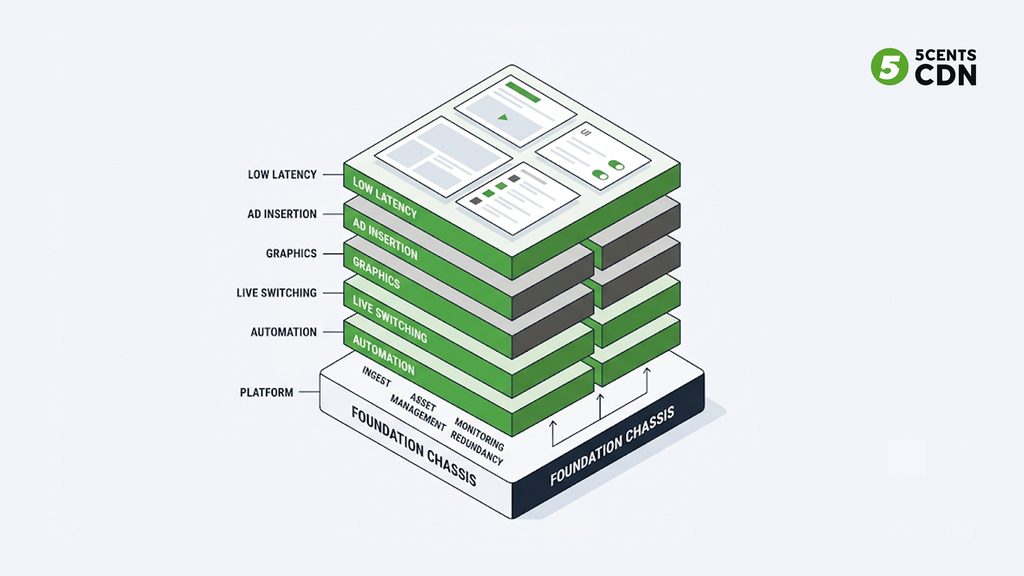
Before the use cases diverge, it’s worth naming what they share, because every cloud playout channel — whatever its type — rests on the same baseline, and that baseline is the price of entry regardless of what you’re building.
Every setup needs reliable content ingest and asset management: a way to get files and live feeds into the system and organize them so the scheduler can reach them. Every setup needs a dependable output chain that renders a clean, broadcast-quality channel and delivers it to wherever viewers watch, in the formats those destinations require. Every setup needs monitoring, so you can see the channel is actually on air and healthy rather than discovering a problem from viewer complaints. And every setup benefits from redundancy appropriate to its stakes, because a channel going dark is the one failure no configuration can excuse. On top of that shared foundation, each setup then adds the specific capabilities its channel type demands — and it’s those additions, not the foundation, that differ so sharply from one use case to the next. Think of the foundation as the chassis and the use-case capabilities as what you build on it: the chassis is common, but a delivery van and a race car are very different vehicles. With that baseline understood, here’s how the build changes for each major channel type.
The Key Insight: Different Channel Types Need Different Setups
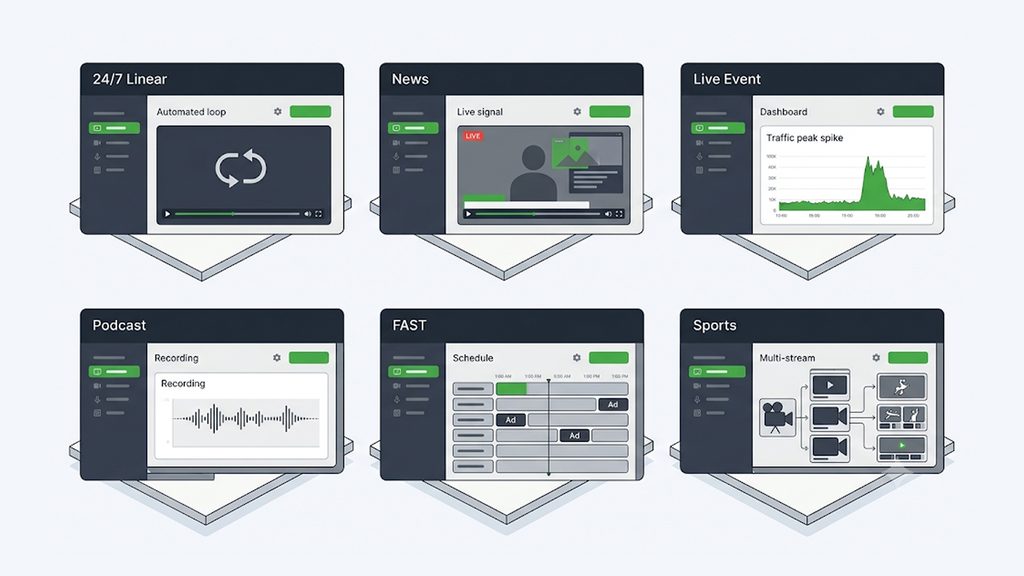
Now the part that matters most for actually choosing and configuring cloud playout. The same underlying engine serves radically different channel types, but what each type *demands* from that engine varies enormously — and matching the setup to the use case is the whole skill. A capability that’s essential for one channel is irrelevant for another. Let’s walk through the major use cases and what each one genuinely needs.
24/7 Linear Channels: Automation and Reliability Above All
A round-the-clock linear channel — a movie channel, a music channel, a curated genre channel running the same way every day — is the classic playout use case, and its defining need is *set-and-forget automation that never fails*. The whole point is that the channel runs continuously without someone watching it every minute, so the capabilities that matter are deep scheduling and automation: building playlists days or weeks in advance, scheduling recurring blocks and dayparts, handling loops and fillers gracefully when a slot runs short, and automatically transitioning between items with no human intervention. Reliability is paramount, because a 24/7 channel that stalls at 3 a.m. is a dead channel — so redundancy and self-healing, the ability to keep playing cleanly through a glitch, matter more here than almost anywhere. Graphics needs are usually modest and templated (a channel logo, a now-and-next bug, schedule-driven overlays). What a 24/7 channel does *not* typically need is heavy live-switching or real-time production tooling; it’s a scheduling-and-automation problem first and foremost. The right setup here is a powerful scheduler, rock-solid automation, and strong redundancy — the live-production bells and whistles would just be unused complexity.
News Channels: Live Switching Meets a Rundown
A news channel is a different animal, because it blends scheduled structure with constant live, time-sensitive change. A newscast has a rundown — a planned sequence of segments — but that rundown shifts all day as stories break, live crosses come in, and segments get reordered or dropped on the fly. So a news setup needs both solid scheduling *and* strong live capabilities: the ability to switch between studio feeds, remote live contributions, and pre-recorded packages seamlessly, often at a moment’s notice. Graphics are heavy and dynamic here — lower thirds identifying speakers, breaking-news banners, ticker crawls, over-the-shoulder graphics — frequently updated live rather than pre-templated. The ability to take in reliable live contribution feeds from the field matters, which is where robust ingest protocols earn their place. And last-second schedule changes have to be effortless, because news that can’t adapt in real time isn’t news. The right setup is a hybrid: scheduling for the planned skeleton, plus live-switching, dynamic graphics, and resilient live ingest for everything that changes around it.
Live Event Channels: Built Around a Moment
A live event channel — a concert, a ceremony, a product launch, a one-off broadcast — inverts the 24/7 priorities. It isn’t about long-run automation; it’s about flawlessly handling a single, high-stakes live moment, often with a known start time and a surge of simultaneous viewers. The defining needs are reliable live ingest and switching (bringing in one or several live feeds and cutting between them cleanly), the ability to top-and-tail the event with pre-recorded elements (a countdown or holding slate before, a replay or sign-off after), and the capacity to absorb a sharp audience spike at start time without faltering. Graphics tend to be event-specific — titles, lower thirds, sponsor bugs — rather than a persistent channel identity. Because the event is scheduled, pre-warming and preparation matter: you set it up in advance, rehearse, and then it has one chance to go right. The setup here is lighter on long-term scheduling and heavier on live production, resilience at the peak, and the pre/post wrap-around — and often it’s a temporary channel, spun up for the event and retired after, which is exactly the kind of agility cloud playout makes trivial.
Conference & Podcast Channels: Simplicity and Repeatability
A conference, webinar, or video-podcast channel has the lightest production demands of the set, and recognizing that saves operators from overbuying. Here the content is usually a single talking-head or panel feed — one or two cameras, a presentation screen share, consistent framing — and the priorities are simplicity, a clean branded frame, and repeatability rather than complex live switching or heavy automation. The valuable capabilities are straightforward: a tidy layout that holds the speaker and any shared slides with consistent branding, simple lower thirds for speaker names and session titles, and reliable recording so the session becomes on-demand content afterward (which, for conferences and podcasts, is often where most of the audience actually is). Multi-session events benefit from easy, repeatable setup — clone the layout for each session rather than rebuilding it. What this use case doesn’t need is the dynamic-graphics firepower of news or the long-run automation of a 24/7 channel; over-provisioning for those just adds friction. The right setup is a simple, consistent, well-branded layout with solid recording — deliberately minimal.
FAST Channels: Monetization Built Into the Schedule
A FAST channel — a free ad-supported streaming TV channel of the kind filling smart-TV home screens — is, from a playout perspective, a 24/7 linear channel with monetization and distribution requirements layered on top. It shares the round-the-clock channel’s need for deep scheduling and reliable automation across a large content library, but adds three things that define the FAST setup. First, ad insertion is central rather than incidental: the schedule has to include ad breaks with proper markers so that server-side ad insertion can monetize every break cleanly, because on a FAST channel the ads *are* the business model. Second, the output has to meet the technical and metadata requirements of the FAST platforms and smart-TV destinations it’s distributed to. Third, scale in the content library matters — a credible 24/7 FAST channel can require a very deep catalog to program without obvious repetition. The right setup is strong linear scheduling plus first-class, marker-driven ad insertion and platform-ready output. Because the FAST model has its own business and distribution depth beyond playout, we cover it fully in our guides to FAST channels and FAST channel infrastructure — here the point is simply that FAST is a playout use case defined by monetization being woven into the schedule itself.
Sports Channels: Live Intensity at Maximum Stakes
A sports channel or event is the most demanding playout use case there is, combining the hardest parts of several others. Like a live event it’s built around a high-stakes moment with a vertical audience spike; like news it needs heavy live switching, dynamic real-time graphics (scores, clocks, stats overlays), and multiple live feeds (different camera angles or venues); and it adds requirements the others don’t, chiefly the need for low-latency delivery so viewers aren’t seeing a goal well after the crowd — or a neighbor — reacts, and typically tight rights and ad-insertion requirements. Multiple simultaneous angles, instant replays, live data-driven graphics, and surge-proof delivery all have to work together under pressure, with no second takes. The right setup is maximal: robust multi-feed live ingest and switching, powerful real-time graphics, low-latency output, integrated ad insertion, and delivery hardened for the biggest concurrency peaks. Sports is where every capability the lighter use cases could skip becomes essential at once — which is exactly why it’s the use case that most rewards a mature, flexible playout system rather than a basic channel-assembly tool.
How to Choose: Matching Use Case to Capabilities
Pulling the use cases together, the practical way to choose a cloud playout setup is to work backward from what your channel actually is to the specific capabilities it demands, rather than buying the most (or least) of everything. The core capabilities to weigh are: scheduling and automation depth, live ingest and switching, dynamic graphics, ad insertion, low-latency delivery, recording, and redundancy. Each use case leans on a different mix.
A 24/7 linear channel prioritizes scheduling, automation, and redundancy, and needs little live switching or heavy graphics. A news channel needs strong scheduling *and* live switching, heavy dynamic graphics, and solid live ingest. A live event channel leans on live ingest and switching, pre/post wrap-around, and peak resilience, with light long-term scheduling. A conference or podcast channel needs only a simple branded layout and reliable recording — deliberately minimal. A FAST channel needs 24/7 scheduling plus first-class ad insertion and platform-ready output. And a sports channel needs essentially all of it at once — multi-feed live switching, real-time graphics, low-latency delivery, ad insertion, and maximum redundancy. Read down that list and your own use case usually names itself, along with the handful of capabilities you should insist on and the ones you can safely treat as optional. The goal is a setup that fits the channel — enough power for what it demands, without paying in cost or complexity for capabilities it will never use.
The reason this matters for choosing a platform is that a good cloud playout system is one flexible engine that can be configured into any of these shapes, rather than a rigid tool that only does one well. That flexibility is exactly what lets you run a simple podcast channel and a demanding sports channel from the same platform, each set up appropriately — and it’s how we’ve approached cloud playout at 5centsCDN: a single engine with layouts and capabilities that fit each of these use cases, drawing on the scheduling, live transcoding, ad insertion, recording, and delivery pieces of our broader channel-building and monetization suite, so you configure the channel you actually have rather than forcing it into a one-size-fits-all mold.
Run the Right Channel, the Right Way
Cloud playout replaced the master control room because it made channels cheaper to launch, faster to stand up, and reachable from anywhere — but its real power is flexibility. The same engine that runs an always-on movie channel can run a breaking-news operation, a one-night concert, a weekly podcast, a monetized FAST channel, or a high-stakes live sports broadcast, provided it’s set up for what each of those actually needs. Understanding that the capabilities worth paying for shift completely from one use case to the next is what separates operators who get a channel that fits from those who fight a tool that doesn’t. Decide what your channel truly is, match it to the capabilities that use case demands, and cloud playout turns launching and running a channel into something you configure in a browser rather than build in a room.
5centsCDN offers cloud playout as part of an end-to-end channel-building and monetization suite — one flexible engine with setups and layouts fitted to each use case, from a simple scheduler-driven 24/7 channel to a fully monetized FAST channel, backed by live transcoding, ad insertion, recording, and delivery over a purpose-built CDN. Whatever kind of channel you’re planning, talk to our team about the playout setup that fits it.
Use-case capability matrix
| Use case | Must-have capabilities | Can skip / minimal |
| 24/7 linear | Deep scheduling & automation; redundancy/self-healing; templated graphics | Heavy live switching; real-time production |
| News | Scheduling + live switching; dynamic graphics (lower thirds, ticker); resilient live ingest | Long-run set-and-forget automation |
| Live event | Live ingest & switching; pre/post wrap-around; peak resilience; event graphics | Long-term scheduling; persistent channel identity |
| Conference / podcast | Simple branded layout; speaker lower thirds; reliable recording | Dynamic graphics firepower; heavy automation |
| FAST channel | 24/7 scheduling; marker-driven ad insertion (SSAI); platform-ready output; deep library | Complex live production |
| Sports | Multi-feed live switching; real-time data graphics; low-latency delivery; ad insertion; max redundancy | (Little — sports needs nearly all of it) |
Frequently Asked Questions
What is cloud playout?
The process of assembling your content — files, live feeds, graphics, ads — into a continuous broadcast-quality channel, run as software in the cloud instead of in a hardware master control room. A browser-based scheduler replaces the automation hardware and control room.
How is cloud playout different from a traditional master control room?
It virtualizes the whole chain (scheduling, graphics, ad insertion, switching, output) into a browser-accessible service with no on-prem hardware, turning a six-figure capital project into a subscription you can launch in days and scale as your channel portfolio changes.
Do all channels need the same cloud playout setup?
No. The engine is the same, but the required capabilities differ sharply by channel type: a 24/7 channel needs automation and redundancy; news needs live switching and dynamic graphics; FAST needs ad insertion; sports needs nearly everything. Match the setup to the use case.
What does a 24/7 linear channel need from playout?
Deep scheduling and set-and-forget automation (playlists days/weeks ahead, loops, fillers, automatic transitions) plus strong redundancy so it never goes dark. It needs little heavy live switching or real-time production tooling.
What makes FAST and sports channels more demanding?
FAST adds marker-driven ad insertion and platform-ready output on top of 24/7 scheduling, because the ads are the business model. Sports combines live switching, real-time data graphics, multiple feeds, low-latency delivery, ad insertion, and maximum redundancy all at once.
Can one cloud playout platform run all these channel types?
Yes — a good cloud playout system is one flexible engine configurable into any of these shapes, so you can run a simple podcast channel and a demanding sports channel from the same platform, each set up appropriately, rather than using a rigid single-purpose tool.
