

A recorded video that fails can be re-uploaded. A live event that fails is gone, because there is no second take. That is why a live event streaming checklist is worth more when it works like a runbook: a timeline, an owner for every step, and clear gates that say when the team is allowed to move on.
Most checklists you will find online were written for a person with one camera and one laptop, and they stop at upload speed and a spare cable. This one is written for the people who run the delivery chain behind a bigger event: capture, contribution, transcoding, packaging, origin, CDN, player and monitoring. It runs from seven days before the event to a week after it, with a go/no-go gate at each stage, a failure-mode table, a recovery-time calculation and a degrade plan for the moment something goes wrong.
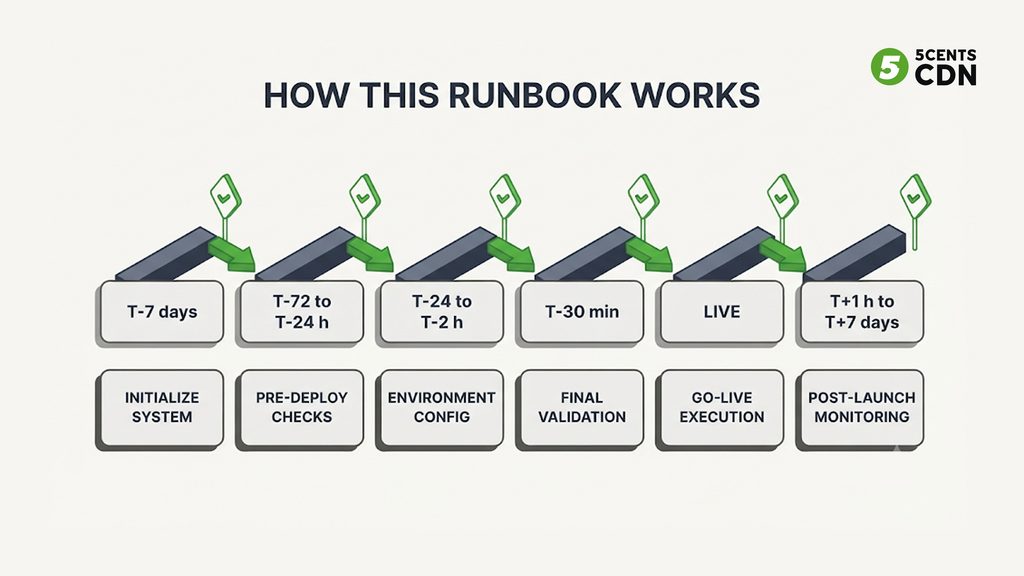
How This Runbook Works
Two ideas hold the whole runbook together. The first is the gate: a point in the timeline where specific exit criteria must be true before the team proceeds. If they are not true, the answer is “no-go”, and someone decides what to fix, cut or delay. The second is the single owner: every hop in the chain, and every checklist line, has exactly one named person responsible and one named backup.
| When | Focus | Gate: what must be true to proceed |
|---|---|---|
| T-7 days | Scope, architecture, capacity | Audience scenarios agreed, single points of failure listed, capacity confirmed, owners named |
| T-72 to T-24 h | Rehearsals and drills | Full-chain rehearsal passed, failure drills timed, load test passed, change freeze in force |
| T-24 to T-2 h | Final checks | Backups hot, dashboards live, runbook and contacts distributed |
| T-30 min | Pre-roll sequence | Every hop verified in order, devices spot-checked, bridge open |
| Live | Monitor and decide | Thresholds watched; degrade ladder pre-authorized |
| T+1 h to T+7 days | Close and learn | Recording secured, keys rotated, review held, ratios recorded |
T-7 Days: Scope the Event and Lock the Architecture
Write the event brief
Start with a one-page brief that every owner reads. It should state the expected audience in three scenarios (base, stretch and surge), the event duration, the audience’s geography, any rights restrictions that limit where the stream may play, whether the event is ad-supported, whether viewers need DVR rewind, and what must be recorded for replay. Add two or three success measures you will track live, such as startup time and rebuffer ratio, so that “is it going well?” has an answer on the day.
The audience numbers drive capacity. Our guide to live streaming bandwidth planning shows how to turn peak concurrent viewers and bitrate into Gbps, and the event bandwidth calculator checks the result against your plan’s included and burst bandwidth. Do this now, not on event day. Extra capacity may need notice, and notice takes time.
Map the chain and name an owner for every hop
Draw the path a frame takes from the camera to the viewer’s screen, and put one person’s name against each hop. A hop with no owner is a hop that fails quietly. For how a stadium-scale chain is put together, see our guide to live sports streaming infrastructure.
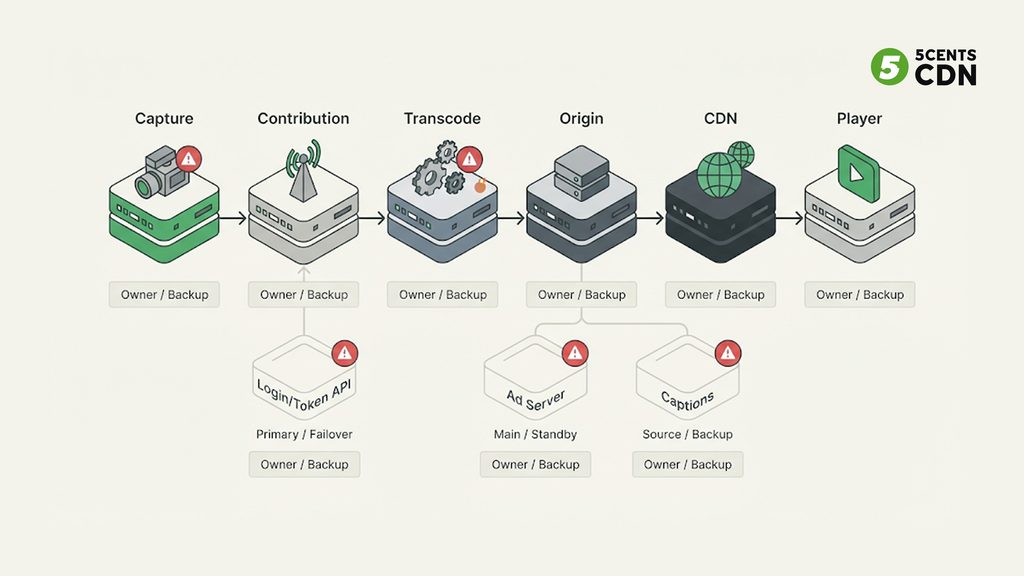
Then walk the chain and list every single point of failure, meaning every component whose loss ends the stream. The usual suspects are the encoder, the contribution link, the packager, the origin, a single CDN, and the services that sit beside the stream rather than in it. The last group is the one teams forget: the entitlement or login API, the token service, the ad decision server, the captioning feed. A stream can die with the CDN perfectly healthy, because something around it stopped answering.
Assign roles, with backups
| Role | Responsibility on the day |
|---|---|
| Incident commander | Owns decisions and the degrade ladder; the only person who can call a no-go |
| Contribution lead | Encoders, the contribution path (for example an SRT feed), backup feed |
| Delivery lead | Packaging, origin, CDN configuration and capacity, traffic shifting |
| Player and QA lead | Device checks, playback tests, viewer-side symptoms |
| Comms lead | Internal bridge, status updates, viewer messaging |
| Scribe | Timestamped log of every change and decision, for the review afterwards |
Every role needs a backup who has actually seen the dashboards, because the person you need is the one who is unreachable at 18:55. On a small event one person may hold several roles, which is fine, as long as the incident commander is never also the person fixing the problem.
Agree the change freeze
Pick a freeze point, often around 48 hours before the event, after which nothing changes in the chain without the incident commander’s sign-off. A late “small” change is a classic way to cause an outage that no rehearsal ever saw.
The Failure-Mode Table: Decide Before the Event What You Will Do
The heart of the runbook is a table you write once and rehearse. For each way the chain can fail, it records how you will notice, what the first action is, who takes it, and how fast it must happen. When something breaks live, people should be reading, not inventing.
| Failure | How you notice | First action | Owner | Recovery target |
|---|---|---|---|---|
| Primary encoder stops | Input drops; segments stop arriving | Switch to hot backup encoder | Contribution | Within buffer runway |
| Contribution link degrades | Packet loss and retransmits climb; frame drops | Fail over to backup path | Contribution | Within buffer runway |
| Packager or origin fails | Manifest stops updating; 5xx at origin | Switch to standby origin or packaging path | Delivery | Within buffer runway |
| One CDN degrades in a region | Errors and rebuffering rise in that region only | Shift that region’s traffic to a secondary CDN | Delivery | Minutes |
| Login or token API slows | Startup time and 401/403 rates rise | Extend token lifetime; scale the service | Delivery | Minutes |
| Ad server returns nothing | Ad errors spike while content plays | Fall back to slate or content | Delivery | Seconds |
| Capacity ceiling approached | Egress nears the plan limit | Cap the top rendition; add capacity | Incident commander | Minutes |
For a deeper treatment of the first three rows, including backup encoders, dual ingest and origin redundancy, see our guide to live stream failover. For the delivery side, the lessons in how to keep streaming when a CDN goes down apply directly to the fourth row.
The recovery-time budget
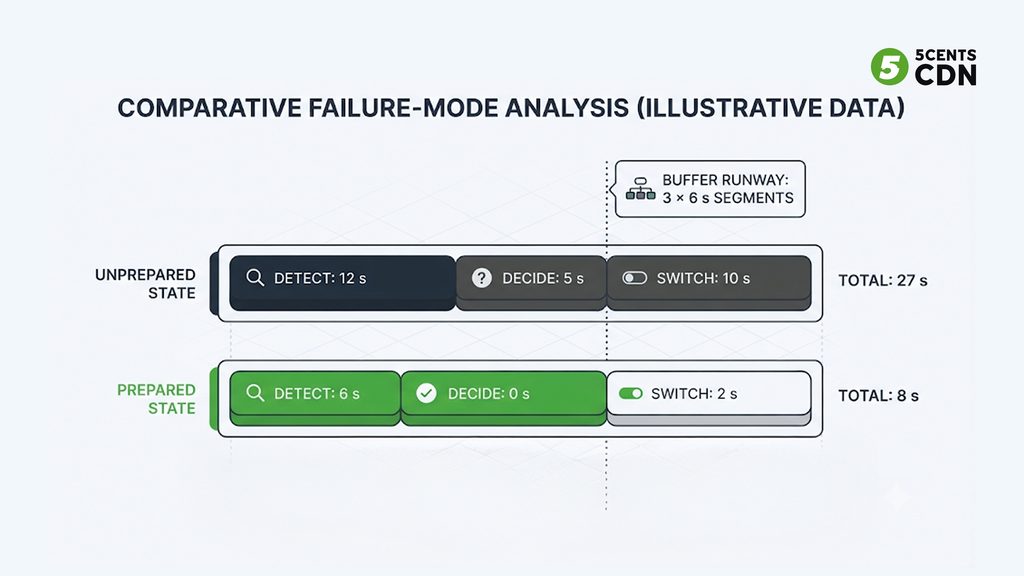
“Recovery target: within buffer runway” needs an explanation, because it is the most useful number in the table. A live HLS player does not play the very latest segment. The HLS specification, RFC 8216, tells players not to start playback closer than three target durations to the end of a live playlist, so a standard player typically sits about three segments behind the live edge. With 6-second segments that is roughly 18 seconds of media in hand. If your chain recovers inside that window, many viewers never see a stall, because the player is still playing media it has already downloaded.
Recovery time is the sum of three steps: detection, decision and switchover. Here is what that looks like with and without preparation, using illustrative figures:
| Step | Unprepared path | Prepared path | What changes it |
|---|---|---|---|
| Detect | 12 s (two missed segments, noticed by eye) | 6 s (alert on one missed segment) | Automated input and manifest-freshness alerts |
| Decide | 5 s (someone has to call it) | 0 s (pre-authorized, automatic) | Pre-agreed trigger and authority |
| Switch | 10 s (cold standby starts) | 2 s (hot standby already ingesting) | Backup running in parallel |
| Total | 27 s | 8 s | Against about 18 s of runway |
The unprepared path overruns the runway by about nine seconds, and viewers stall. The prepared path finishes with ten seconds to spare. The figures are illustrative, so replace them with timings from your own drills, and measure your player’s real buffer depth, because players differ. The principle holds regardless: every minute you spend automating detection and keeping the standby hot buys more than any amount of heroics during the event.
T-72 to T-24 Hours: Rehearse the Event You Are Actually Running
A rehearsal that tests a different setup from the real one proves nothing. Use the real encoders, the real contribution path, the production packaging settings and the real CDN configuration. Three kinds of rehearsal matter, and they answer different questions.
Functional rehearsal: does it play everywhere?
Run the complete chain end to end and watch it on the devices your audience really uses: a phone on mobile data, a laptop, a smart TV, and any app you ship. Check video, audio sync, captions, ad breaks if the event is ad-supported, and the DVR window if viewers can rewind. Use the Stream Tester to inspect the manifest and the renditions the player sees. If the event uses ads, confirm that the markers arrive as expected with SCTE-35 monitoring, so you are not discovering a broken cue during the first break.
Failure drills: does the backup actually take over?
Pull the plug on purpose. Stop the primary encoder and time how long the backup takes. Cut the contribution link (for example an SRT feed) and watch what the viewers’ player does. Disable a CDN path and confirm traffic moves. Record every time against your recovery-time budget. A backup that has never been triggered is a hope, not a plan.
Also test your own agility: make a small configuration change and time how long it takes to reach the edge. If a change takes ten minutes to propagate, you cannot use a configuration change as an emergency lever, and you need to know that in advance.
Load test: does it hold when the audience arrives?
A load test must look like live traffic. Testing with a pre-encoded file at a modest, steady request rate simulates on-demand viewing and will pass easily. Live traffic is different: viewers arrive in a wave, every player asks for the same newest segment at nearly the same moment, and the playlist changes every few seconds. Use player-based test traffic against a stream generated by a real encoder, ramp the audience up the way a real join wave behaves, and watch the origin, not only the edge.
Pay particular attention to the first minute, when caches are cold, and to origin load as the audience grows. With an origin shield in place, the origin should see a small, roughly constant load that does not scale with viewers. If it does scale, fix that before the event. Our guide to why streaming platforms crash during live event traffic spikes explains the mechanics.
Check the dependencies and the keys
- Confirm token lifetimes suit the event’s length, so a long event does not expire everyone’s access mid-match.
- Confirm geo-restrictions and any rights-based blocking behave as the licence requires.
- Use publish credentials scoped to this event, and plan to rotate them afterwards. A stream key is a credential, and a leaked one lets someone else push video into your channel.
- Check that third-party scripts, chat and analytics cannot block playback if they fail.
T-24 to T-2 Hours: The Go/No-Go Checks
By now the system should be frozen. These checks confirm that it still matches what you rehearsed:
- Hot backups running. Backup encoder and backup contribution path are live and ingesting, not merely installed.
- Capacity in writing. Confirm your included peak, how bursts are treated and how extra capacity is added. Check each region, not only the global total, using the approach in our guide to regional CDN performance.
- Multi-path delivery ready. If you run more than one CDN, confirm the steering rules and the secondary’s readiness. See multi-CDN setup and our explainer on content steering.
- Dashboards live. Concurrent sessions, edge egress in Gbps, origin egress, cache hit ratio, startup time, rebuffer ratio and error rate by region, on one screen with the backups able to see it too. A live stream health monitoring view of the ingest side belongs on the same screen.
- Thresholds set. Alerts at the levels you chose during rehearsal, for example at 70% and again at 85% of capacity.
- Runbook and contacts distributed. The failure-mode table, the degrade ladder, and every escalation contact, available offline as well as online.
- Recording and replay plan confirmed. Know what is being recorded, where, and how it becomes a replay. DVR and recording settings should match the brief.
The incident commander runs a short go/no-go call and asks each owner for an explicit “go”. Silence is not a yes.
T-30 Minutes: The Pre-Roll Sequence
In the last half hour, work through the chain in order, from source to screen, so that each step is verified before you depend on it. The order matters because a fault upstream shows up as a symptom downstream, and you want the cause, not the symptom.
- Start the primary and the backup feeds and confirm both are arriving at the platform.
- Check the contribution stats: loss, retransmits and round-trip time within the ranges you saw in rehearsal.
- Confirm transcoding and packaging are producing every rendition, and that the manifest is updating on time.
- Load the stream on real devices, on a network other than the studio’s, and confirm audio, captions and quality.
- Open the dashboards and confirm the numbers are moving. A flat line means broken telemetry, not a calm event.
- Open the bridge, check every owner is present, and confirm the incident commander has the degrade ladder in front of them.
- Put up a holding slate so early arrivals see something intentional, then go live on schedule.
During the Event: Watch, Decide and Degrade Gracefully
Once the event is live, the job changes from preparing to watching and deciding. Keep the dashboards visible, keep the bridge open, and keep to the plan.
What to watch
| Signal | What healthy looks like | Act when |
|---|---|---|
| Concurrent sessions versus capacity | Tracks the forecast scenario | Approaching your alert thresholds |
| Edge egress (Gbps) | Consistent with sessions × bitrate | Nearing the plan’s ceiling |
| Origin egress | Small and steady | It rises with audience size |
| Cache hit ratio | High and stable | It falls suddenly |
| Startup time and rebuffer ratio | Steady through the join wave | They climb, especially in one region |
| Error rate by region | Flat and low | Spikes in a single region or network |
| Manifest freshness and ingest stats | Playlist updates on schedule | A segment is late or missing |
The degrade ladder
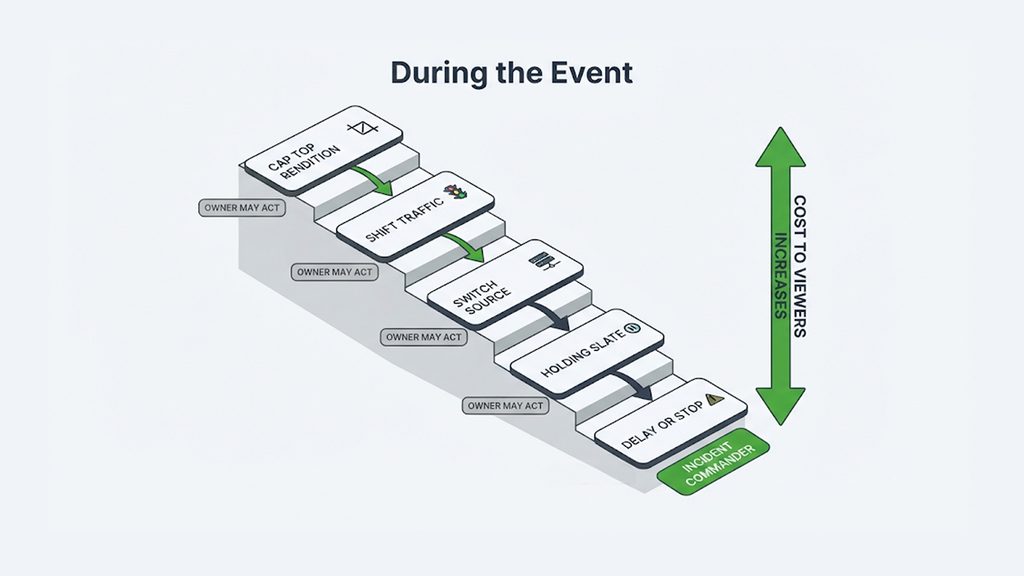
When a problem appears, work down a pre-agreed ladder, starting with the least costly action. Each rung has a named person who may take it without asking.
- Cap the top rendition. Viewers on the highest rung step down one level. In the bandwidth guide’s example mix, this cuts delivery load by about 31%, at some cost in picture quality.
- Shift traffic. Move the affected region or network to a secondary CDN.
- Switch the source. Fail over to the backup encoder or contribution path.
- Show a holding slate. Buy time while the cause is found, instead of letting players spin.
- Delay or stop. The final rung, which only the incident commander may call, ideally with a clear message to viewers.
Communicate, and set latency expectations
Keep one voice for the outside world and one bridge for the inside. Write the viewer message templates in advance (“we are experiencing a problem and are working on it”) so nobody drafts under pressure. Make sure the scribe logs every decision with a timestamp.
Set expectations about delay, too. A standard HLS stream runs well behind the venue, because capture, encoding, packaging and the player’s own buffer all add delay, so viewers who follow the action on social media will see spoilers first. If the audience will notice, the low-latency options in our guide to low-latency streaming are worth reading before you commit to a design.
After the Event: The First Hour and the First Week
- First hour. Confirm the recording is complete and the replay is published. Rotate or revoke the event’s publish credentials. Export the logs and dashboards before retention windows cut them off.
- First day. Collect the scribe’s log, the timings and the numbers: peak concurrency, the rendition mix, one-minute peak egress, startup time and rebuffer ratio.
- First week. Hold a blameless review. Ask what the plan got right, what surprised you, and what you will change in the runbook. Update the failure-mode table and the timings.
The most valuable output is a set of ratios you did not have before: how peak concurrency compared with your forecast, which renditions viewers actually used, and how far the one-minute peak ran above the five-minute average. These turn the next event’s forecast from a guess into an estimate.
Common Mistakes
| Mistake | What to do instead |
|---|---|
| Testing with a static file, not live traffic | Load test with player-based traffic against a real encoder’s live stream |
| A backup that has never been triggered | Drill every failover and record the time it takes |
| No owner for a hop in the chain | One named owner and one named backup for each hop |
| Forgetting the dependencies beside the stream | List the login, token, ad and caption services as single points of failure |
| Changing things in the final 48 hours | Freeze, with sign-off from the incident commander only |
| Deciding what to do while it is failing | Pre-authorize a degrade ladder and rehearse it |
| Watching only the edge | Watch the origin and the ingest as well |
| Skipping the review | Record the ratios and update the runbook while the event is fresh |
Where 5centsCDN Fits
If you are planning an event with this runbook, 5centsCDN’s live event streaming solution brings together the pieces it relies on: SRT ingest, live transcoding, origin shield, multi-CDN delivery and DVR. For a pre-event review of your design, capacity and failover plan, talk to our team and we will walk through it with you.
Frequently Asked Questions
What should a live event streaming checklist include?
It should cover the whole chain, not only the encoder: scope and capacity, owners for every hop, a failure-mode table, rehearsals including failure drills and a load test, a final go/no-go check, a pre-roll sequence, live monitoring thresholds, a degrade plan and a post-event review.
How far in advance should I start preparing for a live event?
Start about a week ahead for a significant event, so there is time to confirm capacity, name owners and fix what rehearsals reveal. Larger or higher-stakes events need longer, particularly if capacity must be arranged with providers in advance.
How do I load test a live stream?
Use player-based test traffic against a live stream produced by a real encoder, and ramp the audience up the way real viewers arrive. Do not rely on a static file, which behaves like on-demand video. Watch origin load and cold-cache behavior during the first minute, as well as the edge.
How long does it take a live stream to recover from a failure?
Recovery is detection plus decision plus switchover. A standard HLS player sits about three segments behind the live edge, so if your total recovery time is shorter than that runway, many viewers will not notice. Measure your real timings in failure drills.
What is a go/no-go gate?
A point in the timeline where defined exit criteria must be true before the team proceeds. If any criterion fails, the incident commander decides whether to fix, cut scope or delay. Gates stop problems from being carried silently into the next stage.
What should I do after the event ends?
Confirm the recording, publish the replay, rotate the event’s publish credentials, export the logs, and hold a blameless review within a week. Record peak concurrency, the rendition mix and the peak-to-average gap so the next forecast is better.