


When a live stream goes dark, the first suspect is usually the CDN. More often the culprit sits much closer to the camera: an encoder that overheated, a venue uplink that a few hundred phones filled up, an ingest endpoint that went away for maintenance, or a packager that quietly stopped producing segments. The CDN stays perfectly healthy through all of it, because it is faithfully delivering a stream that no longer exists. Live stream failover helps prevent these upstream failures from interrupting the viewer’s experience.
Live stream failover is the discipline of keeping a second path ready to take over, fast enough that viewers never notice the first one failed. Most advice on the subject concentrates on the delivery end, which our guides on keeping streaming when a CDN goes down and surviving live-event traffic spikes already cover. This guide covers the other half: the contribution chain from encoder to origin, where failures usually start and where redundancy is least often built.
We will look at where the chain breaks, how cold, hot and 2×2 standby differ, how to duplicate each layer, why timestamps and segment boundaries decide whether a switch is seamless or a visible stutter, how failover knows when to fire, and how to prove all of it works before the event instead of during it. Where it helps, we anchor the details in the standards: RFC 8216 for HLS and the newer ISO/IEC 23009-9:2025 for redundant live encoding and packaging.
Why the First Half of the Chain Is Where Live Streams Break
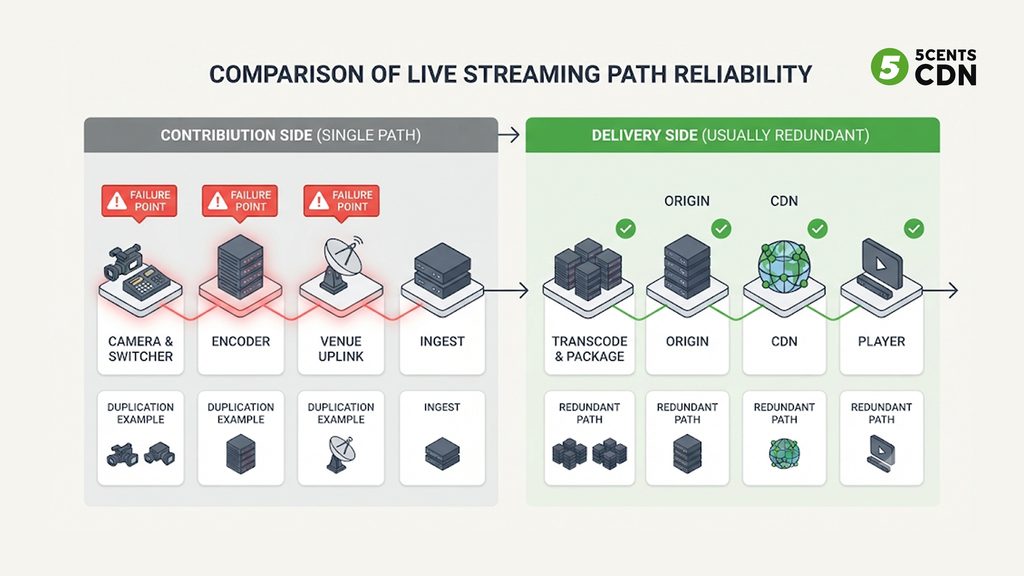
A live stream is a chain: camera and switcher, encoder, the venue’s internet uplink, an ingest endpoint, transcoding and packaging, an origin, a CDN, and finally the player. Delivery networks have been built redundant from the start, because serving large audiences demands it. The first half of that chain usually has not. One encoder, one uplink, one ingest URL and one packager is the default setup, and each of those is a single point of failure.
The two halves also fail in different ways. A CDN problem is like a burst pipe in the street: water still exists upstream, and a second route can carry it. An encoder failure is like the reservoir running dry. Adding more pumps and pipes at the delivery end does nothing, because there is no water left to move. Multi-CDN protects the pipes. It cannot protect a stream that has stopped being created.
The causes are rarely exotic: an encoder crash or overheat, a power circuit shared by both machines, a venue network shared with thousands of attendees, a wrong stream key, or an operator stopping the wrong thing. All of them can be duplicated, and a complete resilience plan treats contribution-side and delivery-side failover as two separate design jobs.
Loud Failures and Silent Failures
A failover system can only fix what it can detect, and live streams fail in two very different ways.
Loud failures are the obvious ones: the encoder crashes, the connection drops, the ingest endpoint refuses the stream. The data stops or the connection closes, and anything watching connection state notices within moments.
Silent failures keep the signal alive and wrong. The source freezes while the encoder keeps emitting perfectly valid packets. The picture turns black but the stream keeps flowing. The audio drops out. A restarted encoder resets its clock and timestamps jump backwards. To the ingest and the packager, everything looks healthy. It is the equivalent of an open phone line with nobody speaking: the call has not dropped, so nothing tells you to dial someone else.
Packaging failures happen after ingest, when the origin stops producing fresh playlists or segments. RFC 8216 gives an unusually precise yardstick here. A live playlist that is still growing must get a new version containing at least one new segment, published between half a target duration and one and a half target durations after the previous version. A playlist that has not advanced after 1.5 target durations, measured at the origin before any CDN caching, is by the specification’s own terms broken, which makes “playlist freshness” a clean, objective health check.
Continuity failures appear when an encoder restarts or a path switches and the timeline breaks. The specification requires a discontinuity tag whenever the timestamp sequence changes, and warns that unmarked discontinuities can cause playback errors. A switch that jumps the clock without saying so is a bug waiting for a player to trip on it.
Human failures deserve a place on the list because redundancy can duplicate mistakes. If both encoders receive the same wrong stream key or the same stop command, a second machine does not help. The design implication is that detection has to look at content and playlist freshness, not just at whether a connection is open.
Cold, Warm and Hot Standby: Choosing the Pattern
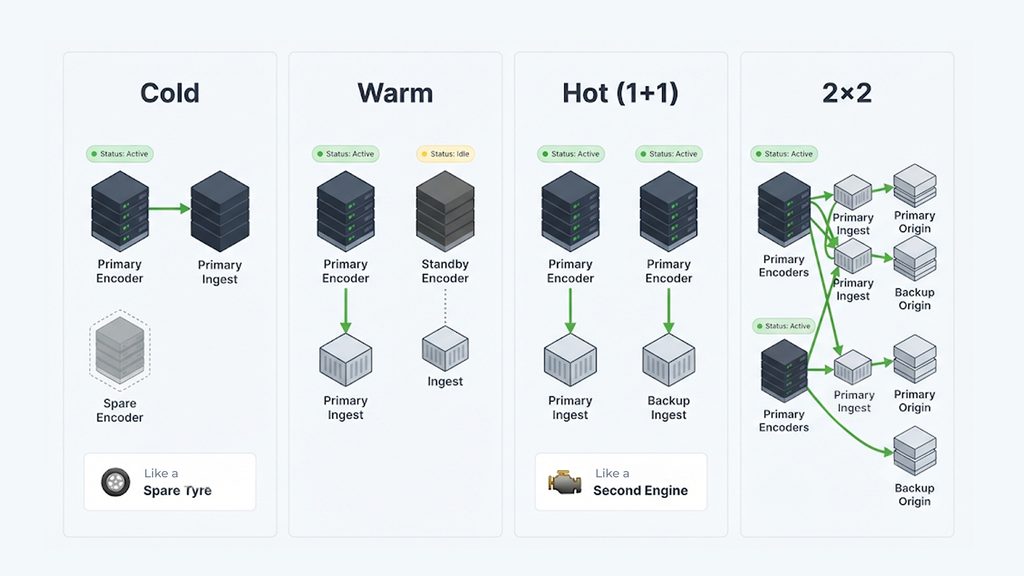
Think of the difference between a spare tyre in the boot and a second engine that is already running. Both are “redundancy”, but they behave very differently the moment something fails.
| Pattern | What is running | What a switch involves | Trade-off |
|---|---|---|---|
| Cold standby | A spare is configured but switched off | Start it, connect it and verify it after the primary has already failed | Cheapest option; viewers see the gap for as long as the recovery takes |
| Warm standby | A spare is powered and connected but not sending the live stream | Start sending and let the origin pick it up | Faster recovery; a short visible hiccup is likely |
| Hot standby (1+1) | A second pipeline sends the same stream the whole time, to a second ingest | A switch rather than a restart; can be close to invisible | Doubles encoders and upload bandwidth; needs aligned timing |
| Active-active (2×2) | Both encoders feed both ingests and both origins at once | Any single component can fail while the surviving copy carries on | Most complex and most expensive; the pattern for marquee events |
The pattern you need depends on how long a gap your audience will tolerate and how much that gap costs. We come back to that decision near the end. First, here is how to build each layer.
Layer 1: Redundant Encoders
The encoder is the most common first failure, so it is the first thing to duplicate. A few rules separate real redundancy from the appearance of it.
- Two machines, not two windows. Run the backup on separate hardware, on a separate power circuit, ideally with its own network port. Two encoders plugged into the same power strip share a single point of failure.
- Feed both from the same program. Split the signal before the encoders so both are encoding identical content. If each takes a different feed, a failover swaps what viewers see, not just the machine producing it.
- Match every setting. Resolution, frame rate, audio layout, segment duration and keyframe interval should be identical. The keyframe interval should divide evenly into the segment duration, because RFC 8216 says video segments should carry enough information to initialize a decoder, and that H.264 segments should contain an IDR frame.
- Share a clock. Both encoders must agree on what time it is, so that the same moment gets the same timestamp on both paths. Synchronize them to a common source through NTP or use timecode embedded in the source. Even a small disagreement turns into a visible jump when the switch happens.
- Duplicate upstream too. Cameras, switchers and audio embedders are single points of failure as well. Redundancy that starts at the encoder protects only against encoder failure.
- Set signal-loss behavior deliberately. If the source disappears, an encoder that stops sending lets downstream logic notice. One that fills the gap with black frames or a slate keeps a valid-looking stream flowing and hides the failure. Where your encoder allows it, prefer stopping output.
Layer 2: The Contribution Link
Two encoders sharing one internet connection still share one point of failure: the uplink. Real redundancy needs two independent paths from the venue, ideally through different providers, or a wired connection plus a cellular one, with the network equipment on separate power.
Protocol choice helps, but only up to a point. SRT recovers lost packets through retransmission, and it only keeps retransmitting for a limited time based on the latency the application configures. That makes it excellent at hiding a lossy link and useless against a dead one. Think of it as a good umbrella on a stormy walk: it keeps you dry in the rain, but it does not help if the road itself is closed. A closed road needs a second road. Our SRT streaming guide covers the protocol, and our SRT ingest supports it with AES encryption for the contribution leg.
Send each path to a different ingest endpoint, as described in the next section, so the whole route from the venue edge to the platform is independent. Remember the cost: two complete copies of the stream double the upload your venue needs, so test both paths at the same time, not one after the other, or you will discover a bandwidth shortfall at kickoff.
Layer 3: Dual Ingest, Dual Origin and the 2×2 Pattern
Ingest endpoints fail too, whether through maintenance, a regional network problem or a misbehaving node, so place the primary and backup endpoints in different locations. There are two ways to wire the encoders to them.
- 1+1: the primary encoder sends to ingest A and the backup encoder sends to ingest B. This survives an encoder failure or an ingest failure, but a failure of the wrong pair can still hurt.
- 2×2 (cross-posting): both encoders send to both ingests. Now any single encoder or any single ingest and origin can fail while at least one complete path remains. This is the standard pattern for marquee events.
Both origins must be configured identically: the same stream names, segment duration, packaging options and authentication. That way a downstream cache or player can move between them without noticing.
When two encoders push identical segments, an origin can accept whichever copy arrives first and discard the duplicate. Failover then stops being an event at all: there is no switch to detect, because both paths are always contributing and the stream simply continues from whichever is healthy. This only works if the segments are truly interchangeable, which is exactly what ISO/IEC 23009-9:2025 standardizes. Published in May 2025, it defines formats for interchangeable live ingest, interchangeable segments and playlists, and supports failover and the rejoining of failed components. How far your platform supports it today is worth asking, but it gives the industry a shared target instead of each vendor’s private convention.
One practical trap to check on your platform: in some origin implementations, an orderly shutdown from one encoder sends an end-of-stream signal that tells the origin the whole broadcast is over. With two sources, one graceful shutdown can then close the stream for everyone. Find out how your platform treats that signal before the event, and know whether retiring a redundant encoder means stopping it gracefully or simply letting its connection drop.
Making the Switch Seamless: Timestamps and Segment Boundaries
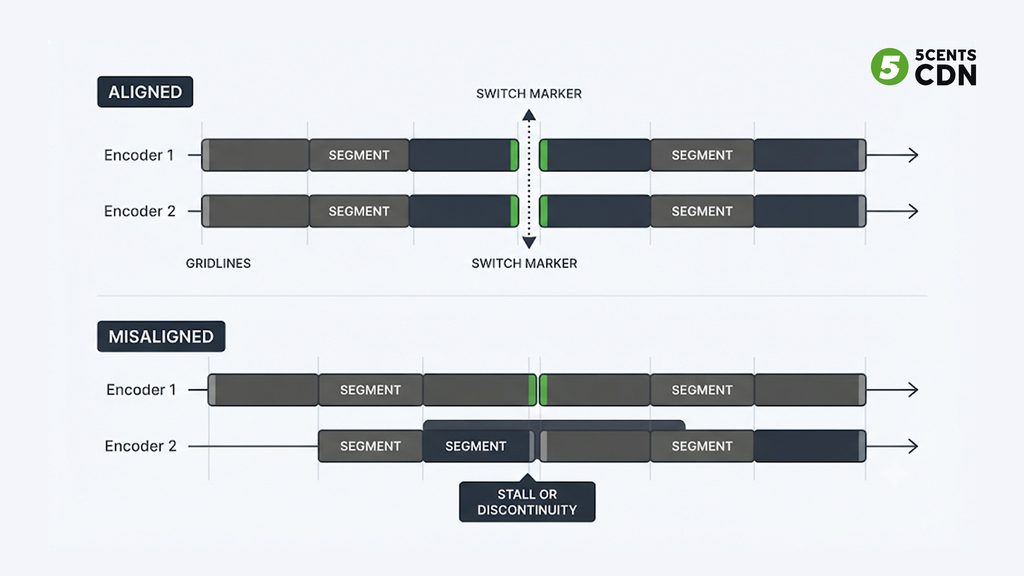
Two people reading the same script aloud can swap places mid-sentence only if both are on exactly the same line. Redundant pipelines are the same: a switch is seamless only if both agree on the timeline, the segment boundaries and the content. When they disagree, players stutter, stall or halt.
What has to match is spelled out in RFC 8216 for variant streams, and redundant pipelines are the same idea: matching content must carry matching timestamps and matching discontinuity sequence numbers, and playlists must share the same target duration. The specification also says a player must not assume that segments with the same media sequence number in different variants sit at the same position in the presentation; it has to locate corresponding segments by their position on the playlist timeline instead.
The same specification tells players that, after reloading a playlist, they should check that each segment still has the same URI as the segment with that sequence number before, and should halt playback if it does not, because that normally signals a server error. The consequence for failover is blunt: if a switch makes the origin publish different segments under numbers or URLs players have already seen, players that follow the specification may stop. Either keep the segments identical across paths, or signal the break with a discontinuity tag. A short, flagged break is far better than a stall.
The most robust way to keep two pipelines aligned is to cut segments on a shared grid. Pick a fixed reference, such as the Unix epoch, and cut segments at exact multiples of the segment duration counted from it. The common timeline in ISO/IEC 23009-9:2025 follows the same idea. An encoder that restarts mid-event then rejoins by waiting for the next boundary, and its segments land exactly where the other path’s segments do.
next_boundary = ceil(now / segment_length) * segment_length
Example: 2-second segments, now = 20:00:01.300 UTC
next boundary = 20:00:02.000 UTC
To check your own setup, capture the playlists from both paths at the same moment and compare segment start times and durations. They should line up exactly. If they drift, fix the clock and the segmenting before you trust the failover.
Detection: How Failover Knows When to Fire
Switching is the easy part. Deciding when to switch is where most failover designs quietly fall down. A robust setup watches several signals together:
- Ingest state: is each encoder connected and sending?
- Incoming bitrate and frame rate: a falling bitrate is often the first sign of a venue network problem. Our live stream health monitoring measures bitrate, frame rate, codec, resolution and audio at ingest.
- Content checks: black frames, frozen frames and silence, which catch the silent failures that connection state misses.
- Playlist freshness: is the live playlist advancing within 1.5 target durations, as RFC 8216 requires?
- Segment availability: can the newest segment named in the playlist actually be fetched?
- Player-side signals: rising error and rebuffer rates from real viewers.
Then tune the reaction. Switch on a single missed packet and the system will flap between paths, which is its own outage; wait too long and viewers watch a stall. A hold-off window that requires a failure to persist briefly, but stays well inside your buffer budget (more on that next), strikes the balance.
Decide in advance what happens after the switch. The moment the first path fails, the stream is running without protection, so the first job is restoring the second path. Switching back is a second switch, and therefore a second risk, so many teams stay on the backup until a quiet moment and then rebuild redundancy rather than failing back automatically. Finally, make sure a human knows. An alert when failover fires, a clear manual override for ambiguous cases and a rehearsed runbook turn automation into something an operator can trust.
How Much Time Does Failover Have? The Buffer Budget
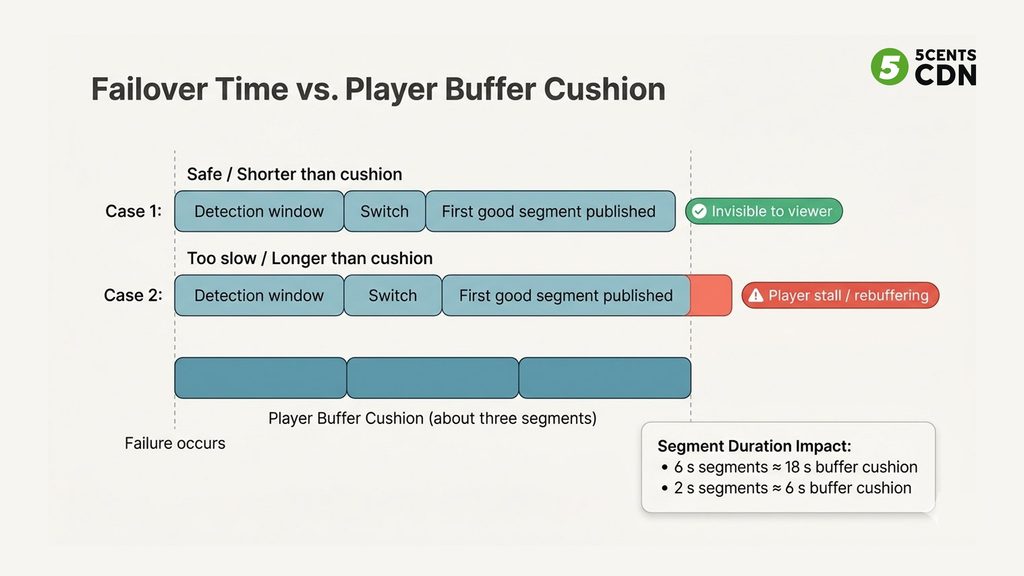
Players hold a few segments of video in reserve, and that cushion is what hides a switch. RFC 8216 requires servers to keep at least three target durations of media in a live playlist and advises players not to start playback closer than three target durations to the end. As a rule of thumb, a standard HLS player therefore sits about three segments behind the newest one, and if new segments stop appearing it has roughly that much video left before it runs dry.
The arithmetic is simple. With 6-second segments the cushion is about 18 seconds; with 2-second segments it is about 6 seconds. Actual player behavior varies, and low-latency modes shrink the cushion further, so treat these numbers as a planning guide, not a promise.
A failover that completes inside the cushion can be invisible. Add up the detection window, the switch itself and the time until the first good segment is published, and compare the total with the cushion. If it does not fit, viewers will see a stall. This is also the honest trade-off between latency and resilience: the more aggressively you cut latency, the less time failover has to work, and the more you need a hot or 2×2 design where both paths are always contributing and no switch has to be detected at all.
The Rest of the Chain: Packager, Origin, CDN and Player
Contribution-side redundancy is only the start. A single packager is a single point of failure for manifests, which is why a 2×2 design duplicates packaging as well. An origin shield protects the origin from request stampedes, as we explain in our live-event crash guide, but it is a shield, not a spare: it does not replace a second origin.
On the delivery side, multi-CDN covers the failure of a delivery network, and a multi-CDN setup belongs in any marquee plan. Be clear about what it does not do. It cannot rescue a stream that no encoder is producing. DNS, the quiet single point of failure that can hide a healthy stream from viewers, also belongs in the delivery-side plan. The end-to-end picture, from contribution through delivery, is laid out in our live sports streaming infrastructure guide.
Finally, consider the player. RFC 8216 leaves the algorithm for switching between variants to the client, so player-side failover to a backup URL behaves differently from player to player. Treat it as a last line of defense, test it on your target devices, and prefer designs where the viewer’s URL never changes and the switching happens behind it.
One more cheap safeguard: record the incoming stream. A clean recording is a second copy of the show, so if a live pass is damaged, the event can still be rebuilt as on-demand content afterwards.
How Much Redundancy Is Enough?
Redundancy has a real price: a second encoder, a second connection, double the upload, more monitoring and more people who need to know the runbook. Failure has a price too, and it is rarely small. The right level depends on what a minute of dead air costs your event.
| Event tier | Typical examples | Suggested pattern |
|---|---|---|
| Tier 1: low stakes | Internal meetings, informal streams | Cold or warm standby: a second encoder configured and ready, a written runbook and a recording running |
| Tier 2: revenue or brand | Ticketed shows, sponsored streams, product launches | Hot standby (1+1) on a separate uplink, with monitoring and alerts on both paths |
| Tier 3: marquee | Sports finals, premieres, regulated broadcasts | 2×2 dual ingest and dual origin, multi-CDN delivery, staffed monitoring and rehearsed switching |
Put a number on it for your own event: what do ten minutes of silence cost in refunds, sponsor make-goods and lost audience? Compare that with the cost of the next tier up. When the gap is large, the decision usually makes itself.
Test It Before You Need It: The Failover Drill
A failover nobody has watched happen is a theory. The drill is where theories become engineering, and it works like a fire drill: unglamorous, scheduled and far cheaper than the real thing.
- Define pass and fail first. Decide the longest acceptable visible interruption and what viewers should see during it, so the result is a measurement and not an opinion.
- Run both paths live to a private test stream. Watch as an ordinary viewer on real devices: a phone, a TV and a browser. The Stream Tester is a quick way to see what an HLS or DASH viewer actually receives.
- Kill the primary encoder. Pull its power rather than stopping it gracefully, since real failures do not ask permission.
- Cut the primary uplink. Unplug the network or switch off the router.
- Take down one ingest endpoint. Confirm the other path carries the stream and nobody has to change a URL.
- Create a silent failure. Freeze or black out the source while the encoder keeps running, and confirm your detection catches it.
- Break the packaging path if you can. Stop one packager or origin and watch what the playlist does.
- Practice the return. Bring the failed path back, rejoin at a segment boundary and make the fail-back decision deliberately. Check audio sync and recording continuity afterwards.
- Time everything and compare it with the buffer budget. Detection, switch and first good segment, against the cushion you calculated earlier.
- Write it down and repeat it. Turn the findings into a runbook with named owners, and run the drill again after any change to encoders, network or platform settings.
A Live Stream Failover Checklist
- Two encoders on separate power, ideally on separate network ports.
- Both encoders fed from the same program, with identical settings and a shared clock.
- Two independent uplinks, tested together at full load.
- Two ingest endpoints in different locations, with identical origin configuration.
- Segments cut on a shared grid, and playlists from both paths compared.
- Signal-loss behavior set so a dead source stops output instead of filling it.
- Detection covering connection state, bitrate, content, playlist freshness and segment availability.
- A hold-off window tuned to your buffer budget and an alert when failover fires.
- End-of-stream behavior understood for your platform.
- A recording of the incoming stream running throughout.
- A drill completed on target devices and a runbook with named owners.
Where 5centsCDN Fits
5centsCDN covers the pieces between your encoder and your viewers: SRT ingest with AES encryption for the contribution link, live transcoding into an adaptive ladder, delivery over our CDN with origin shield, and a multi-CDN option for the delivery layer. If you are planning a broadcast where a gap is not acceptable and want a second opinion on the architecture, take a look at our live event streaming solution or talk to our team.
Frequently Asked Questions
What is live stream failover?
Live stream failover is the ability to switch from a failed primary path to a backup path so viewers keep watching. It can apply to encoders, internet connections, ingest endpoints, packagers, origins and CDNs, and the best designs make the switch fast enough that it is invisible.
What is the difference between hot and cold standby?
A hot standby is already running and sending the same stream, so failing over to it is a switch. A cold standby is switched off and has to be started, connected and checked after the primary has failed, which takes time a live audience will not wait through.
Does multi-CDN protect me if my encoder fails?
No. Multi-CDN protects the delivery layer against a network failure. If no encoder is producing the stream, every CDN has nothing new to deliver. Encoder, ingest and origin redundancy have to be built separately.
How many encoders do I need for a live event?
For anything that matters, two: a primary and a hot backup on separate power and separate network paths. Marquee events add a second ingest and origin and send both encoders to both, a pattern known as 2×2.
Why did my failover not trigger when the encoder sent a black screen?
Because the stream was still valid. Failover logic that watches connection state sees a healthy connection carrying black frames. Add content checks for black frames, frozen frames and silence, watch playlist freshness, and set the encoder to stop output when the source is lost.
Does SRT give me failover?
Not by itself. SRT recovers lost packets within a latency window, which helps on a lossy link, but it cannot keep a stream alive over a dead connection or a failed encoder. Failover needs a second encoder, a second network path and a second ingest.
