


A live stream fails very differently from a website. When a normal page returns a 502, a visitor refreshes and moves on. When a live stream 502 error appears, thousands of viewers hit a dead player at the same moment—during the goal, the product reveal, or the keynote—and many of them do not come back. The error that would be a minor annoyance on a blog becomes a broadcast failure in front of your entire audience.
The frustrating part is that these errors almost never originate where they appear. A viewer sees a broken player and blames the stream. The stream looks fine at the encoder. The real fault is usually sitting one layer back, in the conversation between your CDN and your origin server. This guide explains what 502, 503, and 504 actually mean in a streaming context, why they happen specifically in a CDN-to-origin delivery chain, how to diagnose which layer is at fault, and how to stop them from taking your stream down.
The Request Chain Behind Every Stream
To understand a gateway error, you have to picture the path a single video segment travels before it reaches a viewer. In a CDN-delivered stream, no viewer talks to your origin directly. Instead, requests pass through a chain.
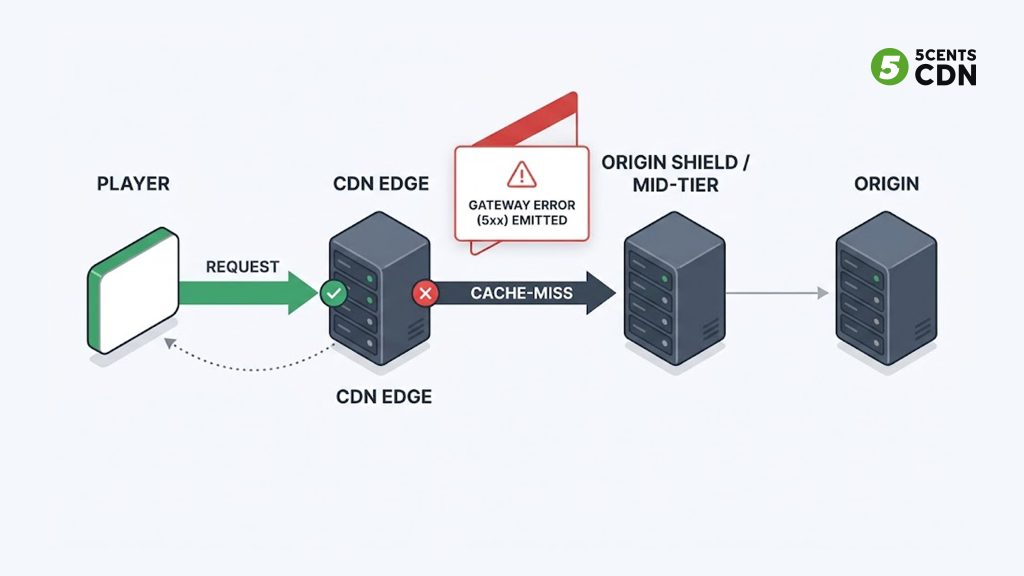
The player requests a manifest and segments from the nearest CDN edge node. If the edge already has the file cached, it serves it instantly. If it does not — a cache miss — the edge asks the CDN’s mid-tier or origin shield, which in turn asks your origin server for the file. The origin produces or retrieves the segment, and the response travels back down the chain to the viewer.
Every one of those hops is a place where one server waits on another. A gateway error is what a CDN returns when it acted as the middleman, reached back toward your origin, and got either a bad answer or no answer at all. The 5xx code tells you which kind of failure happened, and that is the single most useful clue you have.
The reason 5xx errors hit live streams harder than websites comes down to caching. A static web page sits in cache for hours; almost every request is a cache hit that never touches the origin. A live stream is the opposite. New segments are produced every few seconds, each with a short time-to-live, so the CDN is constantly going back to the origin for fresh content. That means a live origin is under continuous request pressure, and any weakness in the origin or the path to it surfaces immediately as a gateway error.
502 Bad Gateway: The Origin Gave a Bad Answer
A 502 Bad Gateway means the CDN edge reached your origin but received an invalid response — or the connection was refused or dropped. As defined in RFC 9110, the gateway received an invalid response from an inbound server while trying to fulfill the request. The CDN is working correctly; it is reporting that your origin handed back something it could not use.
In a streaming pipeline, a handful of causes produce the overwhelming majority of 502s:
The origin process crashed or restarted. If your origin packager, media server, or origin web server is down when the edge comes calling, there is nothing listening on the port. The edge cannot complete the request and returns 502. During live events this often happens when the origin runs out of memory or CPU under load and the process is killed.
A TLS handshake failure between CDN and origin. When the CDN connects to your origin over HTTPS, an expired certificate, a host name mismatch, or — a sneaky one — a missing intermediate certificate in the chain causes the handshake to fail. Desktop browsers sometimes mask a broken chain because they cache intermediates from other sites, but a CDN edge does not, so it rejects the connection and surfaces a 502. A certificate that “works in my browser” can still break CDN delivery.
The origin returned a malformed response. A common variant is a compression mismatch: the origin serves gzip-encoded content but sends an incorrect Content-Length, or the compressed payload is broken. The edge cannot parse the response and reports 502.
A firewall is blocking the CDN. If your origin firewall does not allow the CDN’s edge IP ranges, connection attempts are dropped. This shows up the moment you put a CDN in front of an origin that was previously locking down inbound traffic. You cannot sit an origin behind a restrictive firewall and expect a CDN to reach it without an allow list.
For a stream, the practical symptom is a player that loads the page but stalls after fetching the manifest, or a stream that dies mid-broadcast when the origin process falls over. The fix path starts at the origin: confirm the packager or media server is running, check the certificate chain end to end, and verify the CDN’s IP ranges are allow listed on the origin firewall.
503 Service Unavailable: The Origin Is Overwhelmed or Down
A 503 Service Unavailable is different in an important way: it usually means the server itself is deliberately or effectively refusing to handle the request right now, rather than communicating a garbled answer. The server is reachable, but it is overloaded, in maintenance, or actively shedding load.
In streaming, 503 is most often the signature of an origin that cannot keep up with cache-miss traffic. Picture a live event where viewership spikes fast. Every CDN edge that does not yet have the newest segment goes back to the origin at nearly the same time. If your CDN topology sends all of those requests straight to a single origin, the origin sees a flood — a cache-miss cascade — and starts returning 503s because it has no workers or connections left to serve them. The stream degrades for everyone precisely at the moment of peak interest.
Maintenance and deployment windows cause the more mundane version: an origin taken down for an update, or a health check failing so a load balancer pulls the node out of rotation. If every node behind the balancer is unhealthy at once, there is nothing left to route to, and viewers get 503.
The distinction that matters for the fix: a 502 points you toward what the origin said, while a 503 points you toward origin capacity and availability. You reduce 503s by reducing how often — and how hard — the origin gets hit. That is largely an architectural problem, and the tools that solve it (origin shielding, request collapsing, tiered caching) are covered in the prevention section below.
504 Gateway Timeout: The Origin Was Too Slow
A 504 Gateway Timeout means the CDN reached your origin and waited, but the origin did not respond within the allowed window, so the edge gave up. The origin is not down and did not refuse the connection — it was simply too slow. This is the critical difference between 502 and 504: a 502 is an invalid or refused response, while a 504 is a response that never arrived in time.
In a live pipeline, 504s tend to trace back to origin work that takes too long. If your origin is packaging or transcoding on demand and a segment takes longer to produce than the edge’s origin-response timeout, the edge times out and returns 504. Slow storage retrieval has the same effect: if segments live on backing storage that is slow to read under load, the origin’s time-to-first-byte climbs past the timeout threshold.
For live content, a 504 is especially damaging because the content is time-sensitive. A segment that arrives ten seconds late is not just slow — it is useless, because the live edge has already moved on. Unlike a website, where a slow response still eventually delivers the right page, a slow live segment misses its window entirely.
Diagnosing 504 means measuring origin response time directly. If your origin’s time-to-first-byte for segment requests is climbing toward or past the CDN’s timeout, you have found the cause. The fixes are to make the origin faster — pre-package rather than package on demand, move to faster storage, add an origin shield so the origin serves fewer requests — or, as a stopgap, to raise the origin-response timeout, though raising a timeout only masks a slow origin and should never be the whole answer.
502 vs 503 vs 504: The Fast Comparison
When a stream breaks, the exact code tells you where to look first. This is the fastest triage you have before opening a single log.
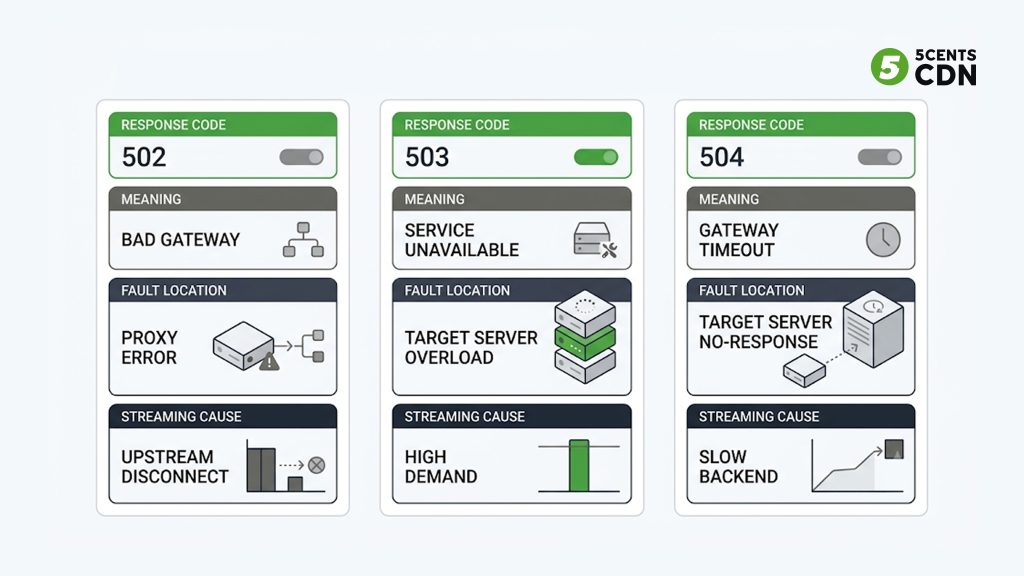
| Code | What it means | Where the fault lies | Typical streaming cause |
|---|---|---|---|
| 502 | Origin reached, invalid/refused response | What the origin returned | Crashed packager, broken TLS chain, blocked firewall |
| 503 | Origin temporarily unable to serve | Origin capacity / availability | Cache-miss cascade at spike, maintenance, unhealthy nodes |
| 504 | Origin reached but too slow to answer | Origin response speed | On-demand packaging, slow storage, high TTFB |
The through-line: in a CDN-delivered stream, all three are almost always origin-side problems that the CDN is faithfully reporting. The CDN is the messenger, not the culprit. That is why “switch off the CDN and it works” is misleading — removing the CDN just removes the layer that was telling you your origin is fragile, and hands the full traffic load straight to the origin that was already struggling.
How to Diagnose Which Layer Is at Fault
A structured check beats guessing, and it takes only a few minutes.
Start in the browser, then leave it. Open developer tools and reload the failing stream. Confirm the exact status code on the failing request — is it the manifest (.m3u8 / .mpd) or a segment that is failing, and is it a 502, 503, or 504? Check the response headers. The header that reveals whether the CDN or the origin produced the error is often a Server header or a CDN-specific cache-status header; a cache-status of MISS on the failing request confirms the request went all the way back to the origin.
Reproduce with curl to strip out the browser. A request from the command line to the failing URL confirms the error is real and not a client-side or caching artifact. The verbose output shows the full exchange and which layer answered.
Test the origin directly, bypassing the CDN. This is the single most valuable step. Request the same file straight from the origin host name or IP. If the origin request succeeds but the CDN request fails, the problem is in the CDN-to-origin path — firewall, TLS, DNS. If the origin request also fails or is slow, the origin itself is the problem, and the CDN was reporting it accurately.
Check origin health and logs. Confirm the origin packager or media server process is running and listening on the expected port, and read the origin’s error logs around the timestamp of the failures. Connection-refused entries point to a down or wrong-port origin; timeout entries point to a slow origin (504 territory); TLS errors point to certificate problems (a common 502 cause).
Correlate with monitoring, not anecdotes. Waiting for viewers to report a dead stream is the slowest possible detection. CDN access logs let you see the rate and distribution of 5xx responses — whether they cluster in one region, one time window, or one content type — and dedicated stream monitoring surfaces the failure before your audience does.
How to Prevent 5xx Errors From Taking Down Your Stream
Diagnosis fixes the incident. Architecture prevents the next one. Because these errors are almost always about the origin being unreachable, overloaded, or slow, prevention comes down to protecting the origin and removing single points of failure.
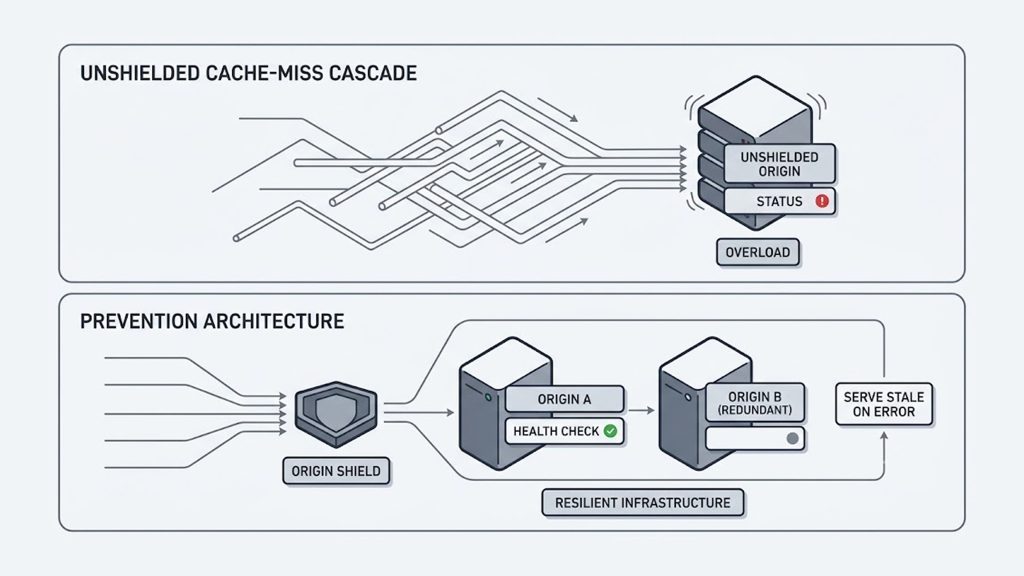
Shield the origin. The highest-impact change for a streaming origin is an origin shield — a mid-tier caching layer that sits between the edge nodes and your origin. Instead of hundreds of edges independently hitting the origin on a cache miss, they hit the shield, and only the shield goes back to the origin. This collapses the cache-miss cascade that produces 503s during traffic spikes and dramatically reduces the request pressure that causes an origin to fall over in the first place. For live streams, where cache misses are constant by nature, this is the difference between an origin that copes with a viewership spike and one that buckles.
Serve stale on error. Configure the CDN to keep serving the last known-good segment or manifest when the origin briefly returns a 5xx, rather than passing the error straight to viewers. A short “serve stale while re-validating” window absorbs momentary origin hiccups invisibly. The one caution for live: stale content must be fresh enough to stay near the live edge, so the stale window has to be tuned tight for live and can be more generous for VOD.
Do not cache error responses. Make sure a transient 5xx is not itself cached and re-served. If the CDN caches a 502 during a two-second origin blip, viewers keep getting that 502 long after the origin recovered. Correct cache rules ensure error responses expire immediately while good content caches normally.
Set realistic origin timeouts. The CDN’s origin-response timeout should reflect how long your origin genuinely needs to produce a live segment — long enough to avoid false 504s, short enough to fail fast when the origin is truly stuck. Pair this with pre-packaging segments rather than generating them on demand, so time-to-first-byte stays well under the timeout.
Build in origin redundancy and health checks. A single origin is a single point of failure. Redundant origins with continuous health checks let the CDN fail over automatically: if the primary origin becomes unreachable, delivery shifts to the secondary without viewer impact. This directly addresses the 503-from-maintenance and 502-from-crashed-origin scenarios.
Keep certificates and firewall rules current. Automate certificate renewal so an expiry never triggers a wall of 502s mid-broadcast, and verify the full certificate chain including intermediates. Keep the CDN’s edge IP ranges allow listed on the origin firewall so a security change never silently severs the delivery path.
Choose a resilient contribution path. Gateway errors live on the delivery side, but a broken contribution feed can cascade into origin problems too. A stable, loss-tolerant ingest protocol like SRT keeps the feed reaching your origin cleanly even over unpredictable networks, so the origin always has good content to serve down the chain. Getting the whole pipeline aligned — from ingest through delivery acceleration — is what keeps a stream up under pressure, a theme covered further in our guide to scaling OTT delivery to 100K+ concurrent viewers and our live-streaming buffering fixes.
Frequently Asked Questions
What is the difference between a 502 and a 504 error?
Both involve a CDN or proxy failing to get a usable response from your origin, but the cause differs. A 502 Bad Gateway means the origin was reached but returned an invalid response or refused the connection — a crashed process, a broken TLS chain, or a malformed response. A 504 Gateway Timeout means the origin was reached but did not respond within the allowed time — it was too slow, usually because of on-demand packaging or slow storage. In short: 502 is a bad answer, 504 is no answer in time.
Is a 502 error caused by my CDN or my origin server?
In almost all cases the origin server. The CDN returns the 502 because it acted as the gateway and could not get a valid response from your origin — but the failure is at the origin or in the path to it. The quickest way to confirm is to request the same file directly from the origin, bypassing the CDN. If the direct request succeeds, the problem is in the CDN-to-origin connection (firewall, TLS, DNS); if it fails, the origin itself is at fault.
Why does turning off the CDN seem to fix a 502?
It does not actually fix it — it hides it. Removing the CDN sends all traffic directly to the origin and removes the layer that was reporting the origin’s failure. For a small test that may load fine, but under real streaming load the origin that was already struggling now has no caching layer protecting it, which makes overload and outages more likely, not less.
Why do 5xx errors hit live streams harder than normal websites?
Because live streams barely cache. A website serves most requests from cache and rarely touches the origin, so an origin weakness stays hidden. A live stream produces new short-lived segments continuously, so the CDN constantly returns to the origin for fresh content. That keeps the origin under steady pressure and makes any origin fragility surface immediately as a gateway error — and it hits every viewer at once, mid-broadcast.
Can an origin shield prevent 503 errors during a traffic spike?
Largely, yes. The 503s that appear during viewership spikes are usually caused by a cache-miss cascade, where many edge nodes hit the origin simultaneously for the same new segment. An origin shield consolidates those requests into a single mid-tier layer so the origin sees a fraction of the traffic, which prevents the overload that produces 503s. It is one of the most effective single changes for keeping a streaming origin stable under load.
How do I stop a cached 502 from breaking my stream after the origin recovers?
Make sure your CDN cache rules do not cache 5xx responses, so a transient error expires immediately instead of being re-served. Pairing that with a serve-stale-on-error policy — where the CDN serves the last known-good content during a brief origin failure — means momentary origin blips never reach viewers at all.
Keeping Your Stream Online
502, 503, and 504 errors are not random, and they are not really CDN problems — they are your origin telling you, through the CDN, that it was unreachable, overwhelmed, or too slow at the exact moment a viewer needed a segment. Reading the specific code tells you which of those three it was, a direct-to-origin test tells you which layer to fix, and origin protection — shielding, redundancy, sane timeouts, and clean cache rules — keeps the whole class of error from reaching your audience in the first place.
| Keeping your stream online5centsCDN provides live streaming and CDN infrastructure built around exactly these failure points — origin shield with redundancy, delivery acceleration, and stream monitoring configured for the demands of live delivery. If you are seeing gateway errors on your streams or want to harden delivery before your next big event, contact our team to talk through the right setup for your audience scale. |
