

Buffering is the single largest driver of viewer abandonment in live streaming. Research consistently shows that more than 50% of viewers leave a live stream within 90 seconds of poor quality — and that each additional second of startup delay increases abandonment by over 6%. For OTT platforms, every buffering event is a direct cost: in viewer drop-off, subscription churn, and brand credibility.
Most guides on reducing buffering are written for viewers — restart your router, use Ethernet, clear your browser. That advice is useless if you are a platform operator. The fixes that actually matter for a live streaming platform are on the infrastructure side: encoder configuration, CDN architecture, ABR setup, ingest protocol selection, and real-time monitoring.
This guide covers 8 infrastructure-level fixes to reduce buffering in live streaming for OTT platform operators and streaming engineers — with specific configuration targets, metrics to track, and a pre-event checklist for preventing buffering before it starts.
What Is Buffering and Where Does It Come From?
Buffering in streaming occurs when the video player cannot receive data fast enough to maintain continuous playback. The player pauses to refill its data buffer — the pre-loaded window of video ahead of the current playback position — before resuming. When this buffer runs empty before it can be refilled, viewers see the spinning wait indicator.
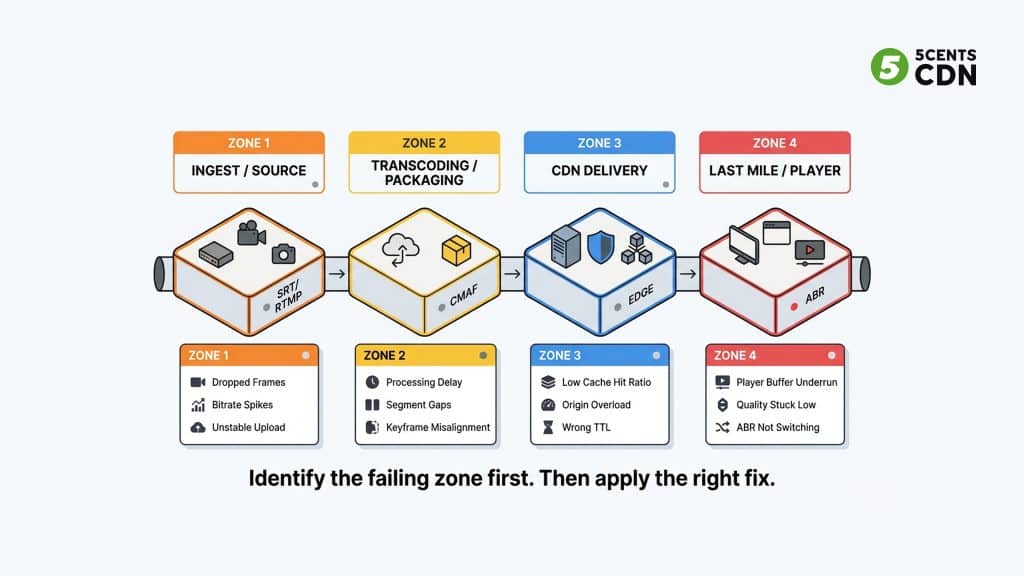
For a live streaming platform, buffering can originate at four distinct points in the pipeline — and the fix depends entirely on which zone is responsible. Applying a CDN fix to an encoder problem wastes time and budget. The first step is always diagnosis.
How to Diagnose Where Buffering Starts: The Four-Zone Framework
Break your streaming pipeline into four zones. Identify which zone is generating the problem before applying any fix:
| Zone | Component | Signs of Failure | Primary Fix |
| Zone 1 | Ingest / Encoder | Bitrate spikes, dropped frames, unstable upload, stream disconnect | Fix 3 (encoder) + Fix 4 (ingest protocol) |
| Zone 2 | Transcoder / Packager | Segment gaps, processing delay, keyframe misalignment across renditions | Fix 3 (encoder settings) + Fix 5 (segment duration) |
| Zone 3 | CDN / Origin | Low cache hit ratio, origin CPU spikes, edge node timeouts | Fix 2 (origin shield) + Fix 7 (cache pre-warm) |
| Zone 4 | Last Mile / Player | ABR stuck at lowest quality, player buffer underrun, high rebuffer ratio | Fix 1 (ABR setup) + Fix 6 (monitoring) |
Most buffering events in production OTT live streaming originate in Zone 1 (encoder/ingest) or Zone 3 (CDN configuration). Zone 4 problems are often symptoms of Zone 1 or 3 failures rather than independent issues.
Fix 1: Enable and Configure Adaptive Bitrate Streaming
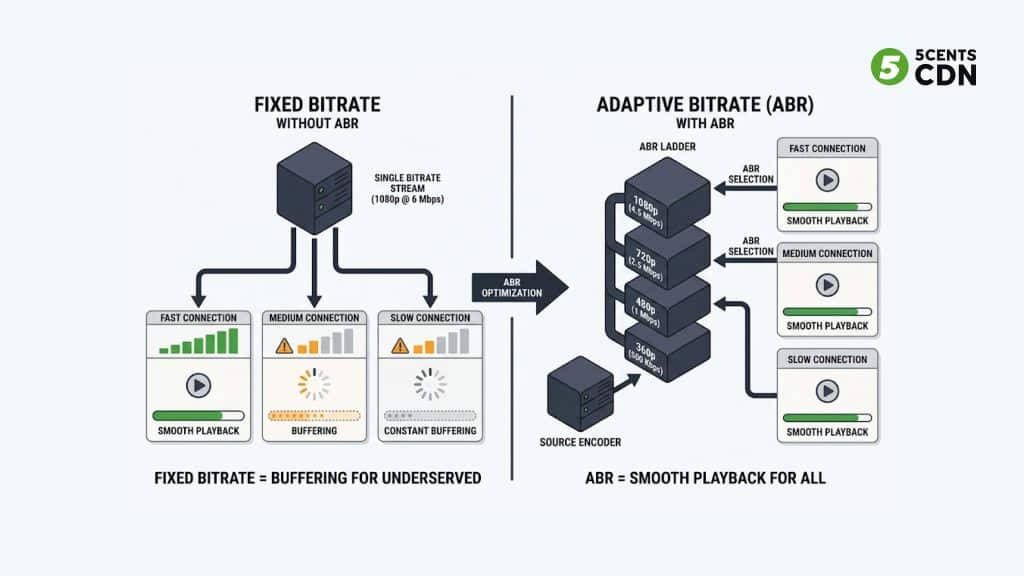
The single most effective fix for viewer-side buffering is properly configured adaptive bitrate streaming (ABR). Without ABR, every viewer receives the same quality stream regardless of their available bandwidth. A viewer on a 2 Mbps connection receiving a 6 Mbps 1080p stream will buffer constantly — not because the CDN is broken, but because the stream is fundamentally too large for the connection.
ABR encodes the same content into multiple quality renditions. The player automatically selects the highest quality the connection can support and switches in real time as conditions change.
ABR Configuration Targets for Live Streaming
- Minimum 4 renditions: include at least one at 480p or below as a fallback for poor connections
- Aligned keyframe intervals across all renditions — misalignment causes stuttering when the player switches quality
- Target buffer depth: 2–3 segments ahead of playback for live content (not the default 10+ segment VOD setting)
- Player startup condition: begin playback from the second-lowest quality tier to minimize startup time, then step up
Your HLS/DASH video player must be configured to use ABR with appropriate ladder boundaries — a player that stays stuck at 1080p when the connection drops to 3 Mbps will cause buffering even with a correct CDN setup.
FIX 2: Configure CDN Origin Shield
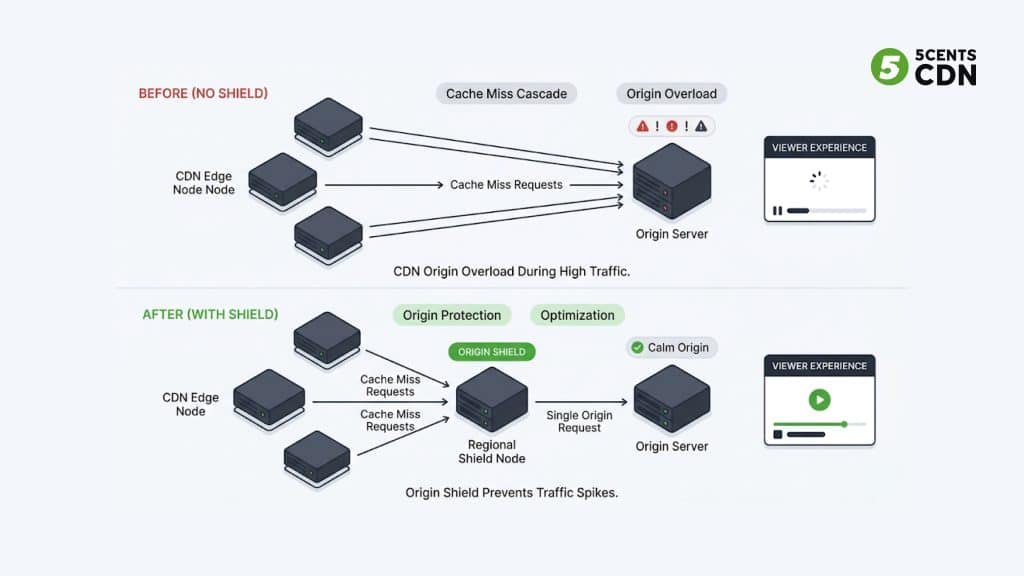
Root cause: During a live event, all CDN edge nodes experiencing a cache miss send requests directly to your origin simultaneously — a cascade that can overwhelm origin infrastructure and cause segment delivery delays that produce viewer-side buffering.
The fix: Enable tiered caching with an origin shield layer between edge nodes and origin. When an edge node misses, it queries the shield. The shield fetches from origin once — all subsequent edge requests for the same segment are served from the shield cache. Origin receives only a fraction of total request volume.
Metric to watch: Origin request rate (should drop to <10% of total requests with shield active). Cache hit ratio at edge (target >90%).
Implementation difficulty: Low — CDN configuration change. No encoder or player changes required.
5centsCDN’s origin shield implements this tiered caching architecture. Pair it with delivery acceleration for maximum edge performance.
FIX 3: Optimize Encoder Settings for Live Output
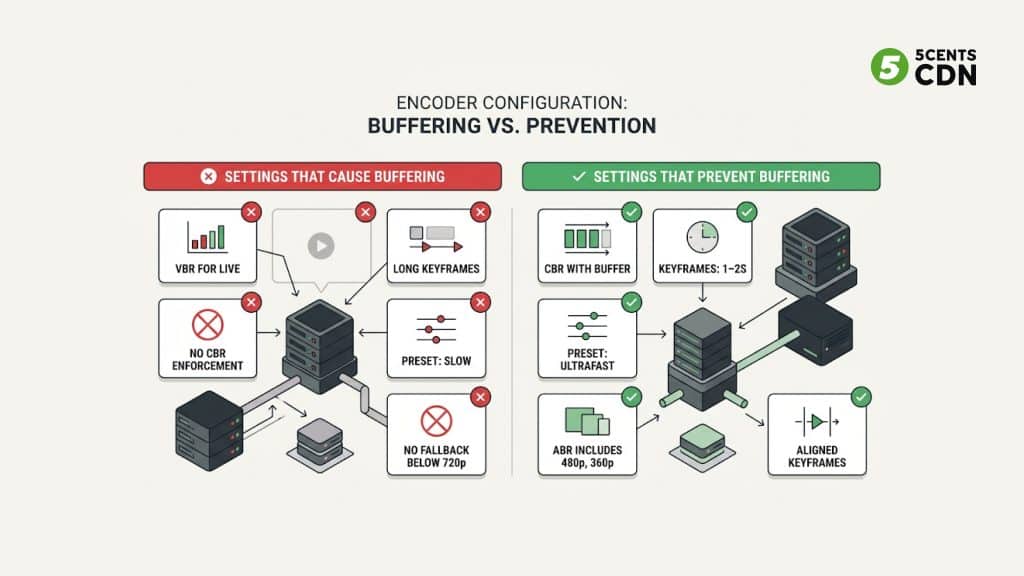
Root cause: Live encoder misconfiguration is the most common root cause of ingest-side buffering. Variable bitrate encoding for live output, long keyframe intervals, or CPU-intensive encoding presets cause the encoder to fall behind real-time — producing gaps in segment generation that cascade to viewers as buffering.
The fix: Set CBR (Constant Bitrate) mode with a 10–15% buffer tolerance. Set keyframe interval to 1–2 seconds (matches LL-HLS partial segment timing). Use a fast hardware encoder preset — for x264 software encoding, use ‘ultrafast’ or ‘superfast’ for live (not ‘slow’ or ‘medium’). Ensure all ABR renditions have the same keyframe interval.
Metric to watch: Encoder output bitrate stability (should stay within ±5% of target CBR). Dropped frame count (target: zero). Segment generation rate (must match or exceed segment duration).
Implementation difficulty: Medium — encoder reconfiguration. May require encoder software or hardware changes.
Use the live transcoding calculator to estimate the compute requirements for your specific ABR ladder and codec combination. Cloud-based live transcoding offloads encoding to managed GPU infrastructure, eliminating encoder capacity as a buffering bottleneck.
FIX 4: Switch Ingest Protocol from RTMP to SRT
Root cause: RTMP uses TCP, which retransmits lost packets using head-of-line blocking — on unstable networks (cellular uplinks, satellite contribution, remote broadcast locations), a single lost packet can stall the entire stream until retransmission completes, causing encoder-side buffering that propagates to viewers.
The fix: Replace RTMP contribution with SRT (Secure Reliable Transport). SRT uses UDP with application-level ARQ error recovery — it recovers from packet loss without TCP head-of-line blocking, maintaining sub-second ingest latency even on high-packet-loss networks.
Metric to watch: Ingest packet loss rate (should drop significantly with SRT). Encoder buffer fill level (should remain stable). Upstream contribution latency.
Implementation difficulty: Low-Medium — requires encoder SRT support (most modern encoders: OBS, Wirecast, vMix support SRT). CDN or transcoder must accept SRT ingest.
See the Secure Reliable Transport — Wikipedia for full protocol details. SRT is open source and supported natively by most professional encoder software.
FIX 5: Reduce Segment Duration for Live Delivery
Root cause: Standard HLS uses 6–10 second segments. A player running a 3-segment buffer on 6-second segments needs 18 seconds of buffered content before playback begins — and a 6-second segment generation gap (from encoder delay or CDN miss) produces immediate playback interruption.
The fix: Reduce segment duration for live output. Standard live delivery: 2–4 second segments. For low-latency live with LL-HLS: 0.2–0.5 second partial chunks. Shorter segments mean smaller gaps between generation events and faster player recovery from temporary disruptions.
Metric to watch: Startup time (should decrease with shorter segments). Rebuffer recovery time (time from buffer underrun to resumed playback).
Implementation difficulty: Medium — requires packager configuration change. Verify CDN chunked transfer support if implementing LL-HLS partial segments.
FIX 6: Implement Real-Time QoE Monitoring
Root cause: Buffering that is not monitored in real time cannot be diagnosed or fixed until after viewers have already left. Many platforms discover buffering events from social media complaints — minutes or hours after the problem started.
The fix: Deploy a player-side video analytics SDK that reports QoE metrics in real time: rebuffer ratio (target <0.5%), startup time (target <2s), average bitrate served, quality switch events per session, and geographic breakdown of where buffering is occurring.
Metric to watch: Rebuffer ratio (alert if >0.5%). Startup time (alert if >2s). Geographic buffering concentration (identifies CDN PoP or regional issues). Average bitrate served (dropping trend = ABR or CDN issue).
Implementation difficulty: Low — SDK integration. Most analytics SDKs are JavaScript snippets for web players or SDK libraries for mobile apps.
The video analytics SDK provides real-time player-side metrics with geographic breakdown — enabling identification of buffering hotspots while the event is still live.
FIX 7: Pre-Warm CDN Cache Before Live Events
Root cause: When a live event starts, thousands of viewers initiate playback simultaneously. Every viewer’s first segment request is a cache miss at the edge — causing a spike of origin requests in the first 30–60 seconds of the event that can overwhelm the origin and produce buffering at the exact moment viewership is highest.
The fix: Pre-warm the CDN cache by initiating the stream 5–10 minutes before the announced start time. Edge nodes cache the first segments during the pre-warm window — so when viewers arrive at the official start, the most-requested segments are already at the edge. Combine with origin shield to absorb any remaining misses.
Metric to watch: Cache hit ratio during the first 60 seconds of the event (should be >70% with pre-warming, vs. near 0% without). Origin request spike magnitude at event start.
Implementation difficulty: Low — operational procedure. No infrastructure change required. Coordinate pre-warm timing with event production schedule.
Fix 8: Run a Pre-Event Infrastructure Checklist
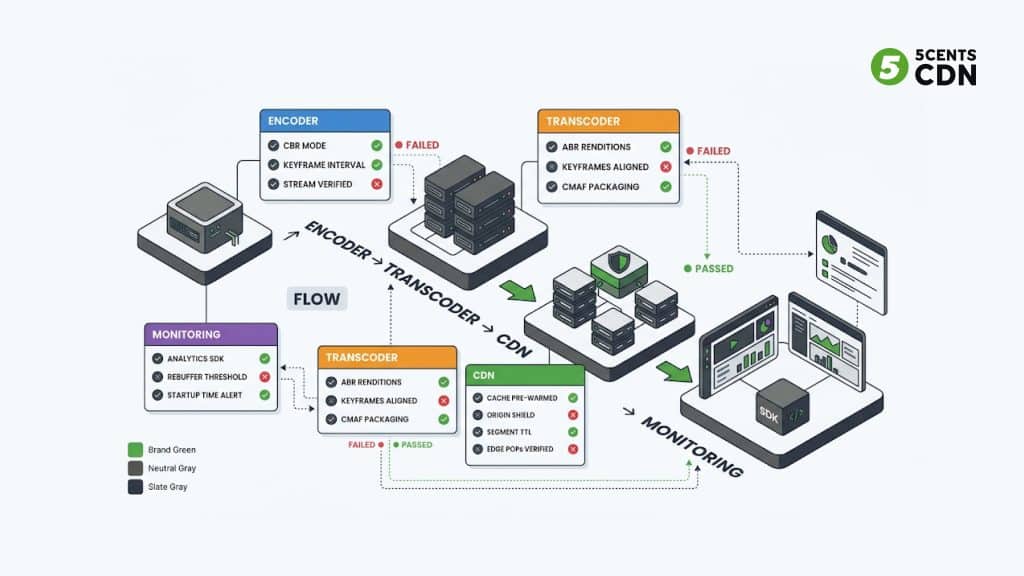
The most effective way to reduce buffering in a live streaming event is to prevent it from occurring. A structured pre-event checklist verifies every layer of the pipeline before the audience arrives.
| Layer | Check | Target / Pass Condition |
| Encoder | CBR mode confirmed active | Output bitrate within ±5% of target |
| Encoder | Keyframe interval confirmed | 1–2s for live / LL-HLS delivery |
| Encoder | Test stream sent and reviewed | No dropped frames, stable bitrate |
| Transcoder | All ABR renditions confirmed active | Minimum 4 renditions; 480p or below included |
| Transcoder | Keyframe alignment verified across renditions | All renditions share same keyframe interval |
| CDN | Cache pre-warming initiated | Stream started 5–10 min before announced time |
| CDN | Origin shield confirmed active | Origin request rate <10% of total under pre-warm load |
| CDN | Segment TTL confirmed for live segments | Near-zero TTL for partial chunks (LL-HLS) |
| CDN | Edge PoPs verified for target audience regions | Latency <100ms to primary viewer geographies |
| Monitoring | Video analytics SDK active | QoE metrics reporting in real time |
| Monitoring | Rebuffer ratio alert set | Alert fires at >0.5% |
| Monitoring | Startup time alert set | Alert fires at >2s |
Buffering Causes and Fixes: Quick Reference
| Symptom | Root Zone | Primary Fix | Key Metric |
| Buffering on all viewers globally | Zone 3 — CDN | Fix 2: Enable origin shield | Cache hit ratio <70% |
| Buffering in one region only | Zone 3 — CDN | Fix 7: Pre-warm + check regional PoP | Geographic rebuffer concentration |
| Buffering only on slow connections | Zone 4 — Player | Fix 1: ABR ladder configuration | ABR switching events, avg bitrate |
| Buffering starts from stream launch | Zone 3 — CDN | Fix 7: CDN cache pre-warm | Cache hit ratio first 60s |
| Stream drops and reconnects | Zone 1 — Ingest | Fix 4: Switch RTMP to SRT | Ingest packet loss rate |
| High startup time, then smooth | Zone 3 / Zone 4 | Fix 5: Reduce segment duration | Startup time >2s |
| Encoder bitrate unstable | Zone 1 — Encoder | Fix 3: Enforce CBR mode | Encoder output bitrate variance |
| Buffering after transcoder change | Zone 2 — Transcoder | Fix 3: Align keyframe intervals | Keyframe interval per rendition |
Frequently Asked Questions
What causes buffering in live streaming?
Buffering in live streaming is caused by data arriving at the viewer’s player slower than it is consumed during playback. For OTT platform operators, the most common root causes are: unrealistic encoder bitrate (set too high for viewer bandwidth), missing or misconfigured adaptive bitrate streaming, CDN origin overload from cache miss cascades, unstable ingest protocol on poor network links, and insufficient CDN edge coverage for the viewer geography.
How does adaptive bitrate streaming reduce buffering?
Adaptive bitrate streaming encodes content into multiple quality renditions at different bitrates. The video player monitors the viewer’s available bandwidth and automatically selects the highest quality rendition the connection supports. If bandwidth drops, the player switches to a lower quality tier rather than buffering. This eliminates the buffering caused by a single fixed-bitrate stream exceeding the viewer’s connection capacity. See: Adaptive bitrate streaming — Wikipedia.
Does a CDN fix buffering?
A CDN reduces buffering caused by geographic distance between viewers and origin, origin overload under high concurrent viewer counts, and slow first-segment delivery. It does not fix buffering caused by encoder misconfiguration, unstable ingest, or incorrectly configured ABR. A CDN is one of the four zones — diagnose which zone is causing the problem before assuming CDN is the fix.
What is rebuffer ratio and what should it be?
Rebuffer ratio is the percentage of total playback time spent buffering rather than playing. A rebuffer ratio of 0% means perfect playback. A ratio of 1% means viewers spend 1% of their watch time waiting for the buffer to refill. For OTT platforms, the target is below 0.5%. Research shows that each 1% increase in rebuffer ratio reduces average session length by more than 3 minutes. Monitor this metric in real time using a video analytics SDK.
Why does my live stream buffer at the start but then play smoothly?
High startup-time buffering followed by smooth playback usually indicates a CDN cache warming issue. At event start, the first segment requests are cache misses — the CDN must fetch from origin for the first viewers. This initial miss cascade causes startup buffering. The fix is CDN cache pre-warming: start the stream 5–10 minutes before the announced time, allowing edge nodes to cache the first segments before peak viewer arrival.
Should I use SRT or RTMP for live streaming contribution?
For any live stream where the contribution path crosses an unstable network — cellular uplink, satellite, long-distance internet routing — SRT is significantly more reliable than RTMP. SRT uses UDP with ARQ error recovery that handles packet loss without TCP’s head-of-line blocking problem. RTMP uses TCP, which can stall the entire stream when packets are retransmitted on a lossy link. For studio-to-cloud contribution over a stable connection, RTMP is adequate. For field production, RTMP is a buffering risk.
Reducing Live Streaming Buffering with 5centsCDN
Eliminating live streaming buffering requires the right infrastructure across every layer — from ingest and transcoding to CDN edge delivery and real-time monitoring. The eight fixes in this guide address each layer independently, but they work best when the entire pipeline is aligned.
5centsCDN provides custom live streaming infrastructure for OTT operators — covering live transcoding, origin shield, delivery acceleration, and live event streaming support. Solutions are scoped per project based on your stream volume, audience geography, and latency requirements.
| Still Experiencing Live Streaming Buffering? 5centsCDN offers custom live streaming infrastructure — from CDN delivery and origin shield to live transcoding and real-time analytics. Get in touch to discuss your setup. → Contact us |