


Government live streaming has moved from a nice-to-have to an operational expectation. Residents expect to watch a council session from a phone, catch up on a public hearing they missed, and find last month’s meeting in an archive without calling city hall. Meeting that expectation reliably — every session, without buffering, without an outage at the exact moment the vote happens, and without exposing the stream to tampering — is less about the camera in the room and more about the delivery infrastructure behind it.
Most guides on this topic stop at equipment and encoders. This one goes further: it walks through how government live streaming actually gets from the chamber to the public, what to require of the delivery layer, and how to keep recordings in a shape that satisfies public-record and accessibility obligations.
TL;DR
- Government live streaming succeeds or fails at the delivery layer — secure ingest, transcoding for every device, and a CDN that absorbs the traffic spike when a meeting begins.
- Keep the official stream on a page you control, protected by access rules; use social platforms only as an added reach channel, never the system of record.
- Record every session automatically and publish it as an organized, captioned archive so it doubles as a public record.
- Accessibility is not optional: live captions align with WCAG 1.2.4 and, for U.S. federal contexts, Section 508.
Why Governments Live Stream Meetings
Public bodies broadcast their proceedings for reasons that are partly legal and partly practical. Understanding them shapes the technical requirements, because a stream that exists to satisfy an open-meeting mandate has different reliability and retention needs than a casual social broadcast.
Transparency and open-meeting obligations
Many jurisdictions operate under open-meeting or “sunshine” rules that require certain sessions to be accessible to the public, with reasonable notice and a durable record of what was decided. Live streaming is one of the cleanest ways to satisfy access requirements, and the accompanying recording becomes part of the documentary trail. Because the obligation is legal, the delivery has to be dependable: an outage during a binding vote is not merely embarrassing, it can raise questions about whether the session met its access requirement at all.
Accessibility and reach
Residents who work during meeting hours, live far from the chamber, are homebound, or have disabilities are effectively excluded by an in-person-only meeting. A reliable stream, plus an archive they can watch later, removes that barrier. This is also where captions become central — both as an accessibility feature and, in many contexts, a compliance requirement.
Public trust and participation
When proceedings are easy to watch and easy to find afterward, more residents follow local decisions, and the perception of openness improves. The technical corollary is that discoverability matters: a stream buried behind a broken embed or an archive no one can search does little for trust.
What Government Bodies Actually Stream
“Government live streaming” covers a wider range of session types than just the headline council meeting, and each carries slightly different delivery demands:
- Council and board meetings — the regular, scheduled sessions that form the backbone of the stream calendar. Predictable timing, but attendance spikes for controversial agenda items.
- Committee and commission sessions — planning, zoning, parks, budget, and similar working bodies. Lower typical viewership, but they still need the same archive and accessibility treatment.
- Public hearings and quasi-judicial proceedings — zoning appeals, permit hearings, and sessions where public testimony is on the record. These raise the bar on audio clarity and on an accurate, tamper-evident recording.
- Town halls, emergency briefings, and public events — often unscheduled and high-demand. An emergency briefing can draw a far larger, more sudden audience than any routine meeting, which is precisely when weak infrastructure fails.
The takeaway for the delivery layer: plan for the busiest, least predictable session, not the average one. Capacity that comfortably handles a quiet committee meeting can collapse under an emergency briefing if it was never designed for the surge.
How Government Live Streaming Works: The Delivery Pipeline
A professional government stream is a chain of stages, each of which has to hold up for the whole broadcast to succeed. Understanding the chain is what lets you ask vendors the right questions instead of comparing feature checklists.
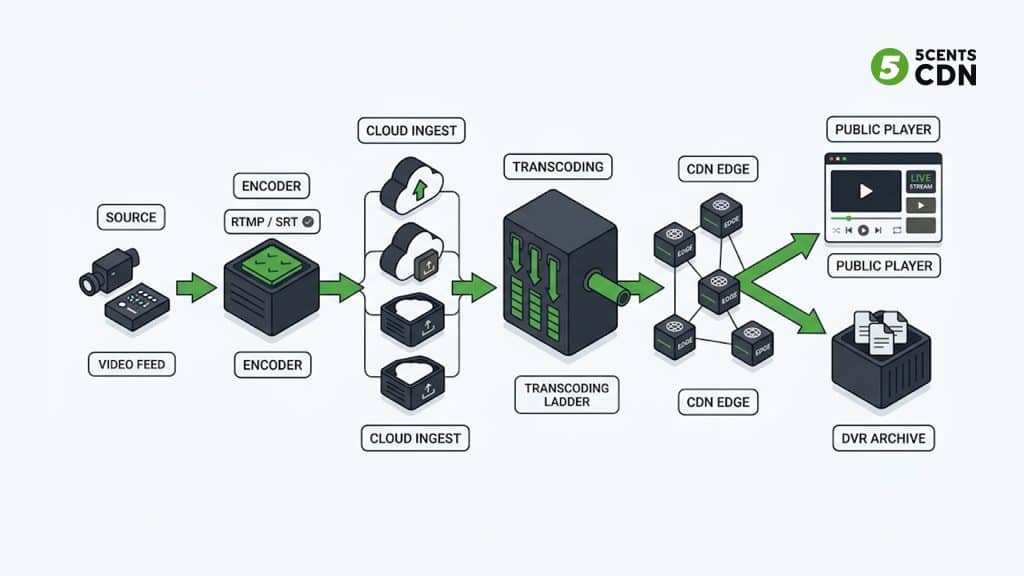
1. Capture and encode in the chamber
It starts with the camera (or several) and — more importantly — the audio feed from the room’s microphone mixer. In public meetings, audio is the payload: residents need to hear names, motions, and vote outcomes clearly, and testimony has to be intelligible for the record. The captured signal is handed to an encoder, in software or hardware, which compresses it into a streamable format and sends it upstream.
Two practical decisions live in this stage. The first is software versus hardware encoding. A software encoder running on a chamber laptop is inexpensive and flexible, which suits smaller bodies with technical staff on hand. A hardware encoder is a dedicated appliance that tends to be more reliable for non-technical operators and less likely to be disrupted by an operating-system update the night before a meeting — a common trade-off for clerks who are not full-time AV staff. The second decision is redundancy at the source: pulling audio directly from the room mixer rather than an on-camera microphone is what separates an intelligible public record from an unusable one, because a camera mic captures room echo and HVAC noise while the mixer feed captures the microphones people are actually speaking into.
2. Ingest: getting the feed out of the building reliably
The encoder pushes the feed to a cloud ingest point, typically over RTMP/RTMPS or SRT. This first mile is where many municipal streams are most fragile, because chamber internet is often a shared, best-effort connection rather than a dedicated broadcast line. SRT (Secure Reliable Transport) was designed for exactly this situation — it keeps a stream stable across packet loss and jitter on ordinary internet connections, and it encrypts the feed in transit so the contribution link cannot be intercepted or hijacked before it reaches the platform.
3. Transcoding into an adaptive ladder
A single high-quality feed does not play well for every viewer. Residents watch on old phones, office desktops, and smart TVs across a range of connection speeds. Live transcoding converts the incoming feed into multiple renditions at different resolutions and bitrates — an adaptive bitrate (ABR) ladder — so each viewer’s player automatically selects the rendition their connection can sustain. The person on a weak mobile signal drops to a lower resolution and keeps watching instead of buffering out.
4. CDN delivery and the meeting-start surge
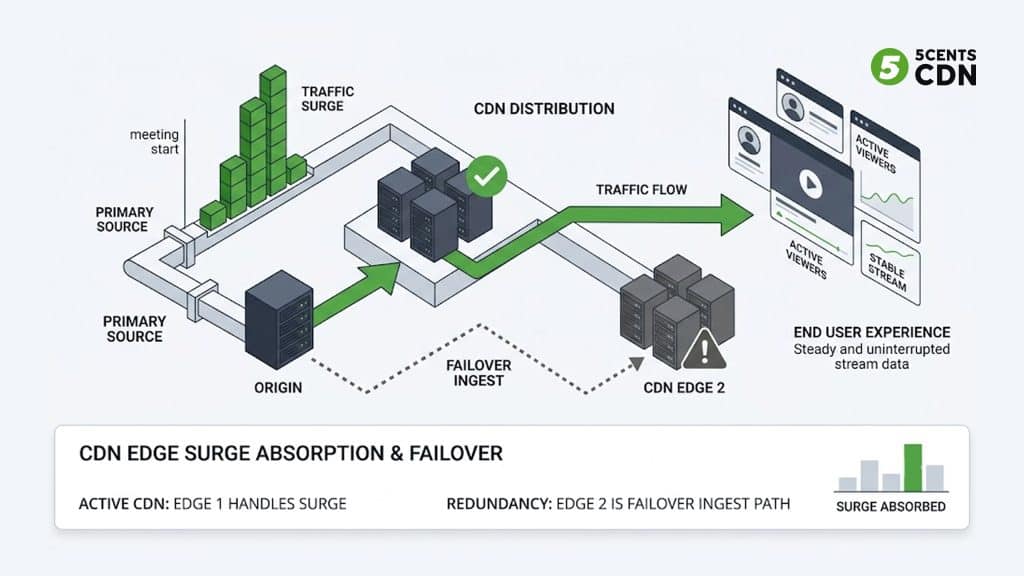
Once packaged (commonly as HLS), the renditions are distributed through a content delivery network so that viewers pull the stream from an edge server near them rather than hammering a single origin. This is what makes the stream scale. The defining traffic pattern of government live streaming is the surge: viewership is near zero, then jumps the instant the meeting is called to order or an emergency briefing is announced. A multi-CDN setup with redundant edge capacity absorbs that spike and provides a failover path if one network degrades mid-session.
5. Playback and archive
The final stage is the player on your official page and the recording written to storage. A good workflow records every session automatically and turns it into on-demand video the moment the meeting ends, with DVR-style controls that let live viewers pause and rewind. That recording is not an afterthought — for a public body it is often the official record, so how it is stored, organized, and retained matters as much as the live broadcast itself.
Planning Bandwidth and Redundancy for the Chamber
The single most common cause of a failed municipal broadcast is not the platform — it is the connection out of the building. Chamber internet is frequently a shared office line that is fine for email and collapses under a sustained video upload, especially if staff elsewhere in the building are also online during the meeting.
A useful rule of thumb is to provision comfortably more upload headroom than a single stream nominally needs, so that a brief dip in the connection does not immediately degrade the broadcast. A single high-definition stream needs a steady upload budget, and running a backup stream or a higher-bitrate rendition roughly doubles it. The mistake is provisioning for the exact minimum: video is sent in bursts, and a connection with no headroom will drop frames the moment anything else contends for bandwidth. Where possible, put the streaming encoder on a dedicated or prioritized connection rather than the general office network, and treat a wired connection as strongly preferable to Wi-Fi for anything that has to stay up for the length of a meeting.
Redundancy is the other half of the plan. Because the ingest step is the fragile first mile, a resilient setup provides a fallback: a secondary internet path (for example, a bonded cellular connection) that the encoder can fail over to, and a delivery layer that itself has redundancy so a problem on one network does not take the broadcast down. This is where a protocol like SRT earns its place — its error recovery is built to ride out the packet loss and jitter that ordinary chamber connections routinely produce, keeping the feed stable where a plain RTMP push would stutter or drop.
Latency is worth a brief, honest note here. Government meeting streams do not need the sub-second, real-time latency that interactive use cases chase; a few seconds of delay is completely acceptable for one-way public viewing, and chasing ultra-low latency adds cost and fragility for no benefit. The sensible target is a stable, low-latency HLS delivery that stays in sync across devices and, above all, does not buffer. Reliability beats raw speed for this use case.
Where the Stream Should Live: Official Site vs. Social
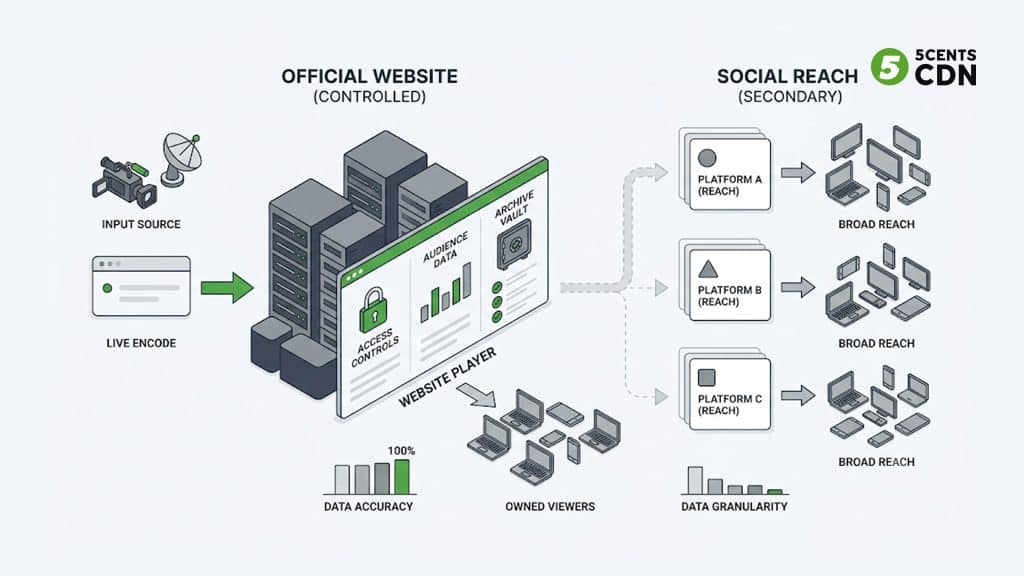
A recurring mistake is treating a social platform as the primary home for government live streaming. Social reach is valuable, but a public body should not depend on a third-party platform it does not control for a legally significant broadcast.
The durable pattern is to make your own website the system of record and use social as an amplifier:
- Official page (primary): an embedded player on a stable, branded government URL that also hosts the agenda, accessibility notices, and the archive. You control access, appearance, retention, and the link that residents bookmark from meeting to meeting.
- Social simulcast (secondary): restream to public platforms for reach, clearly pointing back to the official page as the authoritative source. If a social platform has an outage or changes its rules, your compliance stream is unaffected.
A related best practice is the two-link model: one watch-only link for the public livestream, and a separate participation link for speakers, public comment, and interpreters. Keeping the broadcast separate from the interaction channel keeps meetings orderly and the public feed clean.
Securing a Public Stream
It is easy to assume a public meeting needs no security because anyone is allowed to watch. That is a misconception. “Public” describes who may view the content, not whether the stream and its infrastructure need protection. Two distinct concerns apply.
Stream integrity and admin security
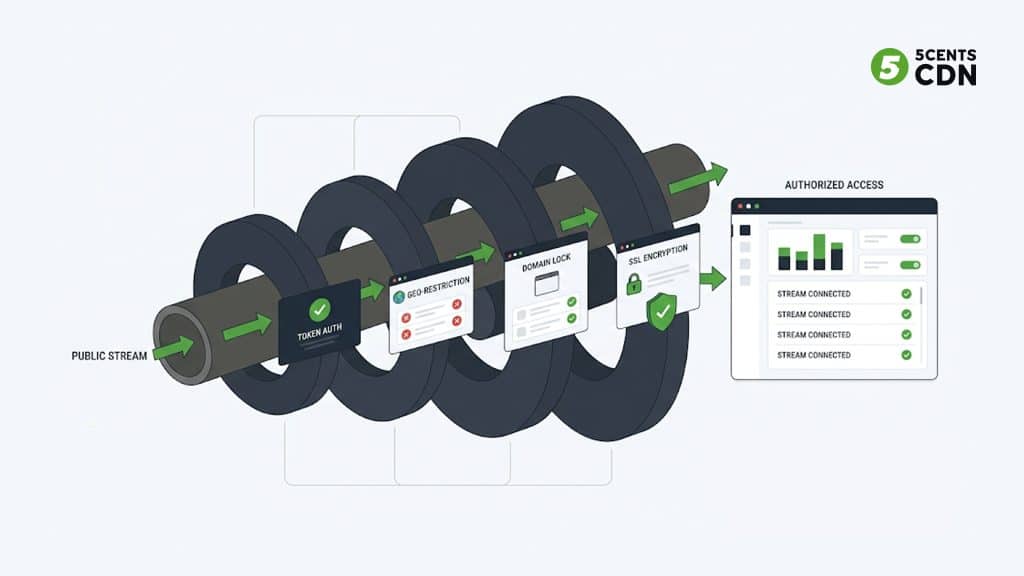
The real risk for a public meeting is not eavesdropping — it is tampering and takeover. Stream keys need to be protected, admin accounts need strong authentication and role-based permissions, and the ingest path should be encrypted so no one can inject or replace the feed. An encrypted SRT or RTMPS contribution link closes the most obvious attack surface between the chamber and the platform.
Controlled access, even for public content
Not every government stream is fully open. Closed-session portions, internal training, or region-restricted content need access controls. A capable delivery platform offers layered options — token authentication, geo-restriction, and domain lock so an embed only plays on your official site — plus SSL on every connection. Even for a fully public meeting, domain lock and SSL keep the stream from being reframed on spoofed pages and keep the connection trustworthy.
Accessibility and Public-Record Compliance
For government bodies, accessibility is frequently a legal requirement rather than a courtesy, and it applies to both the live broadcast and the archive.
Captions for live and recorded video
Live captions make a broadcast usable for residents who are deaf or hard of hearing, and they help everyone in noisy or sound-off viewing conditions. The widely referenced baseline is WCAG Success Criterion 1.2.4, which addresses captions for live audio content. For U.S. federal contexts, Section 508 requires support for captions and accessible player controls. Whatever the jurisdiction, plan for live captions on the broadcast and accurate captions or transcripts on the archived replay.
Archiving that doubles as a public record
Because the recording often functions as an official record, the archive needs more than a raw video file dumped on a server. A records-ready archive is automatically captured, organized by meeting with the agenda alongside it, timestamped or chaptered so residents can jump to a specific item, ideally transcribed for search, and retained for the period your rules require. Reliable long-term storage and a clean, findable index are what turn a pile of recordings into a usable public archive.
What to Require From a Government Streaming Solution
Pulling the pipeline together, here is what a public body should insist on when evaluating government live streaming infrastructure — framed as requirements rather than vendor features:
- Reliable, encrypted ingest — RTMPS/SRT support so the chamber’s ordinary internet connection can still deliver a stable, tamper-resistant feed.
- Adaptive transcoding — an ABR ladder so every resident gets smooth playback regardless of device or connection.
- Scalable, redundant delivery — CDN capacity that absorbs the meeting-start surge, with a failover path so a single network problem does not end the broadcast.
- Layered access control — token authentication, geo-restriction, domain lock, and SSL, available even on public streams.
- Embed and branding control — a clean HTML5 player you can place on an official page alongside agendas and notices, not a link that sends residents off to a third-party site.
- Automatic recording and records-ready archiving — every session captured, published as organized on-demand video, and retained to meet your record-keeping rules.
- Accessibility support — live captions and caption/transcript workflows for the archive.
- Predictable pricing — government budgeting favors clear allowances over surprise overage charges, so transparent, predictable cost structures fit procurement far better.
Day-of operations that prevent the common failures
Even with the right infrastructure, most on-air problems trace back to a handful of preventable operational gaps. A short, repeatable pre-meeting routine removes them. Run a rehearsal on the actual room, microphones, and internet path rather than a desk test, because problems with the mixer feed or the chamber connection only show up under real conditions. Start the stream ten to fifteen minutes early with a holding slide so the connection is confirmed live before the meeting is called to order. Verify on a second device that the public embed loads on mobile, since a large share of residents watch on phones. Confirm the recording is actually running and captions are visible before the gavel. And assign one person to own the broadcast — separate from whoever runs the meeting — so a mid-session issue has an owner who is not also chairing the discussion.
Delivering Reliable Government Streams with 5centsCDN
5centsCDN provides the delivery layer behind public-sector broadcasts: encrypted SRT/RTMPS ingest, live transcoding into adaptive renditions, redundant CDN delivery built to absorb meeting-start surges, layered access controls, and automatic recording for a records-ready archive. If your municipality or agency is planning or upgrading its government live streaming, our live event streaming solution covers the full path from chamber to public archive. Talk to our team to map it to your requirements.
Frequently Asked Questions
What is government live streaming?
Government live streaming is the broadcasting of public-sector proceedings — council and board meetings, committee sessions, public hearings, and town halls — over the internet so residents can watch live and, usually, replay them later from an archive. For public bodies it commonly serves an open-meeting or transparency obligation, which is why reliability, security, and a durable recording matter as much as video quality.
Do public meeting streams need security if the meeting is already public?
Yes. “Public” means anyone may watch; it does not mean the stream needs no protection. The concern is not eavesdropping but tampering and takeover, so stream keys, admin access, and the ingest path all need protection. Encrypted ingest, strong admin authentication, and domain lock protect the integrity of the broadcast even when viewing is fully open.
Should we stream on our website or on social media?
Use both, but make your official website the primary system of record. Host the embedded player, agenda, accessibility notices, and archive on a stable government URL you control, and treat social platforms as a secondary reach channel that points back to the official page. That way a social outage or policy change never affects your compliance stream.
Do government live streams have to be captioned?
In most public-sector contexts, yes. Live captions align with WCAG Success Criterion 1.2.4, and in U.S. federal contexts Section 508 requires caption support and accessible player controls. Best practice is live captions on the broadcast plus accurate captions or transcripts on the archived replay.
How do we handle traffic spikes when a meeting starts?
Plan delivery around the surge, not the average. Viewership jumps sharply the moment a meeting is called to order or an emergency briefing is announced. A CDN with redundant edge capacity — ideally a multi-CDN setup with failover — absorbs that spike so the stream stays smooth at exactly the moment the most residents are watching.
How should recordings be archived for public record?
Record every session automatically and publish it as organized on-demand video: grouped by meeting with the agenda, timestamped or chaptered for navigation, ideally transcribed for search, and retained for the period your rules require. Reliable long-term storage plus a findable index is what turns raw recordings into a usable public archive.
Conclusion
The camera in the chamber is the easy part. What makes government live streaming dependable is everything downstream: an encrypted ingest that survives ordinary internet, transcoding that reaches every device, a CDN that holds up during the meeting-start surge, access controls that protect stream integrity, and an archive built to serve as a public record. Get the delivery layer right and transparency becomes routine — every session available, accessible, and permanently on the record.
