


Most streaming services encode every video with the same recipe. A cartoon, a lecture recorded from a fixed camera, a football match, and a grainy thriller all go through the same set of resolutions and bitrates, as if they were the same kind of picture. They are not. The cartoon looks perfect at a fraction of the bits the match needs, which means every time it plays you pay to deliver data that no viewer can see. Meanwhile the match may be starved at the very bitrate that was plenty for the cartoon. Per-title encoding addresses this mismatch by recognizing that different content needs different encoding settings.
Per-title encoding fixes that mismatch by tailoring the encode to each video. Done well, it delivers the same perceived quality for fewer bits on simple content and better quality on demanding content. This guide explains how it actually works, what it saves and what it costs, when it is not worth the effort, four practical ways to adopt it (from cheap to sophisticated), and how to validate and roll it out without hurting playback or your cache. It builds on our guide to the encoding ladder, which covers rung design, spacing, codec-specific ladders, and keyframe alignment. Here we go deeper on the one technique that decides which rungs each video should get.
The Problem With One Ladder for Everything
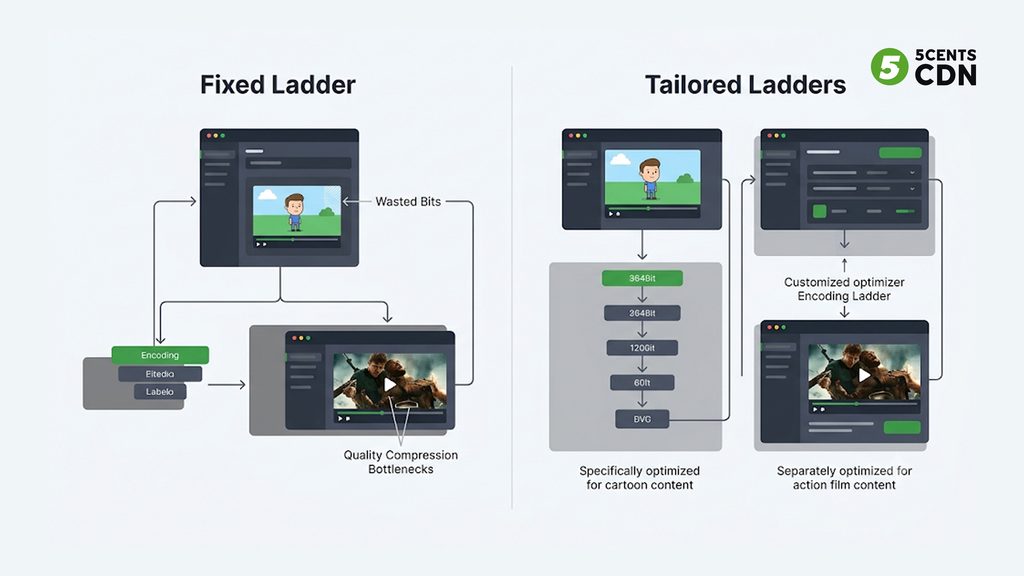
In adaptive bitrate streaming, a ladder is the set of resolution and bitrate pairs a player can choose from. The traditional approach is a fixed ladder: one predetermined set applied to every title. It is simple, fast, and predictable, which is why it is still the default almost everywhere.
Its flaw is that video complexity varies enormously. Animation, slides, screen recordings, and talking-head lectures have large flat areas and little motion, so they compress extremely well. Sports, action films, and anything shot with heavy grain or fast camera movement are expensive to compress. A fixed ladder has to pick one set of bitrates for all of them, and whichever compromise it picks is wrong in both directions at once. Simple titles are over-allocated, so you spend bits, storage, and delivery fees on quality nobody can perceive. Complex titles are under-allocated, so viewers see blocky, soft video at the bitrate that looked fine in testing on easier content.
The cost of the first mistake is quietly large because it repeats. Delivery cost scales with the bytes you send, so every extra megabit allocated to a simple title is paid again on every single view for as long as the title exists. That is the opening per-title encoding exploits.
How Per-Title Encoding Works
The idea is to let each video tell you what it needs rather than assuming. The classic method, popularised by Netflix in 2015, works like this.
First, the encoder runs a set of trial encodes of the title, covering several resolutions and, at each resolution, a range of bitrates. Second, each trial encode is scored with a perceptual quality metric such as VMAF, a full-reference metric developed by Netflix with university partners that compares the encoded video with the original and produces a score designed to track human judgment. Third, those scores are plotted as quality-versus-bitrate curves, one curve per resolution.
The key observation comes from how those curves behave. At very low bitrates, a lower resolution looks better than a higher one, because the higher-resolution encode runs out of bits and falls apart into blocks and smearing while the smaller picture can still be encoded cleanly. As bitrate rises, the higher-resolution curve climbs and eventually crosses above the lower one. Every resolution therefore has a range of bitrates where it is the best choice, and the points where the curves cross tell you exactly when to switch resolution.
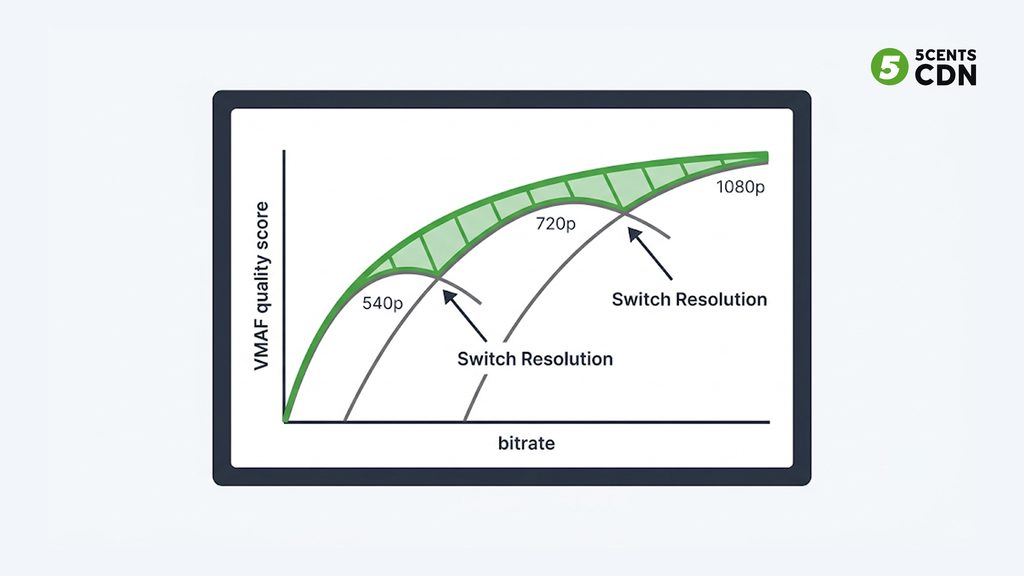
Fourth, you take the upper envelope of all the curves, often called the convex hull: for every bitrate, the best quality any resolution can deliver. That envelope is the efficient frontier for that particular video. The final step is to place the rungs of the ladder along it, choosing bitrate and resolution pairs where each step up buys a worthwhile quality improvement.
The output is a ladder shaped by the content. For a simple cartoon, the curves rise steeply and flatten early, so top quality arrives at a modest bitrate and the ladder may need only a handful of rungs. For a grainy action film, the curves climb slowly, so the ladder needs higher bitrates to reach the same quality and may justify more rungs. Same method, very different ladders, each matched to its title.
Beyond the Title: Per-Shot and Context-Aware Refinements
The same logic extends in two directions. The first is finer granularity. A single title is rarely uniform, since a quiet dialogue scene and a chase sequence need very different bitrates, so per-shot or per-scene approaches apply the same trial-and-measure process to segments of a video rather than to the whole thing. Gains can be larger, and so is the complexity of encoding, packaging, and testing.
The second is context. Context-aware encoding folds in the devices and networks your audience actually uses, so that rungs no real viewer will ever select are never built. Our encoding ladder guide covers that approach and how it fits alongside fixed and per-title ladders; the point here is that these refinements stack on top of the per-title foundation rather than replacing it.
What It Saves, and What It Costs
The case for per-title encoding is economic, so it deserves honest arithmetic rather than a headline percentage. There is no universal saving. The real figure depends on how complex your content is and how your current ladder was built, and any vendor quoting one number for every library is selling, not measuring.
Where the savings come from. The main saving is delivery. Fewer bits per viewing minute means fewer gigabytes delivered, and delivery is billed by the gigabyte. Efficient encoding is one of several levers on that bill, alongside caching, routing, and contract terms, which our guide to reducing CDN bandwidth costs walks through. A secondary saving is storage, because lower bitrates and sometimes fewer rungs mean smaller files to keep. A smaller footprint also helps at the edge, since smaller renditions take less cache space.
A worked illustration. Suppose a heavily watched lecture series delivers 50 terabytes a month on a fixed ladder. Imagine per-title encoding lowers its average delivered bitrate by 25 percent at equal perceived quality. That is an assumption for illustration, not a promise. It would remove 12.5 terabytes, or 12,500 gigabytes, from the monthly bill. At an illustrative delivery rate of two cents per gigabyte, that is about $250 a month, every month, for that one title. Use your own volumes and your own rate in the same calculation; our bandwidth calculator is a quick way to model your real delivery spend before you decide how much encoding effort is justified.
What it costs. Trial encodes multiply compute: instead of encoding each rendition once, you encode many candidate renditions and throw most of them away. The analysis takes time and adds pipeline complexity. Re-encoding an existing catalog is a project in itself. And the savings are not free of trade-offs, because for demanding content the method may *raise* the bitrate above what your fixed ladder used, in exchange for the quality it was missing. Per-title is a quality-per-bit optimization, not a pure cost cut.
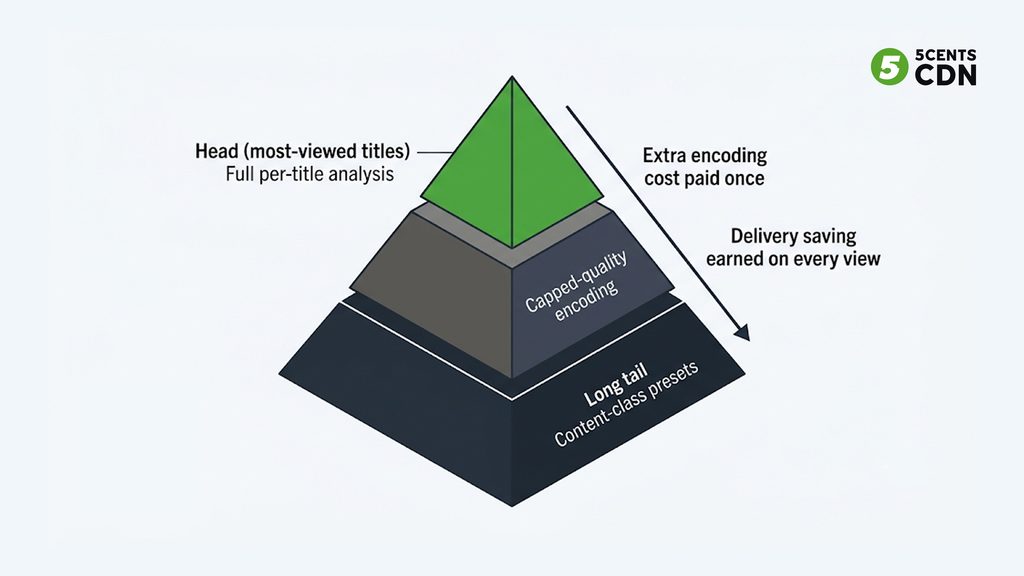
The break-even logic. The extra encoding cost is paid once per title, while the delivery saving is earned on every view. A title watched thousands of times pays back quickly. A title watched twice in its lifetime may never recover its extra encoding cost. That asymmetry is the most important idea in deciding where to apply the technique.
When Per-Title Isn’t Worth It
Knowing where *not* to use per-title encoding is as valuable as knowing where to use it.
It is a poor fit for the long tail of rarely watched titles, where the extra compute will never be repaid by delivery savings. It is a poor fit for content that is uniformly complex, such as sports or grain-heavy film, where every title already needs near-maximum bitrates and there is little to trim. Classic per-title analysis needs the whole file before it can run, so it suits on-demand libraries rather than live streams, where operators rely on genre-tuned fixed ladders or fast approximations. Very small catalogs may find that engineering time costs more than the bandwidth saved. And if your audience’s devices impose fixed requirements on resolutions or bitrates, a fully free-form ladder can create compatibility headaches you did not have before.
A Quick Audit Before You Invest
You can estimate how much room per-title encoding has in your library before building anything. Take a representative sample of titles, covering your simplest content, your most demanding, and the middle, and encode each one to the same quality target rather than the same bitrate. Then compare the bitrate each title needed to reach that target.
The spread is the answer. If the sampled titles cluster tightly, your content is fairly uniform, a fixed ladder is already close to right, and the saving from tailoring will be modest. If the bitrates spread widely, with some titles reaching the target at a fraction of what others need, you are over-delivering on the simple ones today and there is real room to improve. Pair that with your viewing data, because a wide spread among rarely watched titles matters far less than a modest spread among the few titles that account for most of your delivery. The audit costs a few test encodes and a spreadsheet, and it tells you whether this is a project worth starting and which tier of your catalog to start with.
Four Ways to Adopt It
You do not have to jump straight to full trial-encode analysis. There is a spectrum, and the right starting point depends on your catalog and your team.
1. Content-class presets. The cheapest step is to sort your content into a few classes, such as animation, talking-head and slides, general film and TV, and sports, and give each class its own ladder. No per-file analysis is needed, and you capture much of the gap between simple and complex content. It is how many libraries start, and it is often enough for a long tail.
2. Capped-quality encoding. Instead of fixing a bitrate for each rung, you set a quality target and cap the maximum bitrate, so simple content naturally uses fewer bits while complex content is held to the ceiling. It is a lightweight approximation of per-title behavior using rate-control settings rather than trial encodes.
3. Full per-title analysis. The trial-encode, VMAF-scoring, convex-hull method described above. It produces the best-fitting ladder per title and carries the highest compute cost, so it is best reserved for titles with large audiences, where the saving repeats on every view.
4. Per-shot or per-scene optimization. The most granular approach, worth considering for premium catalogs with very large audiences, where even small percentage gains on a large delivery bill justify the added pipeline complexity.
Four ways to tailor a ladder at a glance
| Approach | Effort and compute | Savings potential | Best for |
| Content-class presets | Low; no per-file analysis | Moderate; depends on how well the classes fit your content | Large libraries and the long tail of rarely watched titles |
| Capped-quality encoding | Low to moderate; rate-control settings | Moderate; simple content uses fewer bits automatically | On-demand libraries that want automatic variation without trial encodes |
| Full per-title analysis | High; many trial encodes plus quality scoring | Highest for simple content; may raise bitrate for complex titles | Heavily viewed on-demand titles where the saving repeats on every view |
| Per-shot / per-scene | Highest; most complex pipeline and testing | Further gains on titles with mixed content | Premium catalogs with very large audiences |
Qualitative guidance only. Actual savings vary widely with content complexity and your current ladder; measure with your own sample titles before committing.
A practical pattern combines them in tiers: content-class presets or capped-quality encoding for the long tail, and full per-title analysis for the head of the catalog, where viewing volume repays the extra encoding. If you also plan to adopt a more efficient codec, the interaction matters, because a new codec shifts every rung’s bitrate; our guide to AV1 for OTT covers that side of the decision.
Validate Before You Roll It Out
A tailored ladder is only an improvement if viewers actually see equal or better quality, so validation is not optional.
Start by choosing a quality target for your top rung, based on your own side-by-side viewing of your own content rather than a number borrowed from someone else’s library. Use VMAF to compare candidates quickly, but confirm with human eyes, because like any metric it has blind spots and certain content types, such as animation, heavy grain, or HDR, can fool it. Test on the real devices your audience uses, not only on a desktop monitor. Check that the declared bandwidth values in your manifests remain accurate for the new renditions, since players choose rungs from those declared values.
Then validate in the field. Publish the new ladder alongside the old one, send a slice of traffic to it, and compare the outcomes that matter: delivered bitrate, startup time, rebuffering, and cost per viewing hour. Our guide to why QoE monitoring matters explains why those viewer-side measurements are the real test, and keep the old renditions available until the new ones have proven themselves, so you can roll back quickly if something goes wrong.
Rolling Out Without Hurting Delivery
Re-encoding changes your delivery profile in ways that are easy to overlook. New renditions are new objects, so they start cold at the edge: the first viewers of a freshly encoded title will cause cache misses and origin fetches that the old renditions no longer would. For popular titles, that can mean a burst of origin traffic at exactly the wrong time.
The practical answer is to roll out gradually, starting with a few titles, and to warm the cache for the heavily viewed ones before switching traffic over. Keep the old and new renditions side by side during the transition, accepting a temporary rise in storage, and watch your cache-hit ratio and origin load as you migrate. The on-demand delivery patterns in our VOD delivery architecture guide are a useful companion for planning that migration.
A Per-Title Adoption Checklist
Pulling the guide together, a team adopting per-title encoding should be able to answer yes to each of these: you have measured how complex your content actually is, and know which part of your library is simple, which is demanding, and which is watched most; you have estimated delivery savings with your own volumes and rates rather than a generic percentage; you have chosen an approach that fits each tier of the catalog, such as content-class presets or capped-quality encoding for the long tail and full analysis for the head; you have defined a quality target from your own viewing and confirmed it by eye as well as by VMAF; you have tested on real devices; manifests declare accurate bandwidth for the new renditions; you have a rollout plan that moves popular titles first and warms the cache; old renditions stay available for rollback; and you will measure delivered bitrate, startup time, rebuffering, and cost per viewing hour after the change to confirm it worked.
Pay for the Bits That Matter
A fixed ladder treats every video as average, and on a library full of simple content that means paying, on every view, for detail nobody can see. Per-title encoding replaces that assumption with measurement, and the saving is real wherever content is simple and viewing is heavy. It is not a universal win: it costs compute, it does not suit live or the rarely watched tail, and for demanding titles it may spend more bits in exchange for better quality. Applied in tiers, with simple presets where volume is low and full analysis where audiences are large, it turns your encoding ladder from a one-time guess into a measured decision.
5centsCDN’s video encoding lets you create any number of custom encoding profiles, combine renditions into adaptive bitrate profiles, use multi-pass encoding, and assign a different auto-transcoding profile to each project in Video Manager, which makes content-class ladders straightforward to run today. Encoded renditions are delivered over a global CDN built for video on demand. If you want help designing ladders for your own catalog, or working out where per-title analysis would repay its cost, talk to our team.
Frequently Asked Questions
What is per-title encoding?
Tailoring the encoding ladder to each individual video instead of using one fixed ladder for everything. The encoder runs trial encodes at several resolutions and bitrates, scores each with a perceptual quality metric such as VMAF, and builds the ladder from the best quality-per-bit points for that title.
How does per-title encoding reduce bitrate?
Simple content (animation, slides, lectures) reaches good quality at lower bitrates than a fixed ladder assigns, so a per-title ladder delivers fewer bits per viewing minute at equal perceived quality. Delivery is billed by the gigabyte, so every view costs less. The saving varies widely with content.
What is the convex hull in per-title encoding?
When you plot quality against bitrate for each resolution, the curves cross: lower resolutions win at low bitrates and higher ones win as bitrate rises. The upper envelope of those curves — the convex hull — shows the best quality available at each bitrate, and the ladder’s rungs are placed along it.
When is per-title encoding not worth it?
For rarely watched titles (the extra encoding cost is never repaid by delivery savings), for uniformly complex content like sports or grainy film (little to trim), for live streams (classic analysis needs the whole file), and for very small catalogs where engineering time exceeds the bandwidth saved.
Can per-title encoding increase bitrate?
Yes. For demanding content the method may assign higher bitrates than a fixed ladder used, in exchange for the quality it was missing. It is a quality-per-bit optimization, not a pure cost cut.
How do I start with per-title encoding without a big project?
Begin with content-class presets (separate ladders for animation, talking-head, general, and sports content), or capped-quality encoding, for the long tail; reserve full per-title analysis for your most-watched titles. First run a quick audit: encode sample titles to the same quality target and compare the bitrates they need.
