


Adding closed captions to a live stream sounds like it should be a single switch you flip. In practice it is a relay race: captions are created at one end of your pipeline, embedded into the video, carried across every processing step in between, correctly described in the manifest, and finally rendered by the viewer’s player — and if any one leg of that race drops the baton, your viewers see a caption track listed in the menu that displays absolutely nothing when they select it. That specific failure, a caption track that exists on paper but never appears on screen, is one of the most confusing problems in live streaming, and it almost always comes down to a misunderstanding of where captions live and who is responsible for them at each step.
This guide walks the entire flow from end to end: what closed captions actually are, the difference between embedded and sidecar captions, how captions travel from your encoder all the way to the viewer’s screen, which encoders can put them into a live stream in the first place, and — the part most explanations skip or get wrong — the real difference between the CEA-608 and CEA-708 formats and why that difference determines whether your captions render at all. By the end you will understand not just how to turn captions on, but why they sometimes silently fail and how to make sure yours don’t.
What Closed Captions Are (and Why They Matter)
Closed captions are the on-screen text representation of a program’s audio — dialogue, speaker identification, and non-speech sounds like music or applause — that a viewer can turn on or off at will. The “closed” part is the key distinction: unlike open captions, which are burned permanently into the video pixels and can never be removed, closed captions are carried as separate data that the player draws on demand, which is what lets a viewer toggle them and, crucially, what lets a single stream carry captions in more than one language.
The case for captions is partly about reach and partly about obligation. A large share of the global audience is deaf or hard of hearing and depends on captions to follow along at all, and a much larger share simply prefers them — people watching in a noisy place, in a quiet place where they can’t turn the sound up, or in a second language. On top of that, in many jurisdictions captioning is a legal requirement for certain kinds of content, not a nicety. For a live streaming operator, captions are therefore both an accessibility commitment and, frequently, a compliance one — which makes “the captions don’t work” a genuinely serious failure rather than a cosmetic bug.
Embedded vs Sidecar: Two Very Different Approaches
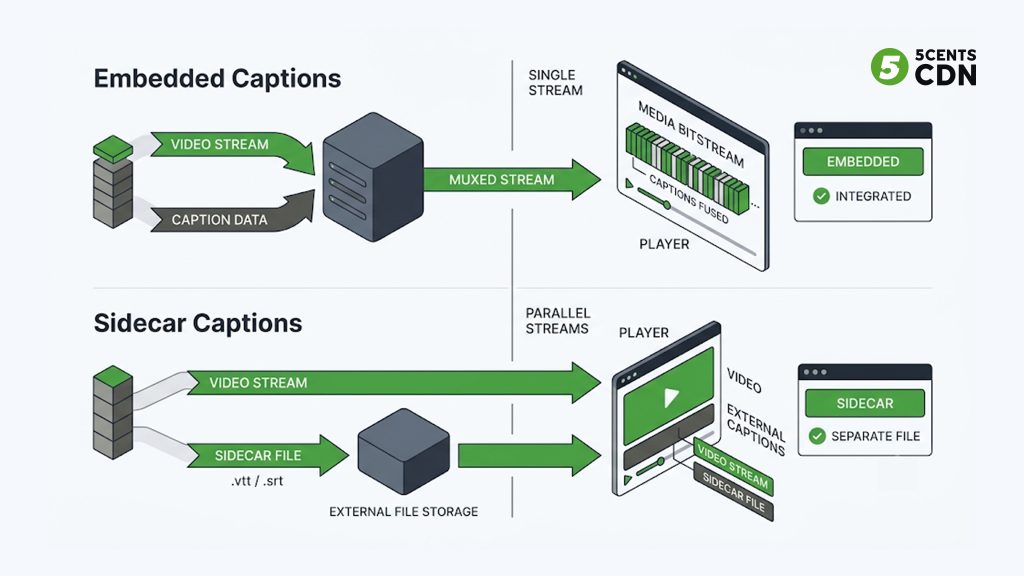
Before tracing the flow, one fork in the road determines almost everything about how captions behave in your pipeline: whether they are *embedded* or *sidecar*.
Sidecar captions live in a separate file alongside the video — a WebVTT or SRT file of timestamped text cues that the player loads and overlays. They are flexible and easy to edit after the fact, and they are the common choice for on-demand video where you have time to author and attach a caption file. If that is your use case, our guide to creating a WebVTT file covers that path in detail.
Embedded captions are different in kind. Instead of riding in a separate file, they are carried *inside the video stream itself*, woven into the compressed bitstream as extra data attached to the video frames. This is the format that dominates live broadcast and professional live streaming, because it travels as an inseparable part of the video: wherever the video goes, the captions go with it, frame-accurately synchronized, with no separate file to attach, lose, or fall out of sync. The two dominant embedded formats are CEA-608 and CEA-708, and they are the focus of this guide because they are what live pipelines overwhelmingly use — and because the difference between them is exactly what trips operators up. The trade-off is that because embedded captions are buried inside the video bitstream, every piece of infrastructure that touches the video has to handle them correctly, which is where the flow below becomes critical.
The End-to-End Flow: How a Caption Reaches the Viewer
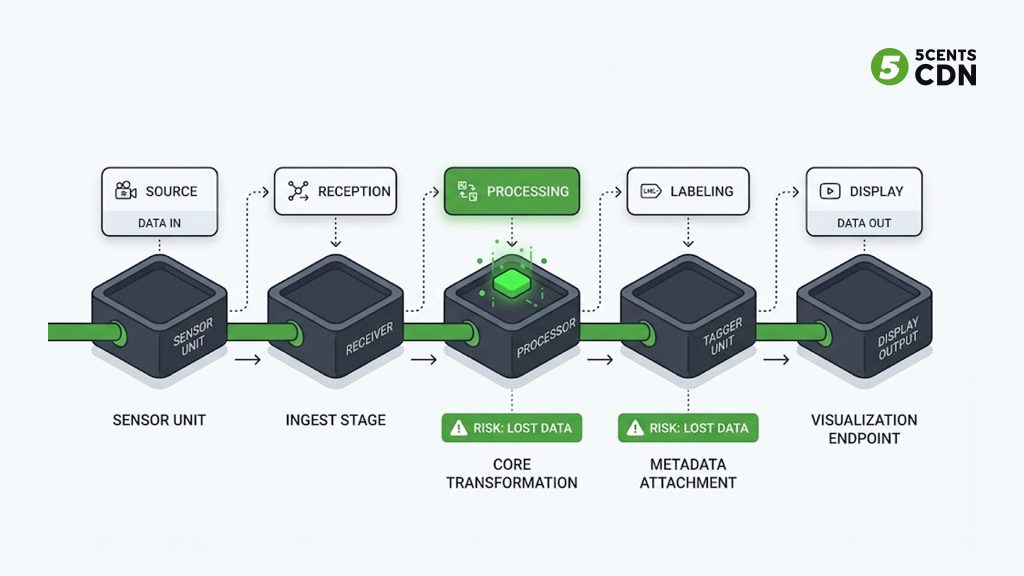
For embedded captions, getting text onto a viewer’s screen is a chain of five distinct stages, each owned by a different part of your pipeline. Understanding the whole chain is what lets you diagnose a failure, because a caption problem is always a problem at one specific link — and the symptom rarely tells you which.
Stage 1: The caption is created and embedded at the encoder
Captions enter the pipeline at the very start, at the encoder — the software or hardware that packages your camera feed into a stream. The text itself comes from somewhere: a live captioner typing in real time, an automatic speech-to-text service, or a caption-generation tool. However it is produced, the encoder’s job is to take that timed text and *embed* it into the outgoing video as CEA-608 or CEA-708 data attached to the correct frames. This is the origin of the caption data, and it is a step only the encoder side can perform — no downstream system can invent captions that were never embedded in the first place. If captions are missing from the very start, nothing later in the chain can rescue them.
Stage 2: The stream is ingested
The encoder sends its stream to your streaming platform, most commonly over RTMP or SRT. With the captions embedded inside the video bitstream, they travel as part of the video during ingest — there is no separate caption connection to configure. For RTMP specifically, embedded 608/708 data is commonly carried using a dedicated onCaptionInfo metadata mechanism, but the principle holds regardless of protocol: the captions arrive fused to the video, not as a separate feed.
Stage 3: The transcoder must retain the captions
This is the stage where captions most often die, and it is the stage that matters most for a streaming platform. To deliver adaptive streaming, your platform transcodes the incoming stream into multiple renditions at different bitrates. Transcoding means *decoding* the video and *re-encoding* it — and here is the danger: because captions live inside the video bitstream, a transcoder that isn’t explicitly caption-aware will decode the video, throw the caption data away as an unrecognized extra, and re-encode clean video with no captions at all. The stream still plays perfectly; it just has no captions, and no error is raised. A correct pipeline must deliberately carry the caption side data across the decode-and-re-encode boundary and re-embed it into every rendition it produces. This is not automatic, and it is precisely why “captions worked from my encoder but disappeared after processing” is such a common complaint.
Stage 4: The packager describes the captions in the manifest
Once transcoded, the stream is packaged into HLS or DASH for delivery, and the packager writes a manifest — the index file that tells the player what tracks are available. For captions, the manifest must declare not just *that* captions exist and in which languages, but *which format* they are in. This sounds like a formality; it is in fact the second most common point of failure, because the manifest is a set of claims the player trusts without verifying. If the manifest describes the captions incorrectly, the player will build a caption menu from those false claims and then fail to render anything, because what it was told to look for isn’t what’s actually in the stream. We will return to this in detail, because it is subtle and costly.
Stage 5: The player renders the captions
Finally, the viewer’s player reads the manifest, sees the declared caption tracks, offers them in its menu, and — when the viewer selects one — reaches into the video stream, finds the caption data of the declared format, decodes it, and draws it on screen. Every prior stage exists to make this last one possible. If the caption data is present and the manifest describes it truthfully, the player renders it. If either is wrong, the viewer gets the dreaded empty caption track.
Which Encoders Can Embed Captions
Because captions originate at the encoder, the practical first question for any operator is whether their encoder can embed 608/708 in the first place. The good news is that support is widespread across the tools operators already use, though the exact mechanism varies.
Professional hardware encoders and broadcast-grade software encoders generally support embedding CEA-608/708 directly, often accepting caption data from a dedicated caption encoder or an upstream feed and inserting it into the outgoing stream. Among software encoders, popular tools can embed captions with the right configuration or plugins — for example, OBS can generate and embed captions through caption plugins or an integrated speech-to-text source, and encoders like vMix have supported embedded caption workflows for live production. Many operators who want automatic captions route their audio through a live transcription service that returns timed text, which is then embedded by the encoder or an intermediary before the stream is sent on.
The specifics differ by tool, but the pattern is consistent: some component on the encoder side turns audio into timed text and writes it into the video as 608 or 708 data before the stream ever leaves your control. The essential thing is to confirm your encoder is actually embedding captions — many operators assume it is when it isn’t, which is the Stage 1 failure that no amount of downstream configuration can fix.
CEA-608 vs CEA-708: The Difference That Decides Whether Captions Render
Now the heart of it. CEA-608 and CEA-708 are thrown around almost interchangeably — “608/708 support,” “608 captions,” “708 captions” — and most of the time nobody distinguishes them. But they are genuinely different formats with a shared lineage, and the difference becomes the reason a caption track renders or fails.
CEA-608: the analog original
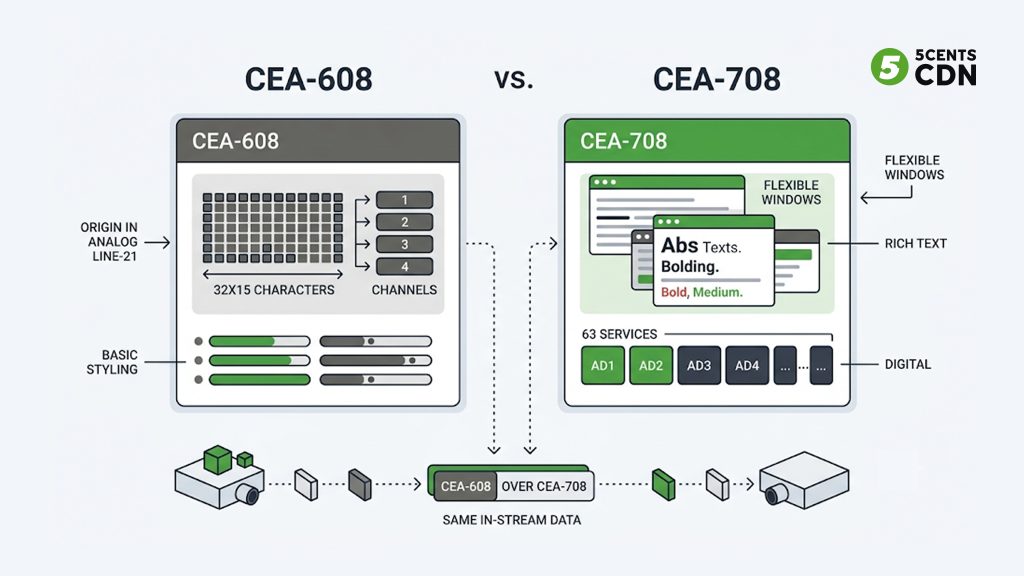
CEA-608 (also called EIA-608 or “Line 21” captions) is the original standard, born in the analog television era. Its name comes from how it worked: caption data was tucked into line 21 of the analog signal’s vertical blanking interval, a physical slot in the broadcast that viewers never saw. That analog heritage defines its limits. CEA-608 supports just four caption channels total, a fixed grid of 32 columns by 15 rows, a small character set, and only basic styling — a few colors, italics, underline. US broadcasters have long used its second channel for a secondary language, commonly Spanish, which is why the idea of a “second caption channel” became a familiar convention. It is capable but constrained, and its constraints are inherited directly from a broadcast system that no longer exists.
CEA-708: the digital-native successor
CEA-708 (also CTA-708) is the modern digital standard, introduced for digital television. It discards the rigid “four fixed channels” model entirely and replaces it with up to 63 independently addressable caption services, each with its own formatting, richer character sets, flexible window positioning, more colors, and proportional fonts. Where 608 was built for one or two languages squeezed into a fixed structure, 708 was designed from the ground up for many languages and rich presentation. It is the format built to actually solve multi-language captioning at scale.
The crucial part: they share one delivery mechanism
Here is the detail that causes most of the confusion. In the digital world, CEA-708 did not replace CEA-608’s delivery method — it *extended* it, and the two travel together. A modern encoder emits a single block of caption data that can carry both legacy 608-style bytes and native 708 data side by side, on the same video frames, in the same place. In fact, for regulatory conformance, US digital streams routinely carry both at once — a practice known as “608 over 708,” where 708-capable decoders are required to also understand embedded 608 — so that older and newer decoders alike find something they can read.
Both formats ride inside the video’s own compressed bitstream, attached to the frames as supplemental data rather than as a separate stream or file. This is why embedded captions survive being repackaged from one container to another untouched — the captions are inside the video, and simply rewrapping the video carries them along automatically. But it is also why a transcoder that decodes and re-encodes the video must go out of its way to carry that supplemental data across, as described in Stage 3: rewrapping preserves captions for free, but true transcoding does not, unless the pipeline is built to preserve them.
The Failure Mode That Catches Everyone: Manifest Mislabeling
This is the problem that turns the whole flow from academic to urgent, and it is worth understanding precisely because it is so counterintuitive. When captions are listed in a player but render nothing, the cause is very often that the manifest describes the wrong caption format — and the player believes the manifest without checking.
In HLS, closed captions are declared with a caption track entry that carries an identifier telling the player which caption channel to read. That identifier can only legitimately be one of two things: a legacy 608 channel (spelled CC1 through CC4) or a native 708 service (spelled SERVICE1 through SERVICE63). There is no third option and, notably, no such thing as a CC5 — any caption channel numbered above four can only be a 708 service and must be spelled as SERVICE, never as a CC channel. DASH handles the same distinction even more explicitly, using two entirely separate declarations — one scheme for CEA-608 and a different one for CEA-708 — forcing the packager to pick the correct one for the format actually present.
When Caption Tracks Appear but Render Nothing
Either way, the requirement is identical and unforgiving: the manifest must declare the format that is genuinely in the stream, not just how many languages there are. Get this wrong and the result is the signature failure of live captioning — tracks that appear in the menu and render nothing. Picture a stream that actually carries several native 708 services but whose manifest labels them as legacy CC channels. A player reads the manifest, dutifully lists every one of those tracks as selectable, and then renders none of them, because when it goes looking for legacy 608 data under those CC labels, there is no 608 data there to find.
The real captions were 708 services under the wrong name. The fix is not to change the captions but to correct their labels to match what the stream actually contains. Nothing about the video changed; only the manifest’s description of it did, and that description is the difference between working captions and empty ones.
Why Correct Caption Labels Matter
This is the deep reason the format distinction matters beyond trivia. CEA-608 versus CEA-708 is not just a question of features; it determines how the captions must be labeled at delivery, and a mismatch between the label and the reality is invisible until a viewer selects a track and gets nothing.
Getting Captions Right, End to End
The through-line of this whole guide is that embedded captions are only as good as the weakest link in the chain that carries them. They must be embedded at the encoder, ingested with the video, deliberately retained through transcoding, truthfully described in the manifest, and finally rendered by the player. A break at any stage produces a failure, and the failures are quiet — the stream keeps playing, so nothing alarms you until a viewer reports that the captions don’t work. Diagnosing it means walking the chain: were they embedded at the source, did the transcoder preserve them, does the manifest describe the real format. The answer is always at one specific link.
Where Captions Commonly Break in the Streaming Pipeline
The two links most under your platform’s control — and most commonly broken — are transcoding and manifest labeling. A transcoder that quietly discards caption data, or a packager that mislabels the format, will defeat captions that were embedded perfectly at the encoder. That is why the delivery layer matters so much for accessibility: it is not enough for your encoder to add captions if your streaming platform loses them in processing or misdescribes them at packaging.
Keeping Captions Intact Through Live Transcoding
This is exactly where 5centsCDN’s live streaming pipeline is built to keep captions intact. Our live transcoding deliberately carries embedded caption data — both legacy CEA-608 channels and genuine multi-service CEA-708 — across the decode-and-re-encode boundary, re-embedding it into every rendition it produces, so captions survive the exact processing step where they most often vanish. And it does this alongside preserving SCTE-35 ad markers in the same pipeline, so accessibility and ad insertion are handled together without one costing you the other — the same disciplined approach we bring to live sports streaming infrastructure, where captions, ad markers, and multi-rendition delivery all have to survive the same processing chain intact. Whether you are streaming in one language or many, the captions your encoder embeds arrive intact at the viewer’s player, labeled correctly for the format they actually are.
If you are setting up captioned live streaming and want a delivery pipeline that preserves your captions from ingest to viewer, our live streaming platform and video player handle embedded 608/708 end to end. To talk through your specific caption workflow — which encoder you use, how many languages, and how to verify it all renders — get in touch with our team.
Frequently Asked Questions
How do I add closed captions to a live stream?
Captions are embedded as CEA-608/708 data at the encoder, ingested with the video, retained through transcoding, described in the manifest, and rendered by the player. Every stage must handle them correctly or the track shows nothing.
What is the difference between embedded and sidecar captions?
Embedded captions (608/708) ride inside the video bitstream and travel with it; sidecar captions (WebVTT/SRT) are separate files the player loads. Live streaming overwhelmingly uses embedded captions.
Why are my live captions listed but not showing?
Most often the manifest declares the wrong caption format — e.g. labeling native 708 services as legacy CC channels. The player lists the tracks but finds no matching data to render. Correcting the labels fixes it.
What is the difference between CEA-608 and CEA-708?
CEA-608 is the analog-era standard (4 channels, fixed grid, basic styling); CEA-708 is the digital successor (up to 63 services, flexible formatting, many languages). Both ride in the same in-stream data, often together (‘608 over 708’).
Do captions survive transcoding?
Only if the transcoder is caption-aware. Decoding and re-encoding will discard embedded caption data unless the pipeline deliberately carries it across and re-embeds it into every rendition. 5centsCDN’s live transcoding retains both 608 and 708.
Which encoders can embed live captions?
Broadcast hardware encoders and many software encoders (e.g. OBS with caption plugins, vMix) can embed 608/708, often fed by a live captioner or a speech-to-text service. Confirm your encoder is actually embedding them.
