


For twenty years the deal with web crawlers was simple. Search engines fetched your pages, you paid a little bandwidth for it, and in return they sent you visitors. AI crawlers have scrambled that arrangement. Some collect your content to train models and send nothing back. Others fetch pages to answer a user’s question in real time. Some do bring you visibility, through citations in AI search answers, and some are just scrapers wearing a friendly name. They all arrive as the same thing in your logs: a growing share of requests, bytes, and cache misses that no human asked for.
The reaction is often to block everything, and that is usually the wrong move. Blocking the wrong crawler can quietly remove your site from AI search results, while doing nothing about the scrapers that are actually driving your bill. The better approach is to treat automated traffic as its own class: measure it, classify who is actually asking, decide a policy for each category, and enforce it with layered controls that start polite and get firmer. This guide covers where the cost really comes from on a CDN bill, how to tell the different kinds of crawlers apart, how to verify who is really knocking, and how to control the traffic without hurting your search visibility. For the fundamentals of bot traffic, our guide to bot traffic management is the starting point; this one focuses on the AI-era version and its effect on cost.
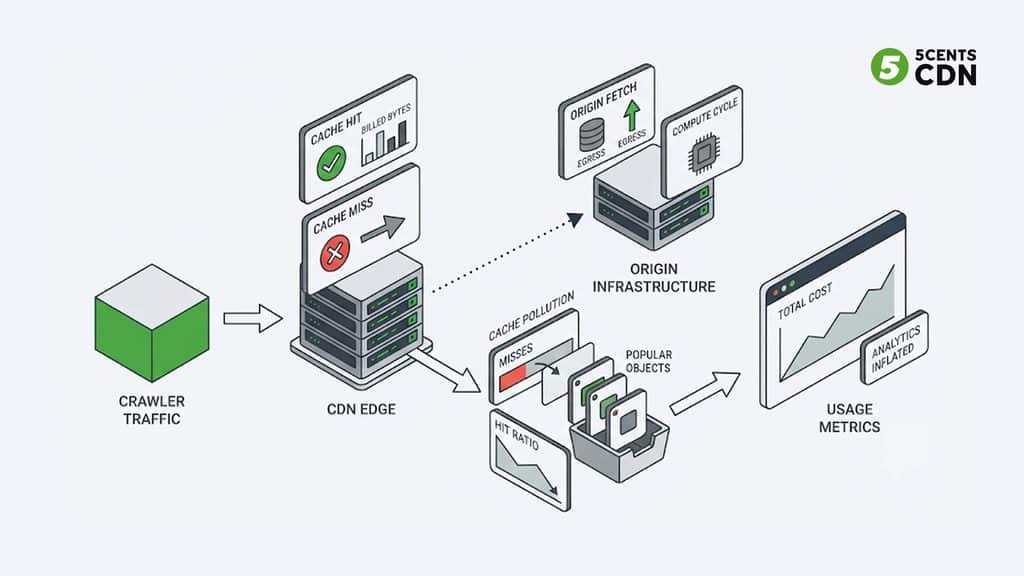
Where the Cost Actually Comes From
Crawler traffic costs more than its request count suggests, because it hurts you in four distinct ways.
Bandwidth, even on cache hits. A CDN bills for the bytes it delivers, and it does not matter whether the requester is a person or a crawler. Every page, image, PDF, and thumbnail a crawler pulls from cache is still delivered, and still billed. A crawler that sweeps a media-heavy site pulls a lot of bytes, because images, posters, transcripts, and documents are exactly what it collects.
Cache misses on the long tail. Human visitors concentrate on a small set of popular pages, which is why caching works. Crawlers do the opposite: they walk everything, including the deep archive pages, old media, and pagination that nobody visits. Those objects are rarely in cache, so each request goes back to your origin, costing origin compute and, if your origin lives in a public cloud, per-gigabyte egress at higher rates than CDN delivery.
Cache pollution. Those long-tail fetches also push content into the cache, which can evict the popular objects your real visitors want. The result is a lower cache-hit ratio for humans, and slower pages for them, caused by traffic that never wanted a fast experience. Our guide to improving cache-hit ratio explains why that ratio matters so much.
Distorted data. Automated visits inflate sessions, skew engagement and conversion numbers, and make capacity planning harder, because you are provisioning for traffic that is not your audience.
A worked illustration shows how it adds up. Suppose crawlers cause 10 terabytes a month of delivery from cache and trigger 2 terabytes of origin fetches from cache misses. At an illustrative CDN rate of two cents per gigabyte, the cache-hit delivery is about $200 a month. At an illustrative cloud egress rate of nine cents per gigabyte, the origin fetches add about $180. That is roughly $380 a month for traffic that may bring you nothing, before counting the origin load, the slower experience for humans, and the polluted analytics. Substitute your own volumes and rates; our bandwidth calculator is a quick way to model them. Crawler traffic is one of several levers on a delivery bill; our guide to reducing CDN bandwidth costs covers the others.
Signs It Is Already Happening
You do not need a specialist tool to suspect a crawler problem. A few patterns in data you already have are telling. Bandwidth rises noticeably without a matching rise in sales, sign-ups, or genuine engagement. Your cache-hit ratio drifts down for no content-related reason. Origin load spikes at odd hours, or in a steady, machine-like rhythm that does not follow your audience’s day. Analytics show sessions with no scrolling, no clicks, and near-zero time on page. Logs show long runs of sequential requests through archive or pagination URLs, or an unusual share of 404 errors from clients walking URLs that do not exist. Image and media endpoints see traffic far out of proportion to page views. Any one of these can have another cause, but two or three together are a strong hint that automated traffic is part of your bill.
Know Who Is Knocking: Four Kinds of Automated Visitor
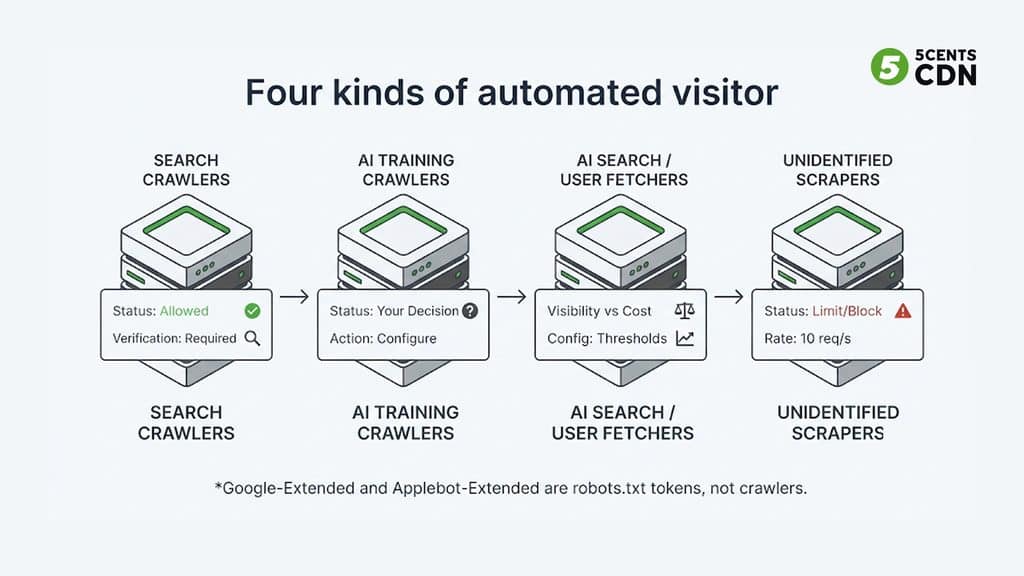
“AI crawler” is not one thing, and the right response differs by type. It helps to sort automated visitors into four groups.
Search and index crawlers such as Googlebot and Bingbot fetch pages so they can appear in search results. You almost always want them, and blocking them costs you organic traffic.
AI training crawlers collect content to train models. GPTBot, Common Crawl’s CCBot, and others in this group typically send no visitors back, so whether to allow them is a business and licensing decision rather than a technical one.
AI search and user-triggered fetchers serve answers. Some index content so an AI search product can cite it, and others fetch a page on the spot when a user asks. These can bring you visibility through citations. Importantly, the operators generally separate them from training crawlers: OpenAI, for example, documents distinct agents for training (GPTBot), search indexing (OAI-SearchBot), and user-triggered fetches (ChatGPT-User), so blocking the training crawler does not remove you from its search answers, while blocking the search crawler does.
Unidentified scrapers use spoofed or generic user agents, rotate IP addresses, and imitate browsers. They are either commercial data harvesters or something worse, and they will not respect any polite signal.
Automated visitors at a glance
| Category | Examples (as of November 2026) | What they do | The question for you |
| Search and index crawlers | Googlebot, Bingbot | Index pages for search results | Almost always allow; verify identity |
| AI training crawlers | GPTBot, CCBot, ClaudeBot, Bytespider (commonly classed as training crawlers) | Collect content to train models | A business and licensing decision |
| AI search and user-triggered fetchers | OAI-SearchBot, PerplexityBot; ChatGPT-User, Perplexity-User | Index for AI search answers; fetch a page when a user asks | Visibility through citations vs cost; may not follow robots.txt |
| Control tokens (not crawlers) | Google-Extended, Applebot-Extended | robots.txt tokens to opt out of AI training use | Never appear in logs; opt out without affecting search |
| Unidentified scrapers | Spoofed or generic user agents | Harvest content or data | Limit by behavior; never trust the claimed identity |
A snapshot, not a definitive list. Crawler names, behaviors, and documentation change often; check each operator’s current documentation before writing rules.
Two details are worth knowing. First, Google-Extended and Applebot-Extended are not crawlers at all: they are control tokens you can put in robots.txt to opt out of AI training use, while the crawling itself is done by Googlebot and Applebot, so you will never see those names in your logs. Second, user-triggered fetchers may behave differently from bulk crawlers. Google states that its user-triggered fetchers ignore robots.txt, and OpenAI’s documentation for its user-triggered agent now indicates robots.txt rules may not apply to it, so robots.txt alone may not govern fetches made on a person’s behalf. Crawler names, behaviors, and documentation change often, so treat the examples here as a snapshot as of November 2026 and check each operator’s current documentation.
Step One: Measure Before You Block
You cannot decide a policy for traffic you have not looked at, and the logs you already have are enough to start.
Pull your CDN or origin access logs and group requests by user agent. For each group, record the share of requests, the share of bytes, and the cache result, because the group with the highest cost is rarely the one with the most requests. Look at what each group asks for: crawlers tend to walk sequentially through archives and sitemaps, request pages no navigation would lead to, ignore cookies and scripts, and fetch at a steady, machine-like rate. Compare the cache-miss rate of automated traffic with that of human traffic, which shows how much origin load the crawlers are causing.
Then separate who a request claims to be from who it actually is. A user-agent string is a label anyone can write. The firmer check is the requesting IP address: several operators publish their crawler IP ranges (OpenAI publishes a file per agent, and Google, Bing, Apple, and Common Crawl document reverse-DNS verification), so a request that claims to be a known crawler but comes from outside its published ranges is an impostor. Not every operator publishes ranges or a reverse-DNS method, so some crawlers can only be judged by behavior. The output of this step is a table of who is hitting you, how much they cost, and which are genuine.
Step Two: Decide a Policy Per Category
With the picture in hand, choose a stance for each category rather than writing one rule for all bots.
Starting policy by category (adapt to your business)
| Category | Starting stance | How to enforce |
| Search crawlers | Allow | robots.txt; verify identity; keep them out of any blanket rule |
| AI training crawlers | Your decision: allow, limit, or block | robots.txt per token; edge rules on user agent; verified IP rules |
| AI search crawlers | Allow if you want citations; otherwise block | robots.txt per token; confirm which token controls search vs training |
| User-triggered fetchers | Allow or rate-limit; do not rely on robots.txt | Rate limits and bot management |
| Unidentified scrapers | Limit or block | Rate limiting; behavior-based bot management; signed links for valuable assets |
Starting points only. The right policy depends on your licensing position, your search strategy, and what the traffic actually costs you.
The choices are yours and depend on your business. A publisher or media company with licensing concerns may block training crawlers entirely, while a company that wants to be cited in AI answers will deliberately allow the search crawlers. A streaming service may care less about page crawling and more about protecting video files and manifests. What matters is that the decision is deliberate. The most common mistake is the blanket block, which treats a search engine, an AI search index, and a scraper as the same thing and loses visibility the owner never meant to give up.
Step Three: Enforce With Layered Controls
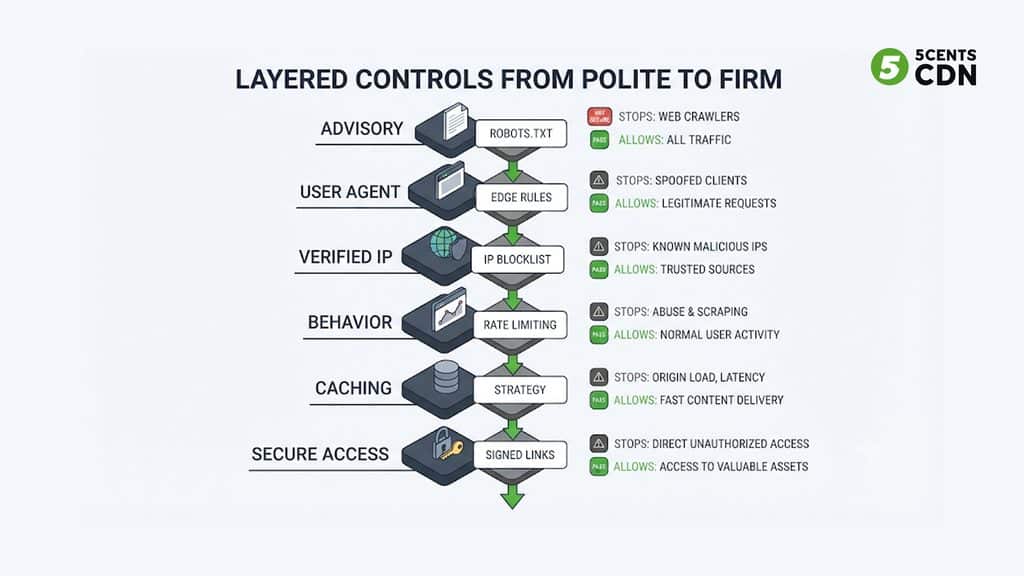
Controls range from polite requests that honest crawlers follow to hard enforcement at the edge. Use them in layers, because each one stops a different kind of visitor.
robots.txt: the polite request. The Robots Exclusion Protocol, standardized as RFC 9309, lets you give each crawler token its own rules. Well-behaved crawlers honor it, which makes it the cheapest control and the right first layer for the crawlers that cooperate. But it is a published policy, not a wall: it relies entirely on the crawler choosing to comply, and it does not govern scrapers that ignore it. Two cautions apply. Crawl-delay is not part of the standard and is not honored by every crawler, so it is not a reliable throttle. And crawlers may cache your robots.txt for up to a day, so changes are not instant.
Emerging preference signals. The IETF has an AI Preferences working group developing a common way to state how content may be used for AI, such as a proposed Content-Usage rule for robots.txt and an equivalent HTTP header. As of the latest draft, still a work in progress, it is worth watching but not something to rely on for enforcement.
Edge rules by user agent and headers. Rules at the CDN edge can refuse requests from specific user agents before they reach your origin or consume cache. This is quick and effective against crawlers that identify themselves honestly, and trivially defeated by any that lie, so treat it as a filter for known tokens rather than a defense. Our guide to CDN Edge Rules covers access rules and their limits.
Verified identity and IP rules. For crawlers that publish their ranges, check the requesting address against the official list and then allow or deny on that basis. It is the strongest control for crawlers that claim a known identity, but the lists change, so it needs to be automated and kept current, and one operator’s agents may share ranges, so a rule meant for one can catch another. Verify before you block.
Rate limiting and behavior-based bot management. For the unidentified scrapers, identity checks do not help, and the signal is behavior: request rate, access patterns, and how the client handles scripts and cookies. This is the job of a bot-management layer such as a web application firewall that scores traffic and mitigates the worst of it, combined with rate limits on expensive endpoints.
Make the cache work for you. Not every crawl needs to be stopped; some only need to be made cheap. If archive pages, thumbnails, and static media carry short cache lifetimes, every crawl pass turns into origin fetches. Lengthening lifetimes on content that rarely changes turns repeat visits, human or automated, into cache hits, and an origin shield in front of your servers means that even the misses reach your origin roughly once rather than once per edge location. Keep personalized and dynamic pages out of long-lived caching, and remember that a crawler hitting only cached content costs you bandwidth but little else, which is a very different bill from one that hammers your origin.
Protect the expensive and valuable assets. Some content deserves stronger protection than a crawl policy. Large files, premium video, and media libraries can sit behind signed, expiring links so that scrapers cannot simply request them; our guide to CDN secure tokens explains how.
Avoid Hurting Yourself
Crawler controls fail in a few predictable ways, mostly by blocking more than intended.
Blanket user-agent blocks and broad IP rules can catch search crawlers and AI search crawlers you wanted. A firewall rule that blocks a crawler at the network level also stops it from reading your robots.txt, so the clearer signal never reaches it. Because crawler documentation and ranges change, a rule that was correct six months ago may be wrong now. And because bot rules affect real visitors when they misfire, any new rule should run in a log-only or monitoring mode first, roll out gradually, and be checked against search traffic and referral numbers afterward. Block the specific behavior you have measured, not the whole category of automation.
A Note for Media and Streaming Sites
If your site is video-centric, the picture has its own twists. Posters, thumbnails, transcripts, captions, and descriptions are the text and images crawlers are most interested in, and they are exactly what a video site has in volume. Large downloadable files and media endpoints can multiply the bytes each request costs. Manifests and media segments are a different problem from page crawling, and are better protected with tokens and access rules than with crawler policy. And headless browsers that actually execute a player can register as real viewers, inflating view counts and, on ad-supported services, ad impressions, which makes invalid traffic a monetization problem as well as a cost one.
An AI Crawler Control Checklist
Pulling it together, a team ready to manage this traffic should be able to answer yes to each of these: access logs are grouped by user agent, with share of requests, bytes, and cache misses per group; claimed crawler identities are verified against published IP ranges or reverse DNS where the operator documents them; you have estimated what automated traffic adds to your CDN and origin bill using your own numbers; each category has a deliberate policy, with search crawlers handled separately from AI training crawlers and from AI search and user-triggered fetchers; robots.txt carries per-crawler rules and you know it is advisory; edge rules cover known user-agent tokens; unidentified scrapers face rate limits or bot management rather than identity rules; large files and valuable media sit behind signed links; new rules ran in monitoring mode first and were checked against search traffic; crawler lists and ranges are refreshed on a schedule; and you will revisit the policy regularly, since the crawlers and their documentation keep changing.
Make a Policy, Not a Panic
AI crawlers are not a reason to panic or to wall off your site. They are a new traffic class with real costs and real, mixed benefits, and the way to deal with them is the way to deal with any traffic: measure it, understand who it is, decide what you want from each group, and enforce those decisions with controls matched to the visitor. Do that, and you stop paying to deliver content to crawlers that give nothing back, keep the ones that help you get found, and keep your cache and your analytics working for the people you actually built the site for.
5centsCDN offers Bot Protection and Management, with an Intelligent WAF that identifies and mitigates bad bots and gives you analytics on your web traffic and user behavior, alongside Edge Rules for access control by user agent, headers, IP, country, and referrer, on a global CDN. If you want help working out what automated traffic is costing you and which controls fit your site, talk to our team.
Frequently Asked Questions
How do AI crawlers affect my CDN bill?
They add delivery bytes even on cache hits, trigger origin fetches on rarely requested long-tail pages (costing origin compute and, in a public cloud, egress), can push popular objects out of cache and lower your human hit ratio, and distort analytics. The cost is often larger than their request count suggests.
Should I block AI crawlers?
Usually not blanket-block. Classify them first: search crawlers you almost always want, AI search crawlers can bring citations, AI training crawlers are a business and licensing decision, and unidentified scrapers should be limited by behavior. Blocking the wrong one can remove you from AI search answers.
What is the difference between GPTBot, OAI-SearchBot, and ChatGPT-User?
Per OpenAI’s documentation they are separate agents: GPTBot gathers content for model training, OAI-SearchBot indexes pages for ChatGPT search answers, and ChatGPT-User fetches a page when a user asks. Blocking GPTBot opts out of training but not search; blocking OAI-SearchBot removes you from search answers.
Does robots.txt stop AI crawlers?
Only those that choose to comply. RFC 9309 defines robots.txt as a voluntary signal, crawl-delay is not part of the standard, user-triggered fetchers may ignore it, and scrapers ignore it entirely. Use it as a first layer, not the only one
How can I tell if a crawler is real?
Don’t trust the user-agent string. Check the requesting IP against the operator’s published ranges (OpenAI publishes a file per agent) or use the documented reverse-DNS method (Google, Bing, Apple, and Common Crawl document one). Not every operator publishes either, so some can only be judged by behavior.
How do I control crawlers without hurting SEO?
Handle search crawlers separately from AI crawlers, write rules for specific tokens or measured behavior rather than whole categories, verify identity before IP blocking, run new rules in monitoring mode first, and check search traffic and referrals afterward.
