


Every business that puts video on its website eventually asks the same question: should we just embed it from YouTube, or host it ourselves? Self-Hosted Video vs YouTube Embed is a comparison with no shortage of opinions. YouTube fans say it’s free and fast. Hosting vendors say YouTube will fill your page with ads and send your visitors to your competitors. Both camps are partly right, and both leave out the thing that makes the question hard to answer: “hosting it ourselves” is not one option. It is at least two, and they have almost nothing in common.
This guide pulls the options apart. It names the three real choices, lays out what a free YouTube embed actually costs you according to how YouTube itself documents its player, explains why putting video files on your own web server is the one option that really is a trap, describes what a dedicated video host with your own player gives you in exchange for money and effort, and then matches each choice to the situations where it wins. It is deliberately even-handed, because YouTube is often the right answer, and a decision made on hype in either direction usually gets reversed a year later at some expense. For help choosing the player itself once you’ve decided where video lives, our video player buyer’s guide is the companion to this one.
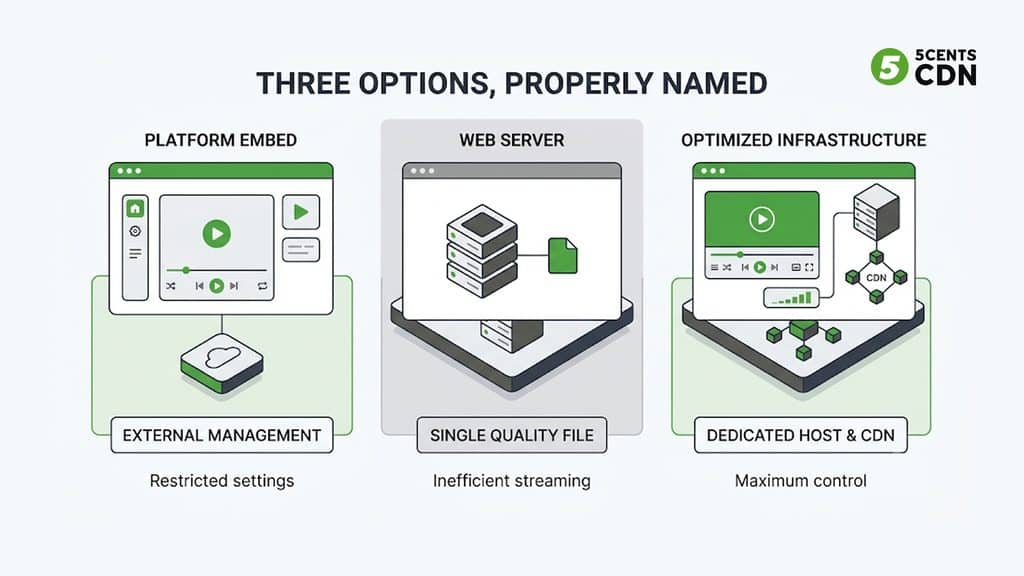
Three Options, Properly Named
The confusion starts with vocabulary. Most comparisons set “YouTube” against “self-hosted,” as if there were two choices, and then the word “self-hosted” quietly covers two completely different setups. Separating them clears up most of the argument.
The three options at a glance
| Option | Where the video lives | Player and delivery | The trade-off |
| Platform embed (for example, YouTube) | On the platform | The platform’s player in an iframe; the platform’s network | Free and quick to start; ads, suggestions, branding, tracking, and rules you don’t fully control |
| Files on your own web server | Your website hosting | The browser’s built-in player; one file, one quality, one server | Looks simple; no adaptive streaming, no CDN, can slow your whole site, little analytics |
| Dedicated video host with your own player | A video service you choose | Your branded player; adaptive streaming over a CDN | You control the experience, ads, access, and data; it costs money and takes setup |
General comparison. Specific platforms and plans differ; check current terms for any provider you rely on.
A platform embed means the video lives on someone else’s platform, and your page shows their player in an iframe. YouTube is the best-known example. You get free hosting, transcoding, and global delivery, in exchange for living inside the platform’s player, rules, and business model.
Files on your own web server means an MP4 sitting on your website’s hosting, played by the browser’s built-in player or a plugin. It looks like owning your video, but you’ve taken on delivery without any of the infrastructure that makes delivery work. This is the option the “never self-host” warnings are really about.
A dedicated video host with your own player means you upload video to a service built for it, which transcodes it into adaptive renditions, delivers it from a CDN, and gives you a player you can brand and control. You own the experience without running servers. This is the real alternative to a platform embed, and most “self-hosted versus YouTube” articles never separate it from the previous option.
What a “Free” YouTube Embed Actually Costs
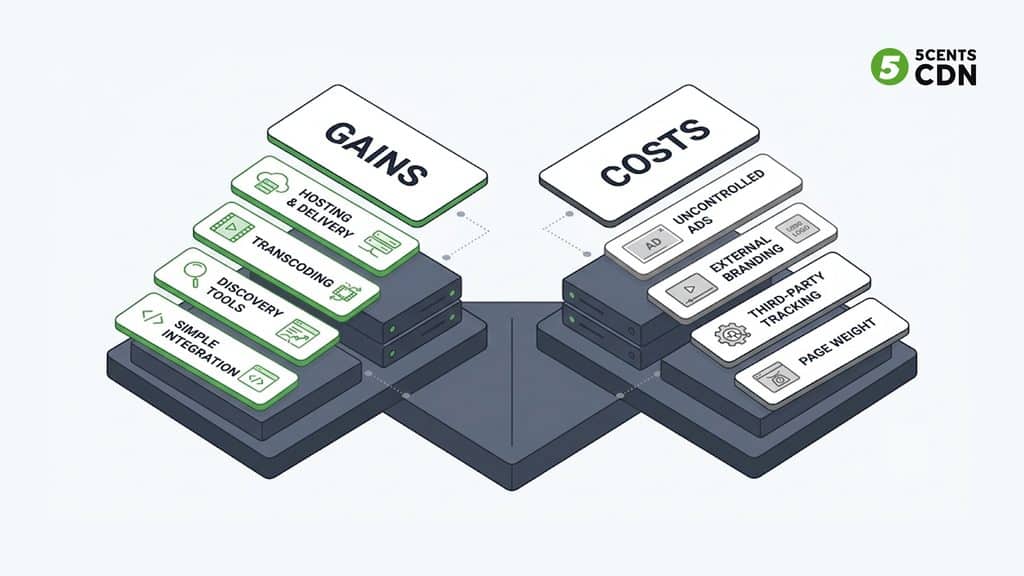
A YouTube embed costs no money, which is a genuine advantage. It does carry costs, and they are worth listing precisely, because a few widely repeated claims are slightly off in each direction.
Ads and suggestions you don’t fully control. YouTube’s embedded player honors the same ad settings as the video on YouTube itself, so if ads are enabled for a video they can appear on embedded plays. There is no embed parameter that turns ads off, and whether ads appear depends on YouTube’s settings and policies, not on your page. Suggested videos work similarly. Years ago, setting the rel parameter to 0 hid related videos at the end of playback. Since September 2018 it only limits those suggestions to videos from the same channel. So a viewer who finishes your product demo can be shown other videos, at best from your own channel, and at worst, depending on the video, from elsewhere.
Someone else’s player and branding. You can adjust a few behaviors with parameters, but the player is YouTube’s, with its controls and identity. If your goal is a page that looks entirely like your product, an iframe from YouTube will always look like an iframe from YouTube.
Tracking and privacy. An embed loads code from another company onto your page. YouTube offers a Privacy-Enhanced Mode, served from the youtube-nocookie.com domain, which stops a view from being used to personalize the viewer’s YouTube experience or ads. That is a meaningful reduction, but it is not a complete privacy solution on its own, and anyone with consent or data-protection obligations should not treat it as one.
Control and continuity. Your video sits under YouTube’s policies. The owner of a video can restrict it, remove it, or disable embedding, and when they do, every embed on every page breaks. Unlisted videos are reachable by anyone who has the link, so an unlisted YouTube video is not a private one, and there is no practical way to restrict an embedded video to your own paying customers.
Page weight. An iframe typically pulls in a substantial amount of third-party code even if no one ever presses play. The standard mitigation is a placeholder that loads the real player only on click, which helps a lot but is something you build and maintain yourself.
Your data lives elsewhere. Viewing analytics sit in YouTube’s reporting, not in your own analytics stack, and they are shaped by what YouTube chooses to measure.
None of that makes YouTube a bad choice. It is the price of free hosting and, more importantly, of access to YouTube’s audience: its search, its recommendations, and its habit-forming reach. That reach is something no other host can give you, and for many videos it is worth more than control.
The Trap in the Middle: Video Files on Your Own Web Server
The advice you’ve seen to never host video yourself is aimed squarely at this option, and it is right.
An MP4 on ordinary web hosting is delivered as a single file at a single quality, so every viewer gets the same rendition whether they are on fiber or a weak mobile connection, with no adaptive switching to rescue a slow connection. It is served from one location, so viewers far from your server wait longer. Each viewer consumes your hosting’s bandwidth and input-output capacity, so a popular video can slow the whole website for everyone else. There is no streaming protocol, no analytics beyond what you build, and no protection beyond a URL anyone can copy.
The <video> element itself is perfectly good; MDN’s reference for the `<video>` element covers the attributes that matter, from a poster image to preload behavior to captions. The element is not the problem. Delivering the file from a server that was never built to serve video is. For a few short, small clips on a low-traffic site it can be acceptable, but it does not scale, and it is not the same thing as running a proper video host.
The Real Alternative: A Dedicated Video Host With Your Own Player
This is what most people actually want when they say they want to host their own video: ownership of the experience without ownership of the infrastructure.
You upload video once. The service transcodes it into a ladder of adaptive renditions, so each viewer gets a quality their connection can sustain, and delivers it from a CDN near the viewer. The player is yours: your colors, your logo, your poster image, your controls, and no suggested videos from someone else’s channel at the end. Access can be restricted with signed, expiring links, as we explain in our guide to CDN secure tokens, which is something a public platform embed can’t offer. Viewing analytics flow into your own reporting, and if you want to monetize, you can run your own ads rather than someone else’s, as in the models our guide to OTT monetization describes.
It also asks things of you. It costs money, usually for storage and delivery. You are responsible for details a platform handles automatically, such as captions, a sensible poster image, and the search markup covered below. And you have to choose and set up a provider. Those are real costs, but they are modest and predictable, and they buy control that a free embed can’t.
What it costs in practice
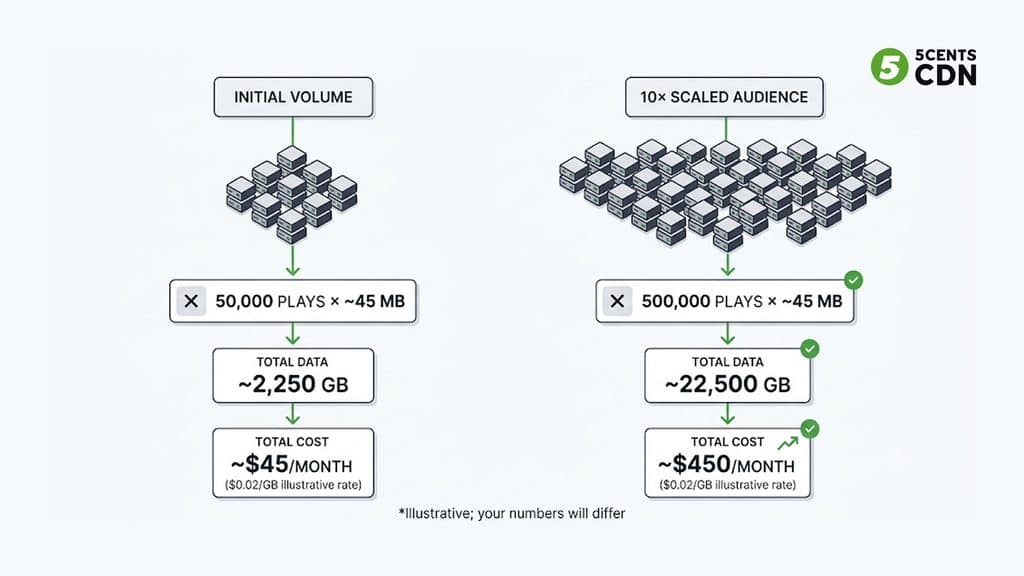
The fear of self-hosting often assumes delivery will be ruinously expensive. A quick illustration shows why that isn’t usually the case at the scale of a business website. Suppose a site’s videos are played 50,000 times a month, each play delivering about three minutes of video at an average of 2 megabits per second. That is roughly 45 megabytes a play, or about 2,250 gigabytes (2.25 terabytes) a month. At an illustrative delivery rate of two cents per gigabyte, that is about $45 a month. At ten times the audience it is about $450. Those figures are illustrative, since real costs depend on your provider, bitrates, and viewing patterns, but they show that at business-site volumes the cost is usually small next to the value of a controlled, branded, ad-free experience. You can model your own numbers with our bandwidth calculator.
Which Option Wins When
The right choice depends on what the video is for, so it helps to ask four questions. Do you need discovery, meaning people finding the video through a search or recommendation engine? Does the page need to keep the viewer focused, for example on a purchase or a sign-up? Does access need to be restricted? And do you need your own branding, ads, or data?
Matching the option to the job
| Use case | Usual best fit | Why |
| Awareness and discovery | YouTube | Reach, search, and recommendations you can’t get elsewhere |
| Marketing pages and product demos | Dedicated host | A focused page: no ads or suggestions, and your own branding |
| Online courses and paid content | Dedicated host with access control | Signed links and other controls; a public embed can’t restrict access to paying customers |
| Internal and private video | Dedicated host with access control | An unlisted link can be shared by anyone who has it |
| Ad-supported publishing with your own ads | Dedicated host with ad support | Your ad server and your revenue |
| A few rarely watched videos on a small site | YouTube | Simplicity; the alternatives may not justify the effort |
| Events and webinar replays | Either, or both | Reach versus control; a hybrid often fits |
Starting points, not rules. Your audience, budget, and compliance needs may change the answer.
Where you answered yes to discovery and no to everything else, YouTube is the simpler and stronger choice. Where the answers are reversed, a dedicated host is. Most real situations are mixed, which is why the most practical answer is often both.
The Hybrid: Publish for Discovery, Host for Conversion
Many organizations that think hard about this end up using both, for different jobs. They publish videos on YouTube to be found, building an audience on the platform that has the audience. On the pages where a viewer has arrived on purpose, such as a product page, a landing page, or a course, they play a hosted version in their own player, with no ads, no suggestions, and no exit routes.
The one thing to decide deliberately is which page you want to be the home of each video in search. The YouTube version competes in YouTube’s own search and recommendations, while your hosted version is a candidate for results tied to your own page. Duplicating a video in both places doesn’t hurt anyone, but it spreads attention, so decide where each video is meant to do its main work.
Video SEO When You Host It Yourself
A frequent worry is that hosting your own video costs you search visibility. It need not, provided you give search engines what they need. Google’s documentation on video describes a short list.
Make the page one whose main purpose is the video, with its own title and description rather than templated text. Google detects videos embedded with the <video>, <iframe>, <embed>, and <object> elements, so a hosted player works as well as a platform embed in principle. Add VideoObject structured data, for which Google asks for a name, a thumbnail URL, and an upload date, and recommends the content URL of the actual video file or, failing that, the URL of the player. Use the same thumbnail everywhere you declare it, whether that is the poster attribute, a video sitemap, or the structured data. Provide a valid thumbnail at a stable address, and consider a video sitemap for a larger library. Google can’t guarantee indexing, and fetching a page is a separate step from indexing its video, so check Search Console’s video reports rather than assuming.
There is one interaction to know about if you restrict access. Signed, expiring links are the right way to protect paid or private video, but a search engine’s crawler typically can’t fetch a link that requires a valid token. For video you want found in search, keep a public, indexable version, such as a free preview or trailer, and treat the gated version as the paid product. If a video sits behind a paywall, Google asks for paywall structured data as well.
Speed and Page Weight
Whichever option you choose, how the player loads affects page speed. Reserve space with explicit width and height attributes so the layout doesn’t jump, which MDN specifically recommends, use a poster image so something appears immediately, and avoid loading the full player until a viewer shows interest. For a platform iframe, a click-to-play placeholder does that; for a hosted player, a lightweight player and a poster image do. Our guide to reducing video startup time covers what happens once playback begins.
Moving From Embeds to Your Own Player
If you already have YouTube embeds across your site, the move is a project but not a hard one, and doing it in stages keeps the risk low.
Start with an inventory: list every page with an embed, which videos matter most, and which are barely watched. Move the high-value pages first, such as product pages, landing pages, and paid content, and leave the long tail of low-stakes videos where they are. Find your original master files; if the originals are gone, YouTube generally lets you download videos you uploaded yourself from its Studio, though not other people’s, and a high-quality master always beats a re-download. Upload them to your new host, let it create the adaptive renditions, and check playback on real devices before touching the page.
Then replace the iframe on one page, add the poster image, explicit dimensions, and structured data, and compare how the page behaves before and after, including viewing metrics. Keep the YouTube version published for discovery if it earns its keep. Because you are changing what the page embeds rather than what the page is, nothing about the URL needs to change, which keeps the search side of the move low-risk. Finally, retire embeds gradually as you confirm the new setup works, rather than swapping everything at once.
A Decision Checklist
Pulling it together, a team choosing between these options should be able to answer each of these: you can say what the video is for, whether discovery, conversion, teaching, or internal use; you know whether viewers must stay on your page at the end of the video; you know whether access needs restricting, and that an unlisted platform link doesn’t restrict it; you have decided who owns the data and the ads; you have counted real costs, including a modeled delivery bill from your own numbers; you are not putting video files on ordinary web hosting for anything with real traffic; if you host, you have captions, a poster image, structured data, and explicit dimensions in place; if you restrict access, you have a public indexable version for search; you have located your original master files before any migration; and you have decided which version of each video should be the one that ranks.
Choose the Home, Not the Slogan
“Self-hosted versus YouTube” is a slogan, and the real decision is about control, reach, and cost. YouTube gives you free delivery and an audience, at the price of someone else’s player, ads, suggestions, and rules. Files on your own server give you neither control nor performance. A dedicated host with your own player gives you the control and the experience, for a modest and predictable cost, but not YouTube’s audience. Match the home to the job, use both where the jobs differ, and stop treating the choice as a matter of loyalty.
5centsCDN gives you the dedicated-host option without running servers: upload videos in Video Manager, deliver them as adaptive streams over a global CDN from video on demand zones, and embed them with an iframe or an HLS URL generated for you in the Video Manager. The 5centsCDN video player can be branded with your own skin, logo, and poster, supports ads through IMA and VAST, and reports viewing analytics, while Secure Token controls who can watch. If you want help deciding which videos belong where, talk to our team.
Frequently Asked Questions
Should I embed YouTube or host my own video?
It depends on the video’s job. YouTube is best for discovery and reach and costs nothing; a dedicated video host with your own player is best for pages that must convert, restrict access, show your branding, or run your own ads. Many organizations use both: YouTube for being found, a hosted version for conversion.
Does a YouTube embed show ads?
It can. YouTube’s embedded player honors the same ad settings as the video on YouTube, and no embed parameter turns ads off. Whether ads appear depends on YouTube’s settings and policies, not on your page.
What does the rel=0 parameter do now?
Since September 2018 it no longer hides related videos. It only limits end-of-video suggestions to videos from the same channel as the video just played.
Is hosting video on my own web server a good idea?
Rarely. An MP4 on ordinary hosting is delivered at one quality from one location, with no adaptive streaming or CDN, and it uses your server’s bandwidth, so a popular video can slow your whole site. It is the option ‘never self-host’ warnings are really about; a dedicated video host with a CDN is a different thing.
Will hosting my own video hurt SEO?
Not if you give search engines what they need: a page whose main purpose is the video, VideoObject structured data (name, thumbnail URL, upload date; content URL or player URL), a consistent thumbnail, and optionally a video sitemap. Google can’t guarantee indexing, so check Search Console. Tokenized links typically can’t be crawled, so keep a public preview for search.
How much does it cost to host video on a CDN?
At business-site volumes it is often modest. Illustratively, 50,000 plays a month at about 45 MB each is about 2.25 TB, or roughly $45 a month at two cents per GB; ten times the audience is roughly $450. Model your own numbers with real bitrates and provider pricing.
