


The company all-hands is scheduled for 10 a.m. At 9:59, fifteen thousand employees across a dozen offices click the same link at the same moment. A minute later, the video is stuttering, the CEO’s audio is breaking up, and — worse — the finance team on the third floor suddenly can’t reach the systems they need, because the enterprise video streaming event has saturated the office’s internet connection and taken business-critical applications down with it. The meeting that was supposed to align the company instead becomes the reason IT spends the afternoon fielding tickets.
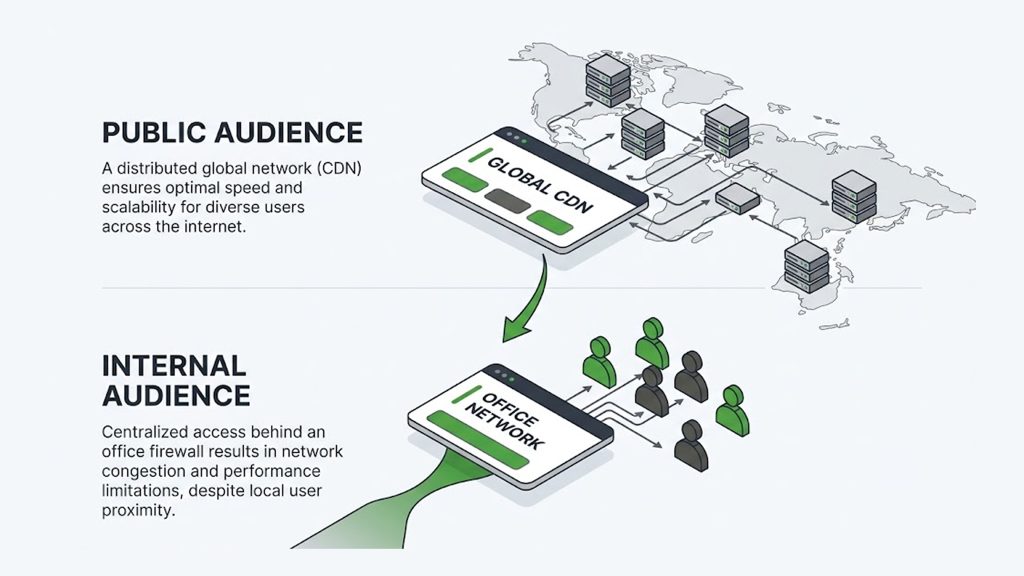
This is the defining challenge of enterprise video streaming, and it is genuinely different from streaming to the public. When you broadcast to consumers, your viewers are scattered across thousands of home internet connections, and a good CDN handles the load at the edge. But when you broadcast to your own employees, a huge share of them sit behind the same corporate network, and that network becomes the bottleneck — not the public internet, not your origin, but the office LAN and the WAN links between sites. Solving that, along with the security and access-control demands that come with broadcasting confidential internal content, is what separates enterprise video streaming from everything else. This guide walks through the enterprise-specific problems — the internal-bandwidth crunch, secure identity-based access, and scaling internal communications — and the delivery choices that actually solve them.
Why Enterprise Streaming Is a Different Problem
Most streaming advice assumes a public audience on the open internet. Enterprise streaming inverts several of those assumptions, and each inversion changes what “good infrastructure” means.
The audience is internal and concentrated. Instead of being spread across the public internet, a large fraction of your viewers are inside corporate offices, often many of them sharing a single site’s internet connection. That turns the corporate network itself into the constraint — a factor that simply does not exist when you stream to the public. The content is usually confidential. A town hall may discuss unreleased products, financial results, restructuring, or strategy, so the stream cannot leak outside the company; access has to be tied to employee identity, not left open. And the alternative is a meeting tool, not a TV. Enterprise streaming competes with video-conferencing platforms, which impose attendee caps and were built for many-to-many calls, not one-to-many broadcasts — so the reason to use streaming at all is to reach the whole company without limits and without turning a broadcast into a laggy conference call.
These differences mean the priorities reshuffle. Raw public-internet scale, which dominates consumer streaming, matters less than solving the internal-network bottleneck, enforcing identity-based access, and integrating cleanly with the corporate environment. Get those right and the all-hands just works; get them wrong and no amount of public CDN capacity will save the third floor’s internet connection.
The Core Enterprise Problem: Internal Network Congestion
Here is the problem that defines enterprise video delivery and that consumer streaming never has to confront. When thousands of employees in one building all stream the same live event, every one of their video players independently pulls the stream across the office’s internet connection. A single high-definition stream might need a few megabits per second; multiply that by two thousand people in one office, and you are suddenly trying to pull gigabits per second through an internet link that was sized for email, web browsing, and business applications — not a simultaneous company-wide broadcast.
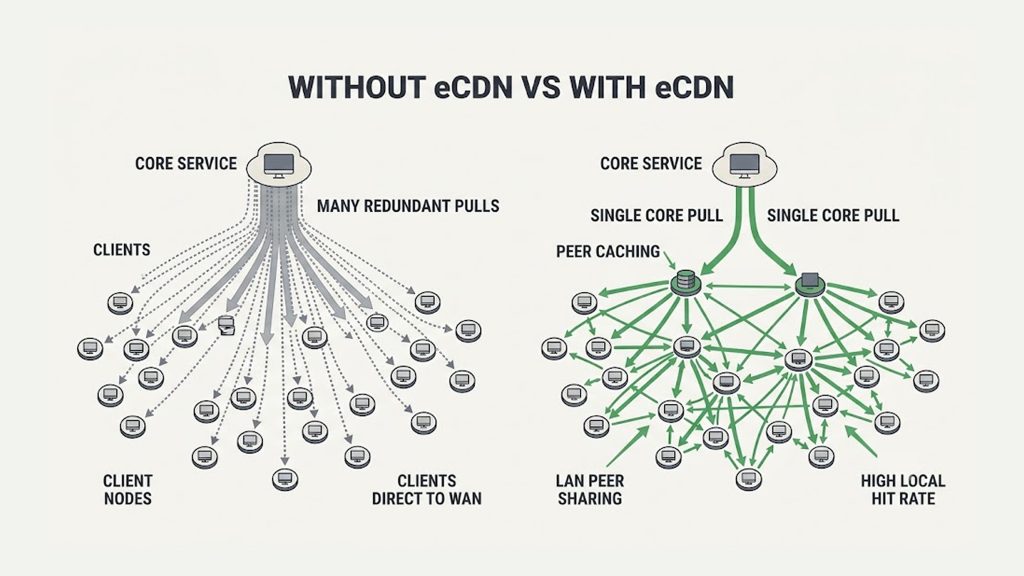
The result is the scenario from the opening: the video degrades for everyone, and because the video is consuming all the available bandwidth, the business-critical applications that share that connection — the CRM, the phones, the file servers — slow down or fail too. The all-hands doesn’t just play badly; it takes the office offline. This is why simply having a great public CDN is necessary but not sufficient for enterprise streaming. The CDN delivers the stream flawlessly to the edge of the corporate network, and then the corporate network itself becomes the point of failure. The last mile inside the building is the part a public CDN cannot help with.
The Solution: Enterprise CDN (eCDN)
The technology built specifically to solve internal network congestion is the enterprise content delivery network, or eCDN. Where a traditional CDN optimizes delivery across the public internet, an eCDN optimizes delivery *inside* the corporate network, so that a company-wide broadcast doesn’t have to cross the internet link once per viewer.
The most common approach uses peer-to-peer distribution within the local network. Instead of every employee’s player independently fetching the stream from outside the building, a small number of devices pull each video segment across the internet link, and then share it directly with nearby colleagues over the fast internal network. The office’s internet connection carries the stream a handful of times instead of thousands of times, while employees receive it from peers a few desks away at local-network speed. Because the sharing happens over the LAN — which is vastly faster and cheaper than the internet uplink — the load on the constrained connection drops dramatically, often by the large majority of what it would otherwise be.
A related model places a caching appliance or server inside each office that fetches the stream once and serves it locally to everyone at that site, achieving the same goal by a different route. Some eCDN approaches build the peer mesh in the browser itself using WebRTC, so there is nothing for employees to install. The shared principle across all of them is the same: pull the stream into the building as few times as possible, then distribute it locally, so the internal network is never asked to carry the same content thousands of times over.
An eCDN and a public CDN are complementary, not alternatives. The public CDN gets the stream reliably to each office; the eCDN distributes it efficiently once it arrives. For any organization streaming to large numbers of employees in physical offices, the eCDN layer is what turns a broadcast that would cripple the network into one that barely registers on it — and it is the single most important enterprise-specific capability to plan for. When evaluating how to deliver internal video at scale, understanding whether and how an eCDN fits your office footprint is the first architectural question to answer.
Secure, Identity-Based Access
The second enterprise-defining requirement is security, and it is a stricter, different kind of security than public streaming needs. A consumer stream protects premium content from piracy; an enterprise stream protects confidential company information from leaking outside the organization at all. That shifts the model from “stop unauthorized copying” to “ensure only the right employees can watch in the first place.”
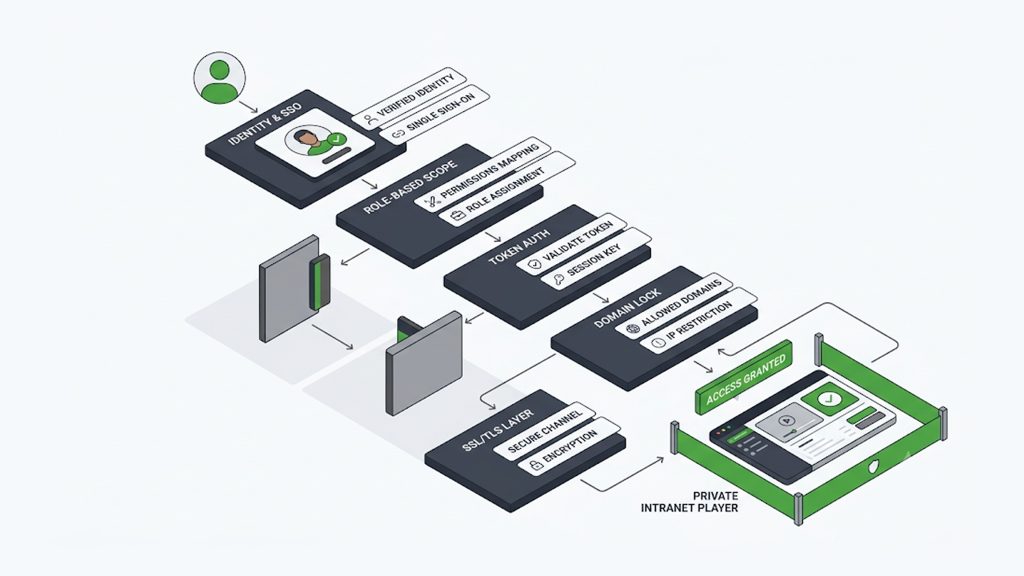
The foundation is identity-based access control. Rather than a public link anyone can open, enterprise streams are gated behind the company’s existing identity system, so only authenticated employees can view — and the natural mechanism is single sign-on. With SSO, employees watch using the same corporate credentials they already use for email and other internal tools, the access is centrally managed by IT, and when someone leaves the company their access to internal video is revoked automatically along with the rest of their accounts. Layered on top of identity, several controls matter for enterprise delivery. Role-based permissions let you scope a given broadcast to the right audience — a board presentation to executives, a regional update to one office, a training to a department — rather than the whole company. A private, ad-free player embedded on the intranet keeps the experience internal and on-brand rather than sending employees to a public video site.
Token-based access at the edge issues time-limited, signed stream URLs that cannot be forwarded outside the company and stop working after the event, so a leaked link is not a standing exposure. Domain lock ensures an embedded player only plays on your approved internal pages, not on a copy someone reframes elsewhere. And SSL on every connection keeps the stream encrypted in transit end to end. Together these turn an internal broadcast into something genuinely internal — visible to the employees who should see it, invisible and inaccessible to everyone else.
Scale Without Per-Viewer Caps
A quieter but important enterprise advantage is that streaming, unlike a video call, has no inherent attendee ceiling. This is often the reason an organization moves an all-hands off a conferencing tool in the first place.
Video-conferencing platforms are built for interactive, many-to-many meetings, and they impose limits on how many participants can join — limits that a growing company eventually hits, and that turn a company-wide moment into a scramble for overflow rooms and secondary links. A one-to-many stream has no such cap: the same broadcast serves five hundred employees or fifty thousand, because it is designed for distribution rather than round-table interaction. The delivery layer scales with the audience — a public CDN absorbing the surge as every office joins at the start time, an eCDN handling the density inside each building — so the broadcast holds up when the entire company shows up at once.
That start-of-event surge, when a whole organization clicks play within the same minute, is the enterprise equivalent of the audience spike any large live broadcast has to absorb, and the same discipline of pre-warming and surge-ready delivery that keeps a big public event online applies here too; our guide on why streaming platforms crash during live event traffic spikes covers that surge dynamic in depth. The point specific to enterprise is that you get that scale without asking employees to dial into a call that was never built to hold them all.
The Rest of the Pipeline Still Matters
The enterprise-specific layer sits on top of the same delivery fundamentals any professional stream needs, and those still have to be right. The feed from the room — a camera and, critically, a clean audio feed from the venue’s microphone mixer rather than an on-camera mic — is captured and handed to an encoder, then sent to the platform over a reliable ingest path. From there it is transcoded into an adaptive bitrate ladder so employees on a strong office connection and colleagues joining from home or a weak mobile signal all get a smooth, appropriately-sized rendition rather than a single quality that fails half the audience. Thoughtful live transcoding into a well-designed ladder matters as much here as anywhere, because an enterprise audience is genuinely mixed — high-bandwidth in-office viewers, home-office workers, and travelling staff on mobile all watching the same event.
Two pipeline elements carry particular weight for enterprise. Recording and archiving is nearly always required: a town hall or training needs to be available on demand afterward for employees in other time zones or those who missed it, so automatic recording into a searchable internal library, with the same access controls as the live event, is part of the core requirement rather than a nice-to-have. And a clean, embeddable video player that sits inside the intranet — rather than a link that sends employees to an external site — keeps the whole experience internal, branded, and consistent with the security model.
Latency, by contrast, is usually a low priority for enterprise: a town hall is one-way viewing where a few seconds of delay is irrelevant, so there is no need to chase the ultra-low-latency targets that interactive use cases require. Reliability and reach matter far more than shaving seconds. (Public-sector organizations face a closely related version of these same institutional-streaming demands, with public-record and transparency obligations layered on top; our guide to government live streaming covers that adjacent case.)
Beyond the All-Hands: The Enterprise Video Portfolio
The town hall is the headline use case, but enterprise video streaming spans a wider portfolio than a single quarterly broadcast, and each type carries slightly different delivery demands worth planning for together rather than one at a time.
Executive town halls and all-hands meetings are the largest, most visible events — company-wide, high-stakes, and the ones where the internal-network congestion problem bites hardest because everyone joins at once. Employee training and onboarding is the highest-volume category, often a mix of live sessions and a large on-demand library that employees watch on their own schedule, which puts more weight on the archive, search, and access-control side than on live surge handling.
Product launches and sales kickoffs blend internal and sometimes external audiences, occasionally requiring a broadcast that reaches both employees behind SSO and invited outsiders through a separate access path. Internal communications from leadership — regular updates, culture content, department briefings — are lower-stakes but frequent, and benefit from being quick to produce and easy to publish into the same secure library. And investor or board communications sit at the most confidential end, where the access controls and audit trail matter more than scale.
The practical implication is that enterprise video is rarely a single event type; it is a standing capability the organization uses repeatedly across all of these. Designing the delivery once — secure access, internal-network handling, transcoding, and a records-ready archive — so it serves the whole portfolio is far more efficient than assembling a one-off setup for each town hall. The same infrastructure that survives the company-wide all-hands comfortably handles the smaller, more frequent events, which is why treating enterprise video as shared communications infrastructure rather than a series of productions is the mindset that scales.
Measuring Reach and Engagement
One more enterprise-specific dimension separates internal video from public streaming: the organization usually needs to *prove* the broadcast worked and reached its people, in a way a consumer platform rarely bothers with. Because these events serve internal goals — communicating a strategy, completing mandatory training, aligning the company — leadership and IT want to know who actually watched, from where, and how the experience held up.
That makes analytics a first-class requirement rather than a vanity metric. Useful enterprise measurement covers attendance and reach (how many employees watched live versus on demand, broken down by office or region), the quality of experience they received (startup time, rebuffering, and the rendition mix, which for enterprise doubles as a check on whether the internal-network layer is working), and engagement with on-demand content afterward.
Real-time analytics during the event also lets IT catch a problem — a site where quality is degrading because the local network is saturating — while the broadcast is still running, rather than reading about it in complaints afterward. For training and compliance content, completion tracking turns the video platform into a record of who fulfilled a requirement, which is a genuinely different job from anything consumer streaming does. Measurement, in other words, is not an afterthought for enterprise video; it is often part of why the broadcast exists.
What to Require From an Enterprise Streaming Setup
Pulling the enterprise-specific requirements together, here is what an organization should insist on when planning internal video delivery, framed as requirements rather than features: a way to solve internal network congestion for on-site audiences, whether through an eCDN peer-to-peer or in-office caching layer, so a company-wide broadcast doesn’t saturate office connections; identity-based access, ideally via SSO integration with the company’s existing directory, so only authenticated employees can watch and access is revoked automatically when they leave; role-based permissions to scope each broadcast to the right audience; a private, ad-free, embeddable player for the intranet rather than an external site; and layered stream protection — token authentication, domain lock, and SSL — so confidential content stays inside the company.
Scalable public-CDN delivery that absorbs the start-of-event surge with no per-viewer cap; adaptive transcoding for a mixed audience of in-office, home, and mobile viewers; and automatic recording into a secure, access-controlled on-demand library for later viewing. Each of these maps to one of the enterprise-specific pressures — internal bandwidth, confidentiality, company-wide scale — rather than to generic streaming features.
A brief operational note worth adding: because an enterprise broadcast usually has one shot to land in front of the whole company, a rehearsal on the real network, from the actual room and connection, is the cheapest insurance available. Testing whether the office network holds up under a simulated full-company load before the real all-hands is what surfaces the congestion problem while there is still time to deploy the eCDN layer that solves it, rather than discovering it live at 10 a.m.
Deliver Internal Video That Just Works
Enterprise video streaming succeeds or fails on the problems that are unique to it: the internal network that buckles when the whole company watches at once, the confidentiality that demands identity-based access, and the company-wide scale that a meeting tool was never built to provide. Get the public delivery right, solve the internal-network congestion, tie access to employee identity, and record everything into a secure archive, and a company-wide broadcast becomes a routine, reliable part of how the organization communicates — not an annual gamble on whether the office internet survives the all-hands.
5centsCDN provides the delivery foundation enterprise streaming is built on: scalable CDN delivery that absorbs the start-of-event surge with no per-viewer caps, live transcoding for a mixed in-office, home, and mobile audience, layered access control with token authentication, domain lock, and SSL to keep confidential broadcasts internal, a private embeddable video player for the intranet, and automatic recording into a secure on-demand archive — brought together in our enterprise and live event streaming solutions. If you are planning town halls, all-hands, or a company-wide training program and want to make sure the network holds up when everyone tunes in, talk to our team about mapping the delivery — including the internal-network layer — to your office footprint.
Frequently Asked Questions
What is enterprise video streaming?
One-to-many video broadcasting built for organizational scale — town halls, all-hands, training, launches, internal comms — delivered securely to employees, typically with identity-based access, internal-network optimization, and recording, rather than as a public stream or a capped video call.
Why does an all-hands slow down the office network?
Because employees in one building each pull the stream across the same internet connection. Thousands of simultaneous players can saturate an uplink sized for normal business use, degrading the video and the business apps that share the link.
What is an eCDN?
An enterprise content delivery network optimizes video delivery inside the corporate network, usually via peer-to-peer distribution or in-office caching, so a company-wide broadcast crosses the internet link a few times instead of once per viewer — often cutting internal bandwidth dramatically.
How do you keep an internal broadcast confidential?
Gate access behind the company’s identity system (SSO), scope each broadcast with role-based permissions, use a private intranet player, and protect the stream with token authentication, domain lock, and SSL so links can’t be shared or reframed outside the company.
Why stream a town hall instead of using a video call?
Video-conferencing tools impose attendee caps and are built for interactive many-to-many calls. A one-to-many stream has no per-viewer cap, so the same broadcast reaches 500 or 50,000 employees reliably without overflow rooms or secondary links.
Does enterprise streaming need low latency?
Usually not. A town hall is one-way viewing where a few seconds of delay is irrelevant, so reliability, reach, and internal-network handling matter far more than chasing ultra-low latency.
