


The video player is the one part of your entire streaming setup your audience actually touches. They never see your CDN, your transcoder, or your origin — but they see the play button, the buffering wheel, the caption toggle, the ad that plays before the content. To viewers, the player is your video service, and a poor one quietly undermines everything you built behind it: the stream that starts slowly, the controls that feel clumsy, the captions that won’t turn on, the branding that says someone else’s name. How to choose a video player is therefore one of the highest-leverage decisions in your video stack, and one of the most commonly rushed.
The trouble is that “best video player” returns a wall of listicles ranking a dozen products, which tells you what exists but not what *you* need. The right player is not the one with the longest feature list; it is the one whose strengths match your specific use case, audience, and infrastructure. This guide is a decision framework rather than a ranking: the criteria that actually matter when evaluating a video player, why each one counts, and how to weigh them for your situation — so you can look at any player, including whichever ones you’re considering, and judge whether it fits. We’ll also cover the factor most buyers overlook entirely, which is that even a perfect player can’t rescue weak delivery behind it.
First, Define What You’re Actually Choosing For
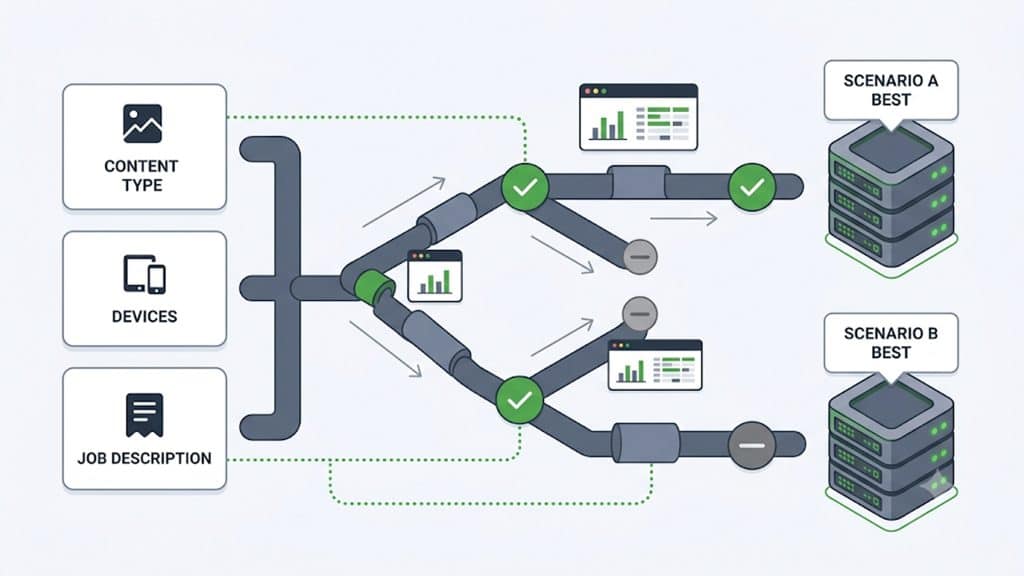
Before comparing any features, get clear on your own requirements, because the “best” player genuinely differs by use case and a mismatch here makes every later comparison meaningless. A few questions settle most of it.
What kind of content are you delivering — on-demand video, live streams, or both? Some players excel at one and are mediocre at the other, and live introduces needs (low latency, an offline state, real-time viewer counts) that on-demand never has. Who is your audience and how do they watch — mostly mobile, desktop, smart TVs, or a mix — and how technical are they? A consumer entertainment audience, a corporate training audience, and a developer audience want very different things.
What is the player’s job beyond playback — is it there to protect premium content, to monetize with ads, to reinforce your brand, to teach, or simply to play reliably? And who will implement and maintain it — a developer who wants an API and full control, or a non-technical team that needs a no-code dashboard? Your answers turn the generic criteria below into a weighted checklist where the factors that matter to you rise to the top and the ones that don’t fall away.
A player that is ideal for a global OTT service may be wrong for a course creator, and vice versa — not because one is better, but because they are solving different problems.
Playback Fundamentals: Protocols and Adaptive Streaming
Everything starts with whether the player can actually deliver smooth video to every viewer, and that rests on two technical foundations that are non-negotiable for professional streaming.
The first is support for modern streaming protocols. A serious player must handle adaptive streaming over HLS and DASH, the protocols that break video into segments and switch quality on the fly — not just play a static file. This matters because it enables the second foundation: adaptive bitrate (ABR) streaming, where the player continuously measures the viewer’s connection and serves the highest quality that plays smoothly, stepping down when the network weakens and back up when it recovers.
Without ABR, every viewer gets one fixed quality that is either too high for weak connections (constant buffering) or too low for strong ones (needlessly poor picture); with it, the viewer on hotel wifi and the viewer on fiber each get the best experience their connection allows. For any audience beyond a handful of people on reliable networks — which is to say, any real audience — ABR is the difference between a stream that works and one that frustrates. When you evaluate a player, protocol and ABR support is the first gate; a player that fails it is disqualified regardless of how good the rest looks.
Device and Browser Reach
A player is only useful where it plays, and the modern viewing landscape is fragmented across an enormous range of devices, screen sizes, operating systems, and browsers. Your audience is watching on phones, tablets, laptops, desktops, smart TVs, and streaming boxes, across different browsers and OS versions, and a player that looks flawless on your development machine can fail silently on a viewer’s older phone or a particular smart-TV browser.
The criterion here is genuinely broad, tested compatibility. A good player is built on the native browser video foundations that work everywhere modern web content works, and it degrades gracefully — adjusting its layout and controls responsively to any screen size rather than breaking. For live and premium use cases, reach extends beyond the browser to native mobile apps and TV platforms, so if those matter to you, confirm the player (or its SDKs) covers them. The practical test is to ask not “does it work” but “does it work on the specific devices and browsers my actual audience uses,” and to verify that against your own analytics rather than a generic compatibility claim. Reach you don’t need is not worth paying for; reach you do need and lack will silently cost you a slice of your audience on every video.
Customization and Branding
For any business, the player is a branded surface, and a player that carries someone else’s logo, colors, and links is advertising a competitor on top of your content. The degree of control you have over the player’s appearance and behavior is a major differentiator, and worth examining closely because “customizable” means very different things across products.
Real customization spans several layers. Visual branding is the baseline: the ability to set the control-bar style, apply your own brand colors to the play button and progress bar, place your own logo as a watermark (with control over its position, size, and opacity), and set a branded poster image that shows before playback.
Beyond appearance, behavioral control matters: which controls appear, whether the player autoplays or starts muted, what happens when a video ends, and what viewers can do through the settings menu. And a genuinely white-label player lets you own the entire experience — including the right-click context menu and any on-player title or information overlay — so nothing points viewers away from your brand.
The deeper question behind all of this is how you customize: a strong player offers this through a no-code interface where changes preview in real time and save as reusable presets, so a non-technical marketer can brand the player without touching the codebase, while still exposing an API for teams that want programmatic control. Match the customization model to who will actually be doing the customizing.
Security and Content Protection
If your video has value — premium content, paid courses, confidential internal material, licensed media — then how well the player protects it is not optional, and the level of protection you need scales with the value of what you’re showing. It is worth being clear that protection is a spectrum, not a single switch.
At the foundational level, every player should deliver over encrypted connections and support signed, expiring access so that stream URLs can’t be freely copied and replayed forever. Above that sit access controls a good player and its platform enforce together: domain lock, so your embedded player only works on your approved sites and can’t be lifted onto someone else’s; geographic restrictions where rights require them; and token-based access tied to the viewer’s session.
At the top of the spectrum, for genuinely premium content, is studio-grade digital rights management, which on the web is delivered through the browser’s Encrypted Media Extensions working with the major DRM systems — this is what rights holders require before they’ll let you stream high-value content. The key is to match the protection to the stakes: a marketing video needs little, a paid course needs solid access control, and licensed premium content needs full DRM.
Paying for the top tier when you don’t need it is waste; lacking it when you do can mean you simply cannot license the content or that it leaks. Assess where your content sits and require the player to meet that level — no more, no less.
Accessibility and Captions
Accessible playback has moved from a nice-to-have to, in many jurisdictions and organizations, a legal requirement — and beyond compliance, a large share of viewers simply prefer captions. A player’s handling of captions and accessibility is therefore a real evaluation criterion, not an afterthought.
Look for full support for caption and subtitle tracks, with genuine control over how captions are styled — font, size, color, background, and edge style — because readable captions against varied video backgrounds require that control, and rigid captions serve viewers poorly. Multi-language subtitle support matters if your audience is international, and some players add automatic translation into many languages, widening reach without manual subtitling for every market. Equally important and often ignored: the player’s own controls must be operable by keyboard and screen reader, since a player that shows captions but can’t be operated without a mouse is still inaccessible. If your organization has compliance obligations, treat accessibility as a hard requirement and verify it specifically rather than assuming a modern player handles it.
Monetization
If your video is a revenue channel rather than a cost center, the player’s monetization capabilities determine what business models you can run, so match them to how you actually intend to earn. There are two broad families to check for.
The first is video advertising — ads that play within the stream as pre-roll, mid-roll, or post-roll. A capable player supports the industry-standard ways of serving these, including the widely used ad-serving template that lets you plug in tags from essentially any ad network, and integration with the major ad platforms, ideally with a fallback tag so a failed ad request doesn’t leave an empty slot.
The second is display advertising — banner and promo overlays shown on top of the video — which lets you monetize or cross-promote without interrupting playback. Beyond advertising, if subscriptions or pay-per-view are your model, the relevant capability circles back to the security section: you can only charge for access you can actually control.
Choose a player whose monetization model fits your revenue strategy; ad-serving depth is critical for an ad-supported service and irrelevant for a subscription one, so weight it accordingly rather than treating a long monetization feature list as universally valuable.
Analytics
You cannot improve what you cannot measure, and the player is where the most meaningful viewing data originates — so its analytics, or its ability to feed your analytics, is a criterion worth real attention. Playback happens on the viewer’s device, which means the player is uniquely positioned to report what actually happened on screen rather than what the server assumed.
Useful player analytics cover engagement (how many people watched, for how long, and where they dropped off), audience (device, browser, operating system, and geographic breakdowns), and quality of experience (startup time, rebuffering, and the bitrate viewers actually received). That last category is the one to prioritize, because it tells you whether your delivery is doing its job — a spike in rebuffering or slow startup in a particular region is a delivery problem you can only see if the player is measuring and reporting it. Whether the value comes from built-in analytics dashboards or from clean data the player pipes into your existing analytics stack, the requirement is the same: the player should make the real viewing experience visible, not opaque.
The Factor Most Buyers Miss: The Delivery Behind the Player
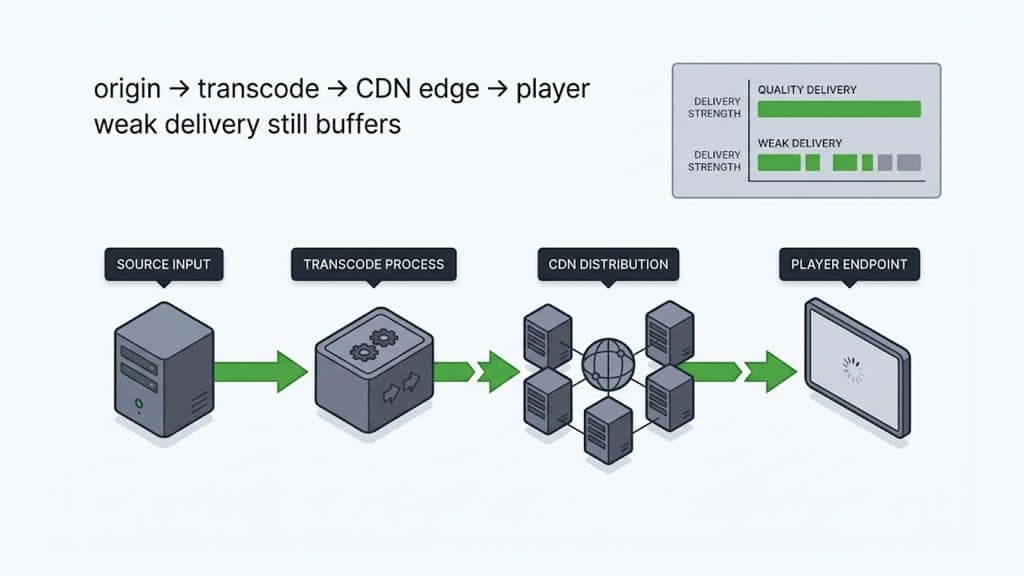
Here is the criterion that listicles almost never mention and that quietly determines whether any player performs: a video player is only as good as the delivery infrastructure feeding it. The player is the last link in a chain, and it cannot invent quality that the delivery didn’t provide.
Think about what actually happens when someone presses play. The player requests video segments, but those segments are served by a CDN from an origin; if that delivery is slow, distant, or unreliable, the player has nothing to work with — it will buffer, start slowly, or stall no matter how elegant its interface. ABR only helps if there are quality levels available and the network can switch between them responsively. The fastest-starting player in the world still waits on the first segment arriving from the edge.
This is why evaluating a player in isolation is a mistake: a beautifully designed player on weak delivery gives a worse experience than a plain player on excellent delivery. The strongest position is a player and a delivery network designed to work together — where the same platform that renders the video also caches it close to viewers, adapts quality through purpose-built transcoding, and reports playback quality back through the player’s analytics.
When you evaluate a player, ask where the video is actually coming from, because that answer shapes the experience more than any feature on the player’s spec sheet. A player bundled with, or tightly integrated into, a capable video delivery platform sidesteps the whole problem of stitching a standalone player onto delivery that wasn’t built for it.
Implementation, Cost, and Fit
Two practical factors round out the decision. The first is how the player fits your team and your stack: a no-code player with a dashboard suits a non-technical team, while developers may want an API, SDKs, and full programmatic control — and either way, easy embedding into your CMS or site (a simple embed code, or a clean integration for whatever platform you run) saves real friction. The second is cost, and the thing to watch is not the headline price but the model: some players charge by views or bandwidth, some by seats, some bundle the player free with a broader delivery platform, and the right choice depends on your scale and how it will grow. Favor transparent, predictable pricing you can model against your real volume over an opaque quote, and weigh the player as part of your total video cost rather than in isolation.
A Video Player Evaluation Checklist
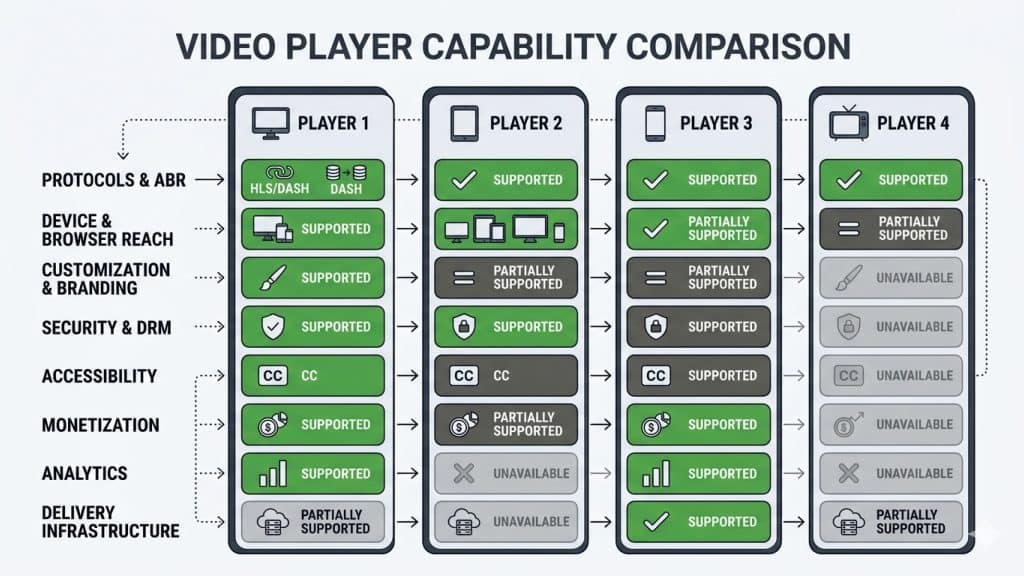
Pulling the framework together, a player worth choosing should let you check off the criteria that matter for your use case: it defines cleanly against your content type, audience, and purpose; it supports modern protocols (HLS/DASH) and adaptive bitrate streaming as a baseline; it plays reliably across the specific devices and browsers your audience actually uses; it offers the level of branding and customization your team needs, through an interface the right people can actually operate; it protects content to the level your content’s value demands, from encrypted delivery and access control up to full DRM if required.
It handles captions, caption styling, and accessible controls, especially if you have compliance obligations; it supports the monetization model you actually run, if any; it makes real viewing and quality-of-experience data visible; it is backed by delivery infrastructure strong enough to feed it; and it fits your team’s technical level and your budget with transparent pricing. Weight these to your situation rather than counting them equally — the right player is the one that scores highest on the criteria you actually care about.
Choosing Well
The best video player is not a single product but a decision: the one whose strengths line up with your content, your audience, your protection and monetization needs, your team’s skills, and — crucially — the delivery infrastructure behind it. Start from your own requirements rather than a feature list, insist on the non-negotiable foundations of protocol and adaptive-streaming support, match the customization, security, accessibility, and monetization depth to what you actually need, and never evaluate the player apart from the delivery that feeds it. Do that, and you’ll choose a player that makes your video look like *you* and play like it should — which is the whole point of the part your audience actually sees.
5centsCDN’s video player is built to meet this framework: adaptive HLS/DASH playback across devices, full no-code branding and customization, caption support with styling and automatic translation, video and display ad monetization, access controls, and real-time analytics — delivered over a purpose-built video CDN so the player is fed by the delivery it needs rather than bolted onto someone else’s. For the delivery-side quality that determines how any player performs, our guides to reducing video startup time and regional performance go deeper. If you’re evaluating players and want to see how one that ships with its own delivery network compares, talk to our team.
Frequently Asked Questions
What should I look for in a video player?
Start with your use case, then evaluate: modern protocol (HLS/DASH) and adaptive-bitrate support, device and browser reach, customization/branding, content security up to DRM if needed, captions and accessibility, monetization fit, analytics, and — often overlooked — the delivery infrastructure feeding the player.
What is the most important video player feature?
Adaptive bitrate (ABR) streaming over HLS/DASH is the non-negotiable foundation: it serves each viewer the best quality their connection can handle, preventing both buffering and needlessly low quality. A player without it is disqualified for professional use.
Do I need DRM in my video player?
Only if your content’s value demands it. Protection is a spectrum: marketing video needs little, paid courses need solid access control, and licensed premium content needs full DRM (delivered via the browser’s Encrypted Media Extensions). Match the protection to the stakes.
Why does my video player buffer even though it’s a good player?
Because a player is only as good as the delivery behind it. If the CDN and origin serving the video are slow or distant, the player has nothing to work with and will buffer regardless of its features. Evaluate the player and its delivery together.
Is the player with the most features the best choice?
No. The right player is the one whose strengths match your specific use case, audience, and infrastructure — not the longest feature list. Weight the criteria to your situation; features you don’t need aren’t worth paying for.
Do I need a developer to set up a video player?
It depends on the player. Some offer no-code dashboards a non-technical marketer can brand and configure; others expose APIs and SDKs for developer control. Match the customization model to who will actually implement and maintain it.
