
This article explains how to configure subtitles and closed captions on your video player. You can add languages for automatic subtitle translation and customize the appearance of closed caption text.
These settings are available under Subtitles Automatic Translations and CC (Closed Caption) Tracker Styles Setup.
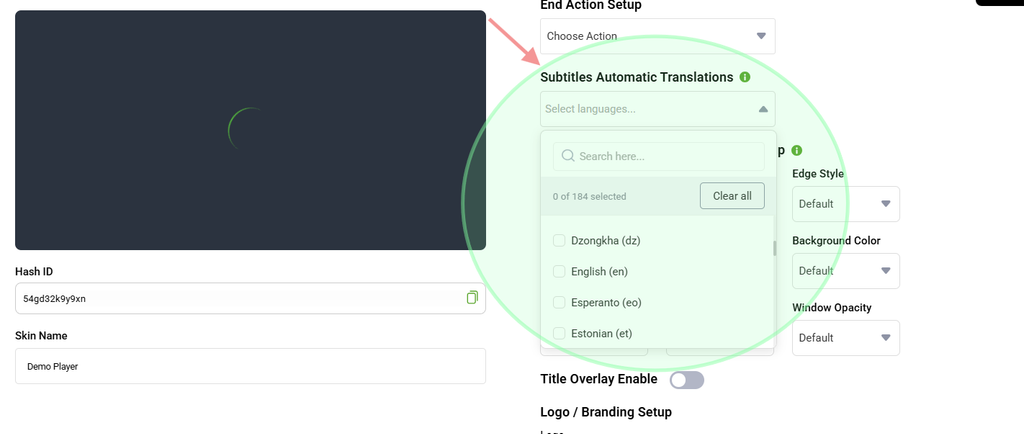
Subtitles Automatic Translations
The Subtitles Automatic Translations section allows you to add the languages into which your subtitles can be automatically translated.
To add a language, type or select the desired language. The selected language will appear as a tag.
To remove a language, click the × icon on the corresponding language tag.
Once configured, viewers can select the available subtitle languages from the player.
CC (Closed Caption) Tracker Styles Setup
The CC (Closed Caption) Tracker Styles Setup section allows you to customize how closed caption text appears on the video player.
Each setting is available as a dropdown option.
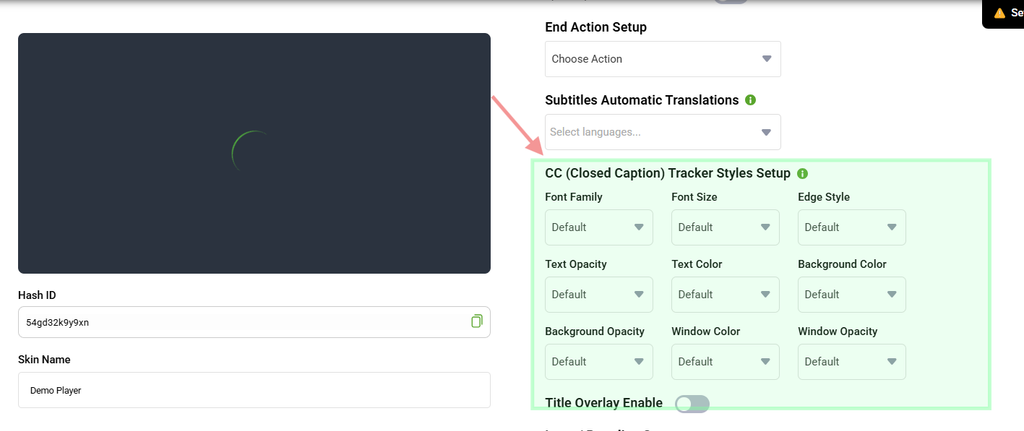
Font Family
Select the typeface used to display the caption text.
Available options may include Script, Sans-serif, Monospace, and other supported font styles.
Font Size
Set the size of the caption text as a percentage.
Edge Style
Select the outline or shadow style applied around the caption characters.
Available options may include Depressed, Raised, Outline, and Drop Shadow.
Edge styles can help improve caption readability against different video backgrounds.
Text Opacity
Set how solid or transparent the caption text appears.
Text Color
Select the color of the caption text.
Background Color
Select the color of the background directly behind the caption text.
Background Opacity
Set how solid or transparent the caption background appears.
Window Color
Select the color of the larger caption window that appears behind the caption area.
Window Opacity
Set how solid or transparent the caption window appears.
Tip: For better readability, use light-colored text with a dark, semi-transparent background. You can also use an Edge Style such as Depressed or Drop Shadow to make captions easier to read against busy video backgrounds.