
If your origin server does not enable CORS then you can enable it via CDN. In CDN, the CORS option is enabled by default. You can also disable the option while creating the Push/Pull zone.

  • Login to 5centsCDN console.
  • Go to Zones and select HTTP or VoD.
  • Click the green plus button to create a new zone.
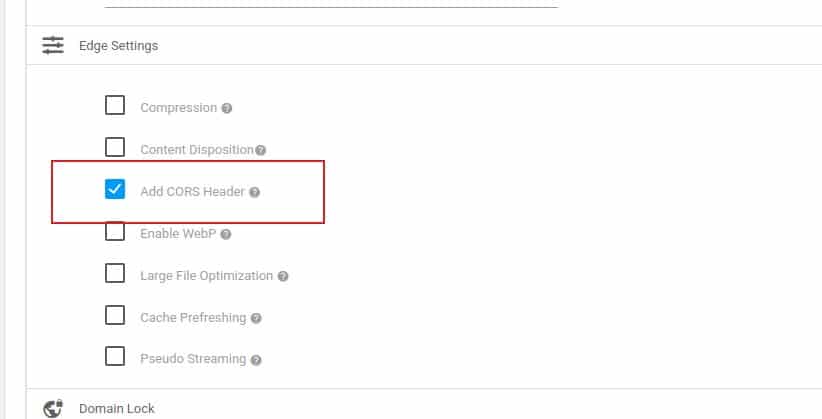
  • Go to Edge Settings, you can find the option CORS Header. This option is enabled by default.
  • You can uncheck the option to disable it.
  • Configure the other settings and create the zone. For further steps, you can refer to these articles.HTTP Push Zone
    VOD Push Zone
Comments

  1. Pingback: Engineering Technicians

  2. Pingback: special promo

  3. Pingback: รวมเลขเด็ดจากทุกสำนักใบ้หวย

  4. Pingback: สล็อตออนไลน์เกาหลี

  5. Pingback: mostbet app

  6. Pingback: hit789

  7. Pingback: เพิ่มยอดวิว

  8. Pingback: more

  9. Pingback: fast-paced crash game

  10. Pingback: pinco

  11. Pingback: ร้านเค้กวันเกิดใกล้ฉัน

  12. Pingback: Mostbet

  13. Pingback: เว็บพนันออนไลน์เว็บตรง

  14. Pingback: xshell

  15. Pingback: บริหารสต็อกสินค้าแบบครบวงจร

  16. Pingback: https://apuesta360.world

  17. Pingback: เกมไพ่

  18. Pingback: Prayer

  19. Pingback: am Automaten spielen

  20. Pingback: sextoy

  21. Pingback: mega888

  22. Pingback: Online Pharmacy Denver

  23. Pingback: รับก่อสร้าง อพาร์ทเมนท์

  24. Pingback: Mulch film

  25. Pingback: official website

  26. Pingback: แฟรนไชส์หม่าล่าทั่ง

  27. Pingback: Sweet Bonanza Slot

  28. Pingback: Villa for sale in phuket

  29. Pingback: Volnewmer ราคา

  30. Pingback: Winstrol Dosage

  31. Pingback: เว็บตรงฝากถอนง่าย

  32. Pingback: Aster Trading

  33. Pingback: Medical Powers of Attorney

  34. Pingback: elephant sanctuary chiang mai

  35. Pingback: jav

  36. Pingback: Houten in beeld

  37. Pingback: เครื่องเป่าแอลกอฮอล์

  38. Pingback: cash eruption rtp

  39. Pingback: เน็ตบ้านทรู

Leave a Reply